Bluefin, a desktop built as a container image, leaves the hard parts undocumented
The next generation Linux workstation, designed for reliability, performance, and sustainability.
At a glance
- What is it?
- ublue-os/bluefin turns a Fedora and GNOME desktop into an OCI image pipeline built from a Containerfile and a Justfile. What this repository does not carry is the install step, the rollback step, or the verification step that would go with the cosign.pub sitting in its root.
- Who is it for?
- Bluefin makes sense for people who already work in containers and declarative tooling, and who accept a weekly image swap as the price of not maintaining packages by hand.
- Can I use it commercially?
- Yes. Apache-2.0 is a permissive licence: you can use, modify and sell software built on it, as long as you keep its copyright and licence notices.
- Is it still maintained?
- Yes. The repository received new commits within the last day.
- What is it written in?
- Mainly Shell, according to GitHub's language statistics.
Answers come from the project's GitHub data, last synced on November 14, 2026, and from our analysis. They are not legal advice.
Star history
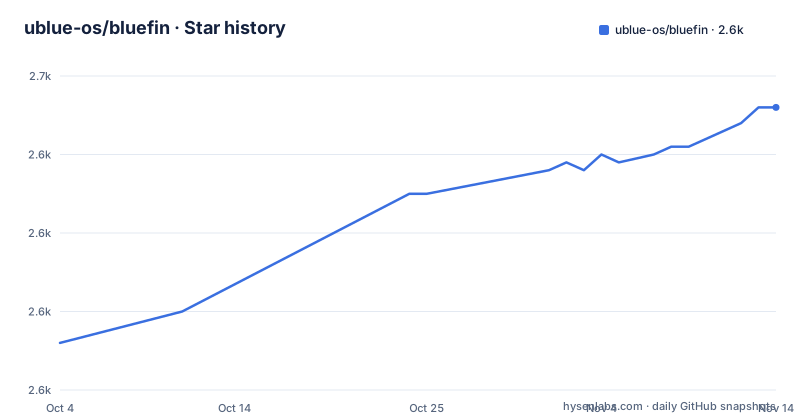
- ublue-os/bluefin2,646 ★ · +30
| Repository | 2026-10-04 | 2026-11-14 |
|---|---|---|
| ublue-os/bluefin | 2.6k | 2.6k |
30 Stars in the last 41 days, measured from the daily GitHub snapshot. Compare with other projects
Editorial analysis
The repository builds an image, not an installer
The top level here holds no installer script, no disk image recipe, and no package manifest for an operating system. What it holds is a Containerfile, a Justfile, two working directories named build_files/ and system_files/, plus image-versions.yml and artifacthub-repo.yml. The declared primary language is Shell, which fits that shape: this is a set of build recipes rather than a program you run to put something on a disk. A Containerfile describes how a filesystem is assembled, image-versions.yml carries version data for the result, and artifacthub-repo.yml is the file that registers the output with Artifact Hub, which is where an OCI artifact gets consumed much like an application would be. The homepage is projectbluefin.io. Nothing among these eighteen entries explains how the artifact this repository produces becomes a booted machine, so the most consequential half of the system lives somewhere this README never points at. A reader who installs Bluefin has crossed a boundary that the source tree does not describe.
The install path ends at a scene picker on the website
The install section of the README is one sentence long and contains no command. It sends readers to projectbluefin.io and to a scene picker there, framed as the place to explore installation options. No image reference, no tag to pin, no checksum, no download line. For a distribution whose central promise is atomic updates, the first step of adopting it is a click on a web page that this repository does not contain, so nothing recorded here tells you which artifact that page handed you or how to check it afterwards. The nearest thing to a version anchor inside the repository is the release tag shape itself, which reads stable-20260929: Stable (F44.20260929, #7aafce4). That single string carries the Fedora stream, the build date and the source commit together, and it is exactly the kind of value an installer page would have to match against. If the page does not tell you which one you got, you have no way to tell from here.
Secure Boot enrollment asks for a password printed in the README
Secure Boot is on by default. After the first installation the machine prompts to enroll the secure boot key in BIOS, and the password for that prompt is written into the README: enter `universalblue`. One string, printed for every reader, standing between an untrusted firmware state and a trusted one. The same section then gives the fallback for anyone who dismissed the prompt, a single terminal command reproduced here exactly as the README has it:
ujust enroll-secure-boot-keyWhether that shared password is a real weakness depends on what the enrolled key is permitted to boot, and the repository does not settle that. The README calls it the project's own custom key and frames Secure Boot as an additional layer of security. It does not say what gets signed, which components fall under that signature, or what happens on a machine whose enrolled key no longer matches the system it is trying to start. Enrolling a key is presented as a one line step with a known password, and the consequences of getting the key wrong are not written down anywhere in this root.
The key you must trust is fetched from another repository
Secure Boot runs on a custom key, and that key is not stored here. The README links the public key from the root of the akmods repository, at https://github.com/ublue-os/akmods/raw/main/certs/public_key.der. Anyone who wants the key enrolled ahead of installation or ahead of a rebase downloads that file first and then runs a two step mokutil sequence:
sudo mokutil --timeout -1
sudo mokutil --import public_key.der
The first call sets the machine owner key manager timeout to never expire, so an enrollment left pending on a machine nobody is sitting at will still be waiting when someone finally reboots it. The second imports a local file called public_key.der, which the README assumes you already fetched by hand. Nothing in that sequence pins a fingerprint or a digest, so the trust chain runs from the machine you are trying to secure, through a URL in a README, into a certificate stored in a second repository under the same organisation. If that file is ever replaced, no tag name and no release name in this repository changes to reflect it.
Three weekly tags carry one build commit
The release list is short and mechanical. stable-20260915: Stable (F44.20260915, #7aafce4) published 2026-09-15T02:37:19Z. stable-20260922: Stable (F44.20260922, #7aafce4) published 2026-09-22T02:15:17Z. stable-20260929: Stable (F44.20260929, #7aafce4) published 2026-09-29T02:15:15Z. Three dates, three version stamps, one short commit repeated in every name. Whatever moved in this repository across those two weeks is not reflected in the tag names, so each weekly build was produced from the same recorded source. The F44 prefix pins the Fedora stream, which reads as a rebuild against a moving base rather than a run of Bluefin changes, and all three publish times land within forty minutes of 02:00 UTC, which fits a scheduled job rather than a hand cut release. The last push to the main branch was 2026-09-24, between the second and third tags, and it left no mark in either name.
cosign.pub is committed and no verification step is written down
Among the eighteen top-level entries there is a cosign.pub. Cosign is the signing tool for container images and OCI artifacts, and committing a .pub file is what lets a third party check a signature rather than trust a download. That sits well with the rest of the root, because artifacthub-repo.yml registers the output with Artifact Hub and image-versions.yml tracks version data, so the pipeline is arranged around artifacts meant to be checked by consumers. The gap is on the documentation side. The README never names cosign, never refers to the cosign.pub file, and gives no command for checking an image before you boot it. CONTRIBUTING.md, AGENTS.md and THEPATTERN.md sit in the same root without appearing in the README either, so the signing key and the build policy are both things a reader has to go find unprompted. The docs live on a separate site at docs.projectbluefin.io, outside this repository, so whatever verification procedure exists is not stated by the files you would naturally read first.
Users type ujust, the repository ships a Justfile
A user chasing the Secure Boot fallback types `ujust enroll-secure-boot-key`. The root of this repository ships a Justfile. Those two names are close enough to look like a typo, and the README never connects them, never says where ujust comes from, and never says whether the Justfile at the root is the same tool under a different name. Two other root entries point at yet more separate workflows: .pre-commit-config.yaml runs checks before a commit lands, and .devcontainer.json lets the build itself run inside a container. .gitmodules adds a third direction, pulling in code that is not stored in this repository at all. So the root is serving at least three audiences at once, which is contributors running checks in a dev container, builders driving build_files/ and system_files/ from a Justfile, and end users typing a command named ujust. Only the last of those groups is served by the README, and it gets one command with no explanation attached.
Atomic updates are promised and no rollback path is written down
The mission section sets out three goals: reliability through atomic updates that keep the system stable, developer experience through integrated cloud native tooling including Kubernetes and container support, and sustainability through lower maintenance overhead for contributors. Atomic updates carry the most weight of the three and have the least support in this repository. There is no rollback command, no rollback trigger, and no statement of what happens when a weekly swap lands on hardware it does not fit, even though the tag cadence puts a fresh image in front of users every seven days. The community surface around the project is unusually complete for a distribution: an official blog, a public work board at todo.projectbluefin.io, a forum at community.projectbluefin.io, documentation at docs.projectbluefin.io, a contributing guide, and the Universal Blue Community Guidelines as the code of conduct. 2604 stars, 260 forks and 54 open issues put the scale of interest next to that gap. Attention is not a recovery path, and the recovery path is the part a weekly updater cannot borrow from anybody else.
Editorial conclusion
Bluefin makes sense for people who already work in containers and declarative tooling, and who accept a weekly image swap as the price of not maintaining packages by hand. Before committing a machine to it, settle three questions this repository leaves open: where the install actually comes from once the scene picker hands you an image, how you verify that image given a cosign.pub with no verification command written beside it, and what you do when an atomic update breaks your hardware. The Secure Boot story deserves its own look, because the enrollment password is printed in the README and the key comes from a sibling repository with no published fingerprint. For everyone else, read the docs site first and keep a recovery plan of your own.
Frequently asked questions
What is Bluefin built on?
Fedora Linux as the base operating system, the GNOME desktop environment for the interface, Universal Blue for cloud native desktop infrastructure, and assorted CNCF projects for containers and tooling. Bluefin itself is under the Apache License 2.0, while every incorporated component keeps its own license and attribution.
How do I install Bluefin?
The README carries no installation command. It points at projectbluefin.io and the scene picker there for installation options, so the download path lives in a web page outside the repository. The only version markers you can compare against afterwards are release tags shaped like stable-20260929: Stable (F44.20260929, #7aafce4).
How does Bluefin handle Secure Boot key enrollment?
Secure Boot is supported by default and the key is enrolled in BIOS after the first installation, using the password universalblue. If that prompt was skipped during setup, the documented fallback is the single command ujust enroll-secure-boot-key. Enrolling ahead of time uses two mokutil calls and a public_key.der downloaded from the akmods repository.
Can I verify a Bluefin image signature before installing it?
The repository root contains cosign.pub and registers its output with Artifact Hub through artifacthub-repo.yml, but no verification command is written down and cosign is never named in the README. Locating the procedure means reading the build files yourself or the separate docs site.
How often does Bluefin publish new builds?
Weekly, judging by the tags stable-20260915, stable-20260922 and stable-20260929, all published within forty minutes of 02:00 UTC. All three carry the Fedora stream F44 and the same build commit 7aafce4. The last push to the main branch was 2026-09-24.
Official sources
Add this badge to your README
If you maintain this project, the badge below links readers to this analysis and shows its maintenance status from the daily GitHub snapshot. Paste the markdown into your README; add ?metric=license or ?metric=stars to the image URL for a different field.

[](https://hysenlabs.com/projects/ublue-os-bluefin)Star history chart for your README
[](https://hysenlabs.com/projects/ublue-os-bluefin)Was this useful?