Bing.NetCore: a .NET Core application framework sold as small NuGet packages
Bing是基于 .net core 3.1 的框架,旨在提升团队的开发输出能力,由常用公共操作类(工具类、帮助类)、分层架构基类,第三方组件封装,第三方业务接口封装等组成。
At a glance
- What is it?
- Bing.NetCore is an MIT licensed application framework for .NET Core that a small team can adopt one package at a time. It bundles unit of work, AOP, validation, security, permissions, events and ASP.NET Core integration rather than arriving as a single application template.
- Who is it for?
- Adopt Bing.NetCore when your team wants the shape of an enterprise application, meaning a layered structure, a unit of work, cross cutting concerns handled by aspects and an ASP.NET Core host that already knows about them, and when picking packages individually fits your roadmap. Do not adopt it for a service with three endpoints, and do not assume a new team can learn the conventions from the README, which is a package list rather than a guide.
- Can I use it commercially?
- Yes. MIT is a permissive licence: you can use, modify and sell software built on it, as long as you keep its copyright and licence notices.
- Is it still maintained?
- Yes. The repository last received commits 1 day ago.
- What is it written in?
- Mainly C#, according to GitHub's language statistics.
Answers come from the project's GitHub data, last synced on November 7, 2026, and from our analysis. They are not legal advice.
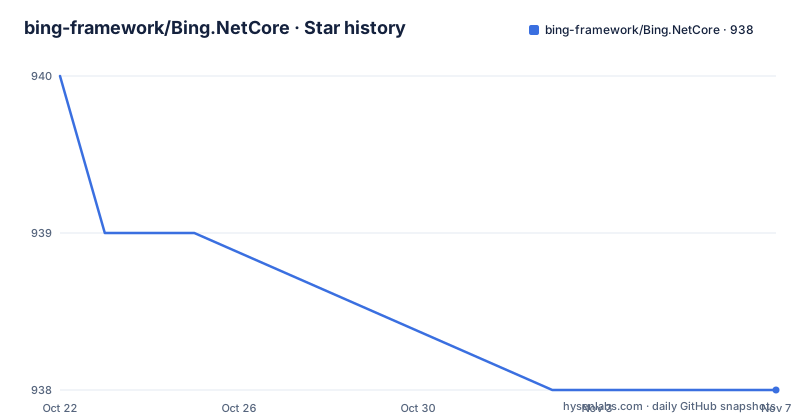
Star history
- bing-framework/Bing.NetCore938 ★ · -2
| Repository | 2026-10-22 | 2026-11-07 |
|---|---|---|
| bing-framework/Bing.NetCore | 940 | 938 |
-2 Stars in the last 16 days, measured from the daily GitHub snapshot. Compare with other projects
Editorial analysis
A framework aimed at small teams, not a platform team
Bing.NetCore is an application framework for the .NET Core platform, published by the bing-framework organisation under the MIT licence. The stated purpose is narrow and practical: raise the output rate of a small team by shipping the pieces that every internal project ends up rewriting. The composition of the framework is listed in the project description itself, and it mixes four categories. There are common operation classes, meaning utility and helper code. There are base classes for a layered architecture. There are wrappers around third party components. And there are wrappers around third party business interfaces. In other words this is not a new programming model. It is a curated layer that sits on top of ASP.NET Core and .NET Core, pre-assembled so that a team of a handful of developers does not have to agree on a base controller, a repository base class and an exception filter every time it starts a new service.
A package list you can adopt one piece at a time
The distribution model is the most useful thing to understand about the project. Instead of one meta package, the framework is published on NuGet as a family of small packages, each listed with a stable version and a preview version on nuget.org. The visible names fall into clear groups. Bing.Core holds the common operation and helper classes. Bing.Uow is the unit of work component, and Bing.ExceptionHandling deals with exceptions. Bing.Security and Bing.Permissions cover authentication and authorisation concerns, and Bing.Events is for the event side of the design. Bing.Aop.AspectCore provides the aspect oriented programming piece, while Bing.Validation and Bing.Validation.Abstractions supply data validation and its contracts. The ASP.NET Core group includes Bing.AspNetCore, Bing.AspNetCore.Abstractions, Bing.AspNetCore.Serilog, Bing.AspNetCore.Mvc and Bing.AspNetCore.Mvc.Contracts. Because the packages are separate, a team can take Bing.Core alone and ignore the rest, which is a different starting point from adopting a full application scaffold.
The repository layout separates framework, components and templates
Based on the top level entries, the repository is organised as a solution rather than a single project. Bing.All.sln is the solution file, and it sits alongside common.props, framework.props, version.props, version.dev.props and their test counterparts common.tests.props and framework.tests.props, which is the usual shape for a repository that builds many projects with shared compilation settings. The code is split into framework/, components/ and modules/ directories, with templates/ and samples/ alongside them and tests/ at the root. The samples are concrete: Bing.Samples.WebApi, Bing.Samples.Hangfire and Bing.Samples.Winform. A Hangfire sample is worth noting because it shows the framework being used with a background job scheduler rather than only with request handling. Continuous integration is configured through .travis.yml and appveyor.yml, and there is an AGENTS.md file at the root, plus a docs/ directory and a documents/ directory for written guidance.
Getting the packages into a .NET Core project
The project publishes its packages to nuget.org, and the package table in the documentation is the catalogue to work from. The README does not document a command line installation, a dotnet add package invocation or a specific global tool, so there is nothing to copy there, and the honest instruction is to add the packages you need from the NuGet feed for your project, using the stable version unless you are deliberately tracking the preview channel. Each package name is a distinct unit of adoption, which is why the table lists stable and preview columns for each one. Because the packages carry contracts as separate packages, such as Bing.AspNetCore.Mvc.Contracts and Bing.Validation.Abstractions, a project that only wants the interfaces can reference those without pulling in the implementation, and the implementation package can then be registered in the host. The templates/ directory is the other half of the onboarding story, since it is where the intended project skeleton for a new service is kept.
Reading the samples as the first real usage
If the README is a package list, the samples are the actual usage documentation. Bing.Samples.WebApi shows a hosted ASP.NET Core application built on the framework, and it is the closest thing to a reference application for the request handling side. Bing.Samples.Winform shows the desktop side of the same framework, which is a useful signal that the layering is not tied to a single hosting model. Bing.Samples.Hangfire shows background job processing, which is where the AOP and event pieces have something to attach to. The practical first use is therefore to clone the repository, open the solution, run the Web API sample, and then replace the sample's project references with the specific packages your own service needs. That is a smaller commitment than adopting the whole framework, because you can start with Bing.Core and Bing.Uow, keep the rest of your own code as it is, and move on to the ASP.NET Core integration only when the host layer is being written anyway.
Versioning tells a story about the project's pace
The release history is worth reading carefully before you pin a version. The repository is not archived and the last push was on 2026-10-15, so work is still landing in the tree. The tagged releases, however, are uneven: v2.2.8 on 2023-01-05, v2.2.9 on 2023-03-30 and then v6.0.0 on 2025-06-03. A jump from 2.x to 6.0.0 with more than two years of gap suggests the versioning scheme changed rather than that every version was published, and the README does not explain the numbering, nor does it point at release notes. The repository does contain a CHANGELOG-style structure in its docs and documents/ folders, and the version.props and version.dev.props files suggest the version number is injected during build, which is how a single repository can publish many packages under one version. Practically, that means the NuGet versions and the git history are not necessarily in step, and the newest published package may be older than the newest commit.
Where the framework is the wrong choice
Several honest limits apply. The first is target framework risk: the project description still names .NET Core 3.1 as its base, so a team shipping on a current .NET release has to confirm that the packages restore and run before committing to them, and the README does not list the supported target frameworks per package. The second is that adopting the framework means adopting its conventions. Base classes for a layered architecture, an AOP package, a unit of work and a security package each impose a shape on your code, and a codebase that already has a different shape will be harder to fit than to write. The third is documentation depth. The published surface is wide and split across many packages, and the guidance lives in docs/ and documents/ rather than in the README, so onboarding a new developer means reading the repository rather than a hosted documentation site. For a small service that only needs a couple of endpoints, pulling in a dozen packages to avoid writing one base class is a bad trade.
The alternative: your own base classes in a plain project
The realistic alternative is not another framework but the approach most teams start from, a plain ASP.NET Core project with a thin set of base classes written by hand. The difference in approach is in who owns the abstraction. Hand written base classes cost a few days and stay exactly as simple as your service, and every decision about transactions, logging and error handling stays visible in your repository. Bing.NetCore moves those decisions into a published, versioned set of packages: the unit of work, the aspect interception for cross cutting concerns, the validation attributes, the permission checks and the MVC and Serilog integration for the host. In exchange you get a consistent starting point across several services and a maintenance burden you do not carry, but you also inherit the layering, the conventions and the version compatibility questions described above. A team that already has two services with different conventions is the case where the framework earns its cost; a team starting its first service is not.
Editorial conclusion
Adopt Bing.NetCore when your team wants the shape of an enterprise application, meaning a layered structure, a unit of work, cross cutting concerns handled by aspects and an ASP.NET Core host that already knows about them, and when picking packages individually fits your roadmap. Do not adopt it for a service with three endpoints, and do not assume a new team can learn the conventions from the README, which is a package list rather than a guide. Check first that the packages restore and run on the target framework you intend to ship, since the project description still names .NET Core 3.1 as its base, and read the docs/ folder and samples/ projects before wiring Bing.Uow into an existing data layer. The last push was on 2026-10-15, and the newest tagged release is v6.0.0 from 2025-06-03.
Frequently asked questions
What is Bing.NetCore and who is it for?
Bing.NetCore is an MIT licensed application framework for the .NET Core platform, described as a way to raise the output rate of a small team. It bundles common helper classes, layered architecture base classes, and wrappers around third party components and business interfaces.
Which NuGet packages does Bing.NetCore publish?
The package table lists Bing.Core, Bing.Uow, Bing.ExceptionHandling, Bing.Security, Bing.Permissions, Bing.Events, Bing.Aop.AspectCore, Bing.Validation, Bing.Validation.Abstractions, Bing.AspNetCore, Bing.AspNetCore.Abstractions, Bing.AspNetCore.Serilog, Bing.AspNetCore.Mvc and Bing.AspNetCore.Mvc.Contracts, each with a stable and a preview version.
How do I install Bing.NetCore packages?
The packages are published on nuget.org, so you add the ones you need from the NuGet feed in your .NET Core project, taking the stable version unless you are tracking the preview channel. The README does not document a command line installation, and it also does not list a supported target framework per package, so check compatibility with your .NET version first.
What sample projects does the repository contain?
Three samples are present: Bing.Samples.WebApi, Bing.Samples.Hangfire and Bing.Samples.Winform. They cover a hosted API, background job processing with Hangfire and a desktop application, and the repository also carries a templates/ directory for project scaffolding.
Is Bing.NetCore still being worked on?
The repository is not archived and the last push was on 2026-10-15, though the newest tagged release is v6.0.0 from 2025-06-03, following v2.2.9 from 2023-03-30. Because the git history and the published package versions are not necessarily in step, the docs/ and documents/ folders are where the current behaviour is described.
Official sources
Add this badge to your README
If you maintain this project, the badge below links readers to this analysis and shows its maintenance status from the daily GitHub snapshot. Paste the markdown into your README; add ?metric=license or ?metric=stars to the image URL for a different field.

[](https://hysenlabs.com/projects/bing-framework-bing-netcore)Star history chart for your README
[](https://hysenlabs.com/projects/bing-framework-bing-netcore)Was this useful?