rafaelfgx/Architecture ships a compose file with a committed signing key, and four run paths that disagree on the scheme
.NET 10, Angular 22, Clean Architecture, Clean Code, SOLID, KISS, DRY, Mediator Pattern, Folder-by-Feature Structure
At a glance
- What is it?
- rafaelfgx/Architecture is a .NET and Angular reference structure that teaches Clean Architecture by naming a folder for each concern: Web, Application, Domain, Model and Database, with a mediator between them. It is also a working sample with four documented ways to start it, a checked in Postman collection, and a compose file whose environment block carries a signing key and a database password in plain text.
- Who is it for?
- Use this repository as a reading template rather than as a starting codebase. Its layer guide is unusually explicit about where a rule belongs, which makes it worth reading even if you never run it, and the four run paths are honest about what each toolchain needs.
- Can I use it commercially?
- Yes. MIT is a permissive licence: you can use, modify and sell software built on it, as long as you keep its copyright and licence notices.
- Is it still maintained?
- Yes. The repository last received commits 4 days ago.
- What is it written in?
- Mainly C#, according to GitHub's language statistics.
Answers come from the project's GitHub data, last synced on November 15, 2026, and from our analysis. They are not legal advice.
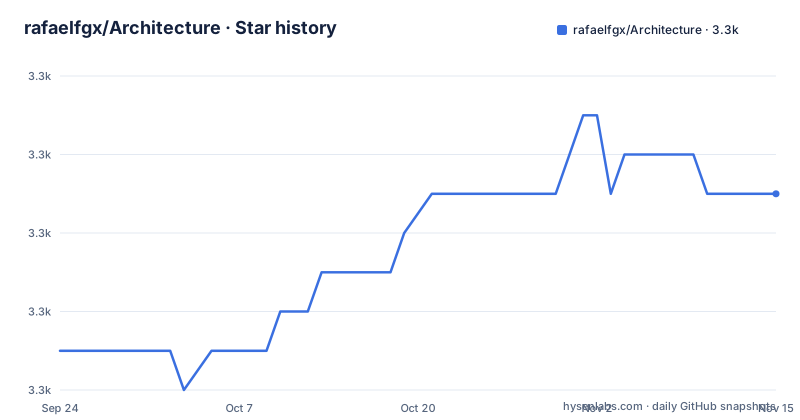
Star history
- rafaelfgx/Architecture3,281 ★ · +4
| Repository | 2026-09-24 | 2026-11-15 |
|---|---|---|
| rafaelfgx/Architecture | 3.3k | 3.3k |
4 Stars in the last 52 days, measured from the daily GitHub snapshot. Compare with other projects
Editorial analysis
The compose file commits a signing key and a sa password in plain text
The environment block of the web service is where a reader should start, because it is where the template's defaults are least cautious. It sets SigningKey to a 64 character hexadecimal value, sets a connection string pointing at a database service with User Id=sa and a password that also appears again as SA_PASSWORD on the database service, and appends TrustServerCertificate=true, which tells the client not to validate the server certificate. The database service publishes 1433 to the host, so the port is reachable from outside the container rather than staying on an internal network, and both services use restart: always. Nothing here is a secret that has leaked by accident; it is a sample credential committed on purpose so that dotnet run works on a clean machine. The consequence is that every fork inherits a publicly known signing key and a publicly known database administrator password, and both have to be replaced before that fork is reachable by anyone else.
The build block never names a Dockerfile, and the tree spells it in lowercase
The compose file builds the web image from a context of . and stops there, with no dockerfile key, so Compose looks for a file called Dockerfile in that context. The tree at the root holds a file named dockerfile in lowercase, along with other lowercase names like license.md and readme.md. On a case-sensitive filesystem those two do not meet, which means the documented Docker path either depends on a case-insensitive filesystem or on a name that the file does not have. The same file has a second gap. The application writes logs to /app/logs through an environment variable named Serilog__WriteTo__1__Args__path, whose doubled separators address nested configuration and which points at the second sink's path argument, but the web service declares no volume for that directory, while the database does get one. The documented command recreates containers forcibly, so each run of it starts from an image with an empty log directory and the previous run's logs are gone.
Four run paths, two schemes for the same port, and four prerequisite lists
The Run section offers the same application four ways, and the differences between them are the interesting part. The Docker path needs Docker and nothing else:
docker compose up --detach --build --force-recreate --remove-orphansThe command line path needs the .NET SDK, SQL Server, Node and the Angular CLI, asks you to run npm run restore inside source\Web\Frontend, then dotnet run inside source\Web, and points at https://localhost:8090. The Docker path points at the same port with http instead, and the compose file explains the port by mapping host 8090 to container 8080, so one of those two schemes is wrong for at least one path. The Visual Studio path is the thinnest prerequisite list of the three local ones: Visual Studio, Node and the Angular CLI, with no .NET SDK and no SQL Server, even though the connection string points at one. Every path uses Windows style backslashes, and every path begins with the same unexplained npm run restore.
The layer guide is a placement rule set, and its rules are testable
The Layers section reads less like a dependency diagram and more like a set of rules you could check in review, which is what makes it useful. Domain holds business rules and domain logic and has no references to any layer. Inside it, an entity has unique identity that may span bounded contexts and outlive the object itself, and its properties may only be changed through internal business methods rather than by direct assignment. A value object has no identity, is immutable, is defined only by its values, must be replaced rather than updated, and may carry methods only if they have no side effects on state. Domain services exist for the remainder, being stateless and holding no operation that belongs to an entity or a value object. Application is flow only, with business flow and no business rules: requests with their validators, responses, handlers that call factories, repositories, unit of work, services or the mediator, and factories for complex objects. Model sits outside all of it holding data transfer objects.
Result Pattern and Unit of Work are promised and never explained
Two things are named in the principles list and then never defined. The principles run Clean Architecture, Clean Code, SOLID, KISS, DRY, the Mediator Pattern, the Result Pattern and a folder-by-feature structure, but the Layers section never introduces a Result type. Request and Response are described only as having properties that represent the request and the response, with validators carrying the rules, so whatever the Result pattern is supposed to wrap is left unstated. Unit of work has the same problem in a different place: a handler is said to call factories, repositories, unit of work, services or mediator, and no layer in the document describes what unit of work is or where it lives. The benefits list has its own loose end in the same register, since avoiding unnecessary dependency injection sits next to a Controller that has no dependencies other than the mediator.
The framework versions are in the repository description, not in the file
The versions this sample targets are stated in the repository description and nowhere in the documentation itself. That line names .NET 10 and Angular 22 alongside the pattern list, while the Technologies section names .NET, ASP.NET Core, Entity Framework Core, C#, Angular and UIkit with links and no version numbers at all. The frontend is on UIkit rather than a component library from the Angular team, which is a choice worth noticing if you copy the layout. The two lists also disagree about scope, because the description omits the Result Pattern that the file's own principles list includes. Reuse is pointed elsewhere: the Packages section sends you to the rafaelfgx/DotNetCore repository for source and to the rafaelfgx profile on NuGet for published packages, so this repository holds the sample and the other one holds the parts meant to be depended on. There are no releases here, and no version string anywhere in the visible tree.
The Angular side keeps its cross cutting work in four named places
The frontend half of the Web layer is described in four parts, which is a usable checklist rather than a diagram. Service is called the interface between frontend and backend and is where logic that does not belong in components is supposed to live. Guard validates whether a route can be activated. ErrorHandler provides a hook for centralized exception handling. HttpInterceptor intercepts and handles an HttpRequest or an HttpResponse. The backend half of the same layer is one line: a Controller with no logic, no business rules and no dependencies other than the mediator. Two other files at the root say something about how the sample is worked on. postman.json is a checked in API description, so the requests this backend accepts are tracked in a Postman collection rather than in a generated specification, and the absence of any env file example in the tree means the connection string has to come from somewhere other than a template.
Editorial conclusion
Use this repository as a reading template rather than as a starting codebase. Its layer guide is unusually explicit about where a rule belongs, which makes it worth reading even if you never run it, and the four run paths are honest about what each toolchain needs. Starting from it means inheriting three things you would have to change first: the signing key and the sa password that are committed in docker-compose.yaml, the SQL Server port published to the host with certificate validation turned off, and a build block that does not name its own Dockerfile. Those are template defaults, not an attack, but they are in git and they will be in your fork too. If you do run it, keep the database port off your host interface, replace both secrets before the first shared environment, and set an explicit image tag on the database so a future upstream change does not move your schema under you.
Frequently asked questions
What layers does rafaelfgx/Architecture define?
Five. Web holds the Angular frontend and a backend controller, Application holds flow with requests, request validators, responses, handlers and factories, Domain holds business rules with aggregates, entities, value objects and services, Model holds data transfer objects, and Database holds persistence with a context, entity configuration and a repository.
How do I run rafaelfgx/Architecture with Docker?
The file gives one command, docker compose up --detach --build --force-recreate --remove-orphans, then opening http://localhost:8090, and lists Docker as the only prerequisite for that path. The compose file maps host port 8090 to container port 8080 and starts a SQL Server service alongside it.
Does rafaelfgx/Architecture include an API description?
There is a postman.json at the repository root, so the requests are tracked as a Postman collection rather than as a generated specification. The Database layer is described as a context that configures the connection, entity configuration for the mapping, and a repository that inherits from a generic repository and implements only specific methods.
Does rafaelfgx/Architecture publish releases?
No. The repository has no GitHub releases and no version string in the visible tree. Its reusable packages are published separately on the rafaelfgx NuGet profile, with source in the rafaelfgx/DotNetCore repository, and the last push in this tree is dated 2026-08-18.
Official sources
Add this badge to your README
If you maintain this project, the badge below links readers to this analysis and shows its maintenance status from the daily GitHub snapshot. Paste the markdown into your README; add ?metric=license or ?metric=stars to the image URL for a different field.

[](https://hysenlabs.com/projects/rafaelfgx-architecture)Star history chart for your README
[](https://hysenlabs.com/projects/rafaelfgx-architecture)Was this useful?