WES-NG: mapping Windows systeminfo output to missing patches and public exploits
Windows Exploit Suggester - Next Generation
At a glance
- What is it?
- WES-NG turns a systeminfo dump or a missing-KB list into a list of vulnerabilities and available exploits for Windows XP through Windows 11. It is a post-exploitation triage tool, not a scanner, and its own README warns that the results need filtering.
- Who is it for?
- Adopt WES-NG if you already have a systeminfo dump or a missing.txt file from an authorized Windows assessment and you want a fast, offline list of candidate patches and exploits, and you accept that the output must be filtered (the README points to the Eliminating false positives wiki page and to --muc-lookup for that).
- Can I use it commercially?
- Yes. BSD-3-Clause is a permissive licence: you can use, modify and sell software built on it, as long as you keep its copyright and licence notices.
- Is it still maintained?
- Yes. The repository last received commits 1 day ago.
- What is it written in?
- Mainly Python, according to GitHub's language statistics.
Answers come from the project's GitHub data, last synced on November 14, 2026, and from our analysis. They are not legal advice.
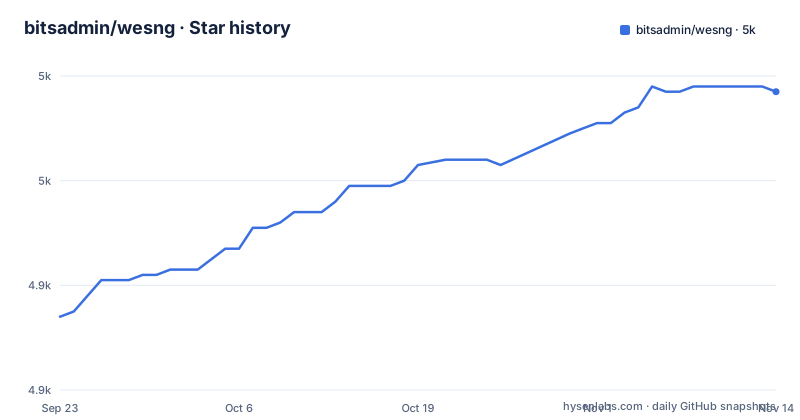
Star history
- bitsadmin/wesng4,977 ★ · +43
| Repository | 2026-09-23 | 2026-11-14 |
|---|---|---|
| bitsadmin/wesng | 4.9k | 5k |
43 Stars in the last 52 days, measured from the daily GitHub snapshot. Compare with other projects
Editorial analysis
What WES-NG does that a patch-level scan does not
The tool takes a text file and returns a list. Input is either the output of Windows' own systeminfo utility (run locally, or remotely with systeminfo /S MyRemoteHost and redirected to a file) or a missing.txt file produced by the bundled missingkbs.vbs or missingkbs.ps1 scripts. Output is the set of vulnerabilities the operating system is exposed to, with exploit references attached where the collector found them. The README states that every Windows OS between Windows XP and Windows 11, including the Windows Server counterparts, is supported.
The audience is narrow and specific. This is for an operator or administrator who already has a shell, a screenshot of systeminfo, or a saved dump from an engagement, and who needs to know which of the thousands of Microsoft patches matter for that exact build. It is not a discovery tool. It performs no network requests against the target and no credentialed scanning. If you do not have a systeminfo file or a missing.txt file, WES-NG has nothing to work with.
The design assumption is that patch level, not banner or service version, is what determines exploitability on Windows. That assumption is mostly right, and it is why the tool survives where port scanners give up: a Windows box often exposes very little, but its build number and hotfix list are enough to reason about known vulnerabilities.
How the vulnerability database is assembled and queried
WES-NG is a lookup table with a parser in front of it. The repository ships definitions.zip, a compressed CSV of hotfix and vulnerability information, and the collector/ folder holds the scripts that regenerate it. According to the README, the collector pulls from four sources: Microsoft Security Bulletin Data for KBs on older systems, the MSRC security update API for modern Microsoft updates, the NIST National Vulnerability Database to attach Exploit-DB links, and OffSec Exploit-DB itself. Those are combined into a single CSV, compressed, and hosted in the repository.
At query time wes.py parses the input file, extracts the OS build and the installed or missing hotfix identifiers, and matches them against that CSV. The README notes that the repository regularly updates the database, so wes.py --update fetches the current version rather than relying on the copy that came with your install. If you need to build the CSV yourself, the collector scripts must be run in the order they are listed in the folder, and the README says that executing them produces definitions.zip.
One architectural consequence is worth stating plainly: the accuracy of your results is bounded by the accuracy of Microsoft's feeds, not by WES-NG's matching logic. The README is explicit that the data provided by Microsoft's MSRC feed is frequently incomplete and that false positives are reported by wes.py. The maintainer added the --muc-lookup parameter, contributed by @DominicBreuker, to validate identified missing patches from the systeminfo.txt file against Microsoft's Update Catalog. That is a network call to Microsoft, which changes the operational profile: a run with --muc-lookup is no longer purely offline.
Installing WES-NG and running it against a systeminfo file
Two installation paths are documented. The first is pip:
pip install wesngThat installs the wesng package and a console entry point called wes, which setup.py declares as wes=wes:main. The second is a shallow clone of the repository:
git clone https://github.com/bitsadmin/wesng --depth 1After either, the README's step 2 is to fetch the vulnerability database:
wes.py --updateThis is not optional in practice. The definitions.zip that ships with a checkout or a package is a point-in-time snapshot, and the README says the repository regularly updates the database, so the update step is what makes the results current.
On the Windows host, collect the input. Either run the bundled script that has Windows determine which patches are missing, or use the built-in utility and redirect it:
systeminfo > systeminfo.txtRemote collection is documented as systeminfo /S MyRemoteHost, redirected the same way. Then feed the file to the tool, using whichever input you produced:
wes.py systeminfo.txtwes.py --missing missing.txtThe README gives wes.py -m missing.txt as the short form of the second. What you should see is a list of vulnerabilities applicable to that system, with exploits noted where the database has them. If the output is long, that is expected rather than broken; the next step is filtering, not re-running.
False positives are the documented failure mode, not an edge case
The README treats false positives as a first-class problem. It states that the MSRC feed is frequently incomplete and that wes.py reports false positives, and it directs readers to a wiki page titled Eliminating false positives before they file anything. There is a second wiki page, Reporting false positives, for cases where the first page does not reduce the noise enough. That is an unusual amount of documentation for a defect, and it tells you how the maintainer expects the tool to be used: as a candidate generator that a human narrows down.
There is a second, quieter limitation. WES-NG reasons from patch metadata, so it cannot tell you whether a given exploit actually works against the target. A suggested KB means the patch is absent and a vulnerability is associated with it. It does not mean the exploit compiles, that the target's configuration permits the attack, or that a mitigation such as a compiler-level protection is not in the way. The tool answers a patch-level question and stops there.
It is also the wrong tool outside its input model. On a non-Windows target it has nothing to parse. On a Windows target where you cannot run systeminfo or the missingkbs scripts, and cannot obtain their output by other means, it produces nothing. And if what you need is continuous vulnerability management across a fleet, a file-in, list-out utility is the wrong shape entirely.
WES-NG compared with GDSSecurity's Windows-Exploit-Suggester
The README's Rationale section names the predecessor directly: GDSSecurity's Windows-Exploit-Suggester. The maintainer says it worked excellently for the Windows XP and Windows Vista era, and that it does not work for operating systems like Windows 11 or for vulnerabilities published in recent years. The stated cause is a data-source change: Microsoft replaced the Microsoft Security Bulletin Data Excel file, on which the older tool is fully dependent, with the MSRC API. That Excel file has not been updated since Q1 2017.
That is the substantive difference between the two projects, and it is not about code quality. The older tool reads a feed that stopped moving. WES-NG reads the feed that replaced it. Any comparison that ignores the data source will reach the wrong conclusion, because a well-written parser over a frozen dataset still returns results that end in early 2017.
The practical implication for a reader choosing between them is a date boundary. If your assessment targets Windows XP or Vista era systems and you already have a working setup with the older tool, there is no functional reason from the README to migrate. If your target is anything from the last several years, the older tool's data source cannot describe it, and WES-NG's collector pipeline is the reason the newer tool can.
Maintenance, packaging and licence
The repository is not archived, and the last push was on 2026-10-29. setup.py declares version 1.0.3, Development Status :: 5 - Production/Stable, and support for Python 2.7 and Python 3.4 through 3.11, with python_requires set to >=3.4, >=2.7. The single runtime dependency is chardet. The BSD-3-Clause licence text is in LICENSE.txt at the repository root.
Three practical notes follow from that packaging. First, the project has no published GitHub releases, so pip install wesng resolves through the package index rather than through a tagged GitHub release; if you need to pin, pin the version string from setup.py rather than a release name. Second, the Python 2.7 classifier means the code is written to run on interpreters that are long past end of life, which is a compatibility statement rather than a recommendation. Third, the database is the part that ages fastest, and it is delivered separately from the code: wes.py --update is the upgrade path that matters most, and it does not require reinstalling the package.
On licensing, BSD-3-Clause is permissive and the repository includes the full text. What that means for redistribution inside a commercial product is a question for your own counsel; the README does not address combined works, attribution obligations in binary form, or the licence status of the upstream Microsoft, NIST and Exploit-DB data that the collector consumes. Those upstream terms are a separate question from the licence on the code.
Editorial conclusion
Adopt WES-NG if you already have a systeminfo dump or a missing.txt file from an authorized Windows assessment and you want a fast, offline list of candidate patches and exploits, and you accept that the output must be filtered (the README points to the Eliminating false positives wiki page and to --muc-lookup for that). Do not adopt it as a network scanner: it never touches the target, it reads a text file you produce with systeminfo.exe or with missingkbs.vbs/missingkbs.ps1. Before relying on it, run wes.py --update so the definitions database is current, then verify the first few suggested KBs against Microsoft's Update Catalog, because the README states the MSRC feed is frequently incomplete.
Frequently asked questions
How do I install WES-NG and get the vulnerability database?
Install it with pip install wesng, or clone the repository with git clone https://github.com/bitsadmin/wesng --depth 1. Then run wes.py --update to obtain the latest database of vulnerabilities, which the README lists as step 2 of normal usage.
Does WES-NG work on Windows 11 and Windows Server?
The README states that every Windows OS between Windows XP and Windows 11 is supported, including their Windows Server counterparts.
Why does WES-NG report vulnerabilities that are not actually present?
The README says the data provided by Microsoft's MSRC feed is frequently incomplete and that false positives are reported by wes.py. It points to the Eliminating false positives wiki page, and to the --muc-lookup parameter, which validates identified missing patches from systeminfo.txt against Microsoft's Update Catalog.
Official sources
Add this badge to your README
If you maintain this project, the badge below links readers to this analysis and shows its maintenance status from the daily GitHub snapshot. Paste the markdown into your README; add ?metric=license or ?metric=stars to the image URL for a different field.

[](https://hysenlabs.com/projects/bitsadmin-wesng)Star history chart for your README
[](https://hysenlabs.com/projects/bitsadmin-wesng)Was this useful?