pydantic/httpx2: two distributions, six extras, and a rename that stops short
A next generation HTTP client for Python. 🦋
At a glance
- What is it?
- HTTPX2 is the HTTP client that Pydantic picked up from the HTTPX project, with the import renamed and the transport moved into the same tree. The rename is complete in the package metadata and partial in the integration hooks, the extras cost more than the README admits, and the resolution window is set to a rolling seven days.
- Who is it for?
- Adopt httpx2 if you want an actively shipped client with a requests-shaped API, a transport you can version separately, and optional HTTP/2 or a command line client. Do not switch on the assumption that this is a drop-in rename: the import is httpx2, the Logfire extra and instrumentation function still say httpx, and the compatibility guide the README links is about requests rather than about migrating HTTPX code.
- Can I use it commercially?
- Yes. BSD-3-Clause is a permissive licence: you can use, modify and sell software built on it, as long as you keep its copyright and licence notices.
- Is it still maintained?
- Yes. The repository received new commits within the last day.
- What is it written in?
- Mainly Python, according to GitHub's language statistics.
Answers come from the project's GitHub data, last synced on November 14, 2026, and from our analysis. They are not legal advice.
Star history
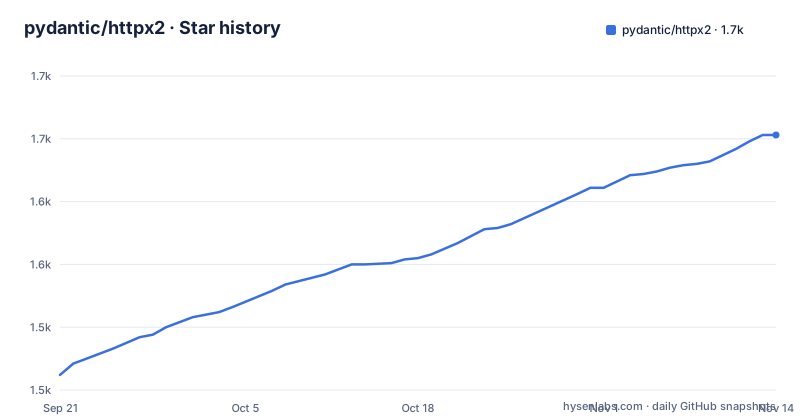
- pydantic/httpx21,653 ★ · +191
| Repository | 2026-09-21 | 2026-11-14 |
|---|---|---|
| pydantic/httpx2 | 1.5k | 1.7k |
191 Stars in the last 54 days, measured from the daily GitHub snapshot. Compare with other projects
Editorial analysis
Two distributions ship from one tree
The root pyproject.toml declares `package = false` and lists two uv workspace members, `src/httpx2` and `src/httpcore2`, with the transport wired in as a workspace source rather than resolved from an index. The client and the layer underneath it are therefore separate distributions built from a single repository, and a transport fix can be cut without waiting for a client release. The same file carves a slice of that tree out of the linters: ruff excludes `src/httpcore2/httpcore2/_sync` and `tests/httpcore2/_sync`, the generated sync wrappers, from the entire rule set, and it excludes `*.md` files as well, so the code samples in the docs are never linted. mypy runs in strict mode with `ignore_missing_imports = true`, and `__init__.py` files are allowed star imports through per file ignores.
The rename is complete in imports and partial in hooks
Installing the package gives you `import httpx2`, and the documentation examples all use that name. The observability path does not follow: the extra to install is `logfire[httpx]` and the function to call is `logfire.instrument_httpx()`. There is no `instrument_httpx2` anywhere in the setup snippet. The same drift appears in the documentation map, where the third party page is introduced as a list of tools that integrate with HTTPX. The compatibility guide the feature list links is described as requests compatible, not as a migration path for HTTPX code, and no mapping between the old release tags and the current 2.x tags is given, so a rename on your side is a read of the source rather than a table.
Six extras, and one the README never lists
Five extras are written down: `httpx2[http2]` for h2, `httpx2[socks]` for socksio, `httpx2[cli]` for click and rich, `httpx2[brotli]` for brotli or brotlicffi, and `httpx2[zstd]` for compressed responses on older interpreters. A sixth, `ws`, appears only in the dev dependency group, where the package is requested as `httpx2[brotli,cli,http2,socks,ws,zstd]`, and websockets 16.1.1 or higher sits in the test group. That lines up with the advertised ability to make requests directly to WSGI and ASGI applications, but the extra itself is undocumented. The command line client is also the only feature that costs two packages rather than one:
pip install 'httpx2[cli]' # The command line client is an optional dependency.The zstd extra installs nothing on Python 3.14
`httpx2[zstd]` resolves to backports.zstd on Python 3.13 and below. On 3.14 and later, zstd is handled by the standard library's `compression.zstd` module when it is available, and the extra installs nothing at all. The same interpreter split shows up in the benchmark group, which pulls zuvloop only for CPython 3.14 and above, and starlette, uvicorn, trio and pytest trio are pinned for the ASGI and trio test paths. The practical consequence is that one extra name describes two different dependency graphs, and a lockfile resolved on one interpreter will not describe the other.
uv resolution runs on a rolling seven day cutoff
The root pyproject.toml sets `exclude-newer = "7 days"` for uv, so every resolution ignores anything published in the last week, and it requires uv 0.8.6 or later before it will run at all. Two packages carry fixed cutoffs instead of the rolling one: idna at 2026-06-03 and httpx2-jsfetch at 2026-08-08. idna is the internationalized domain name library in the runtime dependency list, so the IDNA behaviour the client ships is pinned months behind the rest of the resolution. httpx2-jsfetch appears in no dependency list and in no example; the single line pinning it is the only trace of it. The tree also carries a `redirects/` directory, a `wrangler.toml` and an `AGENTS.md`, none of which the README explains.
Strict timeouts, advertised in a list and absent from the example
One bullet in the feature list promises strict timeouts everywhere. The example that opens the documentation makes a bare module level call with a URL and nothing else:
>>> import httpx2
>>> r = httpx2.get('https://www.example.org/')
>>> r
<Response [200 OK]>
>>> r.status_code
200
The snippet stops at the status code, so the strictness claim is left to the linked documentation rather than demonstrated. That example also never constructs a client object, which is the form the Logfire section says you can pass in to scope instrumentation to a single instance.
Certificate trust is delegated to the machine
truststore is listed as a runtime dependency, described as SSL verification using the operating system trust store, and the feature list carries browser style SSL verification across from the requests catalogue the project follows. Read together, those two lines mean the default set of trust anchors is whatever the machine already holds. A certificate authority installed at the system level, including one added by an inspection proxy, is then accepted without any opt in from the caller, and no environment variable or flag for pointing verification at a private bundle is documented. The same feature list also carries Basic and Digest authentication, .netrc support and sessions with cookie persistence, so credentials sit in the headers and cookie jar of every request the process makes.
capture_all records the headers and the body
Logfire instrumentation is two lines, and it works the same way for module level calls and for an explicit `httpx2.Client()` or `httpx2.AsyncClient()`:
import logfire
import httpx2

logfire.configure()
logfire.instrument_httpx()

httpx2.get("https://pydantic.dev/")
Passing a client to `logfire.instrument_httpx(client)` narrows the scope to that instance. The option worth reading twice is `capture_all=True`, which turns on recording of headers and bodies. Authorization values from Basic and Digest authentication, cookies accumulated in a session, and the contents of multipart uploads all travel in exactly those fields, so enabling it in a shared environment is a decision about what leaves the process and where it is stored.
Editorial conclusion
Adopt httpx2 if you want an actively shipped client with a requests-shaped API, a transport you can version separately, and optional HTTP/2 or a command line client. Do not switch on the assumption that this is a drop-in rename: the import is httpx2, the Logfire extra and instrumentation function still say httpx, and the compatibility guide the README links is about requests rather than about migrating HTTPX code. Before you commit, read the extras list to see which optional packages your deployment will pull, confirm how the operating system trust store affects certificate verification in your network, and leave `capture_all=True` off until you know where the recorded headers and bodies are sent.
Frequently asked questions
What is HTTPX2?
It is the pip-installable name for the HTTPX client that Pydantic took over. The README describes it as a fully featured client with a broadly requests compatible API, sync and async interfaces, HTTP/1.1 and HTTP/2 support, and an integrated command line client that sits behind an optional extra.
Is httpx2 the same package as httpx?
No, the distribution and the import are both named httpx2. The project describes itself as a continuation of the work started by lovelydinosaur and the HTTPX community, taken on by Pydantic because HTTPX itself had seen limited activity, but it publishes no version mapping between the old tags and the current 2.x releases.
Which extra do I need for HTTP/2 and for the command line client?
HTTP/2 comes from the h2 package through the httpx2[http2] extra. The command line client needs two packages, click and rich, through the httpx2[cli] extra, which is why it is installed as `pip install 'httpx2[cli]'` rather than as part of the base install.
How do I record httpx2 calls in Pydantic Logfire?
Install `pip install 'logfire[httpx]'`, call logfire.configure() and then logfire.instrument_httpx(), and the requests are traced with timings and status codes. Pass a specific client to scope it, and pass capture_all=True to also record headers and bodies.
What does httpx2 use to verify TLS certificates?
truststore, which performs SSL verification against the operating system trust store. HTTP/1.1 handling sits in h11 underneath the httpcore2 transport, anyio supplies the concurrency primitives for both asyncio and trio, and idna handles internationalized domain names.
Official sources
Add this badge to your README
If you maintain this project, the badge below links readers to this analysis and shows its maintenance status from the daily GitHub snapshot. Paste the markdown into your README; add ?metric=license or ?metric=stars to the image URL for a different field.

[](https://hysenlabs.com/projects/pydantic-httpx2)Star history chart for your README
[](https://hysenlabs.com/projects/pydantic-httpx2)Was this useful?