Bitscoper CyberKit: A Flutter Swiss Army Knife for Network Scanning and Hash Tools
A Flutter App: Bluetooth LE Scanner, IPv4 Subnet Scanner, mDNS Scanner, UPnP Scanner, Route Tracer, TCP Port Scanner, Pinger, File Hash Calculator, String Hash Calculator, CVSS Calculator, Base Encoder, Morse Code Translator, QR Code Generator, OGP Data Extractor, Series URI Crawler, DNS Record Retriever, WHOIS Retriever, and Wi-Fi Details Viewer
At a glance
- What is it?
- Bitscoper CyberKit bundles 18 network and security utilities into one Flutter app, from BLE scanning to CVSS calculation. It is a capable toolkit for auditors and tinkerers, but its breadth brings platform inconsistencies and a paused Android store presence.
- Who is it for?
- Adopt Bitscoper CyberKit if you need a portable, multi-platform collection of network reconnaissance and hashing tools without juggling separate apps. It suits security students, network admins, and hobbyists who prefer a single interface.
- Can I use it commercially?
- Yes, with conditions. GPL-3.0 is a copyleft licence: if you distribute software that includes it, you must release that software's source code under the same licence. Running it internally without distributing it does not trigger that obligation.
- Is it still maintained?
- Yes. The repository last received commits 11 days ago.
- What is it written in?
- Mainly Dart, according to GitHub's language statistics.
Answers come from the project's GitHub data, last synced on October 18, 2026, and from our analysis. They are not legal advice.
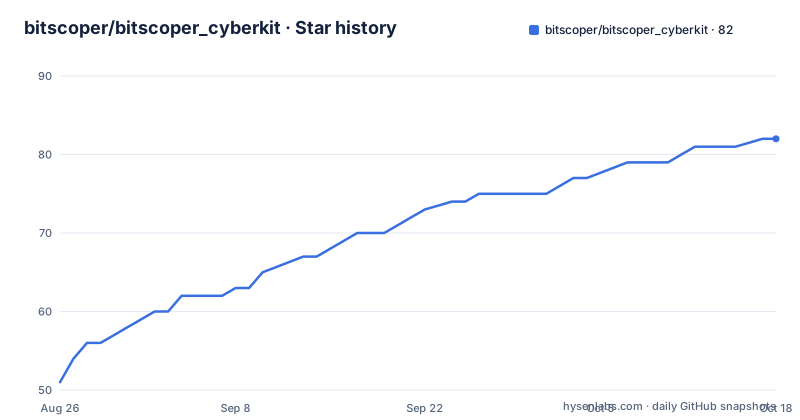
Star history
- bitscoper/bitscoper_cyberkit82 ★ · +31
| Repository | 2026-08-26 | 2026-10-18 |
|---|---|---|
| bitscoper/bitscoper_cyberkit | 51 | 82 |
31 Stars in the last 53 days, measured from the daily GitHub snapshot. Compare with other projects
Editorial analysis
What CyberKit Bundles and Who Needs It
Bitscoper CyberKit is a Flutter application that packs 18 distinct utilities into one interface. The list includes Bluetooth Low Energy scanning, IPv4 subnet scanning, mDNS discovery, UPnP enumeration, route tracing, TCP port scanning, ping, DNS record retrieval, WHOIS lookups, file and string hash calculators, a CVSS calculator, base encoders, Morse code translation, QR code generation, OGP data extraction, a series URI crawler, and a Wi-Fi details viewer. This is not a single-purpose tool. It is aimed at people who frequently move between different network diagnostics and encoding tasks, such as security auditors, network technicians, or students learning about protocols. Instead of installing separate apps for each function, you get one bundle. The trade-off is that each utility is likely less deep than a dedicated tool, but for quick checks and fieldwork, the convenience is real.
How the App Is Structured and What the README Reveals
The repository is a Dart project using Flutter, which means the same codebase targets Android, iOS, Linux, macOS, Windows, and web. The README lists release artifacts for each platform, including executables, AppImages, APKs, MSIX packages, and a container image. It also mentions a web application zip, but that build is disabled due to a build failure. This tells you the project is actively built and distributed, with a release version v18.2.2+44 pushed in August 2026. The app's name, CyberKit, suggests a toolbox metaphor, and the feature set confirms it. The README does not describe the internal architecture, so the exact data flow for each scanner is not documented. What is visible is that the app is a single Flutter binary that can run on desktop and mobile, with a container option for headless or remote use. The lack of architectural detail is a limitation for anyone wanting to extend or debug specific scanners.
Installation Paths: From F-Droid to WinGet to Containers
Getting CyberKit running varies by platform. On Android, the README points to IzzyOnDroid's F-Droid repository. You can install it with the fdroidcl command-line tool, which the README shows: first add the IzzyOnDroid repo, enable it, update, then install the package bitscoper.bitscoper_cyberkit. This is a straightforward path for users who prefer open-source app stores. On Windows, the recommended method is WinGet with the Microsoft Store ID: winget.exe install --id "9MV2046TZ302" --exact --source msstore. That command includes flags to accept agreements and run silently. For desktop Linux, you can download an AppImage or an x64 executable directly from the release page. There is also a container image on GitHub Container Registry. You pull it with podman or docker, then run it with a command like podman run -it --rm ghcr.io/bitscoper/bitscoper_cyberkit:latest. The README even explains how to build the container locally on Linux with docker build -t bitscoper_cyberkit . and run it with Wayland display variables. The variety is useful, but note that the web build is broken, so browser-based deployment is not an option right now.
The Scanner Tools: What You Can Actually Do
The core of CyberKit is its network scanning suite. The Bluetooth Low Energy scanner is notable because BLE scanning on mobile platforms often requires special permissions and platform-specific handling, which Flutter can abstract. The IPv4 subnet scanner likely sends ICMP or TCP probes to enumerate live hosts, but the README does not specify the method. The mDNS scanner would discover services on the local network using multicast DNS, which is useful for finding IoT devices or printers. UPnP scanning targets devices that expose UPnP services, often routers or media servers. Route tracing and TCP port scanning are standard diagnostic tools. The pinger is a basic ICMP echo tool. The DNS record retriever and WHOIS retriever are lookup utilities. The Wi-Fi details viewer probably shows SSID, signal strength, and connection info, but again, the README gives no details. What matters is that these are all separate tools under one roof. The practical benefit is that you can run a quick port scan, then immediately check the WHOIS of a discovered IP without switching apps. The practical cost is that each tool may not have the advanced options that a dedicated scanner like Nmap offers.
Hash, Encoding, and Utility Tools Beyond Networking
Beyond scanners, CyberKit includes a set of utilities for hashing and encoding. The file hash calculator computes hashes for local files, and the string hash calculator does the same for text input. The CVSS calculator is a notable inclusion for security professionals who need to score vulnerabilities quickly. The base encoder handles common encodings like Base64, and the Morse code translator is a quirky addition. The QR code generator is practical for sharing Wi-Fi credentials or URLs. The OGP data extractor fetches Open Graph Protocol metadata from a URL, which is useful for previewing how a link appears when shared. The series URI crawler is the odd one out; it likely crawls a series of URIs, but the README does not explain its purpose. These tools are not deeply documented, but they are straightforward to use if you know what each function does. The inclusion of a CVSS calculator suggests the target user is someone involved in vulnerability assessment, not just casual network browsing.
Platform Coverage and Distribution Realities
CyberKit is distributed widely. The release page lists signed and unsigned APKs for Android, including separate builds for x86_64, ARM64-V8A, and ARMEABI-V7A, plus an all-ABIs APK. There are executables for Linux, macOS, Windows, and iOS. The Microsoft Store has a listing, and the README provides a WinGet command for silent installation. However, the Android Google Play submission is paused because the developer no longer owns the account. That is a significant limitation for mainstream Android users who rely on Google Play. The IzzyOnDroid repository is a workaround, but it requires the user to know about F-Droid and add a third-party repo. The container image is on GitHub Container Registry, but the README notes that the Amazon ECR Public Gallery free tier has expired, so that mirror is gone. The web build is disabled due to a build failure, so browser access is not available. These distribution gaps mean you cannot assume the app is easy to install everywhere. You have to pick the right channel per platform.
Licensing, Contribution Rules, and Maintenance Signals
The project is licensed under GPL-3.0, which means any derivative work must also be open source under the same license. That is an important consideration if you plan to embed parts of the code in a proprietary tool. The README includes a warning: unlawful use is prohibited, and AI-generated code is not allowed in contributions. The second rule is unusual and signals that the maintainer wants human-written code. The project is not archived, and the last push was August 2026, with a release version v18.2.2+44. That indicates active maintenance. The release artifacts include checksums for APKs, which is a good practice for verifying integrity. The README does not mention a changelog or upgrade path, so moving between versions may require checking release notes manually. The container build is a plus for those who want to run the toolkit in isolated environments, but the Wayland setup in the README is Linux-specific and may not work on all systems.
Real Limitations and When This Is the Wrong Tool
The biggest limitation is the lack of documentation for each individual tool. The README lists features but does not explain how the scanners work, what protocols they use, or what limitations each has. For example, the IPv4 subnet scanner might not support CIDR notation or custom port ranges, but you cannot tell from the README. The web build failure is another concrete limitation. If you need a browser-based tool, this is not it. The paused Google Play submission means Android users outside the F-Droid ecosystem will have difficulty finding the app. Also, the breadth of features means each tool is likely shallow. If you need a serious port scanner with timing control, OS detection, and scriptable output, CyberKit is the wrong tool. Similarly, if you need a full WHOIS client with raw data and history, a dedicated CLI tool is better. For users who want a quick, all-in-one utility for everyday checks, CyberKit fits. For penetration testers who need depth and reliability, it does not.
Alternatives and How They Differ in Approach
The obvious alternative is Nmap, which is a command-line network scanner that offers far deeper port scanning, OS fingerprinting, and scripting. Nmap is not a GUI app and does not bundle hash calculators or Morse code. Its approach is to be a specialized tool for network discovery and security auditing, not a general-purpose toolkit. Another alternative is Fing, a mobile app that provides network scanning and device discovery, but it is closed-source and focuses on home network management rather than a broad security toolkit. For hashing and encoding, tools like HashCalc or online utilities are simpler but not multi-platform. The key difference is that CyberKit tries to cover many use cases in one Flutter app, while alternatives like Nmap sacrifice breadth for depth. If you need comprehensive network analysis, Nmap is the standard. If you need a portable assistant for quick tasks, CyberKit is more convenient. The choice comes down to whether you prefer a jack-of-all-trades or a master of one.
Editorial conclusion
Adopt Bitscoper CyberKit if you need a portable, multi-platform collection of network reconnaissance and hashing tools without juggling separate apps. It suits security students, network admins, and hobbyists who prefer a single interface. Avoid it if you require deep, production-grade scanning features or reliable Android distribution, since Google Play submission is paused and some builds, like the web version, are disabled. Before relying on it, verify that the specific scanner you need works on your target platform, check the latest release for known issues, and confirm the GPL-3.0 license fits your usage. The project is actively maintained with regular releases, but its breadth means you should test each tool in your environment.
Frequently asked questions
How do I install Bitscoper CyberKit on Android?
Google Play is out, because submission is paused after the maintainer no longer owned the account. Use the IzzyOnDroid F-Droid repository, which serves the app as bitscoper.bitscoper_cyberkit, or point Obtainium at the repository. A command line option is fdroidcl over the Android Debug Bridge.
Does Bitscoper CyberKit have a container image?
Yes, and only on the GitHub Container Registry, since the free tier of the Amazon Elastic Container Registry Public Gallery has expired. Pull it as ghcr.io/bitscoper/bitscoper_cyberkit:latest with podman or docker. The Dockerfile in the repository builds the image locally from the latest release binary.
Which Bitscoper CyberKit APK should I download?
If you are unsure, take the signed APK that supports all ABIs: Bitscoper_CyberKit-All_ABIs-Signed.apk. The release also offers separate x86_64, ARM64-V8A and ARMEABI-V7A builds, an app bundle, and a mirrored unsigned set, each with its own zip of APK checksums.
What tools are inside Bitscoper CyberKit?
The README names seventeen: Bluetooth Low Energy, IPv4 subnet, mDNS, UPnP and TCP port scanners, a route tracer, a pinger, a DNS record retriever, file and string hash calculators, a base encoder, a series URI crawler, an OGP data extractor, a WHOIS retriever, a CVSS calculator, a Morse code translator and a Wi-Fi details viewer. The repository description also mentions a QR Code Generator.
Can I install Bitscoper CyberKit on Windows?
Three ways: the Microsoft Store under id 9MV2046TZ302, an x64 executable zip, or the MSIX package. A WinGet command for the store listing is provided as well, though the README warns that versions submitted to the Microsoft Store may vary and be delayed.
Official sources
Add this badge to your README
If you maintain this project, the badge below links readers to this analysis and shows its maintenance status from the daily GitHub snapshot. Paste the markdown into your README; add ?metric=license or ?metric=stars to the image URL for a different field.

[](https://hysenlabs.com/projects/bitscoper-bitscoper-cyberkit)Star history chart for your README
[](https://hysenlabs.com/projects/bitscoper-bitscoper-cyberkit)