OPEA GenAIExamples: 28 sample stacks that share one component library
Generative AI Examples is a collection of GenAI examples such as ChatQnA, Copilot, which illustrate the pipeline capabilities of the Open Platform for Enterprise AI (OPEA) project.
At a glance
- What is it?
- The OPEA examples repository is a catalogue of microservice pipelines, where each folder is an application assembled from the same LLM, embedding and reranking components. Deployment runs through Docker images, Helm or GMC, and the tagged releases lag the working branch by months.
- Who is it for?
- GenAIExamples earns a place if you want a complete multi-service GenAI pipeline you can read end to end rather than a single model call, and if you can give it a cluster or a Compose host with enough memory for the reference model. Skip it if you want a library to import, since every example is a deployment.
- Can I use it commercially?
- Yes. Apache-2.0 is a permissive licence: you can use, modify and sell software built on it, as long as you keep its copyright and licence notices.
- Is it still maintained?
- Yes. The repository last received commits 12 days ago.
- What is it written in?
- Mainly Shell, according to GitHub's language statistics.
Answers come from the project's GitHub data, last synced on November 14, 2026, and from our analysis. They are not legal advice.
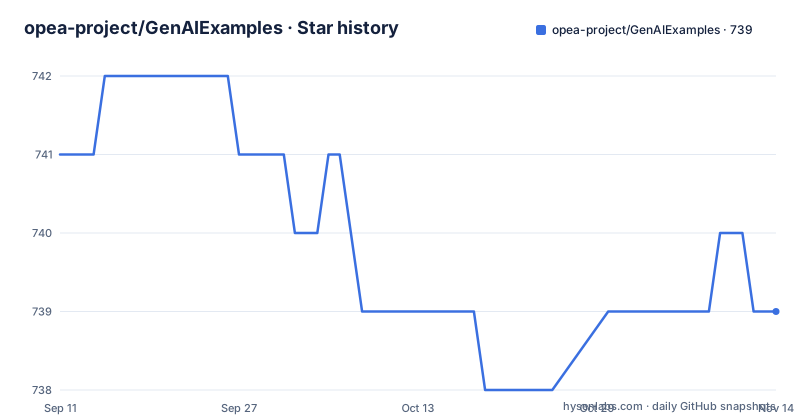
Star history
- opea-project/GenAIExamples739 ★ · -2
| Repository | 2026-09-11 | 2026-11-14 |
|---|---|---|
| opea-project/GenAIExamples | 741 | 739 |
-2 Stars in the last 64 days, measured from the daily GitHub snapshot. Compare with other projects
Editorial analysis
Every example is assembled from the same component library
The examples are not standalone applications. They are built out of a shared set of microservices maintained in a sibling repository, GenAIComps, which provides components for things like llm, embedding and reranking. ChatQnA, DocSum and the rest are compositions of those pieces, which is the reason a repository with 28 example folders can stay coherent: the model call, the vector store and the reranker are not reimplemented per sample.
Two more sibling projects do the operational work. GenAIInfra is described as part of the OPEA containerization and cloud-native suite and is what makes deployment in the cloud reasonable; it also ships GMC, the microservices connector, which appears as a Kubernetes deployment option. GenAIEval measures service performance metrics such as throughput, latency and accuracy, so comparing the same pipeline on different hardware is a supported activity rather than a hobby.
The umbrella is OPEA, the Open Platform for Enterprise AI, whose site is opea.dev, and the examples documentation lives on the opea-project.github.io pages with architecture and deployment guides for every sample. Read the three sibling repositories as much as the examples: the examples are the visible part, the components are where the real configuration lives.
Deployment defaults to released images, and the image list is a file
Three deployment methods are in use: Python startup, Docker Compose and Kubernetes. The choice is framed as a trade between setup ease, scalability and the environment you already have, and the Kubernetes route comes in two flavours, Helm charts or GMC-based deployment.
The prerequisites are specific enough to save a failed attempt. Docker Compose needs docker compose installed. Kubernetes needs a cluster that is ready to use, Helm at version 3.15 or newer if you want the charts, and GMC installed into the cluster if you want to try that path instead.
By default the deployment is based on released Docker images rather than a local build. The image list lives in its own file at the root, `docker_images_list.md`, and building your own images is supported when you need to change something. That default is worth pausing on: the fast path pulls published images, so what you are really choosing is which published tag to run. Anyone pinning a version for the long term has to read that file rather than assume a tag name matches the release tag in this repository.
The hardware table is the real cost model, and it is large
A recommended hardware reference table is included, and the numbers set expectations quickly. Every row in the visible portion runs the same deployment model, `Intel/neural-chat-7b-v3-3`, so the differences are the machine, not the workload.
For Xeon the reference configuration is 64 vCPUs, 365 GB of disk, 100 GB of RAM on Ubuntu 24.04, available through Intel Tiber Developer Cloud. The Gaudi row asks for one or two Gaudi Cards with 16 vCPUs, the same 365 GB disk and 100 GB of RAM, also on Ubuntu 24.04. The AWS row drops to 100 GB of disk and 64 GB of RAM with the same 64 vCPUs, with `c7i.16xlarge` given as the instance name.
Two things follow from those rows. A single 7B chat model is being served with 64 to 100 GB of memory behind it, so a laptop is not the target environment for the full stack. And because the accelerators differ, Gaudi configurations get fewer vCPUs for the same model, which is why the accelerator and the host sizing are one decision rather than two. A companion file at the root, `validated_configurations.md`, is where you check a specific pairing before you commit hardware time.
The repository is example folders plus a benchmark harness
Alongside the sample directories sit four Python entry points that explain what the collection is for: `benchmark.py`, `deploy.py`, `deploy_and_benchmark.py`, and a README dedicated to deployment and benchmarking. They are the reason the repository reports Shell as its primary language: the examples are compose files and shell scripts that these helpers drive, not Python libraries.
The dependency list in `requirements.txt` shows what measuring a pipeline needs: `locust` for load generation, `prometheus_client` for metrics, `opea-eval>=1.3` to talk to GenAIEval, `sseclient-py` for the streaming responses these services emit, `kubernetes` for the cluster path, plus `pytest`, `numpy`, `pyyaml`, `requests` and `transformers`.
That set is a fair description of what the project values. A sample that cannot be deployed, loaded and measured is hard to compare across the hardware the project supports, so deployment and benchmarking are first-class scripts in the root rather than a document describing them. If your goal is to compare a pipeline on two machines, start here rather than with an example folder.
Lint configuration targets Python 3.10 while deployment targets a cluster
The Python configuration in `pyproject.toml` is small and opinionated. isort uses the black profile with a line length of 120, black is set to line-length 120, and Ruff matches it with `target-version = "py310"`, indent width 4, and a broad exclusion list for virtualenvs, caches and build directories.
The lint selection is deliberately narrow. Ruff enables the pyflakes set and a subset of pycodestyle with `select = ["E4", "E7", "E9", "F"]`, and the ignore list switches off E402 for module level imports not at the top of a file, E501 for long lines, E721, E722, E731, E741, and the F401, F403, F405 and F841 unused-name rules. A separate codespell configuration skips `.po`, `.js`, `.json`, `.sql` and `.txt` files and loads its word list from `.github/code_spell_ignore.txt`.
Two observations. The lint target is Python 3.10 while the deployment prerequisites assume a Kubernetes cluster with Helm 3.15 or newer, so the code floor and the ops floor are set independently and neither is derived from the other. And a pre-commit config plus a `.prettierignore` at the root means formatting is enforced on more than Python, which is consistent with a repository whose real content is shell, YAML and Markdown.
The tree has grown well past the six scenarios the table highlights
The README highlights six scenarios and seven named examples: ChatQnA and VisualQnA under question answering, Text2Image for image generation, DocSum for document summarization, CodeGen as a code generator, DocIndexRetriever for retrieval with RAG, and InstructionTuning for fine-tuning.
The root directory holds 28 example folders, so the highlights are a sample rather than a catalogue. The retrieval and question answering family alone spans ChatQnA, SearchQnA, DBQnA, DocSum, DocIndexRetriever, EdgeCraftRAG, GraphRAG and HybridRAG, which is eight separate ways to build the same general pipeline. Code work has CodeGen and CodeTrans, translation has Translation and PolyLingua, and the fine-tuning side has InstructionTuning and RerankFinetuning.
The newer shapes are the agent folders: AgentQnA, BrowserUseAgent, DeepResearchAgent, FinanceAgent and WorkflowExecAgent, plus MultimodalQnA, AudioQnA, VideoQnA, AvatarChatbot and ProductivitySuite. Vertical and domain examples sit alongside them, including ArbPostHearingAssistant and CogniwareIms. The file `supported_examples.md` at the root is where the full list with supported deployment types lives, and `one_click_deploy/` is the shortcut directory for running an example without assembling a stack by hand.
Release tags trail the working branch by about nine months
The release history reads v1.3 on 2025-05-14, v1.4 on 2025-08-25 and v1.5 on 2025-12-22, each shipped with release notes. The last push to the default branch is 2026-09-13. That gap is the single most useful fact for anyone deploying this collection: the branch has moved a long way past the newest tag, and the published Docker images those tags point at are correspondingly older.
The project itself is large and active in the ordinary sense, with 740 stars, 339 forks and 61 open issues at the time of this snapshot. The fork count relative to the star count is high, which fits a repository people clone to modify a sample rather than to read, and 61 open issues is a real queue rather than a token number.
So the practical advice is narrow. Decide whether you want a tagged, reproducible deployment or the current branch, and do not assume the two look alike. If you need a specific example at a specific commit, build the images yourself instead of pulling, since building is explicitly supported, and use the documentation site for the version that matches what you built rather than the guide attached to a tag.
Editorial conclusion
GenAIExamples earns a place if you want a complete multi-service GenAI pipeline you can read end to end rather than a single model call, and if you can give it a cluster or a Compose host with enough memory for the reference model. Skip it if you want a library to import, since every example is a deployment. Before you start, pin by commit rather than by tag, check the image list for the tag you actually pull, and confirm your hardware matches a row in the reference table instead of assuming a smaller machine will do.
Frequently asked questions
What is the OPEA GenAIExamples repository?
It is a collection of GenAI examples such as ChatQnA built from the shared GenAIComps microservice components, illustrating pipeline capabilities of the Open Platform for Enterprise AI. The root holds 28 example folders.
Which deployment methods does GenAIExamples support?
Three: Python startup, Docker Compose and Kubernetes. The Kubernetes route uses Helm charts, which need Helm 3.15 or newer, or GMC, which has to be installed into your cluster.
What hardware do the GenAIExamples reference configurations use?
All visible rows run Intel/neural-chat-7b-v3-3. Xeon asks for 64 vCPUs, 100 GB RAM and 365 GB disk on Ubuntu 24.04, Gaudi for one or two cards with 16 vCPUs, and AWS c7i.16xlarge for 64 vCPUs and 64 GB RAM.
How does GenAIExamples measure performance?
GenAIEval measures throughput, latency and accuracy, and the root requirements pull in opea-eval>=1.3 with locust for load and prometheus_client for metrics. Benchmarking scripts sit at the repository root.
Are there agent or multimodal examples in GenAIExamples?
Yes. Folders include AgentQnA, BrowserUseAgent, DeepResearchAgent, FinanceAgent and WorkflowExecAgent, alongside MultimodalQnA, AudioQnA, VideoQnA, VisualQnA and AvatarChatbot.
Official sources
Add this badge to your README
If you maintain this project, the badge below links readers to this analysis and shows its maintenance status from the daily GitHub snapshot. Paste the markdown into your README; add ?metric=license or ?metric=stars to the image URL for a different field.

[](https://hysenlabs.com/projects/opea-project-genaiexamples)Star history chart for your README
[](https://hysenlabs.com/projects/opea-project-genaiexamples)Was this useful?