APatch: kernel-level Android root with a KPM layer above Magisk modules
The patching of Android kernel and Android system
At a glance
- What is it?
- A Kotlin manager and daemon that patch the Android kernel rather than overlaying the filesystem, carrying two module systems at once. The kernel version range and the SuperKey are the two things to check before anything else.
- Who is it for?
- APatch is the right tool when you want root with the ability to hook kernel code, not just overlay a filesystem, and when your device's kernel is inside the supported range and built with the symbols APatch needs. Skip it if your kernel is outside 3.18 to 6.12, if you are on ARM32, or if a superuser key you cannot protect is a worse trade than the features you would gain.
- Can I use it commercially?
- Yes, with conditions. GPL-3.0 is a copyleft licence: if you distribute software that includes it, you must release that software's source code under the same licence. Running it internally without distributing it does not trigger that obligation.
- Is it still maintained?
- Yes. The repository last received commits 4 days ago.
- What is it written in?
- Mainly Kotlin, according to GitHub's language statistics.
Answers come from the project's GitHub data, last synced on October 20, 2026, and from our analysis. They are not legal advice.
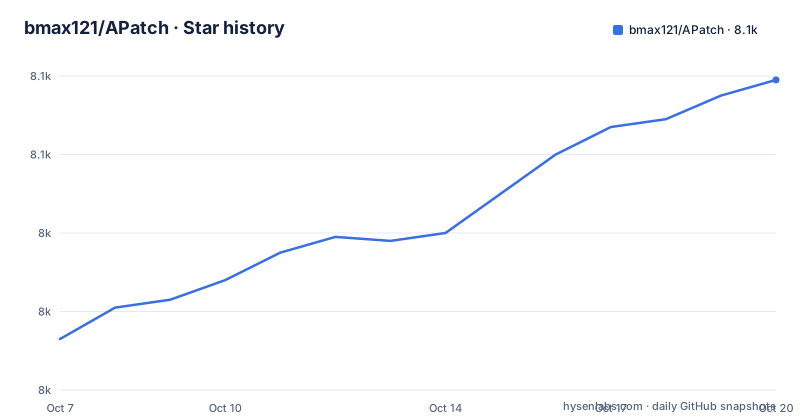
Star history
- bmax121/APatch8,079 ★ · +66
| Repository | 2026-10-07 | 2026-10-20 |
|---|---|---|
| bmax121/APatch | 8k | 8.1k |
66 Stars in the last 13 days, measured from the daily GitHub snapshot. Compare with other projects
Editorial analysis
What APatch patches, and what it leaves alone
The project's own description is one line: the patching of Android kernel and Android system. Everything else follows from that. APatch is described as a kernel-based root solution, which is the distinction that matters when you compare it to anything else in this space.
The usual Android root model rewrites the filesystem through an overlay and grants a process the ability to act as root at runtime. A kernel-based solution instead patches the kernel image itself, so the elevated privilege exists at a lower layer and the hooks available to it reach deeper. That is also why the architecture and kernel version limits below are not incidental: a patch targets specific kernel internals, and kernel internals are not a stable interface.
The dependency chain is stated plainly. APatch relies on KernelPatch, in a separate repository by the same author, which is credited as the core. The credits section also names Magisk for magiskpolicy and KernelSU for the app UI and the Magisk-like module support, since the APatch UI and the APModule source code have been derived and modified from KernelSU.
So the honest picture is a small kernel patcher carrying a manager app and a daemon, with a UI borrowed from another project and a policy binary borrowed from a third. Reading it as one monolith obscures which part is original.
Two module systems that target different layers
APM is described as support for modules similar to Magisk, meaning the familiar overlay-based module format and the install experience people already have tooling for. That is the compatibility layer, and it is why an existing Magisk module collection is the nearest thing to a starting point.
KPM is the part that has no direct equivalent elsewhere. These are modules that inject code into the kernel, and the project notes they are given two primitives: the kernel function `inline-hook` and `syscall-table-hook`. A syscall table hook redirects a system call, so you can sit in front of a kernel operation and alter its behaviour. An inline hook rewrites the machine code at a function's entry, which works for calls the table does not expose.
The practical difference is blast radius. An APM module lives in the userspace overlay and can be removed cleanly. A KPM module runs inside the kernel, and a badly written one is a kernel panic rather than a crash. The gain is capability: things like hiding traces of what is running, or hooking behaviour no userland module can reach, are only available at that layer.
The 2026-08-07 release, tagged `11224`, shows the surface still moving. Alongside a manager fix for the update dialog reopening on every recomposition, it adds `apd` support for setting target gid and the `-g` and `-G` options for `su`. The `11219` release from 2026-08-01 adds a KPM configuration dialog and a module list search, and introduces a package manager API for module WebUIs.
The version and config requirements that decide your device
The README states two hard limits and one soft one. Only ARM64 is supported, and only Android kernel versions 3.18 through 6.12. There is no ARM32 path and no forward compatibility beyond 6.12, which means a phone shipping a newer kernel is out regardless of how capable the hardware is.
The kernel configuration requirement is the one that catches people out. APatch needs `CONFIG_KALLSYMS=y` and `CONFIG_KALLSYMS_ALL=y`. A kernel built with `CONFIG_KALLSYMS=y` and `CONFIG_KALLSYMS_ALL=n` is described as initial support, which is a way of saying it may not behave as expected. Many stock OEM kernels strip or restrict symbol tables, so this is a genuine gate: if your device's kernel was built without them, no amount of effort on the APatch side will fix it.
Samsung devices with security protection are listed separately as planned rather than supported. Knox and the related integrity mechanisms are a separate problem from kernel symbols, and the honest reading is that Samsung support is not yet solved.
Checking these three things before downloading anything saves the most common wasted evening. The architecture, the kernel version, and whether the symbols are in the config are all knowable before you start.
The SuperKey outranks root, which changes the risk model
The README carries a security alert in its own section, and the reason to read it is that the risk is not the usual one. The SuperKey has higher privileges than root access. Weak or compromised keys can lead to unauthorized control of your device, and the instruction is to use strong keys and safeguard them from exposure.
That is a different shape of risk from patching a bootloader. With most root solutions, the trust anchor is the unlocked bootloader and whoever can reach it. Here there is a cryptographic key with authority above root, and the security of the device depends on that key never being copied. Anyone who obtains it does not need to exploit anything; they authenticate.
The practical consequences follow directly. Generate the key on the device you intend to root rather than on a shared machine. Do not put it in a backup that syncs to a cloud account. Do not paste it into a support thread when asking for help with the manager, because it is the one piece of information that must never leave the device.
This is the single strongest argument for reading the rest of the documentation before installing, and the README says as much about its own docs being incomplete.
Where to get it, and what the documentation does not cover
The distribution rule is unambiguous: the only way to download the latest APK is from the repository's Releases section. There is no Play Store listing and no mirror in the README's instructions, which is sensible for a tool in this category and means you should be suspicious of anything else offering you an APatch APK.
The repository is a Kotlin project built with Gradle, and the tree shows the shape: `app/` for the manager, `apd/` for the daemon, `scripts/`, `docs/`, a `fastlane/` directory for store metadata and `version.properties`. The Gradle wrapper is committed, `gradlew` and `gradlew.bat` both being present, so the build does not depend on a system Gradle.
Help comes from apatch.dev, and the README qualifies it plainly: the documentation is currently not quite complete and the content may change at any time. It also asks for more volunteers to contribute documentation in other languages through the separate APatchDocs repository, with Chinese and English as the two reference languages. Translations are handled by a hosted weblate-style workflow, and the README says they are managed by a language model, with Chinese and English not accepting pull requests for corrections.
That last point deserves attention from anyone who cares about what the interface says. The manager's strings in many languages come from machine translation maintained by a bot, so treat a translated prompt as something to verify rather than something to obey. Community discussion happens on Telegram, with separate English and Chinese groups and an updates channel.
APatch against Magisk and KernelSU, stated carefully
The credits tell you where the differences are not, so it is worth being precise about where they are.
Against Magisk, the shared ground is the module format. APM exists precisely to support modules similar to Magisk, and APatch even borrows magiskpolicy for the policy side. What Magisk's own model does not offer is KPM, since Magisk's modules live in the userspace overlay and cannot hook kernel code. If your requirement is an existing Magisk module and nothing more, Magisk is the simpler answer, and APM compatibility is APatch's attempt to make that migration unnecessary.
Against KernelSU, the relationship is inheritance rather than competition. The APatch UI and the APModule source were derived and modified from KernelSU, which is why the two managers look and behave similarly. The structural difference is what sits underneath: APatch patches the kernel through KernelPatch, and KernelSU works at a different level of the boot chain.
The comparison people actually search for is which one to install on a specific phone, and that question is answered by the version table rather than by features. Check your kernel version against the 3.18 to 6.12 range, check the symbol config, and check whether the manufacturer is on the supported list. A phone that passes those checks can run either; one that fails them runs neither, and no amount of comparison changes that.
Editorial conclusion
APatch is the right tool when you want root with the ability to hook kernel code, not just overlay a filesystem, and when your device's kernel is inside the supported range and built with the symbols APatch needs. Skip it if your kernel is outside 3.18 to 6.12, if you are on ARM32, or if a superuser key you cannot protect is a worse trade than the features you would gain. Start by reading the requirements list in the README against your own kernel config, then follow apatch.dev for the install steps, and keep the SuperKey offline, because a leaked key means somebody else holds privileges above root on your device.
Frequently asked questions
Which tool is better, APatch or Magisk?
If you need to hook kernel code, APatch has something Magisk does not: KPM modules with `inline-hook` and `syscall-table-hook`, which run inside the kernel. For an existing Magisk module, APM is designed to support modules similar to Magisk, and APatch even reuses magiskpolicy. On hardware where you only need root with a module overlay, Magisk is the shorter path.
How do I install APatch?
The README does not carry the install steps itself and points to the official documentation at apatch.dev, while noting that the documentation is still incomplete. What it does state is where to get the app, the releases section being the only source for the latest APK, plus the requirements: ARM64 only, kernel versions 3.18 to 6.12, and a kernel config with `CONFIG_KALLSYMS=y` and `CONFIG_KALLSYMS_ALL=y`.
What are the differences between APatch and KernelSU?
The APatch UI and the APModule source code were derived and modified from KernelSU, which is why the managers behave similarly. The structural difference is underneath: APatch relies on KernelPatch, in a separate repository by the same author, and patches the Android kernel itself. APatch adds the KPM module layer for injecting code into the kernel, which the README notes works through `inline-hook` and `syscall-table-hook`.
Official sources
Add this badge to your README
If you maintain this project, the badge below links readers to this analysis and shows its maintenance status from the daily GitHub snapshot. Paste the markdown into your README; add ?metric=license or ?metric=stars to the image URL for a different field.

[](https://hysenlabs.com/projects/bmax121-apatch)Star history chart for your README
[](https://hysenlabs.com/projects/bmax121-apatch)Was this useful?