ArchiveTune, an Android YouTube Music player built around sound and privacy
🌸 The Cutest Music Player With Support Local File and Youtube Music for Android!
At a glance
- What is it?
- ArchiveTune is a Kotlin Android client for YouTube Music that also plays local files, applies EBU R128 loudness normalization, and refuses support for forks. It needs a VPN or proxy before the first data fetch if your region blocks YouTube Music.
- Who is it for?
- ArchiveTune fits an Android user who wants YouTube Music playlists, local files in the same app, and control over loudness and interface density, and who is willing to accept that it depends on YouTube Music rather than replacing that service. It is not the right tool outside Android, in a region where YouTube Music is unavailable and no proxy is an option, or for anyone planning to fork it and ask upstream for help, since forks are explicitly unsupported.
- Can I use it commercially?
- Yes, with conditions. GPL-3.0 is a copyleft licence: if you distribute software that includes it, you must release that software's source code under the same licence. Running it internally without distributing it does not trigger that obligation.
- Is it still maintained?
- Yes. The repository received new commits within the last day.
- What is it written in?
- Mainly Kotlin, according to GitHub's language statistics.
Answers come from the project's GitHub data, last synced on November 14, 2026, and from our analysis. They are not legal advice.
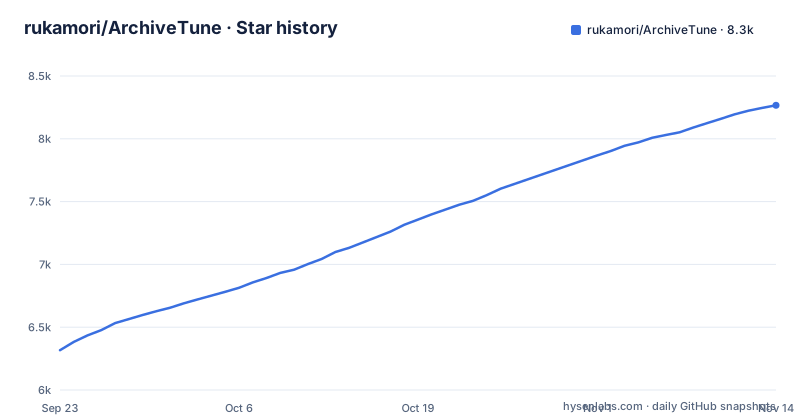
Star history
- rukamori/ArchiveTune8,267 ★ · +1,950
| Repository | 2026-09-23 | 2026-11-14 |
|---|---|---|
| rukamori/ArchiveTune | 6.3k | 8.3k |
1,950 Stars in the last 52 days, measured from the daily GitHub snapshot. Compare with other projects
Editorial analysis
A custom player rather than a skin over the official app
ArchiveTune's own framing is explicit on this point: it is not another generic YouTube Music wrapper but a player built from the ground up, on the argument that music should stay private, look clean and behave the way the listener expects. The primary language is Kotlin, the default branch is main, and the license is GPL-3.0.
What that buys a listener is visible in the feature list rather than in the marketing line. Playback covers multiple accounts with quick switching, ad-free playback with background listening, and the usual playlist, liked song and subscription entries appearing once you sign in. Local file and local song playback sits in the same list, which is unusual for a client built around a streaming catalogue.
The privacy claim has a specific boundary worth noticing. It is about the listening experience rather than about what reaches the network: the feature list pairs 'fast startup and lightweight performance' with 'a private, uninterrupted listening experience', and the site carries a separate privacy page. ArchiveTune reads a YouTube Music account, so the account still matters.
A proxy is required before the first data fetch in some regions
The README carries this as an important note rather than a footnote: if YouTube Music is not supported in your region, a VPN or a proxy set to a supported region is required for initial data fetching.
The phrasing matters. The requirement attaches to the initial fetch, which implies later behaviour differs, but the documentation does not spell out how or when the proxy can be dropped. Anyone evaluating this outside a supported region should treat the proxy as ongoing until confirmed otherwise.
That condition removes a large slice of the audience before any feature is discussed. The README presents ArchiveTune as an Android app, and the repository tree tells the same story: the top level holds Android and Gradle project files such as `app/`, `build.gradle.kts`, `settings.gradle.kts`, `gradlew`, `gradlew.bat`, `fastlane/` and `IconPack`.
So the region question is the first gate. After it, the platform question closes off the rest.
EBU R128 normalization sits next to a system equalizer
The audio column is the most concrete part of the feature list, and it pairs a broadcast standard with device-level controls.
EBU R128 loudness normalization is listed first. That standard exists to make perceived loudness consistent across tracks, which is the problem you get when era and mastering history disagree about levels. Combined with the other three entries, it covers tempo, pitch and playback speed controls, crossfade between tracks, and system equalizer plus spatial audio integration.
Note what the pairing implies. The README lists system equalizer and spatial audio integration, but does not establish whether an equalizer change affects other apps. Android audio effects can be attached to a particular audio session, so verify the behaviour on your device and player configuration.
The tempo and pitch controls are listed alongside playback speed and crossfade.
Lyrics come with three translation modes and a recognition feature
The lyrics and discovery column lists live synced lyrics, then lyrics translation with two further modes named as AI lyrics translation and romanization, and then music recognition for songs around you.
Three separate translation paths in one place is unusual, and the documentation does not explain which one applies when, whether they are user-selectable per track or global, or what feeds the AI variant. Romanization is listed as a mode rather than a separate setting, which suggests it sits alongside the translation choices rather than beneath them.
Listening statistics are listed as available whenever you want them.
Music recognition for songs around you is the item most likely to raise a question the documentation leaves open, since it implies the microphone is in use. How it is triggered and what it records is not covered in the README, and the privacy page on the project site is the place to look before enabling it.
Check current download sources
The current README names GitHub Releases, Obtainium configured through the official repository, and early-access builds through the official Discord as trusted sources. It warns that applications using the ArchiveTune name on Google Play are not official. Download channels can change, so check the project’s current instructions and verify the source before installing.
Stable and early-access builds may differ in stability and features. A project-approved download is useful evidence of provenance, but it is not a guarantee that the binary contains no vulnerabilities.
Forks are refused rather than discouraged
The README states that forks are not supported in any way, and that no support, maintenance, troubleshooting or assistance is provided for a forked version, at the user's own risk. There is no softener and no exception path described.
That matters more for a client app than for a library, because a fork is often the only route to a feature the upstream will not take. With GPL-3.0 as the license, the legal right to modify and redistribute is broad, and the maintainers have chosen to separate that right from any expectation of upstream help.
Support runs through one Telegram channel and one Discord server, the support link points at an issue template with a chooser, and the top level of the tree holds Koiverse server and data text files alongside a signing keystore in `Koiverse.jks`. Localization is handled by invitation, under a heading asking people to help translate for their own region, with a Japanese README alongside the English one.
Direct contact is the support path. There is no documented response time, so a fork that needs upstream behaviour changed has no route.
Android's design language with nine player styles and eight backgrounds
The interface column is the clearest statement of what ArchiveTune thinks a music player should let you change. The Android design language is the base, and album art powers the dynamic colors, so the palette follows whatever is playing.
The ceilings are stated as numbers: up to nine different player styles and up to eight different player background styles. That is a deliberate design decision rather than an omission, and it pairs with responsive layouts for different screen sizes plus what the documentation calls clean browsing, player, artist, album and lyrics views.
Customization goes further than appearance. Deep playback and interface settings, dynamic color theming options, gesture customization, and animation and layout tuning are listed as their own category, and the last item promises flexible controls to shape the app around your workflow. Nothing in that list says what is protected from change, so pinning down whether a setting can be reverted without a reinstall means testing it rather than reading about it.
The repository layout matches the feature split rather than the table. `canvas/`, `shazamkit/`, `lastfm/` and `spotifycore/` are separate top-level directories, so a fork that wants to drop one integration has a directory to start from.
The sync column reaches well beyond YouTube Music
The sync and social column is where ArchiveTune stops looking like a player. It lists importing a playlist from Spotify, YouTube Music account integration, Last.fm scrobbling, ListenBrainz history sync and Discord rich presence.
Each moves data in a different direction, and the difference has practical consequences. Last.fm scrobbling and ListenBrainz history sync write listening history outward. Spotify playlist import brings a catalogue in. Discord rich presence publishes what you are playing, live, to whoever can see your status.
Rich presence deserves the attention because it is the only item here that broadcasts rather than records. Discord exposes presence data to friends and to any application that is permitted to read it, which is a different privacy posture from scrobbling to a service that exists to collect listening data. The README does not describe what fields are sent or how to disable it.
The repository tree gives the shape of these integrations. `lastfm/` and `spotifycore/` are separate directories, and `shazamkit/` sits beside `lyrics` and `canvas/`, matching the recognition, lyrics and interface features in the table above. Whether each is a Gradle module or a self-contained package is not something the tree alone settles.
Editorial conclusion
ArchiveTune fits an Android user who wants YouTube Music playlists, local files in the same app, and control over loudness and interface density, and who is willing to accept that it depends on YouTube Music rather than replacing that service. It is not the right tool outside Android, in a region where YouTube Music is unavailable and no proxy is an option, or for anyone planning to fork it and ask upstream for help, since forks are explicitly unsupported. Before installing, check the region question and consult the project’s current trusted-source list. The README warns that Google Play listings using the ArchiveTune name are not official. Confirm the license is GPL-3.0 before shipping any modification.
Frequently asked questions
Is ArchiveTune safe to install on Android?
The project currently lists GitHub Releases, Obtainium configured through the official repository, and early-access builds through its official Discord as trusted sources. It warns that Google Play listings using its name are unofficial. An official source reduces impersonation risk but does not guarantee that software is free of vulnerabilities.
How do I install ArchiveTune?
Consult the current README for its trusted download channels. It lists GitHub Releases, Obtainium via the official repository and early-access builds through the official Discord, and warns that Google Play listings are not official.
Does ArchiveTune work outside regions where YouTube Music is available?
The README states that if YouTube Music is not supported in your region, a VPN or a proxy set to a supported region is required for initial data fetching. How long that is needed is not documented.
What can ArchiveTune do that a stock YouTube Music client cannot?
It plays local files alongside the streaming catalogue, applies EBU R128 loudness normalization, and offers tempo, pitch and speed controls plus crossfade. It also adds synced lyrics with three translation modes including romanization, and connects outward to Spotify playlist import, Last.fm scrobbling, ListenBrainz history sync and Discord rich presence.
Official sources
Add this badge to your README
If you maintain this project, the badge below links readers to this analysis and shows its maintenance status from the daily GitHub snapshot. Paste the markdown into your README; add ?metric=license or ?metric=stars to the image URL for a different field.

[](https://hysenlabs.com/projects/rukamori-archivetune)Star history chart for your README
[](https://hysenlabs.com/projects/rukamori-archivetune)Was this useful?