Meerschaum: An ETL Framework That Treats Time-Series Pipes as First-Class Citizens
Create and manage data pipes with Meerschaum.
At a glance
- What is it?
- Meerschaum is a Python ETL framework that automates incremental syncing, scheduling, and serving for time-series data. This review covers its pipe model, plugin system, and where its trade-offs matter.
- Who is it for?
- Adopt Meerschaum if you manage many small-to-medium time-series streams and want a single tool to handle incremental syncs, scheduling, and serving without hand-rolling cron jobs. Avoid it if your pipelines require complex multi-stage transforms that are not easily expressed as fetch functions or if you need a fully managed cloud service.
- Can I use it commercially?
- Yes. Apache-2.0 is a permissive licence: you can use, modify and sell software built on it, as long as you keep its copyright and licence notices.
- Is it still maintained?
- Yes. The repository received new commits within the last day.
- What is it written in?
- Mainly Python, according to GitHub's language statistics.
Answers come from the project's GitHub data, last synced on October 22, 2026, and from our analysis. They are not legal advice.
Star history
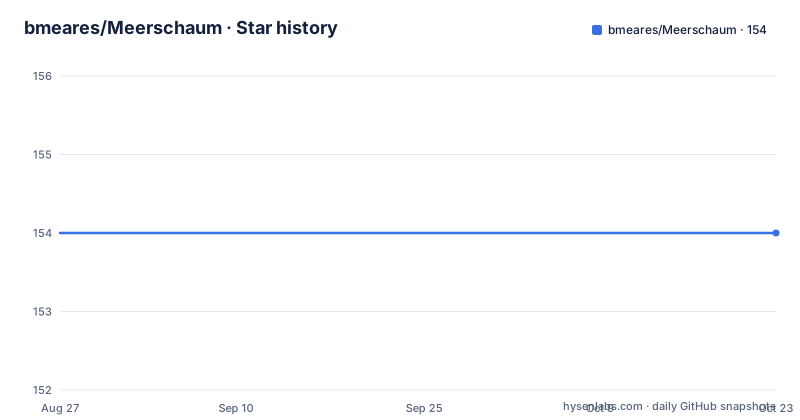
- bmeares/Meerschaum154 ★ · +0
| Repository | 2026-08-27 | 2026-10-22 |
|---|---|---|
| bmeares/Meerschaum | 154 | 154 |
0 Stars in the last 56 days, measured from the daily GitHub snapshot. Compare with other projects
Editorial analysis
The Problem: Time-Series Sync Is Repetitive and Error-Prone
Most ETL tools expect you to write extraction, transformation, and loading logic for every source. For time-series data, this becomes a treadmill: you write a script, then add an incremental window, then handle duplicates, then schedule it with cron. Meerschaum targets that specific pain. It defines a pipe as a named data stream, and its sync engine fetches only new or changed rows, deduplicates, and upserts them. The README gives a minimal example: create a pipe, call sync, and Meerschaum pulls only what is new since the last run. This is not a general-purpose data integration platform. It is for analysts and data scientists who have a handful of time-series sources, like weather feeds or financial transactions, and want to stop babysitting them. The framework assumes your data has a datetime column and optionally an ID column, which it uses for deduplication and incremental logic.
The Pipe Model: A Named Stream with a Sync Engine
The core abstraction is the Pipe object. You instantiate it with a connector, a metric, and a location, plus an instance that points to a database. The README shows a pipe for NOAA weather: mrsm.Pipe('plugin:noaa', 'weather', 'atl', instance='sql:local'). The sync method does the heavy lifting. It creates the table on first run if it does not exist, ignores duplicate rows, and updates rows with existing keys. The documentation describes a sync engine that fetches only new or changed rows and updates many streams concurrently. The pipe also has a get_data method that returns a DataFrame filtered by begin and end parameters, and a get_rowcount method to check how many rows are stored. This model is simple, but it is also opinionated: your data must fit a tabular shape with a datetime column. If your source is a nested JSON blob, you will need to flatten it in your fetch function before syncing.
Getting Running: Commands and Configuration
Installation is straightforward: pip install meerschaum or uv tool install meerschaum[api]. The README then shows a three-command setup: mrsm stack up -d to deploy a TimescaleDB and Grafana stack, and mrsm bootstrap pipes to start a wizard. For a manual route, you install a plugin, register a pipe, and sync it. The CLI example registers a pipe with -c plugin:noaa -m weather -l atl -i sql:local, where sql:local is the built-in SQLite database. The Python API mirrors this: you create a Pipe object, pass a list of dicts to sync, and read it back. Configuration lives under ~/.config/meerschaum/plugins, where each plugin is a Python file. The MRSM_ROOT_DIR environment variable emulates multiple installations, which is useful for testing. There is no separate config file for the core engine; most settings are passed as CLI flags or Python arguments. This keeps the surface small, but it also means you have to read the CLI help to discover options.
The Plugin System: A Fetch Function Is All You Need
Plugins are the extension mechanism. A plugin is a Python file in the plugins directory, and it must define a fetch function that returns a list of dicts or a DataFrame. The README shows a minimal plugin with a register function that declares columns, and a fetch function that makes an HTTP request and returns rows. Meerschaum handles the rest: syncing, deduplication, scheduling. This is a low-friction design. You do not need to learn a DSL or write a connector class. But there is a catch: the fetch function receives begin and end parameters, so you must implement your own incremental logic inside it. Meerschaum will call fetch with those parameters, but it does not automatically know how to query your source. The plugin author is responsible for using those parameters to fetch only the new rows. The README's example ignores begin and end entirely, which means every sync would fetch the full dataset. That works for small sources, but for large APIs it defeats the purpose of incremental syncing.
Scheduling and Jobs: Built-In But With Caveats
Meerschaum includes a scheduler for cron and interval schedules, and you can run any command as a background job with the -d flag. The release notes for v4.0.3 mention adopting Compose jobs that run compound commands, and v4.0.2 proves job ownership by project rather than by tag. This suggests the scheduler is actively developed. You can execute jobs locally, via systemd, or remotely on an API instance with --executor-keys. That is a real feature: you can run the same pipe sync on a remote server without SSHing in. However, the documentation does not specify how the scheduler persists state or recovers from failures. If a job crashes, does it retry? The README does not say. Also, the scheduler is part of the CLI, so you need to keep a process running, either the Meerschaum daemon or a systemd unit. That is not zero-maintenance, but it is simpler than writing your own cron wrappers.
Limitations and When It Is the Wrong Tool
The biggest limitation is the assumption of a single table per pipe. If your pipeline requires joining multiple sources or doing complex transformations before loading, Meerschaum gives you little support. The README mentions composable SQL pipes with reference inheritance and {{ Pipe(...) }} table resolution, but that is for in-database SQL, not for arbitrary Python transforms. If your transformation logic is more than a simple filter or rename, you will end up writing it in the fetch function, which mixes extraction and transformation. Another limitation: the sync engine is tied to SQL databases. The README lists connectors for SQL, API, Valkey, and custom backends, but the core sync logic likely assumes SQL semantics like upsert and dedup. If your target is a data lake or a NoSQL store, you are on your own. Also, the project depends on virtual environments for dependencies, which can be a hassle in constrained environments. The README says anything needed installs into a virtual environment, which is fine for a laptop but may complicate deployment in a Docker container without careful handling.
Alternatives: Airflow and Prefect Take a Different Route
The natural alternative is a workflow orchestrator like Apache Airflow or Prefect. These tools treat pipelines as directed acyclic graphs of tasks, where each task is a Python function. They also handle scheduling and retries, but they do not provide a built-in sync engine for time-series data. With Airflow, you would write a DAG that calls your fetch logic, then a separate task to upsert into the database. Meerschaum collapses that into a single pipe.sync() call. The difference is in the level of abstraction: Airflow gives you full control over task dependencies and retries, but you must implement the incremental logic yourself. Meerschaum gives you the incremental logic, but you must fit your pipeline into its pipe model. If you have a complex data flow with branching and conditional execution, Airflow is more flexible. If you have many independent time-series streams that just need to be kept fresh, Meerschaum is more direct.
Maintenance and Upgrade Cost
The project is under active development, with recent releases in 2026. The release notes show a pattern of bug fixes and feature additions, which means you should expect frequent updates. The license is Apache-2.0, which is permissive and allows commercial use without copyleft obligations. The README does not mention a migration guide or deprecation policy, so you should be prepared to adapt to API changes when upgrading. The plugin API is stable enough that the README example from 2022 would likely still work, but the scheduler and Compose jobs have changed in minor versions, suggesting that the job system is still evolving. The documentation site is the primary source of truth, and the project has a dedicated maintainer, Bennett Meares. There is no mention of a large contributor base, so bus factor is a consideration. Before adopting, check the issue tracker and the changelog for any breaking changes in the version you plan to use. Also, verify that the virtual environment installation works in your CI/CD pipeline, because the README emphasizes that no dependencies are required upfront, which is a double-edged sword: it is portable, but it also means every install may pull in a fresh set of packages.
Editorial conclusion
Adopt Meerschaum if you manage many small-to-medium time-series streams and want a single tool to handle incremental syncs, scheduling, and serving without hand-rolling cron jobs. Avoid it if your pipelines require complex multi-stage transforms that are not easily expressed as fetch functions or if you need a fully managed cloud service. Before committing, verify that your target SQL dialect is supported by its sync engine, test the plugin API against your actual data sources, and confirm that the virtual environment installation works in your deployment environment, especially if you rely on systemd or remote executors.
Frequently asked questions
What is a pipe in Meerschaum?
A named data stream that Meerschaum keeps in sync. You create one with `mrsm.Pipe('plugin:noaa', 'weather', 'atl', instance='sql:local')` or `mrsm register pipe -c plugin:noaa -m weather -l atl -i sql:local`, and the first sync creates a table named plugin_noaa_weather_atl.
How does Meerschaum avoid fetching data it already has?
The sync engine fetches only new or changed rows and can update many streams at once. Duplicate rows are ignored and rows with existing keys are updated, which is why syncing the same list of dicts twice still leaves `pipe.get_rowcount()` at 1.
What does a Meerschaum plugin have to provide?
A `__version__` string, a `required` list of packages, a `register` function returning the column mapping, and a `fetch` function taking the pipe, a `begin`, and an `end` and returning a list of dicts or a Pandas DataFrame. Plugins live under `~/.config/meerschaum/plugins/`.
What are the ways to install Meerschaum?
`pip install meerschaum` or `uv tool install meerschaum[api]`, then `mrsm stack up -d` and `mrsm bootstrap pipes`. The container is built from fedora:44, and the compose file runs the published bmeares/meerschaum:api image with host networking and the checkout mounted at /app.
How does Meerschaum run background jobs and schedules?
Any command can run as a background job with `-d`, and the built-in scheduler handles cron and interval schedules so no crontab or systemd setup is needed. Jobs execute locally, via systemd, or remotely on an API instance using `--executor-keys`.
Which Python versions does Meerschaum claim to support?
`requires-python` is set to `>=3.8`, while the classifiers list 3.9 through 3.14, so 3.8 sits inside the floor but appears in no classifier. The package targets Linux, Windows, and MacOS and is marked Development Status :: 5 - Production/Stable.
Official sources
Add this badge to your README
If you maintain this project, the badge below links readers to this analysis and shows its maintenance status from the daily GitHub snapshot. Paste the markdown into your README; add ?metric=license or ?metric=stars to the image URL for a different field.

[](https://hysenlabs.com/projects/bmeares-meerschaum)Star history chart for your README
[](https://hysenlabs.com/projects/bmeares-meerschaum)