ShellCrash: A shell-based manager for mihomo and sing-box on routers and Linux
ShellCrash is a shell-native client for sing-box and mihomo that helps users switch kernels and manage proxy-related workflows through concise commands.
At a glance
- What is it?
- ShellCrash is a GPL-3.0 shell script that installs, switches, and manages mihomo or sing-box kernels on OpenWrt, Padavan, and standard Linux. It targets users who prefer terminal workflows over GUI clients, but its dependency list and update cadence deserve scrutiny before adoption.
- Who is it for?
- Adopt ShellCrash if you run OpenWrt, Padavan, or a minimal Linux distribution and want a single text-menu tool to install, switch, and update mihomo or sing-box kernels, especially when you already use crontab and iptables or nftables. Do not adopt it if you need a graphical interface, if your device lacks root access, or if you cannot accept that the default branch is 'dev' and that releases appear irregularly (1.9.1 to 1.9.3 took over a year).
- Can I use it commercially?
- Yes, with conditions. GPL-3.0 is a copyleft licence: if you distribute software that includes it, you must release that software's source code under the same licence. Running it internally without distributing it does not trigger that obligation.
- Is it still maintained?
- Yes. The repository last received commits 1 day ago.
- What is it written in?
- Mainly Shell, according to GitHub's language statistics.
Answers come from the project's GitHub data, last synced on November 13, 2026, and from our analysis. They are not legal advice.
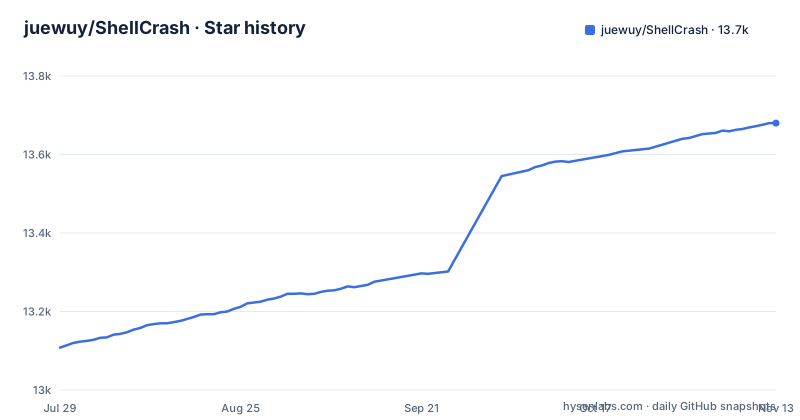
Star history
- juewuy/ShellCrash13,680 ★ · +572
| Repository | 2026-07-29 | 2026-11-13 |
|---|---|---|
| juewuy/ShellCrash | 13.1k | 13.7k |
572 Stars in the last 107 days, measured from the daily GitHub snapshot. Compare with other projects
Editorial analysis
What ShellCrash actually does
The intended audience is clear from the device list: OpenWrt-based routers, Xiaomi and Netgear devices, Padavan in conservative mode, ASUS/Merlin firmware, and standard Linux distributions like Debian, CentOS, Armbian, and Ubuntu. Docker environments are mentioned as compatible, with a separate image on Docker Hub. This is not a tool for desktop users who want a system tray icon. It is for people who are comfortable with SSH, root privileges, and a text-based menu.
How the script fits together: kernels, subscriptions, and dashboards
One design choice stands out: the dashboard is optional and installed on demand. That keeps the core script lightweight, but it also means the user must understand when to use the shell menu versus the web UI. The README does not explain the exact relationship between the two, so expect to learn by trial.
Installation: multiple mirrors, one command pattern
The command examples are copy-paste ready, but note the use of '--no-check-certificate' in the wget commands. That disables SSL verification, which is a security trade-off. The README does not explain why this is necessary, but it suggests the target devices may have outdated CA bundles. You should be aware of that before running the installer.
The interactive menu and command-line flags
The dependency table adds context for what the menu can do. Without iptables or nftables, the script can only run in Pure Mode. Without crontab, scheduled tasks will not function.
What the README does not tell you
The release history shows a gap: 1.9.1 from December 2024, 1.9.3 from December 2025, and 1.9.4 from February 2026. No 1.9.2 release is listed, and the jump from 1.9.3 to 1.9.4 was only about six weeks, while the gap from 1.9.1 to 1.9.3 was a full year. That irregular cadence suggests maintenance is opportunistic, not on a schedule. For a tool that manages network security software, you should check the changelog before each upgrade to see what changed.
Limitations and wrong-tool cases
A more subtle issue is the 'dev' default branch. The README installation commands point to the 'dev' branch, not a tagged release. That means you are installing the development version by default. While the releases exist, the default install path is the unstable branch. That is a deliberate choice, but it contradicts the goal of a stable proxy setup. If you want a fixed version, you must modify the URL to point to a release tag, but the README does not document that. This is a genuine trap for new users.
Alternatives and how they differ
The obvious alternative is using mihomo or sing-box directly, with your own scripts or systemd units. That approach gives you full control over the config format and startup behavior, but it requires you to write and maintain your own update and switching logic. ShellCrash automates those steps, but it also hides the details, which can be a problem when you need to debug a config issue. Another alternative is a GUI client like Clash for Windows or Clash Verge, but those are desktop applications and do not run on an OpenWrt router. A closer alternative is OpenClash, which is an OpenWrt package that manages mihomo with a LuCI web interface. ShellCrash's README lists support beyond OpenWrt, including Padavan, ASUS/Merlin firmware and standard Linux distributions. The choice depends on whether you want a web UI and OpenWrt-specific features, or a shell script that works on a broader range of devices.
Maintenance, license, and upgrade cost
The dependency table lists crontab as low necessity, but if you rely on scheduled config updates, it becomes mandatory. The README does not explain how to set up the scheduled tasks beyond saying they exist. You will need to use the interactive menu to configure them, and that assumes the menu is discoverable. Overall, the maintenance burden is moderate: the script handles updates, but you must stay alert to release notes and mirror availability.
Editorial conclusion
Adopt ShellCrash if you run OpenWrt, Padavan, or a minimal Linux distribution and want a single text-menu tool to install, switch, and update mihomo or sing-box kernels, especially when you already use crontab and iptables or nftables. Do not adopt it if you need a graphical interface, if your device lacks root access, or if you cannot accept that the default branch is 'dev' and that releases appear irregularly (1.9.1 to 1.9.3 took over a year). Before deploying, verify that your firmware's init system and firewall tools match the script's assumptions, test the local installation path if online mirrors are blocked, and check the changelog for breaking changes between kernel versions.
Frequently asked questions
How do I install ShellCrash on a Linux server?
Get root over SSH, then run the installer as root. On a standard Linux box the documented path downloads install_en.sh with wget and runs it with bash, then sources /etc/profile so the crash command exists. After that, crash opens the interactive menu and crash -h lists the commands.
Does ShellCrash install a release or the development branch?
The development branch. The documented sources point at dev, through jsDelivr, raw.githubusercontent.com or the author's own host (the legacy HTTP beta source names no branch), and none of them names a tag. The newest numbered release is 1.9.4 from 2026-02-15, and the last push to dev was on 2026-11-02.
What does ShellCrash need on a device before it forwards traffic?
curl or wget is mandatory, and iptables or nftables is critical: without them the script can only run in Pure Mode. crontab is required for the scheduled config and rule update tasks, net-tools is used for automatic port occupancy detection, and ubus or iproute-doc is used to obtain the local host address.
Can I run ShellCrash in Docker?
Yes, an official image is published on Docker Hub. The Dockerfile installs into /etc/ShellCrash with systype set to container, and it builds only for linux/amd64, linux/arm64, linux/arm/v7 and linux/386; any other platform fails with unsupported $TARGETPLATFORM.
Which proxy kernels does ShellCrash support?
mihomo and sing-box, and the menu switches between them. The container build downloads a mihomo (meta) core from the repository's update branch at image build time.
Official sources
Add this badge to your README
If you maintain this project, the badge below links readers to this analysis and shows its maintenance status from the daily GitHub snapshot. Paste the markdown into your README; add ?metric=license or ?metric=stars to the image URL for a different field.

[](https://hysenlabs.com/projects/juewuy-shellcrash)Star history chart for your README
[](https://hysenlabs.com/projects/juewuy-shellcrash)Was this useful?