YAGPDB self-hosting and plugin architecture
Yet another general purpose discord bot
At a glance
- What is it?
- YAGPDB is a modular Discord bot written in Go, with separate bot, web, and feed components backed by PostgreSQL and Redis. Docker Compose is the quickest documented setup, while production deployments require attention to proxies, backups, and upgrade migrations.
- Who is it for?
- YAGPDB fits operators who want many Discord features through plugins and a control panel, rather than a narrow bot with one command set. It is less suitable for a minimal deployment that cannot operate PostgreSQL, Redis, and separate service components.
- Can I use it commercially?
- Yes. MIT is a permissive licence: you can use, modify and sell software built on it, as long as you keep its copyright and licence notices.
- Is it still maintained?
- Yes. The repository last received commits 3 days ago.
- What is it written in?
- Mainly Go, according to GitHub's language statistics.
Answers come from the project's GitHub data, last synced on November 7, 2026, and from our analysis. They are not legal advice.
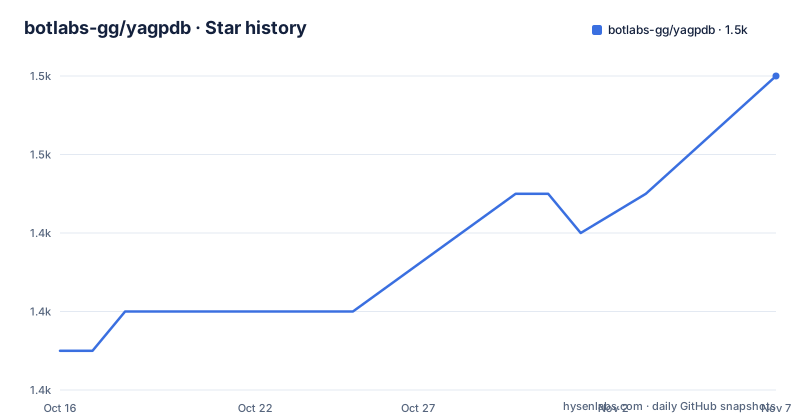
Star history
- botlabs-gg/yagpdb1,452 ★ · +7
| Repository | 2026-10-16 | 2026-11-07 |
|---|---|---|
| botlabs-gg/yagpdb | 1.4k | 1.5k |
7 Stars in the last 22 days, measured from the daily GitHub snapshot. Compare with other projects
Editorial analysis
YAGPDB's plugin scope and intended operators
YAGPDB addresses Discord server operators who need several automation and community-management functions in one self-hosted system. The README calls it a "multifunctional, modular Discord bot" and lists plugins for YouTube feeds, stream announcements, server statistics, a soundboard, reputation, reminders, Reddit feeds, notifications, moderation, logs, and custom commands. It is therefore a broad server utility rather than a bot centered on one workflow.
The plugin model has dependencies. The README explicitly notes that some plugins may depend on other plugins, so selecting a feature does not necessarily create an isolated deployment. An operator should map required server functions to plugins, then inspect those plugins before assuming that every listed capability is available independently.
YAGPDB is intended for operators who can manage infrastructure. Its standalone requirements include PostgreSQL 9.6 or later and Redis 5.x or later. The Docker instructions also call for accessible ports 80 and 443, while the bot includes a web control panel, login flow, bot plugins, web plugins, and feed instances. The README expects web, bot, and feed instances to be run separately. That architecture is a meaningful operational commitment compared with deploying one small command bot.
Separate bot, web, and feed components
The repository layout contains separate areas for bot behavior, web functionality, and feeds. The README identifies `bot/plugin` for bot plugins, `web/plugin` for web plugins, and `feeds/plugin` for feeds. It also contains directories for features such as `moderation/`, `notifications/`, `reddit/`, `reminders/`, `reputation/`, `streaming/`, and `youtube/`. Based on that layout, functionality is organized by domain and connected through the wider application rather than collected into one undifferentiated command package.
The data layer has a documented division of responsibility. Redis is used for light data and caching. PostgreSQL stores most configuration and heavy data, with logs given as an example. The Go module declares `github.com/botlabs-gg/yagpdb/v2` and includes dependencies associated with PostgreSQL access, Redis access, Discord connections, HTTP services, feed parsing, and application monitoring.
There is a version detail worth resolving before building. The standalone instructions list Golang 1.23 or above, while `go.mod` declares `go 1.26.0`. A checkout built from the current module file may therefore need a newer toolchain than the README's minimum suggests. The repository metadata is the more specific source for the current build, but the exact build behavior should be confirmed with the maintainers if a particular runtime cannot satisfy it.
Docker Compose as the documented first run
The README presents Docker Compose as the fastest documented route. Clone the repository and create the two environment files used by the Docker configuration. These files need credentials before startup, and the instructions also require a proper image in `docker-compose.yml`.
From the repository root, the documented sequence is:
git clone https://github.com/botlabs-gg/yagpdb
cp yagpdb/yagpdb_docker/{app.example.env,app.env}
cp yagpdb/yagpdb_docker/{db.example.env,db.env}
After editing `app.env` and `db.env`, start the compose project with:
docker-compose -f yagpdb/yagpdb_docker/docker-compose.yml upThe README says that ports 80 and 443 must be accessible on the network. For a deployment behind a proxy, it documents a separate network and two compose files:
docker network create proxy-tier
docker-compose -p proxy yagpdb/yagpdb_docker/docker-compose.proxy.yml up
docker-compose -f yagpdb/yagpdb_docker/docker-compose.proxied.yml up
For development, the repository names `docker-compose.dev.yml`:
docker-compose -f yagpdb/yagpdb_docker/docker-compose.dev.yml upThe README does not document a post-start health check or a first command that verifies plugin health. The documented first success condition is therefore service startup plus the configured web endpoints, not a particular command output.
Standalone build, database setup, and first launch
The standalone path is intended for operators who already have Go, PostgreSQL, and Redis configured. Create a PostgreSQL user and database named `yagpdb`, then grant that user access to the database. The README also directs administrators to the linked Discord bot creation instructions for credentials and to `cmd/yagpdb/sampleenvfile` for the environment variable list.
The documented build and launch commands are:
git clone https://github.com/botlabs-gg/yagpdb
cd yagpdb/cmd/yagpdb
sh build.sh
./yagpdb -all
The standalone bot starts an HTTP service on port 5000 and an HTTPS service on port 5001 by default. The README also documents the available flags through the binary itself:
./yagpdb -helpYAGPDB has two documented HTTPS arrangements. It can serve HTTPS directly, with HTTPS enabled by default:
./yagpdb --https=trueFor production, the README recommends placing the process behind a reverse proxy such as Nginx or Caddy. In that arrangement, the internal server uses plain HTTP while YAGPDB is told that HTTPS is handled externally:
./yagpdb --https=false --extHttps=trueThe project requires Discord redirect URIs for the host's `/confirm_login` and `/manage` paths. A first deployment should therefore include both external HTTPS configuration and the Discord application redirect settings. Authorization is handled through the Control Panel according to the README.
PostgreSQL migrations, Redis caching, and upgrade work
YAGPDB separates lightweight or temporary data from configuration and heavier records. Redis is the stated destination for light data and caching, while PostgreSQL carries most configuration and heavy data such as logs. This design gives operators a reason to provision both services rather than treating PostgreSQL as the only state store.
The README says schema migrations should happen automatically when updating from v1 or later. That reduces routine migration work, but it is not permission to skip preparation. It specifically says to make backups and consult `breaking_changes.md` before updating. The repository includes that file at the top level, so it is the first project-specific file to inspect during an upgrade.
The upgrade surface includes more than the Go binary. Operators must account for PostgreSQL schema changes, Redis state, environment files, the web control panel, Discord credentials, and any plugin dependencies. The README does not document rollback procedures, backup formats, or a supported restoration command. An operator who cannot define a separate restoration procedure should treat that omission as a deployment risk rather than assuming that automatic migrations are reversible.
YAGPDB versus a narrow Discord bot
The practical alternative is a narrowly scoped Discord bot built around one feature, such as reminders or stream announcements. Such a bot can usually be deployed with fewer moving parts because it does not need YAGPDB's full plugin set, control panel, feed instances, PostgreSQL-backed configuration, and separate Redis role.
YAGPDB takes the opposite approach. Its value for adoption is breadth: several community and moderation functions share one application, database, and configuration surface. The cost is a larger infrastructure and upgrade surface. Plugin dependencies also mean that an operator must validate the selected feature combination rather than evaluating each plugin in isolation.
For a server administrator who already operates containers or a small Go service environment, the tradeoff may be reasonable. For a single-purpose hobby server that only needs one command, YAGPDB introduces PostgreSQL, Redis, separate service components, and control-panel configuration without a documented lightweight profile in the README. The choice depends on whether the operator values a shared administration surface enough to accept those responsibilities.
Editorial conclusion
YAGPDB fits operators who want many Discord features through plugins and a control panel, rather than a narrow bot with one command set. It is less suitable for a minimal deployment that cannot operate PostgreSQL, Redis, and separate service components. Before adoption, read `breaking_changes.md`, verify the required ports and HTTPS arrangement, and confirm that the plugins you need work with the intended deployment. The last push was on 2026-10-13, so the repository was not archived and its recent activity is current.
Frequently asked questions
What does YAGPDB do?
YAGPDB is a self-hosted, modular Discord bot with plugins for moderation, notifications, reminders, reputation, feeds, logs, custom commands, and other server functions. Some plugins may depend on others.
How do I self-host YAGPDB with Docker Compose?
Clone the repository, copy the example environment files to `app.env` and `db.env`, edit them, and run the documented `docker-compose` command. The README says ports 80 and 443 must be accessible and also provides proxy and development compose variants.
What services are required for standalone YAGPDB?
The standalone requirements are Golang 1.23 or above, PostgreSQL 9.6 or later, and Redis 5.x or later. YAGPDB uses PostgreSQL for most configuration and heavy data, and Redis for light data and caching.
Can YAGPDB run behind a reverse proxy?
Yes. The README recommends a reverse proxy for production and documents `--https=false --extHttps=true` so the bot uses plain HTTP internally while the proxy handles HTTPS. The Discord redirect URIs must point to the external host's `/confirm_login` and `/manage` paths.
Does YAGPDB migrate its database automatically?
The README states that schema migrations should happen automatically when updating from v1 or later. It also says to make backups and consult `breaking_changes.md` before updating. It does not document a rollback procedure.
Official sources
Add this badge to your README
If you maintain this project, the badge below links readers to this analysis and shows its maintenance status from the daily GitHub snapshot. Paste the markdown into your README; add ?metric=license or ?metric=stars to the image URL for a different field.

[](https://hysenlabs.com/projects/botlabs-gg-yagpdb)Star history chart for your README
[](https://hysenlabs.com/projects/botlabs-gg-yagpdb)Was this useful?