yq: a jq-style processor for YAML, JSON, XML and TOML
yq is a portable command-line YAML, JSON, XML, CSV, TOML, HCL and properties processor
At a glance
- What is it?
- yq is a Go binary that brings jq syntax to YAML, JSON, XML, CSV, TOML, HCL and properties files. It is aimed at shell scripts and CI pipelines that need to read or rewrite config without a language runtime.
- Who is it for?
- Adopt yq when shell scripts or CI jobs need to read and rewrite YAML, JSON, XML or TOML without pulling in a Python or Node runtime, and when the jq expression style is already familiar to the people writing those scripts. Skip it if you need full jq compatibility, because the README states it does not yet support everything jq does.
- Can I use it commercially?
- Yes. MIT is a permissive licence: you can use, modify and sell software built on it, as long as you keep its copyright and licence notices.
- Is it still maintained?
- Yes. The repository last received commits 3 days ago.
- What is it written in?
- Mainly Go, according to GitHub's language statistics.
Answers come from the project's GitHub data, last synced on November 14, 2026, and from our analysis. They are not legal advice.
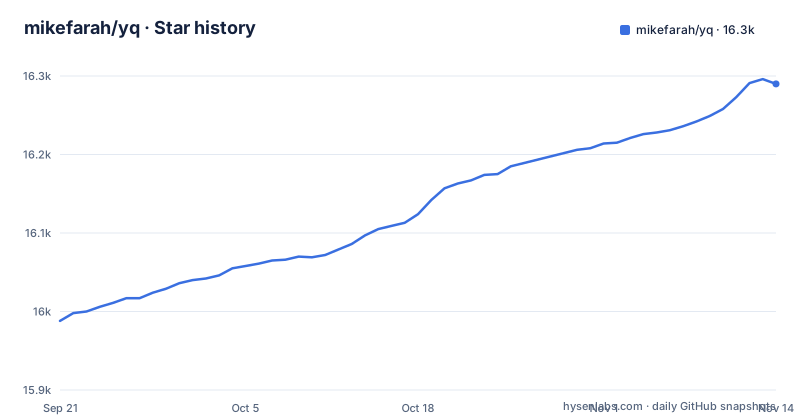
Star history
- mikefarah/yq16,290 ★ · +302
| Repository | 2026-09-21 | 2026-11-14 |
|---|---|---|
| mikefarah/yq | 16k | 16.3k |
302 Stars in the last 54 days, measured from the daily GitHub snapshot. Compare with other projects
Editorial analysis
What yq actually replaces in a config pipeline
Editing structured config from a shell script is awkward. sed and awk do not understand YAML indentation or quoting, and reaching for python -c or a Node one-liner means the script now depends on an interpreter being present, plus a YAML library that may not be installed. yq targets that gap. It is a single Go binary that reads and writes YAML, JSON, XML, CSV, TOML, HCL and properties files, and it borrows the filter syntax from jq, the JSON processor, so anyone who has written a jq expression can transfer most of that knowledge.
The audience is narrow but real: CI jobs that bump a version field in a manifest, deployment scripts that read a value out of a nested config, migration work that converts between formats, and Terraform-adjacent tooling that needs to touch HCL. The README describes yq as lightweight and portable, and the portability claim is backed by the release layout: prebuilt binaries per platform plus a Docker image, so the same command works on a laptop and inside a build container. It is a command-line processor first, though the README also shows how to use it as a Go library through pkg/yqlib.
How the filter language and format layer fit together
The architecture is visible in go.mod. The parser comes from alecthomas/participle, a parser combinator library, and the expression evaluation is the project's own implementation rather than a binding to the C jq. Format support is split across separate dependencies: goccy/go-yaml and go.yaml.in/yaml for YAML, goccy/go-json for JSON, go-ini/ini for INI, magiconair/properties for Java properties files, pelletier/go-toml for TOML, hashicorp/hcl for HCL, and zclconf/go-cty for HCL's type system. That split is what lets one tool convert between formats.
The practical consequence is that the filter language is format-agnostic. The same expression works whether the input is YAML or JSON, which is why the README can show `yq -o json file.yaml` and `yq -o yaml file.xml` as variations of one idea. It also means the semantics you get are yq's, not jq's. The README is explicit: yq does not yet support everything jq does, but it supports the most common operations and functions. Treat the jq resemblance as a familiar syntax, not a compatibility guarantee.
Installing yq and running a first in-place edit
The README lists several install paths. Homebrew and snap are the shortest on macOS and Linux, and a prebuilt binary is available for platforms including linux_amd64, linux_arm64, darwin_amd64, darwin_arm64 and windows_amd64. The wget route downloads a compressed binary and moves it onto the PATH:
VERSION=v4.2.0
PLATFORM=linux_amd64
wget https://github.com/mikefarah/yq/releases/download/${VERSION}/yq_${PLATFORM}.tar.gz -O - |\
  tar xz && sudo mv yq_${PLATFORM} /usr/local/bin/yq
After that, `yq --version` should print the version you installed. Note that the version string in this example comes from the README, not from the current release list; substitute the release you actually want.
Reading a nested value is the first useful command. The README's example is:
yq '.a.b[0].c' file.yamlThe path is a jq-style expression, and the output is the value at that position. The same expression works when the document arrives on stdin, which is what makes yq composable in pipelines:
yq '.a.b[0].c' < file.yamlWriting back into the file uses the in-place flag. This is the command most CI scripts end up running:
yq -i '.a.b[0].c = "cool"' file.yamlOne detail worth knowing before you put this in a pipeline: yq can read values from the environment through strenv, so a secret or a build number does not have to be interpolated by the shell first. The README's form is `NAME=mike yq -i '.a.b[0].c = strenv(NAME)' file.yaml`. Multiple updates can be chained in a single invocation with the pipe operator, which matters because each in-place run rewrites the file.
Format conversion and merging multiple documents
Conversion is a flag, not a separate tool. The README gives `yq -Poy sample.json` to pretty-print JSON as YAML, `yq -o json file.yaml` to go the other way, and `yq -o yaml file.xml` to turn XML into YAML.
Merging is where the expression language earns its keep. The README shows two approaches. The first loads two files explicitly and multiplies them, which deep-merges the maps:
yq -n 'load("file1.yaml") * load("file2.yaml")'The second handles a glob of files, and the README attaches a warning to it: `ea` evaluates all files at once instead of in sequence.
yq ea '. as $item ireduce ({}; . * $item )' path/to/*.ymlThat distinction between sequential and all-at-once evaluation is the kind of thing that silently changes results if you copy the wrong example. The README flags it rather than hiding it, which is the right call, but it also means merge behaviour is something you should confirm on your own file set before trusting it in a release pipeline.
Where yq stops being the right tool
The clearest limitation is stated by the project itself: yq does not yet support everything jq does. If your existing pipeline depends on a jq builtin or a corner of the jq language that yq has not implemented, the migration is not a rename. You will find out at runtime, in the middle of a script, unless you test the expressions first.
There is a second boundary to check: validation. The README's usage guide covers reading, updating, merging and converting documents, not schema checking against a JSON Schema or an OpenAPI definition. If the job is to reject a malformed manifest rather than edit it, yq is the wrong layer, and pairing it with a dedicated validator is the honest answer rather than stretching yq to do it.
The container path has its own friction. The image no longer runs as root, which the README ties to a specific pull request, so installing extra packages or writing to mounted files can hit permission errors. The README's remedies are to run with `--user="root"` or to add a `USER root` step in a derived Dockerfile, and it notes that the Alpine base does not ship timezone data, so the `tz` operator needs `apk add --no-cache tzdata`. Snap users get a different restriction: strict confinement means no direct access to root-owned files, and the README's workaround is to pipe through sudo cat and write back with sponge or a temporary file. None of these are blockers, but each one is a real step you have to plan for.
yq against jq, and where the two diverge
The obvious alternative is jq itself. jq is a mature JSON processor with a large body of documentation and a long history, and if your data is already JSON, jq is the more direct choice. The difference in approach is the data model. jq is defined around JSON values; getting it to handle YAML means converting to JSON first, which loses comments and can change key ordering and scalar formatting. yq carries a YAML-aware value tree through the whole pipeline, and the README shows it preserving that awareness while still emitting JSON when asked.
That difference cuts both ways. yq's YAML handling is the reason to pick it, and its incomplete jq coverage is the reason not to, if your filters are non-trivial. A second alternative is a general-purpose language binding, for example a Python script using a YAML library. That gives you full programmability and testability, at the cost of an interpreter dependency in every environment that runs the script. yq's trade is the reverse: one static binary, a smaller language, and no runtime to install. For a CI image where you control the base layer, either works. For a script that has to run on an unknown machine, the binary is easier to justify.
Maintenance, licensing and the cost of upgrading
The repository is not archived, and the last push was on 2026-10-29. The release history shows v4.54.1 on 2026-09-29, v4.53.6 on 2026-08-20 and v4.53.4 the day before that. Two patch releases inside two days is worth reading as a signal about cadence: fixes arrive quickly, but if you track latest you are tracking a moving target. Pinning a version in CI is the cheaper habit.
The project is MIT licensed, which is permissive and places few obligations on how you redistribute or embed the binary. That is a statement about the licence text, not legal advice, and anyone embedding yq in a distributed product should read the LICENSE file in the repository rather than take this paragraph as clearance.
Upgrade cost is low by construction. There is no daemon, no config file and no migration step described in the README: you replace a binary or pull a new image tag. The risk sits in the expression language rather than the install. Because the README states that jq coverage is incomplete and still growing, a filter that works on one version can in principle behave differently on another, so the version you test with is the version you should pin. The repository also ships a Makefile with build, test, check and secure targets, which is useful if you build from source rather than downloading a release.
Editorial conclusion
Adopt yq when shell scripts or CI jobs need to read and rewrite YAML, JSON, XML or TOML without pulling in a Python or Node runtime, and when the jq expression style is already familiar to the people writing those scripts. Skip it if you need full jq compatibility, because the README states it does not yet support everything jq does. Before rolling it out, verify the exit code and the exact output of the expression you intend to run in CI, and pin the binary version rather than tracking latest, because the release history shows multiple v4.53.x releases within two days.
Frequently asked questions
What does the yq command do?
yq is a command-line processor for YAML, JSON, XML, CSV, TOML, HCL and properties files. It uses jq-like syntax to read values, update files in place, merge documents and convert between formats.
What does YAML actually stand for?
yq treats YAML as one of several input formats yq processes, alongside JSON, XML, CSV, TOML, HCL and properties files.
What is the difference between jq and yq?
jq is a JSON processor, while yq applies a similar filter syntax to YAML as well as JSON, XML, CSV, TOML, HCL and properties files. The README states that yq does not yet support everything jq does, but covers the most common operations and functions.
How do I install yq on RHEL?
The README lists downloading a prebuilt binary from the releases page, Homebrew, snap, Docker or Podman, go install, and a GitHub Action as the supported install paths, so on RHEL the binary download or the container image is the documented route.
Official sources
Add this badge to your README
If you maintain this project, the badge below links readers to this analysis and shows its maintenance status from the daily GitHub snapshot. Paste the markdown into your README; add ?metric=license or ?metric=stars to the image URL for a different field.

[](https://hysenlabs.com/projects/mikefarah-yq)Star history chart for your README
[](https://hysenlabs.com/projects/mikefarah-yq)Was this useful?