Mission Control: A Self-Hosted Dashboard for Governing AI Agent Runs
Project brief: Self-hosted control plane for AI agents: dispatch tasks, review runs, track spend, and operate OpenClaw, Claude Code, Codex, and other runtimes.
At a glance
- What is it?
- Mission Control is an alpha-stage, self-hosted control plane that sits above AI agent runtimes like OpenClaw, Claude Code, and Codex, offering task dispatch, review gates, spend tracking, and a SQLite-backed dashboard. It is a pragmatic fit for multi-agent setups, but its schema and API are still unstable.
- Who is it for?
- Adopt Mission Control if you operate multiple agents or runtimes and need a single, self-hosted view of task ownership, execution, review, and spend. Skip it if you run one agent on one machine, need a managed multi-tenant SaaS, or want an agent framework for planning and tool use.
- Can I use it commercially?
- Yes. MIT is a permissive licence: you can use, modify and sell software built on it, as long as you keep its copyright and licence notices.
- Is it still maintained?
- Yes. The repository last received commits 6 days ago.
- What is it written in?
- Mainly TypeScript, according to GitHub's language statistics.
Answers come from the project's GitHub data, last synced on November 14, 2026, and from our analysis. They are not legal advice.
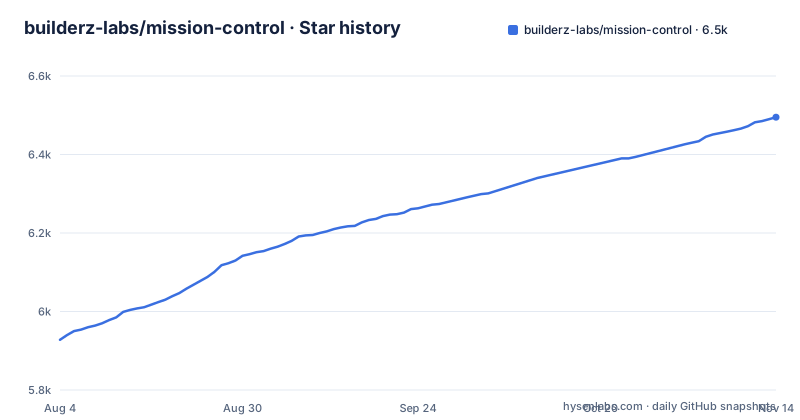
Star history
- builderz-labs/mission-control6,495 ★ · +567
| Repository | 2026-08-04 | 2026-11-14 |
|---|---|---|
| builderz-labs/mission-control | 5.9k | 6.5k |
567 Stars in the last 102 days, measured from the daily GitHub snapshot. Compare with other projects
Editorial analysis
What Mission Control Actually Solves
Mission Control addresses a coordination problem, not a reasoning problem. The README is explicit: it does not replace an agent's reasoning or tool loops. It sits above runtimes like OpenClaw, Claude Code, and Codex, and gives operators one place to answer questions that become hard when multiple agents are in play: who owns a task, what executed, which result passed review, and where spend and failures accumulated. The target user is an operator or small team running several agents across different runtimes, who needs an audit trail and a review workflow rather than another agent framework. The README's own guidance says it is the wrong tool for a single agent on a single machine where the native CLI is already understandable. That scoping is honest and useful. It is a governance layer, not a runtime.
The Architecture: SQLite, Workspaces, and a Gateway
The control plane is self-hosted and workspace-aware. SQLite stores local control-plane state, which keeps the default deployment simple and single-node. The README describes shared workspaces using deployment-level runtime integrations, while strict workspaces block those integrations until underlying resources carry workspace ownership. That distinction matters for security: it lets you isolate agents that should not share state. A gateway is optional for task, project, agent, scheduler, webhook, alert, and cost work, but live session messaging requires a connected runtime gateway. So the architecture is modular: you can run a basic REST loop without a gateway, but real-time session observation needs the extra component. The data flow is straightforward: agents register via API, tasks are created and assigned, agents claim a queue, and results flow back through the same API. The dashboard then compresses that sequence into current state, as the README's operator field notes put it.
Getting It Running: Source, Docker, and the First Agent
Installation is documented for both source and Docker. For a source install, you need Node.js 22 or newer and pnpm. The command sequence is: git clone, cd, then bash install.sh --local. After that, open http://localhost:3000/setup, create the first admin account, and copy the API key from Settings. The manual path uses nvm use 22, pnpm install, and pnpm dev. Windows users have install.ps1 -Mode local. Docker users can run docker compose up, or pull the published multi-architecture image ghcr.io/builderz-labs/mission-control:latest and run it with a port mapping. For network-accessible deployments, the README points to a hardened Compose overlay: docker compose -f docker-compose.yml -f docker-compose.hardened.yml up -d. The shortest agent loop uses the REST API. Export MC_URL and MC_API_KEY, then POST to /api/agents/register and /api/tasks, and GET /api/tasks/queue?agent=scout.
The Aegis Quality Gate and Review Workflow
Mission Control's task board tracks work through inbox, assignment, execution, review, quality review, and completion. The Aegis quality gate is a notable mechanism: it requires an approval record before a task reaches done. That is a concrete control for preventing unreviewed agent output from being marked complete. The README's operator field notes add a practical rule: when a run needs review, record the identity, task, tool call, approval, result, and verification evidence before changing it, and keep unresolved items distinct from accepted risk. This is not a fancy AI feature; it is a discipline enforced by the data model. The review gate is likely useful for teams that need an audit trail for compliance or debugging. The README points to docs/orchestration.md for dispatch, handoffs, workflows and review gates.
Adapters and Their Uneven Depth
The README lists adapters and observation surfaces for OpenClaw, Claude Code, Codex, CrewAI, LangGraph, AutoGen, and Claude SDK workflows. But it warns that adapter depth varies by runtime and tells you to see docs/agent-setup.md and docs/cli-integration.md before assuming feature parity. That is a genuine limitation: not every runtime will have the same level of integration, and the README does not promise otherwise. If you rely on a specific runtime, you must verify that the adapter supports the features you need, such as heartbeats, session messaging, or workspace sync. The CLI and MCP server provide headless access, but again, the tool surface is documented separately in docs/cli-agent-control.md. The REST contract lives in openapi.json, and a running instance serves an interactive reference at /docs. This is a case where the documentation is honest about variability, but the onus is on the adopter to check.
Security, Alpha Status, and a Real Failure Mode
The README carries a prominent warning: Mission Control is alpha software, and APIs, schemas, and configuration may change between releases. It also tells you to read the security guidance before exposing it to a network. That is a real constraint. The recent releases show a pattern of security hardening: v2.2.0 is titled Security Hardening & Workspace Isolation, and v2.3.0 is a Dependency Security Patch. So the project is actively addressing security, but the alpha label means you cannot assume stability. A concrete failure mode: if you deploy it on a network without reading the hardened Compose overlay and the deployment guide, you skip the security guidance the README says to read before exposing it to a network. Another failure mode is schema drift: a task created under v2.1.0 might not behave identically under v2.3.0, and the README says configuration may change. This is not a tool for production environments that cannot tolerate breaking changes.
Maintenance, Upgrades, and Licensing
The project is MIT licensed, which means you can use, modify, and redistribute it freely, with the usual conditions. The README warns that APIs, schemas and configuration may change between alpha releases. The release cadence is active: three releases in three weeks, with the latest on 2026-07-25. That suggests a fast-moving project, but also one where you must track changes closely. The maintenance cost is therefore not trivial: you need to monitor releases, read changelogs, and test your workflows after each upgrade. The Docker image is multi-architecture, which simplifies deployment across hardware, but the source install requires Node 22 and pnpm, which is a specific toolchain.
Alternatives and How They Differ
The README does not name competitors, but the description implies a contrast with two categories. First, an agent framework like LangGraph or AutoGen: those define planning and tool use, whereas Mission Control explicitly does not. If you need a framework to structure agent reasoning, Mission Control is the wrong tool, as the README states. Second, a managed SaaS control plane: Mission Control is self-hosted, so if you want a multi-tenant hosted service, it is not that. The key difference in approach is that Mission Control stores state in local SQLite and is designed for single-tenant self-hosting, whereas a SaaS would handle multi-tenancy and managed upgrades. For a single operator, the local SQLite approach is simpler and cheaper, but it means you handle backups and scaling yourself.
Editorial conclusion
Adopt Mission Control if you operate multiple agents or runtimes and need a single, self-hosted view of task ownership, execution, review, and spend. Skip it if you run one agent on one machine, need a managed multi-tenant SaaS, or want an agent framework for planning and tool use. Before adopting, verify the alpha schema and API stability against your deployment tolerance, check adapter depth for your specific runtime in docs/agent-setup.md, and review the README's security guidance and the deployment guide in docs/deployment.md before exposing it to any network.
Frequently asked questions
how to use mission control
After a source install, open http://localhost:3000/setup to create the first admin account, then copy the API key from Settings for headless access. From there a runtime connects through the REST API by posting to /api/agents/register, creating work on /api/tasks and claiming its queue at /api/tasks/queue, or through the CLI and MCP server.
how to install mission control
Docker needs only `docker compose up`, or you can pull the published multi-architecture image ghcr.io/builderz-labs/mission-control:latest and run it on port 3000. A source install needs Node.js 22 or newer with pnpm, using bash install.sh --local, or ./install.ps1 -Mode local on Windows, or nvm use 22 with pnpm install and pnpm dev by hand.
Does Mission Control replace the agent runtime it watches?
No. It sits above the runtimes and does not replace their reasoning or tool loops; it governs the work around those loops. Adapters and observation surfaces cover OpenClaw, Claude Code, Codex, CrewAI, LangGraph, AutoGen and Claude SDK workflows, and adapter depth varies by runtime.
Do I need a runtime gateway to use Mission Control?
Not for most work. A gateway is optional for task, project, agent, scheduler, webhook, alert and cost operations; live session messaging is the part that needs a connected runtime gateway. Setting NEXT_PUBLIC_GATEWAY_OPTIONAL to true runs the dashboard in standalone mode.
Official sources
Add this badge to your README
If you maintain this project, the badge below links readers to this analysis and shows its maintenance status from the daily GitHub snapshot. Paste the markdown into your README; add ?metric=license or ?metric=stars to the image URL for a different field.

[](https://hysenlabs.com/projects/builderz-labs-mission-control)Star history chart for your README
[](https://hysenlabs.com/projects/builderz-labs-mission-control)Was this useful?