Trigger.dev: exported tasks with no timeouts, and the self-hosting bill
Project brief: Trigger.dev, build and deploy fully managed AI agents and workflows.
At a glance
- What is it?
- Trigger.dev runs background tasks from your own TypeScript codebase with retries, queues, checkpointing and no per-task timeout, and it will run them on its cloud or on yours. The convenience is real, and the interesting costs sit in resource settings, tag limits and self-hosting.
- Who is it for?
- Trigger.dev fits teams whose agents run longer than a single request, that stream from an LLM or drive a browser, and that would rather export tasks from a TypeScript codebase than operate a worker fleet. It does not suit a team that needs its queue to run inside its own process with no external dependency.
- Can I use it commercially?
- Yes. Apache-2.0 is a permissive licence: you can use, modify and sell software built on it, as long as you keep its copyright and licence notices.
- Is it still maintained?
- Yes. The repository received new commits within the last day.
- What is it written in?
- Mainly TypeScript, according to GitHub's language statistics.
Answers come from the project's GitHub data, last synced on November 13, 2026, and from our analysis. They are not legal advice.
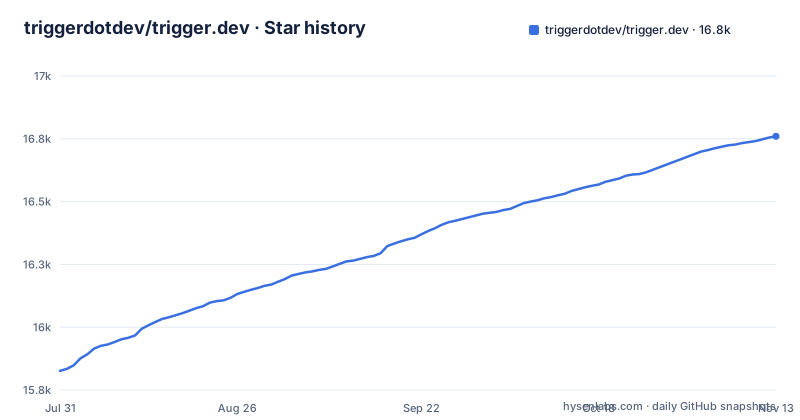
Star history
- triggerdotdev/trigger.dev16,760 ★ · +934
| Repository | 2026-07-31 | 2026-11-13 |
|---|---|---|
| triggerdotdev/trigger.dev | 15.8k | 16.8k |
934 Stars in the last 105 days, measured from the daily GitHub snapshot. Compare with other projects
Editorial analysis
The no-timeout claim is the pitch, and Machines is the price
The headline capability is that tasks execute with no timeouts at all, positioned directly against AWS Lambda, Vercel and other serverless platforms. That is the reason to look here: an agent that streams from an LLM, drives a browser or shells out to a subprocess does not fit inside a request timeout budget.
The cost surfaces in the next feature rather than staying hidden. Machines let you set the number of vCPUs and the GB of RAM a task uses. The timeout ceiling you removed returns as a resource dial you now own. Alerts cover run failures and deployments.
Checkpointing, waits and waitpoints decide what a deploy does to a run in flight
Three features govern work that is already running. Checkpointing is what the project calls inherent durability. Waits pause execution for a specified duration. Waitpoints add human-in-the-loop judgment at a critical decision point, letting a run sit until a person approves, rejects or gives feedback. Versioning is described as atomic, letting you deploy a new version without affecting running tasks.
The consequence comes from combining them. A run parked at a waitpoint can outlive the code that started it, and when it resumes it resumes the version it began on. A payload checked at runtime by a structured schema is only checked against what that older run knows about, so changing a task's input shape changes a contract you already promised to honour for a run that is still open. That is a compatibility problem to plan for, not a deploy you can treat as routine.
Ten tags per run, and metadata you can read from the frontend
Concrete limits show up in the filtering layer. Each run takes up to ten tags, and those tags are what you filter by in the dashboard, over realtime and through the SDK. Run metadata attaches to a run, updates as the run progresses, and is available to use in your frontend for live updates. Batch triggering starts many runs of a task at once with custom payloads and options through batchTrigger(), and bulk actions replay or cancel several runs simultaneously.
Ten is a tight budget when your environments are Development, Staging, Preview and Production, your previews are branching, and your runs are batched. Decide early which axes you will ever filter on, because an eleventh means redesigning the tagging convention your dashboard queries, your alerts and your React hooks already depend on.
Four named environments, with branches supplying preview isolation
Environments are named rather than arbitrary: Development, Staging, Preview and Production. Isolation beyond those four comes from preview branches, which create isolated environments for testing and development and integrate with Vercel and git workflows. Realtime sits on top of all of it, letting you trigger, subscribe to and receive real-time updates for runs, with LLM streaming support.
The shape is deliberate and it constrains you. Four fixed names make the promotion path a known sequence rather than a per-service configuration, which suits teams that ship everything together. Branch previews help you test a change; they do not add a name to that list.
Build extensions are the only way Python and FFmpeg get onto a task
Runtime freedom arrives through build extensions that hook directly into the build system so you can customize the build. The stated uses are running browsers, Python scripts and FFmpeg, alongside system packages. Nothing about your task definition changes, because the change happens in the image your code is built into.
That is the trade. A task that shells out to ffmpeg or launches a headless browser needs those binaries present and working in that image, and customizing the build makes it yours. The repository carries its own base-images/ and docker/ directories, which shows the shape of the responsibility. Expect a build pipeline you maintain and debug rather than a pure function deploy, and expect build time to move from nothing to something you wait for.
A task is an exported object with an id you have to keep stable
The SDK ships as @trigger.dev/sdk, and a task is an exported object carrying a unique id and a run function.
import { task } from "@trigger.dev/sdk";

//1. You need to export each task
export const helloWorld = task({
  //2. Use a unique id for each task
  id: "hello-world",
  //3. The run function is the main function of the task
  run: async (payload: { message: string }) => {
    //4. You can write code that runs for a long time here, there are no timeouts
    console.log(payload.message);
  },
});
Two details matter more than they look. The task must be exported, because that export is how the platform discovers work rather than a separate registration call. And the id is yours to choose, which makes it the stable name your queue entries, concurrency rules and dashboard views refer to, so renaming one is a migration rather than an edit.
Self-hosting starts from a private monorepo and a precedence rule that bites
Self-hosting is offered as the alternative to the cloud, with its own documentation and a Helm chart published as a separate release (Helm Chart 4.8.3); the repository root shows what local development of the platform involves. The root package.json is marked private, named triggerdotdev and versioned 0.0.1, with workspaces across apps/*, packages/* and integrations/*, and builds driven by turbo. Docker is scripted rather than described in prose: node scripts/docker.mjs -f docker/docker-compose.yml up -d --build --remove-orphans brings up the stack, an extras compose file adds more services, and a separate dev compose file runs under its own project name.
Environment handling is the part to read twice. .env.example says to copy overrides to .env.local and never to .env.schema, that local defaults and configuration documentation live in .env.schema, that existing .env files still load, and that exported variables take precedence over files. That last clause is the trap. A variable exported in your shell silently beats the file you just edited, and nothing tells you the two disagreed until a stack behaves unlike the configuration you believe it read. Optional integrations add more surface: credentials for GitHub auth and Resend belong in the local overrides, and the optional runops profile needs its own database URL on port 5434.
What you hand over by moving the queue out of your own process
The credible alternative for the same job is to keep the queue where it already is. BullMQ is the common choice: jobs live in Redis and workers run inside your own services, so there is no hosted control plane to depend on. Temporal sits at the other end, a general durable execution engine where you operate workers and write against its own workflow model.
Choosing trigger.dev trades that control for work you would otherwise do yourself: no worker fleet to size, checkpointing instead of hand-written recovery, Machines instead of your own instance types, atomic versioning so a deploy cannot strand a running task, and browser or FFmpeg support without maintaining a custom image. What you give up is the ability to run all of it with no external service, unless you self-host. Pick by asking whether operating workers is a cost you actually pay today.
Editorial conclusion
Trigger.dev fits teams whose agents run longer than a single request, that stream from an LLM or drive a browser, and that would rather export tasks from a TypeScript codebase than operate a worker fleet. It does not suit a team that needs its queue to run inside its own process with no external dependency. Check three things before committing: what a run actually consumes, since Machines moves the timeout decision into your vCPU and RAM settings; whether a run parked at a waitpoint can still resume after you reshape a task's input schema; and, if you intend to self-host, what the self-hosting guide asks of you; the project publishes a Helm chart as its own release (Helm Chart 4.8.3).
Frequently asked questions
What is trigger.dev used for?
It is a TypeScript platform for background work that outlives a single request, offering long-running tasks with retries, queues, idempotency, observability and elastic scaling. Tasks are written in your own codebase with the @trigger.dev/sdk and run either on the hosted cloud or self-hosted.
How do I use trigger.dev?
You define and export a task with a unique id and a run function using task() from @trigger.dev/sdk, then deploy it. The SDK is published on npm as @trigger.dev/sdk, and the README links to the documentation.
Is trigger.dev open source?
Yes, the project describes itself as the open-source platform for building AI workflows in TypeScript, and the repository carries an Apache-2.0 licence. Self-hosting is offered as an alternative to running on the hosted cloud.
Is trigger.dev free?
The repository itself is licensed Apache-2.0, and deployment can target the hosted cloud or your own self-hosted installation.
trigger.dev vs Temporal?
Temporal is a general durable execution engine where you operate workers and write against its own workflow model. trigger.dev keeps tasks as exported functions inside your codebase and adds AI-facing pieces such as LLM streaming, waitpoints, and per-task vCPU and RAM settings.
trigger dev vs bullmq?
BullMQ keeps jobs in a Redis queue that your own services and workers process, so you run the worker fleet. trigger.dev moves execution onto managed infrastructure and supplies checkpointing, automatic retries, atomic versioning and machines, at the cost of depending on a control plane unless you self-host.
Official sources
Add this badge to your README
If you maintain this project, the badge below links readers to this analysis and shows its maintenance status from the daily GitHub snapshot. Paste the markdown into your README; add ?metric=license or ?metric=stars to the image URL for a different field.

[](https://hysenlabs.com/projects/triggerdotdev-trigger-dev)Star history chart for your README
[](https://hysenlabs.com/projects/triggerdotdev-trigger-dev)Was this useful?