Chrome++ Next: a version.dll beside chrome.exe that rewrites tab, hotkey and portable behavior
A DLL hijack implements Chrome full portability as well as tab enhancements.
At a glance
- What is it?
- Chrome++ Next from Bush2021 is a C++ DLL hijack for Google Chrome on Windows. It adds tab gestures, hotkeys, portable data paths and policy overrides, and it is aimed at portable installs only.
- Who is it for?
- Use it if you run a portable, offline-installer copy of stable Google Chrome on Windows and want tab gestures, a boss key or fixed data and cache folders that no extension can provide. Skip it if Chrome updates itself on your machine, if you use another Chromium browser, or if you need documented rollback.
- Can I use it commercially?
- Yes, with conditions. GPL-3.0 is a copyleft licence: if you distribute software that includes it, you must release that software's source code under the same licence. Running it internally without distributing it does not trigger that obligation.
- Is it still maintained?
- Yes. The repository last received commits 6 days ago.
- What is it written in?
- Mainly C++, according to GitHub's language statistics.
Answers come from the project's GitHub data, last synced on November 25, 2026, and from our analysis. They are not legal advice.
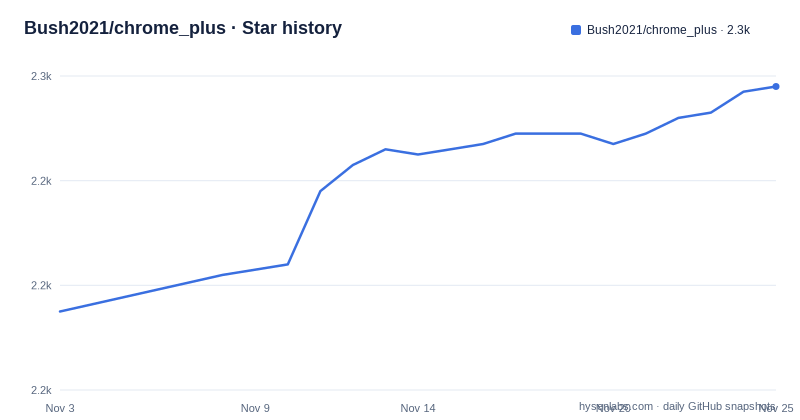
Star history
- Bush2021/chrome_plus2,258 ★ · +43
| Repository | 2026-11-03 | 2026-11-25 |
|---|---|---|
| Bush2021/chrome_plus | 2.2k | 2.3k |
43 Stars in the last 22 days, measured from the daily GitHub snapshot. Compare with other projects
Editorial analysis
A version.dll placed next to chrome.exe is the whole injection mechanism
Chrome++ Next works by dropping a file named version.dll into the same directory as chrome.exe. Chrome loads it at startup, and the project's code then augments browser behavior from inside that process. That is the DLL hijack in the repository description: A DLL hijack implements Chrome full portability as well as tab enhancements.
There is no installer, no extension and no wrapper window. The project describes itself as focused on practical browser behavior changes instead of UI wrappers or extensions, and it aims at capabilities that extensions cannot implement well or that external tools do not solve cleanly. Right-click handling on the tab strip and mouse wheel switching are the kind of thing a normal extension cannot reach, because the tab strip belongs to Chrome's own UI rather than to a web page.
The target is Google Chrome on Windows and nothing else. The source is C++ under src/, built with CMake (CMakeLists.txt, CMakePresets.json and a build.cmd are in the repository root), and it vendors detours and mini_gzip as top-level entries. The license is GPL-3.0 from version 1.6.0 onward.
Tab gestures that change what a click on the tab strip does
Most of the capability list is about tabs. A double-click closes a tab. A right-click closes a tab too, and holding Shift on the right-click keeps Chrome's original context menu, so the menu is still reachable but now costs a modifier key. Closing the last tab can be prevented from closing the browser window.
Two wheel behaviors exist. Scrolling the mouse wheel over the tab strip switches tabs, and scrolling while holding the right mouse button does the same from anywhere in the window. A third option activates a tab simply by resting the cursor on it, so tab switching follows the pointer.
Two more options redirect navigation into new tabs: omnibox input and bookmarks can each open in a new tab. How Chrome++ decides that a tab counts as a new tab is controlled by the new_tab_disable and new_tab_disable_name settings. The README names the two keys and does not say what values they take, so the details sit in src/chrome++.ini.
The boss key hides windows and mutes audio in one press
A boss key can be configured to hide Chrome windows and bring them back. The same action can mute audio when the windows are hidden and restore it when they return, so one shortcut covers both the screen and the sound. A separate hotkey can be assigned to translation.
General remapping goes through the keymapping option. A hotkey can be remapped to another key combination or to a Chrome command ID, which is the more interesting half: instead of only swapping keys, a shortcut can trigger an internal Chrome command that has no default binding.
The README gives no list of command IDs and no example mapping line. Anyone who wants to bind a command has to find the ID elsewhere, because the README does not list which IDs exist.
Portable mode depends on data_dir, cache_dir and the offline installer
Portability is half of the project's pitch. The data_dir and cache_dir options override where Chrome keeps the profile and the cache, so both can live beside the executable on a USB stick or a synced folder.
The recommended install route is the Chrome offline installer package from the companion repository Bush2021/chrome_installer. The instruction is to extract that package twice and use the unpacked Chrome program files directly, then add version.dll to that folder.
Two other settings serve the same goal. command_line appends Chromium switches to every launch, so flags no longer need a shortcut edit. launch_on_startup and launch_on_exit run a command or program when the browser starts and when it exits.
Updater remnants are your problem, and the project says so
The README states that the project is intended for portable Chrome deployments. If updater components or other Chrome remnants remain on the system, the person running it is responsible for the resulting environment-specific behavior. The maintainer is declining to support a mixed setup, so a machine that has a normal Chrome installation with its updater beside a Chrome++ copy is on its own.
That has a practical consequence for anyone who tries Chrome++ on their main browser. Putting version.dll beside a system-installed Chrome that keeps its updater falls under that statement, so breakage there carries no support promise. The README's own route is a separate folder built from the offline installer.
Two browser-environment options exist for the awkward cases. suppress_false_upgrade_notification hides Chrome's false out of date upgrade notification on portable installs. The win32k fallback is documented as something to enable only when Chrome++ itself causes startup crashes, so it is a repair switch and not a default.
ignore_policies and show_password change browser security surfaces
ignore_policies tells Chrome to disregard enterprise policies. On a managed machine that means group policy restrictions are no longer applied to this Chrome copy. The README gives no guidance on when to use it, so the decision is yours.
show_password is listed as one of the additional public options. The README points to src/chrome++.ini as the full public configuration surface and names show_password only in passing, so what it reveals and where is something you read from that file, not from the README.
There is a wider point about trust. Code loaded through a replaced version.dll runs with the same rights as Chrome itself, with access to everything the browser sees. The repository is GPL-3.0 and the source is in src/, which lets you read it before running it, but the README makes no statement about signing the DLL or checking release hashes.
Support covers stable Chrome, and the release trail has a gap against the last push
Stable Google Chrome is the primary support target. Reports of regressions in Beta, Dev and Canary are welcome. Other Chromium-based browsers may work, but they are not supported targets, so a Chromium fork that breaks gets no fix on principle. Issue reporting requirements live in the GitHub Issues templates.
On timing, the repository is not archived. The default branch is main and the last push was 2026-08-15. Releases run 1.18.1 on 2026-07-21, 1.18.2 on 2026-07-30 and 1.18.3 on 2026-10-26, three releases in about three months.
Licensing changed over time. Versions 1.5.4 and earlier are MIT with all rights reserved by Shuax, the original author. Versions 1.5.5 through 1.5.9 are MIT with changes by contributors in this repository, and 1.6.0 and later are GPL-3.0. A fork of an old MIT release is therefore a different legal object than the current code. Setdll, from Bush2021/setdll, is the fallback the README names if version.dll is not loaded correctly.
Editorial conclusion
Use it if you run a portable, offline-installer copy of stable Google Chrome on Windows and want tab gestures, a boss key or fixed data and cache folders that no extension can provide. Skip it if Chrome updates itself on your machine, if you use another Chromium browser, or if you need documented rollback. Before anything else, put version.dll next to chrome.exe in a throwaway copy and confirm Chrome starts with it loaded.
Frequently asked questions
What is Chrome Plus?
Chrome++ Next from Bush2021/chrome_plus is a version.dll injection project for Google Chrome on Windows. It sits next to chrome.exe and adds tab, hotkey, portable, command-line and policy-related behavior at startup.
What is Google Chrome Plus in the Bush2021 project?
It is not a Google product. Bush2021/chrome_plus is a community DLL project, licensed GPL-3.0 from version 1.6.0, that modifies the behavior of Google Chrome on Windows.
How does Chrome Plus differ from plain Chrome?
Plain Chrome has no double-click or right-click tab closing, wheel tab switching or boss key. Chrome++ Next adds those through version.dll, plus data_dir and cache_dir overrides for portable use.
Is Chrome Plus an operating system?
No. The Bush2021/chrome_plus repository is a C++ DLL for Google Chrome on Windows. It is not an operating system and not related to Chromebook Plus hardware.
Official sources
Add this badge to your README
If you maintain this project, the badge below links readers to this analysis and shows its maintenance status from the daily GitHub snapshot. Paste the markdown into your README; add ?metric=license or ?metric=stars to the image URL for a different field.

[](https://hysenlabs.com/projects/bush2021-chrome-plus)Star history chart for your README
[](https://hysenlabs.com/projects/bush2021-chrome-plus)Was this useful?