mokuro Review: Selectable Japanese Manga Text in the Browser
Read Japanese manga inside browser with selectable text.
At a glance
- What is it?
- mokuro is an offline OCR pipeline and browser-based reading format for Japanese manga, aimed at learners who want selectable text and a pop-up dictionary workflow. The current .mokuro format is more flexible than the legacy HTML output, but processing depends on PyTorch, manga-ocr, and comic-text-detector.
- Who is it for?
- Adopt mokuro when you own Japanese manga pages, want an offline OCR step, and read the results through the web reader or compatible tools. Do not choose it as a lightweight viewer if you already have OCR text, or if unsupported Python and PyTorch combinations are a deployment concern.
- Can I use it commercially?
- Yes, with conditions. GPL-3.0 is a copyleft licence: if you distribute software that includes it, you must release that software's source code under the same licence. Running it internally without distributing it does not trigger that obligation.
- Is it still maintained?
- Yes. The repository last received commits 95 days ago.
- What is it written in?
- Mainly HTML, according to GitHub's language statistics.
Answers come from the project's GitHub data, last synced on October 23, 2026, and from our analysis. They are not legal advice.
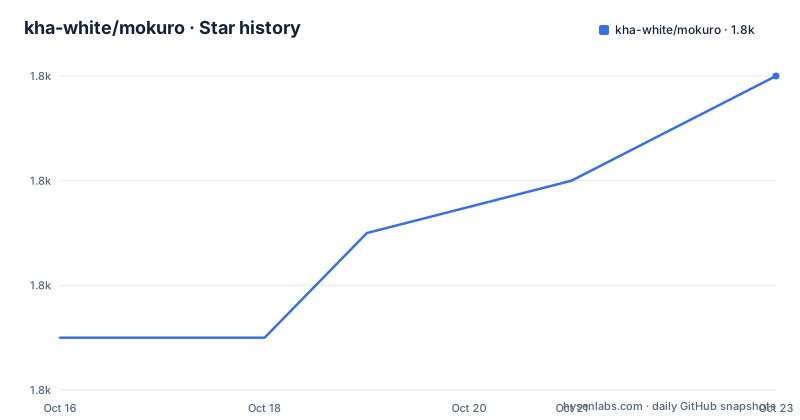
Star history
- kha-white/mokuro1,758 ★ · +5
| Repository | 2026-10-16 | 2026-10-23 |
|---|---|---|
| kha-white/mokuro | 1.8k | 1.8k |
5 Stars in the last 7 days, measured from the daily GitHub snapshot. Compare with other projects
Editorial analysis
mokuro's Offline OCR Boundary for Japanese Learners
mokuro solves a specific gap between ordinary manga images and study-oriented reading. A manga page is usually just an image, so its Japanese dialogue cannot be selected, searched, or passed easily to a pop-up dictionary. mokuro processes those pages first and creates a browser reading artifact that includes OCR results and metadata. The README names Japanese learners as its target users and connects the project with the Yomitan pop-up dictionary workflow.
The important boundary is that mokuro is an offline preparation tool, not a hosted conversion service described in the README. Text detection and OCR run before reading. After a complete volume is processed, mokuro writes a `.mokuro` file containing OCR results and metadata. The images remain associated with that file and are loaded through the separate web reader at `reader.mokuro.app`.
This design has a practical consequence. The expensive or time-consuming OCR stage is separate from the reading stage. You can prepare a volume locally, then open its processed content in the reader without sending the source pages through a remote processing workflow. The README does not document OCR correction UI, confidence handling, or a rollback procedure, so users should not treat the generated text as guaranteed to be free of recognition errors.
The comic-text-detector and manga-ocr Processing Chain
mokuro uses two named components. Text detection is assigned to `comic-text-detector`, while Japanese text recognition is performed with `manga-ocr`. The package metadata reflects this composition through dependencies on `manga-ocr`, `torch`, `torchvision`, `transformers`, `opencv-python`, `Pillow`, `numpy`, `scipy`, and related libraries. That is a computer-vision and machine-learning stack rather than a small image viewer.
The processing sequence described by the README is straightforward. Each page is prepared for text detection, the detected regions are passed through OCR, and the results are collected across the volume. Once all pages are complete, the output file stores the OCR data and metadata needed by the reader. The reader then combines that data with the manga images during viewing.
The repository also includes `tests/`, a `notebooks/` directory, and a bundled `comic_text_detector` package. The README links to a Colab notebook for trying the workflow on manga. It does not specify page formats, supported image dimensions, model memory requirements, expected OCR accuracy, or processing speed, so those details cannot be inferred from the package description. CPU execution is available through `--force_cpu`, while GPU use depends on a suitable PyTorch installation.
Installing mokuro and Creating a First Volume
The README requires Python 3.10 or newer. It warns that the newest Python release may not be supported because of the PyTorch dependency, so Python compatibility is a real installation constraint rather than a footnote. GPU users are directed to install PyTorch according to the PyTorch documentation. If Microsoft Store Python produces a `fugashi` DLL import error, the README suggests using Python from the official Python site.
Install the command-line package from a terminal:
pip3 install mokuroThe package exposes the `mokuro` command through `mokuro.__main__:main`. For a first use, point that command at one manga volume directory:
mokuro /path/to/manga/vol1The README says this generates `/path/to/manga/vol1.html`, which can be opened in a browser. That tutorial demonstrates the legacy workflow, which remains supported. For the current format and web reader, process the volume and then load the resulting `.mokuro` file together with its images in the reader.
If a path contains spaces, quote it:
mokuro "/path/to/manga/volume 1"The quoted command is the documented form for that path. The README does not give a separate command for loading a `.mokuro` file into `reader.mokuro.app`, so the browser reader's upload or catalog behavior should be checked at the reader itself.
Batch Processing Options for Manga Collections
mokuro can process more than one volume, which matters for a learner building a catalog over time. Separate volume arguments produce separate HTML files under the documented legacy workflow:
mokuro /path/to/manga/vol1 /path/to/manga/vol2 /path/to/manga/vol3For a directory containing volume subdirectories, the README gives this command:
mokuro --parent_dir manga_title/The expected layout uses a title directory containing `vol1/`, `vol2/`, `vol3/`, and similar directories. The command is intended to process all volumes that match that structure. The README also lists options for controlling confirmation prompts, OCR, caching, errors, archives, and output format.
Several flags have direct operational effects. `--disable_confirmation` suppresses the prompt for the volume list. `--disable_ocr` produces a file without OCR results. `--ignore_errors` continues after an error in one volume. `--no_cache` bypasses cached OCR results in `_ocr` directories. `--unzip` extracts `zip` or `cbz` volumes in place, while `--disable_html` suppresses legacy HTML output and is documented as acting as if `--unzip` is enabled.
The cache flag deserves attention during experimentation. Reusing cached OCR results can avoid repeating recognition work, but the README does not explain cache invalidation when page files or OCR settings change. Users changing inputs should decide explicitly whether cached results still represent the current directory.
The .mokuro Format Versus Legacy HTML Transfer
The format split is the main design change in mokuro 0.2.0 and later. The older HTML approach placed OCR results and the complete reader interface in one file for each volume. Images were separate, and links depended on the directory layout. Moving a manga to another device therefore meant transferring both the HTML files and the images. Updating the interface also required updating all existing volume files.
The `.mokuro` format narrows the generated artifact to OCR results and metadata. The reader is a separate web application, so the interface can exist independently from processed volumes. The associated images are loaded with the file, and the reader can act as a catalog for processed series and volumes. This is a cleaner boundary between generated data and the application that displays it.
The legacy output remains available for backward compatibility, but the README explicitly says it will not be developed further. Its transfer model is still relevant for users who need an HTML file with a separate image directory. It is not the preferred path for a multi-volume catalog.
A real alternative is `Mokuro2Pdf`, described in the README as a Ruby command-line script that generates selectable-text PDFs from mokuro's HTML overlay. Its output goal is PDF rather than a browser catalog. Another listed option is `mokuro-reader`, a separate web reader developed by Gnathonic. Both alternatives change the delivery format, while mokuro's current `.mokuro` workflow keeps OCR data and the browser reader as separate pieces.
Maintenance, Python Compatibility, and GPL-3.0 Distribution
The repository is not archived. Its last push was on 2026-07-20, and the listed releases include v0.2.5 on 2026-07-20, v0.2.4 on 2026-02-22, and v0.2.3 on 2026-02-22. That is evidence of recent project activity, but it does not establish compatibility with every environment or guarantee that every OCR model will be maintained at the same pace.
The main upgrade cost is dependency coordination. `pyproject.toml` requires Python `>=3.10` and pins a broad lower bound for `manga-ocr`, `torch>=1.7.0`, `torchvision>=0.8.1`, and `transformers>=4.25.0`. The README specifically calls out PyTorch as a source of Python-version friction. A new installation can therefore require selecting a compatible Python release and, for GPU processing, installing the correct PyTorch build before mokuro itself.
The project identifies its license as GPL-3.0 and includes a `LICENSE` file. The repository does not provide legal guidance about manga copyrights, personal copies, or the treatment of generated OCR files. Before redistributing modified software or distributing a deployment, review the license text and separate copyright questions concerning the manga images.
Where mokuro Is the Wrong Tool
mokuro is a poor fit when the manga is already accompanied by accurate text, because its main purpose is to create OCR data from pages. It is also unsuitable for a user who only wants a fast image viewer and does not want to install Python, PyTorch, OCR dependencies, or machine-learning models.
The workflow can be expensive for large collections. The README documents CPU and GPU choices, caching, and archive extraction, but it does not publish processing times, memory requirements, or a quality guarantee. `--ignore_errors` can continue a batch, but it does not explain which page caused an error or how to recover that volume. Users who need reliable editing of OCR errors will not find a documented correction interface in the README.
There is also a format decision to make before processing a library. The legacy HTML route produces one HTML file per volume and keeps images separate. The `.mokuro` route is recommended for the web reader and a multi-volume catalog, but the README does not document a browser-side import command. Confirm the reader workflow and storage arrangement before converting hundreds of volumes.
Editorial conclusion
Adopt mokuro when you own Japanese manga pages, want an offline OCR step, and read the results through the web reader or compatible tools. Do not choose it as a lightweight viewer if you already have OCR text, or if unsupported Python and PyTorch combinations are a deployment concern. Verify Python compatibility, the selected manga-ocr model, output format, and transfer workflow before processing a large library. The last push was on 2026-07-20, and v0.2.5 was released on 2026-07-20, so recent maintenance activity is documented. For a GPL-3.0 project, check the included LICENSE and obtain appropriate legal guidance before redistributing software or modified distributions.
Frequently asked questions
What is mokuro used for?
mokuro is used to process Japanese manga pages and produce browser-readable content with selectable OCR text. It is aimed at Japanese learners who want to use the text with a pop-up dictionary workflow such as Yomitan.
How do I install mokuro?
The README requires Python 3.10 or newer and documents `pip3 install mokuro`. It warns that PyTorch compatibility may lag behind the newest Python releases, and it provides a specific troubleshooting suggestion for the Microsoft Store Python `fugashi` DLL error.
What is the difference between a .mokuro file and legacy HTML output?
A `.mokuro` file contains OCR results and metadata for the separate web reader, while legacy HTML embeds the reader interface and requires associated manga images to remain linked. The README recommends the `.mokuro` format and says legacy HTML will not be developed further.
Official sources
Add this badge to your README
If you maintain this project, the badge below links readers to this analysis and shows its maintenance status from the daily GitHub snapshot. Paste the markdown into your README; add ?metric=license or ?metric=stars to the image URL for a different field.

[](https://hysenlabs.com/projects/kha-white-mokuro)Star history chart for your README
[](https://hysenlabs.com/projects/kha-white-mokuro)Was this useful?