DeepLinkKit: Block-Based Route Matching for iOS Deep Links
GitHub describes it as A splendid route-matching, block-based way to handle your deep links.. The repository metadata lists Objective-C as its primary language. The metadata lists the MIT license. This article stays within the project description and details documented in the GitHub repository README.
At a glance
- What is it?
- DeepLinkKit is an Objective-C library from Button that maps incoming URLs and NSUserActivity objects to block handlers. It offers regex route matching, scheme-specific routing, and AppLinks support, but its last release was in 2019.
- Who is it for?
- Adopt DeepLinkKit if you maintain an Objective-C iOS app and want a lightweight, block-based router for deep links and universal links without learning a new DSL. Do not adopt it if you need Swift-native APIs, active maintenance, or support for modern iOS versions beyond what was current in 2019.
- Can I use it commercially?
- Yes. MIT is a permissive licence: you can use, modify and sell software built on it, as long as you keep its copyright and licence notices.
- Is it still maintained?
- Activity is slowing. The repository last received commits 11 months ago.
- What is it written in?
- Mainly Objective-C, according to GitHub's language statistics.
Answers come from the project's GitHub data, last synced on October 22, 2026, and from our analysis. They are not legal advice.
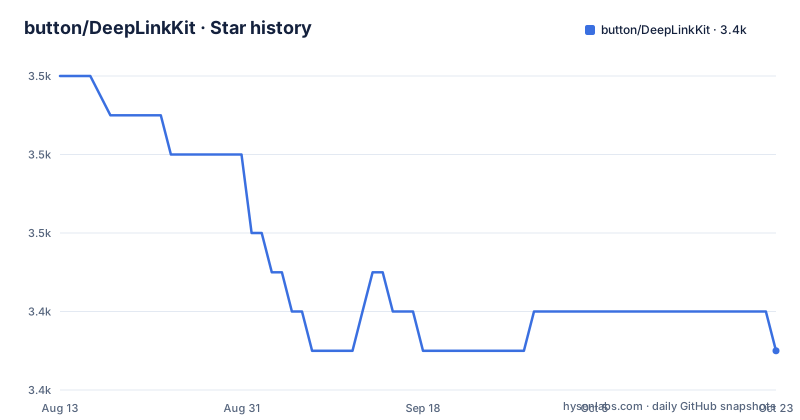
Star history
- button/DeepLinkKit3,448 ★ · -6
| Repository | 2026-08-13 | 2026-10-22 |
|---|---|---|
| button/DeepLinkKit | 3.5k | 3.4k |
-6 Stars in the last 70 days, measured from the daily GitHub snapshot. Compare with other projects
Editorial analysis
What DeepLinkKit Solves
DeepLinkKit addresses the repetitive work of parsing incoming URLs, extracting parameters, and dispatching them to the right screen or action in an iOS app. Instead of writing a chain of if statements or a custom parser for each URL format, you register a route pattern with a block. The library handles the matching and passes you a DPLDeepLink object with route parameters. The target audience is iOS developers who use CocoaPods or Carthage, write Objective-C, and want a small, focused tool. The README promises setup in five minutes or less, which is plausible given the four steps it lists: register a URL scheme, import the header, create a DPLDeepLinkRouter, and register handlers.
Route Matching Mechanics
The router matches URLs based on path components and hosts. The first forward slash in a registered route determines where the path starts; anything before that slash is treated as the host. For example, with an incoming URL of twitter://timeline, the route "timeline" matches, but "/timeline" does not. With twitter://dpl.com/timeline, the opposite is true: "/timeline" matches, while "timeline" does not. This distinction is easy to get wrong, and the README warns about it explicitly. You can also register scheme-specific routes, like "scheme-one://timeline", which only match URLs with that scheme. Routes are matched in the order they are registered, so a catch-all regex pattern like ".*" registered first will block all more specific routes. That ordering constraint is a real footgun, and the documentation calls it out directly.
Regex and Named Parameters
DeepLinkKit supports regex inside route patterns. You can match any URL with ".*", any URL with a given scheme like "myscheme://.*", or use named groups. A route like "trycaviar.com/:path(.*)" extracts everything after the host into a parameter named path. You can combine named groups with literal parts, as in "trycaviar.com/:city([a-zA-Z]+)/:restaurant(.*)", which gives you city and restaurant from a URL like https://trycaviar.com/manhattan/nicoletta-297. The regex syntax is flexible but also a double-edged sword: a pattern like ":restaurant([0-9])" only matches a single digit, not a multi-digit number, which the README demonstrates with an example that expects "297" but would only match "2". This is a subtle trap for developers who assume the regex quantifier applies to the whole parameter. The documentation shows the pattern but does not warn about this limitation.
Installation and Basic Usage
Installation is straightforward. With CocoaPods, add pod "DeepLinkKit" to your Podfile. With Carthage, add github "button/DeepLinkKit" to your Cartfile. You can also drop the source files from the DeepLinkKit directory into your project. After installation, import <DeepLinkKit/DeepLinkKit.h> (the README notes this is required as of version 1.0.0). Create a DPLDeepLinkRouter in your app delegate, register a route handler using subscript syntax in Objective-C or the register method in Swift, and pass incoming URLs to handleURL:withCompletion:. For universal links, implement continueUserActivity:restorationHandler: and call handleUserActivity:withCompletion:. The README also mentions a sample project you can try with pod try "DeepLinkKit".
AppLinks Support and Limitations
DeepLinkKit includes a category called DPLDeepLink+AppLinks that provides convenience accessors for AppLinks 1.0 properties. The README is truncated at that point, so the exact accessors are not described, but the category exists and is importable. This is useful if your app participates in the AppLinks ecosystem. A genuine limitation is that the library has not been updated since September 2019. The last release, 1.5.1, was pushed on 2019-09-09. There is no repository activity since then, no archived flag, but also no new releases. This means it was written for the iOS SDK of that era. If you need support for newer iOS features or Swift concurrency, you will be on your own. The block-based API is simple, but it is also Objective-C-centric; the Swift registration method shown in the README is a thin wrapper and still passes a DPLDeepLink object.
Comparison with Alternatives
A common alternative is to use a router like JLRoutes, which also matches URL patterns to blocks. The difference is that JLRoutes uses a simpler path-matching syntax without regex in the route pattern itself, and it has a longer track record of maintenance. DeepLinkKit, by contrast, bakes regex directly into the pattern, which gives you more power but also more complexity. Another alternative is to use the iOS native NSUserActivity handling with a switch statement, but that means writing the parsing and dispatch logic yourself. DeepLinkKit centralizes that logic in one place, which is its main advantage. The trade-off is that you are tied to this library's route-matching semantics, and you must remember that route order matters.
Maintenance and License
The project is licensed under MIT, which allows free use and modification with attribution. The repository is not archived, but the last push was in 2019, so do not expect bug fixes or updates. The maintenance cost is effectively zero because there is nothing new to upgrade to, but that also means no fixes for iOS changes that may have broken behavior. The README references a wiki integration guide, but the repository itself is the only source of truth. If you adopt DeepLinkKit, you are accepting a frozen dependency. That is acceptable for a small, stable feature set, but you should verify that the regex matching and route ordering behave as documented in your iOS version, since the library was last tested against a much older SDK.
Editorial conclusion
Adopt DeepLinkKit if you maintain an Objective-C iOS app and want a lightweight, block-based router for deep links and universal links without learning a new DSL. Do not adopt it if you need Swift-native APIs, active maintenance, or support for modern iOS versions beyond what was current in 2019. Before adopting, verify that the regex matching behavior and route ordering fit your URL scheme, and check that the MIT license and unmaintained status are acceptable for your project. The library still works as documented, but you will be relying on a frozen codebase.
Frequently asked questions
What is DeepLinkKit used for?
It routes incoming deep links in an iOS app. You register a route pattern on a DPLDeepLinkRouter, and the router matches incoming URLs or NSUserActivity objects against those patterns and hands the matched values back as route parameters. Routes are matched in the order they were registered.
How do you install DeepLinkKit?
Three ways, none of them naming a version. CocoaPods wants the line `pod "DeepLinkKit"` in your Podfile, Carthage wants `github "button/DeepLinkKit"` in your Cartfile, and the manual route is to include all the source files from the repository's DeepLinkKit directory. The sample project runs with `pod try "DeepLinkKit"`.
How does DeepLinkKit match routes?
The first forward slash in a registered route marks where the path starts, and anything before it is treated as the host. Regex patterns are allowed, groups can be named with `:name(pattern)`, an unnamed segment acts as a positional constraint, and routes are matched in registration order.
Does DeepLinkKit support Universal Links and AppLinks?
Universal Links are handled by forwarding an NSUserActivity to the router with `handleUserActivity:withCompletion:`, and that step is marked optional. AppLinks are covered by a category named `DPLDeepLink+AppLinks`, whose description ends one word into the sentence promising accessors to AppLinks 1.0 properties.
When was DeepLinkKit last released?
1.5.1 on 2019-09-09, before 1.5.0 on 2017-10-18 and 1.4.0 on 2017-08-10. The repository is not archived and its last push is dated 2025-11-25, so commits have landed on the branch well after the newest tag. The license recorded for it is MIT.
Official sources
Add this badge to your README
If you maintain this project, the badge below links readers to this analysis and shows its maintenance status from the daily GitHub snapshot. Paste the markdown into your README; add ?metric=license or ?metric=stars to the image URL for a different field.

[](https://hysenlabs.com/projects/button-deeplinkkit)Star history chart for your README
[](https://hysenlabs.com/projects/button-deeplinkkit)