mcp-ssh-manager: an MCP server that gates an AI agent's SSH access per host
MCP SSH Server: 37 tools for remote SSH management | Claude Code & OpenAI Codex | DevOps automation, backups, database operations, health monitoring
At a glance
- What is it?
- A Model Context Protocol server exposing 37 SSH tools to Claude Code and OpenAI Codex, with per-server readonly and restricted modes and a centralised shell-quoting helper. The recent release history is mostly a record of command-injection fixes, which is the honest way to read this project.
- Who is it for?
- Per-host readonly and restricted modes can reduce an agent's SSH access, but they are not an unbreakable security boundary. The project documents policy-bypass and command-injection fixes through v3.8.7, including vulnerabilities after v3.8.5.
- Can I use it commercially?
- Yes. MIT is a permissive licence: you can use, modify and sell software built on it, as long as you keep its copyright and licence notices.
- Is it still maintained?
- Yes. The repository received new commits within the last day.
- What is it written in?
- Mainly JavaScript, according to GitHub's language statistics.
Answers come from the project's GitHub data, last synced on November 15, 2026, and from our analysis. They are not legal advice.
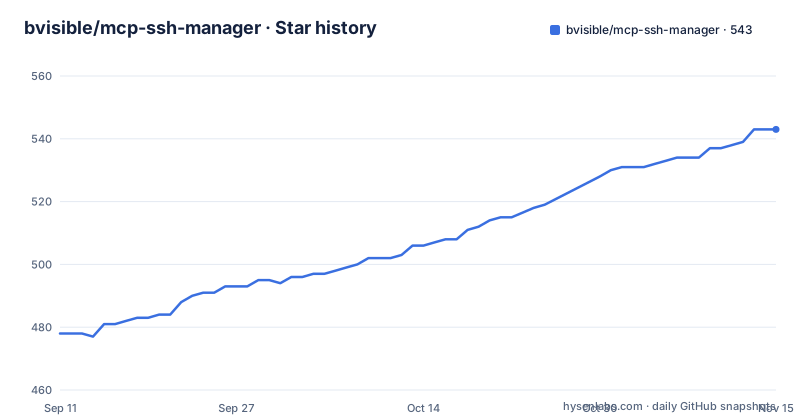
Star history
- bvisible/mcp-ssh-manager543 ★ · +65
| Repository | 2026-09-11 | 2026-11-15 |
|---|---|---|
| bvisible/mcp-ssh-manager | 478 | 543 |
65 Stars in the last 65 days, measured from the daily GitHub snapshot. Compare with other projects
Editorial analysis
The problem: an agent with a shell on machines that matter
Giving a coding agent SSH access is qualitatively different from giving it a filesystem tool. The README states the case directly: an MCP SSH server is the most dangerous tool you can hand an AI agent, because it is a shell on machines that matter. The project's answer is not to remove the shell but to let you bound it per server. That distinction matters for who this is for. It is aimed at people running Claude Code or OpenAI Codex against more than one host: a production box, a staging box, a database host. The README's own examples reach for ERPNext and Frappe operations, backups, database dumps and service restarts, which is the shape of work where you want the agent to run ssh_tail on a log but not ssh_deploy on a live system.
What it does not solve is authorisation in any deeper sense. The unit of trust is the server entry in your config file. If your mental model is "the agent should be able to do anything a human operator can do", the security modes are overhead. If your model is "the agent should be able to look, and occasionally restart one named unit", this is built for you.
Three modes, and why restricted is the only interesting one
The modes are set per server through environment variables. The README gives this example:
SSH_SERVER_PROD_MODE=readonly SSH_SERVER_STAGING_MODE=restricted SSH_SERVER_STAGING_ALLOW_PATTERNS=^systemctl (status|restart) myapp$;^tail -n \d+ /var/log/
The default is unrestricted, which the README describes as behaving the same as any other SSH MCP server. readonly refuses mutating tools outright: no deploy, no upload, no sudo, no database import, while read commands still work. restricted requires every command to match an allow pattern and no deny pattern, and refuses anything else before it reaches the host.
The interesting property is that restricted is enforced before the host, not on it. That means the policy layer is the only thing standing between the agent and a shell, which is exactly why the v3.8.5 advisory about readonly being bypassed is worth reading in full rather than skimming. The README says ssh_service_status and ssh_tail are read-only, so they stay enabled on servers you locked down, and neither quoted its arguments nor consulted the policy layer. A service name like nginx; id > /tmp/pwned executed. That is the failure mode of allow-listing by tool category: the tool was classified as safe, so the policy layer was never asked. The project reports a fix in v3.8.5, but later releases fixed additional policy bypasses. A read-only classification is only as safe as its implementation: use a current patched version, test the enabled tools, and restrict permissions on the host.
How the quoting actually works now
The release notes for v3.8.5 describe a consolidation. The quoting helper now lives in one module, src/shell-quote.js, so the question "did this builder quote its inputs?" has a single answer. Before that, the answer depended on which file you were reading. The release notes state that backup-manager.js had zero shell escaping across its 9 builders, while database-manager.js had 95. The v3.6.7 fix was never extended to the backup file, which is why the ssh_backup_* advisory exists.
The verification approach is described in the same notes: a test drives 340 builder by argument by payload combinations through a real shell to prove none of them execute. A separate 648-combination injection test is mentioned as guarding the database argument quoting. The numbers are from the release notes, not from anything I ran. The architectural point is that centralising the helper is what makes the test meaningful. A test suite that checks 340 combinations only proves something if all 340 go through the same code path, and the previous state of the repository was that they did not.
If you are evaluating this for adoption, src/shell-quote.js is the file to read first, and the test directory is the second thing to read. The release notes say the helper is the single answer to the quoting question, but you should confirm that for the specific tools you plan to enable rather than taking it on faith.
Getting it running: npm, an MCP host, and env vars
The package is published on npm as mcp-ssh-manager, which is also the homepage URL given for the project. The README shows an interactive CLI menu with a screenshot at docs/images/ssh-manager-cli-menu.png, so there is a first-run configuration path that does not require hand-editing a config file. Registration in the official MCP Registry is under the identifier io.github.bvisible/mcp-ssh-manager, according to the v3.8.2 and v3.8.3 release notes.
The configuration surface is environment variables of the form SSH_SERVER_<NAME>_MODE, SSH_SERVER_<NAME>_ALLOW_PATTERNS, and a deny-pattern equivalent referenced but not shown in the README excerpt. A v3.8.0 entry describes a new optional group field per server, contributed in a pull request and requested in an issue, which suggests the config file supports grouping servers rather than flat naming. The README excerpt does not show the full config schema, so the exact file path and the remaining keys are not something I can state from this material.
On installation hygiene, the v3.8.1 notes say the lockfile is committed, CI installs with npm ci, and there is an npm run test:lockfile script guarding it against drift and tampering. The README also states that a test enforces every dependency resolving to registry.npmjs.org with an integrity hash and no unreviewed install scripts. If you vendor this into a build pipeline, that test is the reason you can run it without a private registry mirror.
The sudo password path, and what it does not fix
Issue #34 in the project concerned the sudo password travelling through echo "<password>" | sudo -S, which the README notes is readable in ps and /proc/<pid>/cmdline by every account on the host, and would appear in an auditd trail. The v3.8.2 and v3.8.3 notes say the password now travels on the SSH channel's stdin instead. That is a real improvement over the pattern the README calls common in this category.
What it does not address is credential storage on the client side. The material says nothing about how server passwords or keys are held between calls, whether they are read from a config file, an agent, or the environment. The v3.8.4 note is adjacent but not the same thing: the logger was writing secrets in clear text to ~/.ssh-manager.log and stderr, which the MCP host captures, and redaction now happens inside the logger. That is a fix for a leak, not a statement about where secrets live.
So the honest reading is that this project has closed two specific exfiltration paths (the remote command line and the local log file); its credential model is the open question. If you are deploying against production hosts, that is the gap to ask about before you enable unrestricted mode anywhere.
Where it is the wrong tool
The design assumes a small, named set of long-lived servers that you configure ahead of time. There is no mention of dynamic host discovery, ephemeral instances, or cloud inventory integration. If your fleet is autoscaled and the hostnames change hourly, a per-server mode variable does not map onto that, and you would be reconfiguring the manager constantly or running it in unrestricted mode against hosts you have not named.
The second case is read-heavy analysis. The current documentation describes ssh_db_query as a SELECT operation in a read-only transaction, which limits scratch-schema work. Earlier releases had a bypass allowing writes, so use a patched release and enforce read-only permissions at the database as well. If your workflow needs a scratch schema, use a separately authorized environment rather than assuming this tool supplies it.
The third case is anyone who needs the agent to act autonomously across a fleet without a human in the loop. The security modes are the product's centre of gravity, and they exist to constrain autonomy. If you find yourself setting every server to unrestricted because the modes keep blocking legitimate work, you have chosen the wrong tool and you are now running an unguarded shell with extra steps.
The realistic alternative: a plain SSH session or a general shell MCP server
The closest alternative is not another SSH MCP server but the absence of one: a human running ssh in a terminal, or an agent with a generic shell execution tool on a machine that already has SSH keys. The difference in approach is where the policy lives. A generic shell tool has no notion of which host you are talking to, so any allow-list you write is a filter on command text with no per-server dimension. Here, the mode is attached to the server entry, so SSH_SERVER_PROD_MODE=readonly and SSH_SERVER_STAGING_MODE=restricted can coexist in one configuration, but the safeguards depend on the implementation and its configuration.
That per-server dimension is the actual product. A generic shell MCP server plus an SSH key on disk gives the agent the same reach with none of the structure, and per-server policy can reduce exposure to prompt injection when correctly configured; past bypasses show it cannot guarantee containment. The trade-off is configuration burden: every new host needs an entry and a mode decision, and the README does not describe a way to inherit modes across a group, only the group field itself from v3.8.0. If you have thirty hosts, that is thirty decisions.
A second alternative worth naming is doing the work in CI instead. If your goal is scheduled backups and health checks, a cron job or a pipeline step does it with no agent in the loop and no shell-quoting surface to audit. The reason to choose this project over that is interactivity: you want to ask questions of a live system and have the agent run the commands. If you do not want that, you do not need this.
Maintenance cost, release cadence and the MIT licence
The release history is dense and recent. v3.8.1 through v3.8.5 all landed on 2026-08-28, with v3.8.0 two weeks earlier on 2026-08-14. That cadence is a maintenance fact you should price in: five releases in one day, three of them security fixes, means the project is being actively hardened and also that the surface has been changing quickly. Pinning is not optional here. Version 3.8.5 fixed three command-injection issues, but the project subsequently reported six fixes in v3.8.6 and two more in v3.8.7, including mode bypasses. Review current advisories and upgrade to a maintained version containing the relevant fixes rather than treating v3.8.5 as a safe minimum.
The supply-chain posture is documented in more detail than most projects at this size. Releases are published from CI with SLSA provenance and a CycloneDX SBOM as of v3.8.3, CodeQL runs on every push, actions are pinned by SHA, and the lockfile is committed and tested for drift. There is an OpenSSF Scorecard badge in the README. That is a set of claims you can verify from the repository rather than take on trust, which is the right way to treat them.
The licence is MIT, stated in the repository metadata and shown as a badge in the README. MIT places essentially no conditions on redistribution or modification beyond retaining the copyright and permission notice. That is permissive enough that embedding this in a commercial internal tool is unremarkable, but the usual caveat applies: the licence covers the code, not the consequences of running an agent with a shell, and nothing in it transfers liability for a misconfigured mode. Read the LICENSE file in the repository rather than a badge, and if your organisation has a policy on agent-driven infrastructure changes, that policy is the binding constraint, not the MIT text.
Editorial conclusion
Per-host readonly and restricted modes can reduce an agent's SSH access, but they are not an unbreakable security boundary. The project documents policy-bypass and command-injection fixes through v3.8.7, including vulnerabilities after v3.8.5. Review current advisories and use a maintained patched release, least-privilege SSH accounts and server-side restrictions; test the exact enabled tools and policies before allowing access to important hosts.
Frequently asked questions
What security modes does mcp-ssh-manager support?
The documented per-server modes are unrestricted, readonly and restricted. They are intended to limit tool use or commands, but past releases had bypasses; check current advisories and enforce least privilege on the remote host as well.
Which command injection advisories did mcp-ssh-manager fix?
Version 3.8.5 fixed three command-injection issues, but later v3.8.6 and v3.8.7 addressed additional injection and policy-bypass vulnerabilities. Consult the current security advisories and changelog for affected versions and fixes.
How do I set a security mode for a server in mcp-ssh-manager?
With an env variable named after the server, following the `SSH_SERVER_[NAME]_[PROPERTY]` convention, for example `SSH_SERVER_STAGING_MODE=restricted` with a matching `SSH_SERVER_STAGING_ALLOW_PATTERNS` list of regular expressions. Server names in `.env.example` are `PRODUCTION`, `STAGING`, and `DEVELOPMENT`.
How does mcp-ssh-manager handle the sudo password?
It never reaches the remote command line. The password travels on the SSH channel's stdin, so it is not visible in `ps`, in `/proc/<pid>/cmdline`, or in an auditd trail, replacing the `echo "$pass" | sudo -S` pattern that issue 34 reported.
Official sources
Add this badge to your README
If you maintain this project, the badge below links readers to this analysis and shows its maintenance status from the daily GitHub snapshot. Paste the markdown into your README; add ?metric=license or ?metric=stars to the image URL for a different field.

[](https://hysenlabs.com/projects/bvisible-mcp-ssh-manager)Star history chart for your README
[](https://hysenlabs.com/projects/bvisible-mcp-ssh-manager)Was this useful?