OpenCommit: an LLM wrapper that writes your git commit messages
top #1 and most feature rich GPT wrapper for git — generate commit messages with an LLM in 1 sec — works with Claude, GPT and every other provider, supports local Ollama models too
At a glance
- What is it?
- OpenCommit turns staged changes into a commit message through a provider of your choice, including local models. It is a convenience layer over git, and its value depends on how much you trust the model with your diff.
- Who is it for?
- Adopt OpenCommit if you already stage changes deliberately and want the message text drafted for you, and if you are willing to keep an API key in ~/.opencommit or point OCO_AI_PROVIDER at a local Ollama or llama.cpp endpoint. Do not adopt it if your commit messages carry review or compliance weight, if your diffs routinely contain secrets, or if you cannot accept a generated message landing in history with --yes.
- Can I use it commercially?
- Yes. MIT is a permissive licence: you can use, modify and sell software built on it, as long as you keep its copyright and licence notices.
- Is it still maintained?
- Yes. The repository last received commits 1 day ago.
- What is it written in?
- Mainly JavaScript, according to GitHub's language statistics.
Answers come from the project's GitHub data, last synced on November 13, 2026, and from our analysis. They are not legal advice.
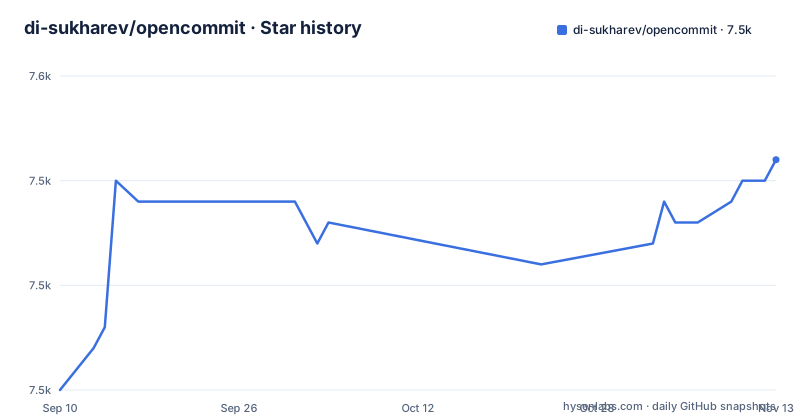
Star history
- di-sukharev/opencommit7,546 ★ · +11
| Repository | 2026-09-10 | 2026-11-13 |
|---|---|---|
| di-sukharev/opencommit | 7.5k | 7.5k |
11 Stars in the last 64 days, measured from the daily GitHub snapshot. Compare with other projects
Editorial analysis
The gap OpenCommit fills is the message box, not the commit
Git already records what changed. The part that requires a human is the sentence above the diff, and that sentence is what reviewers, bisect searches and release notes depend on. OpenCommit targets exactly that step: you stage files, run oco, and the tool asks an LLM to produce a commit message from the staged diff. The README frames the goal as killing lame commits, and every commit in the repository itself is authored by OpenCommit, which the README offers as a demonstration. The intended user is a developer who commits often and finds message writing a tax. It is not a review tool, not a changelog generator and not a replacement for thinking about what you staged. The scope is narrow on purpose, and that narrowness is the reason the tool is small enough to reason about.
What actually happens between git add and the commit
The flow described in the README is short. After installation, oco reads the staged changes, sends them to the configured provider, receives a message, and commits. Running git add first is optional because oco will stage for you. Emoji behaviour is configurable in two places: OCO_EMOJI turns GitMoji on, but without the --fgm flag the tool restricts itself to a set of ten emojis, and the README states the reason plainly, which is to limit the number of tokens sent in each request. That is a design decision worth noticing: the default is a token budget compromise, not a stylistic preference. OCO_EMOJI_POSITION_BEFORE_DESCRIPTION controls whether the emoji sits immediately before the subject.
Install, key, and the first commit
The README gives a three step setup. Install globally with npm install -g opencommit. Obtain an API key from OpenAI or another supported provider. Then run oco config set OCO_API_KEY=<your_api_key>. The key is stored locally in ~/.opencommit. From there, git add <files...> followed by oco produces the commit. Provider selection is a config key, not a separate binary: OCO_AI_PROVIDER accepts openai (the default), anthropic, azure, ollama, llamacpp, gemini, flowise, deepseek, aimlapi, openrouter or orcarouter. Model choice is OCO_MODEL, set for example with oco config set OCO_MODEL=gpt-4o-mini. Token ceilings are explicit: OCO_TOKENS_MAX_INPUT defaults to 4096 and OCO_TOKENS_MAX_OUTPUT to 500. OCO_REASONING overrides reasoning-model auto-detection with true or false and is omitted by default, and OCO_REASONING_MAX_TOKENS sits alongside it. Configuration can live globally in ~/.opencommit or per repository in a .env file, and the README states local config takes priority over global. The split is deliberate: set OCO_MODEL and locale globally, set OCO_EMOJI and OCO_DESCRIPTION per repo. oco config describe lists the available parameters and accepted values.
Local models change the cost and privacy equation
Ollama and llama.cpp are first class providers here, which matters because the alternative is sending diffs to a hosted API. For Ollama the README instructs you to install and start it, pull a model once with ollama run mistral, then run oco config set OCO_AI_PROVIDER='ollama' OCO_MODEL='llama3:8b' in the project directory. The default Ollama model is mistral. If Ollama runs on another machine or in Docker with GPUs, OCO_API_URL points at it, for example oco config set OCO_API_URL='http://192.168.1.10:11434/api/chat'. The README documents a specific failure mode for this path: a connect ECONNREFUSED ::1:11434 error, attributed to Ollama not listening on IPv6 by default, fixed by exporting OLLAMA_HOST=0.0.0.0 before starting Ollama. For llama.cpp the setup is to build it, start the server with a GGUF model on a port, then set OCO_AI_PROVIDER='llamacpp' and OCO_API_URL to the server address. What you get in return is that the diff does not have to leave your network.
Where the design puts friction, and why that is not a flaw
By default oco asks you to confirm the generated message before committing. The --yes flag skips that confirmation, and the README describes it as useful for users who want to avoid additional steps. Read those two sentences together and the tool's position becomes clear: the confirmation step is the safety mechanism, and --yes is the opt-out. A generated message that mischaracterises a change is worse than no message, because it misleads whoever reads the log later. There is a second, less discussed exposure. The diff you stage is sent to whichever endpoint OCO_API_URL resolves to, and diffs occasionally contain credentials, internal hostnames or customer data. The repository carries a .opencommitignore file, but do not assume it filters secrets out of a diff; that responsibility sits with the user and with the choice between a hosted provider and a local one. OCO_API_CUSTOM_HEADERS, which takes a JSON string of custom HTTP headers, exists for proxy and gateway setups, and it is worth understanding what those headers contain before pointing the tool at a shared endpoint.
The realistic alternative is a commit hook, not another wrapper
The closest thing to a competitor in this space is a git hook that runs a generation step on commit, and the repository itself carries github-action releases from May 2023, which suggests the project has explored CI-side generation too. The difference in approach is real. A hook fires automatically at commit time, so the message is produced whether or not you were ready to think about it, and the diff goes to the provider on every commit. OpenCommit's CLI model is manual: you run oco when you want it, and the default confirmation step keeps you in the loop. That is a different posture toward automation, and for a tool whose output lands in permanent history, manual invocation is the more defensible default. The cost is that you must remember to type oco, and nothing enforces consistency across a team the way a hook would.
Maintenance, licence and what the release history suggests
OpenCommit is MIT licensed, which permits commercial use, modification and redistribution provided the copyright notice and licence text are preserved. That is a permissive arrangement with few obligations, though it says nothing about the terms of the LLM provider you point it at, and those terms are where the real constraints usually live. The repository is not archived and the last push is dated 2026-11-01, so the project is active. The release list is less reassuring on one point: the only tagged releases shown are github-action-v1.0.2, github-action-v1.0.1 and github-action-v1, all from 2023-05-21. The CLI, which is what the README is mostly about, does not appear in that release list. That does not mean the CLI is unmaintained, since pushes continue, but it does mean version pinning for the CLI is harder to reason about than for a project with regular tagged releases. If you need a reproducible version in a team environment, verify how the npm package versioning relates to the repository's commit history before standardising on it.
Editorial conclusion
Adopt OpenCommit if you already stage changes deliberately and want the message text drafted for you, and if you are willing to keep an API key in ~/.opencommit or point OCO_AI_PROVIDER at a local Ollama or llama.cpp endpoint. Do not adopt it if your commit messages carry review or compliance weight, if your diffs routinely contain secrets, or if you cannot accept a generated message landing in history with --yes. Verify first that your chosen provider and model respond under the token limits you set in OCO_TOKENS_MAX_INPUT and OCO_TOKENS_MAX_OUTPUT.
Frequently asked questions
What is OpenCommit?
It is an MIT licensed command line tool that generates a commit message from your staged changes using a language model. You install it globally, set a provider key through its config command, and then run the short command name in a repository; staging your changes first is optional because the tool will do it for you.
How do I install OpenCommit?
Install it globally with your package manager so it is available in any repository, then set your provider API key through the tool's config command. The key is stored locally in a hidden config file in your home directory, and the readme notes that a hosted provider account needs payment details set up for the API to work.
How do I use OpenCommit with a local model?
Start a local model server first, then point the tool at it with the provider and model settings. For one local runtime the readme gives three steps, including pulling the default model once; for the other runtime you start its server with a model file and a port, then set the provider and API URL. If the server runs on another machine, set that machine's URL instead of the local one.
How do I configure OpenCommit?
Two ways: a dotenv file in a repository for per-project settings, or the config set command for global settings stored in your home directory, where local settings take priority. The readme suggests setting the model and locale globally and the emoji and description settings per repository. Two further commands list all available parameters or describe one of them.
Official sources
Add this badge to your README
If you maintain this project, the badge below links readers to this analysis and shows its maintenance status from the daily GitHub snapshot. Paste the markdown into your README; add ?metric=license or ?metric=stars to the image URL for a different field.

[](https://hysenlabs.com/projects/di-sukharev-opencommit)Star history chart for your README
[](https://hysenlabs.com/projects/di-sukharev-opencommit)Was this useful?