svu: working out the next semantic version from your git history
semantic version utility
At a glance
- What is it?
- svu is a small Go helper for release scripts and workflows that bumps a version, either when you tell it which part to increase or by reading the conventional commit messages in the git log and deciding for itself. It is a command line tool with six install routes, a YAML configuration file, and a v3 module path that means the earlier major versions are separate import paths.
- Who is it for?
- svu suits a project that follows conventional commits and wants the version bump derived from the history rather than typed by hand on every release, and the built-in docker image makes it easy to run in a pipeline that has no Go toolchain.
- Can I use it commercially?
- Yes. MIT is a permissive licence: you can use, modify and sell software built on it, as long as you keep its copyright and licence notices.
- Is it still maintained?
- Yes. The repository last received commits 5 days ago.
- What is it written in?
- Mainly Go, according to GitHub's language statistics.
Answers come from the project's GitHub data, last synced on November 7, 2026, and from our analysis. They are not legal advice.
Star history
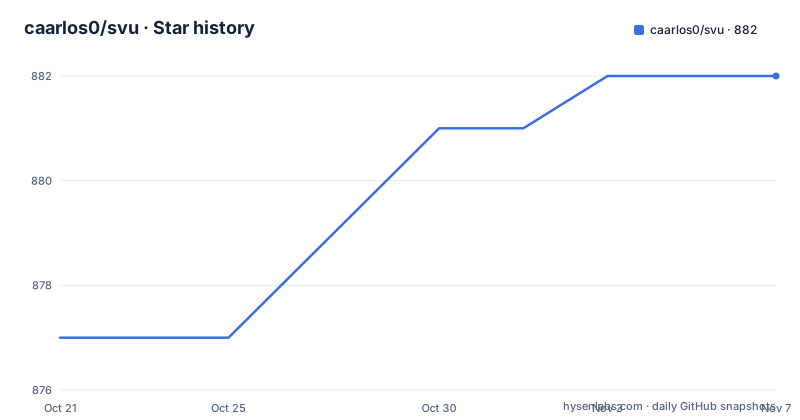
- caarlos0/svu882 ★ · +5
| Repository | 2026-10-21 | 2026-11-07 |
|---|---|---|
| caarlos0/svu | 877 | 882 |
5 Stars in the last 17 days, measured from the daily GitHub snapshot. Compare with other projects
Editorial analysis
The next command reads your commit messages
The command you will use most is next, with the short form n. It checks your git log and automatically increases and returns the new version based on a table that maps commit message prefixes to a version part. A chore prefix changes nothing. A fix prefix gives a patch increase. A feat prefix gives a minor increase. A fix with a BREAKING CHANGE footer gives a major increase, and so does a fix with the exclamation mark after the type, and a feat with the exclamation mark. The exclamation mark form is worth calling out, because a breaking change announced only in the body of a message is easy to miss, and a breaking change announced only by a trailing exclamation is easy to miss too, so the tool accepts both and treats either as major. The underlying rule comes from the semantic versioning specification, which the readme links to. svu provides both utility commands and functions, so the same logic is available to a Go program that wants to compute a version rather than print one.
An alias that turns the answer into a tag
The readme suggests turning the output into a tag directly, with a shell alias:
alias gtn='git tag $(svu next)'That is the whole release flow in one line, and it explains the design of the tool. svu does not create tags, it prints a version, and it deliberately leaves the tagging to git so the command stays composable with whatever else your release process does. The readme also points out that you can run svu --help for the list of subcommands and flags, which matters because the automatic mode is only one of them, and there are also explicit commands for increasing a specific part of the version by a specific amount. The distinction between the two is the design decision worth knowing: svu is a calculator that can also read your history, not a release manager that owns your tags.
Configuration lives in a .svu.yml with the flag names
Every flag option can also be set in a.svu.yml in the current directory or the repository root folder, and the naming convention is that the keys are the same as the flags themselves. The example is three lines:
tag.prefix: ""
always: true
v0: true
The tag.prefix key sets the prefix put in front of the version when a tag is generated, always turns on the behaviour of applying a change even when the result is the same as the current version, and v0 turns on zero major version handling. The repository root carries a.svu.yml for the project itself, and there are also example.svu.yaml and mono-repo-example.svu.yml files alongside an examples.sh script, which tells you the tool is expected to be used in monorepos where several components need different version handling. The go.mod lists viper, the configuration library, as a direct dependency, so the config file loading is its job.
Five ways to install, and the one that suits a pipeline
The install section is a set of collapsed blocks, one per platform. On macOS it is a single brew command. On Debian and Ubuntu you add a repository line for the apt.fury.io service, update the index and install. On the yum side the same pattern applies with a yum.fury.io baseurl and a repository file dropped into /etc/yum.repos.d. The docker route runs the published image with the current directory mounted at /tmp and the working directory set there, which is what you want in a pipeline with no Go toolchain. And go install pulls the module at its latest version. There is also a manual route, downloading a binary from the releases tab, and a packaging status badge from repology to see which distributions carry it. The go install command is:
go install github.com/caarlos0/svu/v3@latestNote the v3 in the path, which is the module major version, and the same v3 appears in the module path in the go.mod and in the documentation link. That is the semantic import versioning rule, and it means the v1 and v2 releases of this tool are separate import paths rather than upgradeable in place.
The dependencies are the standard Go stack plus a terminal UI library
The module is a single module, github.com/caarlos0/svu/v3, requiring Go 1.25.3, and the direct dependencies tell you what it does. Masterminds/semver is the semantic version handling, cobra and pflag are the command line and flag parsing, viper is the configuration, gobwas/glob does the matching, and caarlos0/go-version is the author's own version helper. There is also charm.land/fang/v2, which is the newer terminal interface library, with lipgloss and the charmbracelet stack behind it as indirect dependencies, so the help output and the error messages are rendered as a styled terminal interface rather than plain text. testify is there for the tests. The fact that a version calculation tool pulls in a terminal rendering stack is a small signal about where the author expects it to run, which is a developer machine or a CI job with a terminal attached, not a library embedded in something else.
The docker image ships a packaged binary rather than a build
The container image is built in a way that is worth understanding if you plan to run it in CI. It starts from alpine, installs git, and copies in an apk file that is named after the target platform, so the build is a packaging step rather than a compile of the Go source inside the image. Git is needed because the whole point of the tool is to read the history, and the image sets safe.directory to a wildcard because the mounted checkout will not be owned by the user running in the container. The entrypoint is the svu binary itself, so the container takes the same arguments as the installed tool, which is why the docker run example in the readme is just the help flag. The changelog and the release history show a steady cadence with v3.4.1 in May 2026, v3.4.0 in February and v3.3.0 in November 2025, and the repository also carries a goreleaser configuration and a golangci configuration, so the release binaries are produced by the same tooling that most Go projects use.
Editorial conclusion
svu suits a project that follows conventional commits and wants the version bump derived from the history rather than typed by hand on every release, and the built-in docker image makes it easy to run in a pipeline that has no Go toolchain. It does not suit a project whose commit messages are not conventional, because the automatic mode is only as good as the message format, and the automatic decision is a guess about intent that a human can override with the explicit commands. Before you wire it into a release, read the table of commit prefixes against tag increases, and decide whether you want the tool to guess or to be told.
Frequently asked questions
How do I install svu?
Run brew install svu on macOS, add the apt.fury.io repository and install on Debian and Ubuntu, add the yum.fury.io repository and install on the yum side, run the published docker image, use go install github.com/caarlos0/svu/v3@latest, or download a binary from the releases tab. A repology badge shows which distributions package it themselves.
How does svu decide which part of the version to increase?
The next command reads the git log and applies a table of commit prefixes. A chore prefix changes nothing, a fix prefix gives a patch increase, a feat prefix gives a minor increase, and a fix or feat carrying a BREAKING CHANGE footer or a trailing exclamation mark gives a major increase.
Can I configure svu without command line flags?
Yes. Every flag option can also be set in a .svu.yml in the current directory or the repository root, with the key names the same as the flags. The repository includes example.svu.yaml and mono-repo-example.svu.yml alongside an examples.sh script for monorepo setups.
Does svu create the git tag itself?
No, it prints the new version and you decide what to do with it. The readme suggests an alias, gtn='git tag $(svu next)', that feeds the output straight into git tag, and there are also explicit commands to increase a specific part of the version by a chosen amount.
Official sources
Add this badge to your README
If you maintain this project, the badge below links readers to this analysis and shows its maintenance status from the daily GitHub snapshot. Paste the markdown into your README; add ?metric=license or ?metric=stars to the image URL for a different field.

[](https://hysenlabs.com/projects/caarlos0-svu)Star history chart for your README
[](https://hysenlabs.com/projects/caarlos0-svu)Was this useful?