js-dos: Running DOS and Windows 9x Applications in a Browser
The best API for running dos programs in browser
At a glance
- What is it?
- js-dos packages DOSBox and DOSBox-X behind a browser and Node.js interface, with WebAssembly, local persistence, networking, audio, and disk streaming options. It is best suited to application developers who need to embed and operate legacy DOS software rather than merely showcase isolated games.
- Who is it for?
- Web developers should consider js-dos when the requirement is to run DOS or Windows 9x software inside an application and when browser storage, streaming, audio, and networking are part of the product. Developers seeking a low-level emulator library or a conventional installation package should first inspect the linked 8.xx documentation, since this repository describes development setup rather than a complete consumer installation tutorial.
- Can I use it commercially?
- Not without permission. GitHub finds no licence file in the repository, and without a licence all rights are reserved by default: you may read the code but not reuse it. Check the README, or ask the authors, before using it.
- Is it still maintained?
- Yes. The repository last received commits 32 days ago.
- What is it written in?
- Mainly TypeScript, according to GitHub's language statistics.
Answers come from the project's GitHub data, last synced on November 6, 2026, and from our analysis. They are not legal advice.
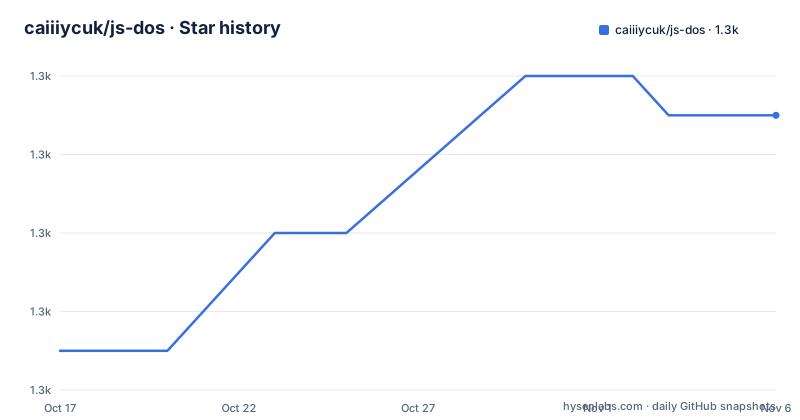
Star history
- caiiiycuk/js-dos1,347 ★ · +6
| Repository | 2026-10-17 | 2026-11-06 |
|---|---|---|
| caiiiycuk/js-dos | 1.3k | 1.3k |
6 Stars in the last 20 days, measured from the daily GitHub snapshot. Compare with other projects
Editorial analysis
Why js-dos Targets Embedded Legacy Software
js-dos solves a specific integration problem: making DOS and Windows 9x applications executable through a modern web application without requiring each visitor to install an emulator. The intended audience includes developers building browser game portals, interactive archives, remote demonstration systems, and other experiences around legacy software. The repository describes itself as a frontend for the separate emulators project, so its role is not merely an emulator engine. It adds the interface and operational infrastructure required to launch programs and manage features such as storage, networking, audio, and large disk images.
The supported execution range is broader than conventional DOSBox use in some respects. The README lists DOSBox and DOSBox-X as multiple backends and specifically identifies Windows 9x support through DOSBox-X. It also states that prebuilt Windows 95 and 98 system images are available, along with Windows games that need DirectX or 3Dfx drivers. That makes js-dos relevant when preserving an entire legacy operating environment matters, not only when launching one `.exe`, `.bat`, or `.com` file.
There is a clear boundary around custom player development. The README directs developers who want to build their own DOS player to the emulators packages instead. js-dos is the better fit when a ready interface and operational features are wanted. Using the lower-level packages makes more sense when the project needs to replace or substantially reshape the presentation layer itself.
How the Emulator, Browser Infrastructure, and Data Flow Fit
The repository layout points to a TypeScript application built with Preact, Redux Toolkit, and Vite. `package.json` identifies the package as `js-dos` version 8.5.3, while the development instructions use the `emulators` distribution as the runtime content copied into `public/emulators`. This separation is significant: the frontend and project infrastructure live in `src/`, Vite configuration, and UI dependencies, while emulator assets are supplied by another package.
At execution time, js-dos can place the emulator in a worker or on the render thread. Both browser and Node.js execution are documented. The presence of WebAssembly and pure JavaScript versions gives integrators more than one implementation route, although the README does not identify a configuration switch for selecting between them. AudioWorklet mode and an experimental JSPI backend are also listed. These details point to a design that adapts the execution path and multimedia output rather than treating DOSBox as a black-box process.
Large software introduces another data-flow problem. Sockdrive V2 provides backendless streaming drives, preload modes, and persistence handling, which can keep large disk images out of the ordinary application bundle path. Persistence is based on OPFS, with filesystem changes, storage usage information, and `fsChanges` hooks for custom save storage. The README therefore treats saved game state and disk modifications as data that the host application may need to observe or route, rather than only as emulator-local memory.
Browser Networking, Rendering, and Windows 9x Features
js-dos includes an IPX networking stack powered by WebRTC-NET. The README lists IPX server creation, direct peer and alias connections, and shared network instances. This is more than a claim that classic multiplayer games can start. It describes several connection models, including a server, direct links between peers, and shared instances. An engineer choosing js-dos for multiplayer still needs to verify how the host page manages signaling, lifecycle, and user authorization, because those details are not included in the repository README.
Rendering has a similarly specific target. The project advertises WebGL-backed accelerated 3Dfx rendering and support for Windows games that use 3Dfx drivers. Turbo controls expose CPU metrics, speed, cycles, fast forwarding, and frame skipping. Those controls are useful for a host application because they expose emulator timing decisions through the player interface instead of requiring every integration to build its own controls.
Mobile support requires version-specific attention. The README labels v8 mobile support as work in progress and v7 mobile support as production. An application targeting current mobile users should not treat the v8 status as equivalent to a completed feature. Desktop browser behavior and mobile behavior should be considered separate acceptance targets when evaluating the current line.
Running the js-dos Development Server for the First Time
The repository does not provide a consumer installation command or a first-application API example in the README excerpt. It links to the js-dos 8.xx documentation for integration guidance. The documented commands below are development commands for a checkout of the repository. They prepare emulator assets and start the Vite development environment; they should not be mistaken for a production deployment procedure.
From a source checkout, install the dependencies using the command printed in the README:
yarnNext, copy the distributed `emulators` files into the public asset directory:
cp -rv node_modules/emulators/dist/* public/emulatorsFinally, start the project development server:
yarn run viteThe README states that the application is then available at `http://localhost:3000`. The `package.json` also defines `yarn run dev` as a Vite script and a production-oriented `build` script consisting of `tsc` followed by `vite build`. However, because the README does not document an `emulators` copy as part of `build`, a source contributor should not assume the production build removes the separate asset-copy requirement.
For an application integrator, the first useful follow-up is the linked 8.xx documentation. The README does not show the exact initialization call, bundle packaging rules, or deployment configuration.
Deployment, Licensing, and Version Upgrade Boundaries
The `package.json` declares `GPL-2.0`, which corrects the unknown license shown in the repository summary. That identifier is a concrete licensing fact, but this review does not provide legal advice about how it applies to a particular distribution or deployment. An organization considering js-dos should inspect its own build and hosting arrangement against the GPL-2.0 terms before adoption.
The repository includes `README.deployment.md`, a production build script, environment support, and multiple emulator backends, but the README does not explain deployment requirements such as headers, cross-origin isolation, asset hosting, or service-worker behavior. OPFS, WebRTC, WebGL, WebAssembly, AudioWorklet, and JSPI each interact with browser capabilities in different ways. The presence of these features does not prove that every browser and deployment target supports the same combination.
Maintenance activity is visible. The repository is not archived, the last push was on 2026-10-07, and the listed releases include v8.5.3 on 2026-10-07, v8.5.2 on 2026-10-07, and v8.5.1 on 2026-10-01. The close release sequence is evidence of recent project changes, not proof that upgrades are free of migration work. The moving boundary between v7 and v8 mobile support illustrates one upgrade concern, while changes among emulator backends, storage APIs, rendering modes, and experimental JSPI support require release-by-release review.
Where js-dos Is the Wrong Level of Abstraction
The clearest wrong-tool case is a developer seeking direct access to emulator internals for a custom player. The README explicitly recommends the emulators packages for that purpose. js-dos adds a full-featured player UI and infrastructure, so using it solely to replace a small rendering component would add a layer whose main value is not being used.
js-dos is also a poor assumption for ordinary native application deployment. A modern 32-bit or 64-bit program that does not belong to the DOS or Windows 9x compatibility target is outside the documented scope. Nor should its v8 mobile status be treated as production readiness, because the README explicitly marks that support as work in progress.
Large disk streaming does not mean unlimited capacity. Sockdrive V2 and preload modes exist because disk images can be large, but the README does not state browser storage quotas, supported image formats, expected load behavior, or limits imposed by the selected backend. Likewise, the OPFS persistence feature requires an application to account for browser storage availability and lifecycle. The repository does not provide enough information to guarantee behavior under storage denial, quota exhaustion, interrupted downloads, or private browsing restrictions.
js-dos Versus the Lower-Level emulators Packages
The practical alternative documented by the project is the separate emulators project. Both approaches concern running emulated software, but they sit at different abstraction levels. js-dos presents a complete DOS player with interface and infrastructure. Its documented capabilities include DOSBox and DOSBox-X backends, rendering controls, audio paths, persistence, IPX networking, Windows 9x support, and streaming drives.
The emulators packages are the lower-level choice when a developer intends to build a custom DOS player. js-dos itself makes that recommendation. They should therefore be compared by UI ownership, not by treating them as interchangeable names. An integrator that wants js-dos-style controls, storage behavior, and browser deployment support can start with js-dos. A renderer or tool author that will replace the player UI and manage emulator behavior directly has a more appropriate starting point in emulators.
The repository does not publish a migration guide, compatibility matrix, or size comparison between the two approaches in the README. It also does not document whether every js-dos backend is exposed identically by emulators. A product decision must therefore include an inspection of the linked 8.xx documentation and, for custom player work, the emulators package API.
Editorial conclusion
Web developers should consider js-dos when the requirement is to run DOS or Windows 9x software inside an application and when browser storage, streaming, audio, and networking are part of the product. Developers seeking a low-level emulator library or a conventional installation package should first inspect the linked 8.xx documentation, since this repository describes development setup rather than a complete consumer installation tutorial.
Frequently asked questions
Can js-dos run Windows 95 and Windows 98 applications?
Yes. The README states that js-dos supports Windows 9x through DOSBox-X, including prebuilt Windows 95 and 98 system images and Windows games requiring DirectX or 3Dfx drivers.
Does js-dos support browser multiplayer through IPX?
Yes. Its IPX stack is powered by WebRTC-NET and supports server creation, direct peer or alias connections, and shared network instances.
How do I save changes from a js-dos browser session?
js-dos uses OPFS for local persistence and exposes filesystem changes, storage usage information, and `fsChanges` hooks for custom save storage. The README does not document rollback.
Official sources
Add this badge to your README
If you maintain this project, the badge below links readers to this analysis and shows its maintenance status from the daily GitHub snapshot. Paste the markdown into your README; add ?metric=license or ?metric=stars to the image URL for a different field.

[](https://hysenlabs.com/projects/caiiiycuk-js-dos)Star history chart for your README
[](https://hysenlabs.com/projects/caiiiycuk-js-dos)Was this useful?