React Native Bottom Tabs: Native Tab Navigation
Native Bottom Tabs for React Native
At a glance
- What is it?
- React Native Bottom Tabs provides bottom tab navigation built from native platform primitives across iOS, Android, iPadOS, visionOS, tvOS, and macOS. It fits React Native applications with native navigation requirements, but the README explicitly excludes native web support.
- Who is it for?
- React Native Bottom Tabs suits teams building React Native applications that need bottom tabs backed by native platform primitives across several platforms. It is the wrong standalone choice when an application requires native tabs on web, because the README states that those primitives are unavailable there.
- Can I use it commercially?
- Yes. MIT is a permissive licence: you can use, modify and sell software built on it, as long as you keep its copyright and licence notices.
- Is it still maintained?
- Yes. The repository last received commits 2 days ago.
- What is it written in?
- Mainly TypeScript, according to GitHub's language statistics.
Answers come from the project's GitHub data, last synced on November 7, 2026, and from our analysis. They are not legal advice.
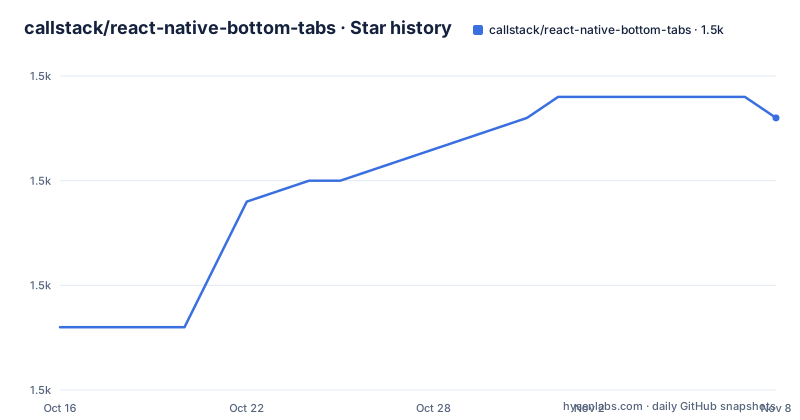
Star history
- callstack/react-native-bottom-tabs1,474 ★ · +11
| Repository | 2026-10-16 | 2026-11-07 |
|---|---|---|
| callstack/react-native-bottom-tabs | 1.5k | 1.5k |
11 Stars in the last 22 days, measured from the daily GitHub snapshot. Compare with other projects
Editorial analysis
Native bottom tabs for React Native applications
React Native Bottom Tabs addresses the bottom tab navigation layer of a React Native application while relying on native platform primitives rather than drawing the entire control from JavaScript. That design is aimed at teams that want a tab bar connected to native navigation behavior on each operating system. The README describes the project as "Native Bottom Tabs for React Native" and identifies TypeScript as the primary language.
The package is relevant to developers who already have a React Native application and need a reusable bottom-tab interface. It is especially relevant when one product supports several native targets, because the README lists iOS, Android, iPadOS, visionOS, tvOS, and macOS. The repository topics also include `react-navigation`, indicating that the project has a relationship with the React Navigation ecosystem, although the README does not expose the complete navigation API or state model.
This is not a general-purpose navigation package. Its specific purpose is to supply native bottom tabs. A product that only needs web navigation, or a product whose tab design depends on behavior outside the supported native primitives, may need another solution or a separate platform implementation.
Platform coverage and the web limitation
The clearest documented strength is native platform coverage. The README marks iOS, Android, iPadOS, visionOS, tvOS, and macOS as supported. This makes the package a candidate for React Native products that ship across mobile, tablet, spatial, television, and desktop environments.
The repository also contains native build tasks named `build:android`, `build:ios`, and `build:macos`. That layout is consistent with platform-specific native code, but these are repository scripts rather than documented application installation commands. The README does not explain how an external React Native project should invoke them.
Web support is an explicit boundary. The README says the library uses native platform primitives that are not available on web, then refers users to a Web Platform Support guide. Therefore, a team cannot assume that the same package will provide a native bottom tab bar in a web build. A cross-platform application must plan for that distinction. The README does not say whether the web guide uses a replacement component, a fallback, or a separate implementation, so the exact approach should be confirmed in the linked guide.
Core package, React Navigation package, and Expo template
The repository is a monorepo with separate packages for the native tab implementation and related integration paths. The README identifies `react-native-bottom-tabs`, `@bottom-tabs/react-navigation`, and `@bottom-tabs/expo-template`. This separation gives consumers a choice based on their existing application structure.
`react-native-bottom-tabs` is the core package associated with native bottom tabs. `@bottom-tabs/react-navigation` is the package for projects that need to connect bottom tabs with React Navigation. `@bottom-tabs/expo-template` gives Expo users a template-oriented starting point. The README does not document their full APIs, so it would be inaccurate to claim that the core package, React Navigation package, and Expo template can be combined in any particular order.
Recent release records show coordinated release activity. `react-native-bottom-tabs` and `@bottom-tabs/react-navigation` both list version `1.4.0` dated 2026-07-09. `@bottom-tabs/expo-template` lists version `1.1.3` from the same date. These records confirm published releases, but they do not establish compatibility between every combination of versions. An application should read the release notes and dependency requirements before upgrading all related packages together.
Installation and first use documented by the project
The README does not include installation commands, configuration keys, initialization code, or a first-use example. It directs readers to the full documentation at `https://oss.callstack.com/react-native-bottom-tabs/`. The repository also contains a `CONTRIBUTING.md` file for contributors, but that is for development workflow rather than application setup.
The exact setup steps are not documented in the README. A first-use tutorial must begin with the project's documentation. Teams using React Navigation should inspect the documentation for `@bottom-tabs/react-navigation`. Teams using Expo should begin with `@bottom-tabs/expo-template`. Teams choosing the native primitive layer directly should inspect the documentation for `react-native-bottom-tabs`.
The first practical verification should be narrow: follow the documented setup, build the smallest application that uses the intended package, and inspect the tab bar on each required native target. The repository's native build scripts indicate that platform-specific builds exist, but the README does not provide commands for using those scripts in an external application. They should not be treated as installation instructions.
Native primitives bring a concrete compatibility trade-off
The central design decision is also the main limitation. React Native Bottom Tabs uses native platform primitives. That can align the tab bar with the target operating system's navigation conventions, but it makes web unavailable through the same implementation. The README states this limitation directly, so a cross-platform product must treat web as a separate compatibility concern.
The README is less specific about customization. It does not state which visual properties can be customized, how badges are configured, how screen transitions behave, how state is preserved, or how accessibility and keyboard navigation are handled. Engineers evaluating a product-specific tab design should obtain those answers from the full documentation rather than infer them from the package name.
Native behavior may also depend on the React Native and operating-system versions selected by the application. The README lists supported operating systems but does not publish a complete version compatibility matrix. A team should build the targets it plans to ship and verify navigation behavior there. This check is especially important for iPadOS, visionOS, tvOS, and macOS, where a mobile-only test would not establish complete coverage.
React Navigation integration and package boundaries
The separate `@bottom-tabs/react-navigation` package confirms that React Navigation integration is an intentional package boundary. A React Native application that already uses React Navigation can examine this package as the connection between its navigation structure and native bottom tabs. This differs from evaluating the core package as an independent tab layer.
The practical difference is route ownership. React Navigation projects need the bottom tab control to fit an existing navigator and route hierarchy. A project evaluating the core package must determine how it will manage screen changes and tab state itself. The README does not provide enough API detail to describe those internals or to claim that one package is always preferable.
This comparison is concrete rather than speculative. Use the dedicated React Navigation package when React Navigation already controls application navigation. Evaluate the core package when the team is selecting the native bottom-tab implementation independently and can define the surrounding navigation structure. The choice should follow the application's existing architecture and its required platforms.
Maintenance, releases, and MIT upgrade implications
The repository is not archived, and its last push was on 2026-09-24. It lists recent releases for the core package, the React Navigation integration, and the Expo template. These facts indicate current repository and release activity. They do not establish a long-term support policy, because the README does not promise response times, compatibility windows, or maintenance duration for individual platforms.
The repository uses Yarn workspaces and declares `[email protected]` as its package manager. Its root scripts include `build`, `build:android`, `build:ios`, `build:macos`, `lint`, `test`, and `typecheck`. The root package is private and named `@bottom-tabs/monorepo`, while the README lists the public packages separately. Consumers should therefore expect to evaluate package-level releases rather than treating the repository as one undifferentiated application.
The project is licensed under MIT. That license governs use and modification under its conditions, but this article does not provide legal advice. Teams should retain applicable license notices and review their own distribution requirements. Upgrade planning should include reading changesets and release notes for each installed package, especially when the core package, React Navigation integration, and Expo template are used together.
Editorial conclusion
React Native Bottom Tabs suits teams building React Native applications that need bottom tabs backed by native platform primitives across several platforms. It is the wrong standalone choice when an application requires native tabs on web, because the README states that those primitives are unavailable there. Before adoption, verify the installation instructions in the project documentation, confirm the target platform compatibility, and check how `@bottom-tabs/react-navigation` fits the existing navigation architecture.
Frequently asked questions
Does React Native Bottom Tabs support web?
The README states that the library uses native platform primitives that are not available on web. It directs users to the project's Web Platform Support guide for web coverage.
Which platforms does React Native Bottom Tabs support?
The README lists iOS, Android, iPadOS, visionOS, tvOS, and macOS as supported platforms.
Which package should a React Navigation project use?
The repository provides `@bottom-tabs/react-navigation` for React Navigation integration. Teams should inspect that package's documentation before adding it to an existing navigation structure.
Official sources
Add this badge to your README
If you maintain this project, the badge below links readers to this analysis and shows its maintenance status from the daily GitHub snapshot. Paste the markdown into your README; add ?metric=license or ?metric=stars to the image URL for a different field.

[](https://hysenlabs.com/projects/callstack-react-native-bottom-tabs)Star history chart for your README
[](https://hysenlabs.com/projects/callstack-react-native-bottom-tabs)Was this useful?