InfraTech: AI Infrastructure Notebooks for Inference Internals and Parallel Strategies
Sharing AI infrastructure knowledge and code exercises: introductions to PyTorch, vLLM/SGLang and the slime/vime frameworks, performance acceleration, LLM fundamentals, AI hardware and software, and more.
At a glance
- What is it?
- CalvinXKY/InfraTech is a Jupyter Notebook collection covering vLLM and SGLang internals, attention and KV cache mechanics, quantization and parallel inference. It is study material, not a library, and its value depends on whether you want to read implementation-level notebooks rather than run a framework.
- Who is it for?
- Adopt InfraTech if you are an inference engineer or graduate student who learns by reading notebook code that reproduces scheduler, attention and memory-management behaviour, and you already have a working PyTorch environment. Do not adopt it if you need a supported package, an API, or installable tooling, because the repository is a knowledge collection with no published releases and no documented licence.
- Can I use it commercially?
- Not without permission. GitHub finds no licence file in the repository, and without a licence all rights are reserved by default: you may read the code but not reuse it. Check the README, or ask the authors, before using it.
- Is it still maintained?
- Yes. The repository last received commits 56 days ago.
- What is it written in?
- Mainly Jupyter Notebook, according to GitHub's language statistics.
Answers come from the project's GitHub data, last synced on November 15, 2026, and from our analysis. They are not legal advice.
Star history
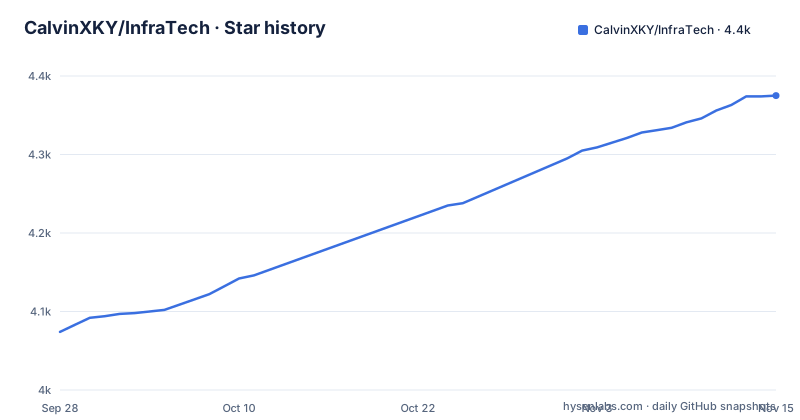
- CalvinXKY/InfraTech4,375 ★ · +301
| Repository | 2026-09-28 | 2026-11-15 |
|---|---|---|
| CalvinXKY/InfraTech | 4.1k | 4.4k |
301 Stars in the last 48 days, measured from the daily GitHub snapshot. Compare with other projects
Editorial analysis
What InfraTech Actually Is: A Notebook Curriculum, Not a Framework
The README opens by stating the repository introduces knowledge in the AI Infra field, covering training and inference frameworks, performance acceleration, deep learning and hardware fundamentals. The practice code is written in Python and presented as notebooks, which the README says is meant to help readers quickly understand or master the content. That framing matters for adoption decisions: nothing here is packaged, versioned or released. The top-level layout confirms the shape of the project. There are directories for deep learning framework topics, DeepSeek V3, docs, llm_infer, models, multi_lora, pytorch_vista and rl, plus a README and two QR code images. The primary language is Jupyter Notebook, so the repository is mostly prose plus executable cells rather than importable modules.
The audience is narrow and specific. If you are trying to understand why a vLLM scheduler behaves the way it does, or how RadixAttention reuses prefixes, the README's index points at a notebook for it. If you want a library to put in a requirements file, this is the wrong repository. The README describes a knowledge collection whose exercise code is delivered as notebooks, and the table of contents is organised by knowledge category and difficulty rather than by module or API.
Reading the Index: Difficulty Ratings and What Each Notebook Covers
The README's main table is the real entry point. Each row gives a notebook filename, a knowledge category, a description and a difficulty marked with lightning bolt symbols. Categories include Attention, distributed fundamentals, inference basics, parallel inference, Nano-vLLM, vLLM, SGLang, and a combined SGLang/vLLM row.
Several rows are explicitly about framework internals. vllm_basic_scheduler.ipynb is described as building a basic scheduler by hand, rated at two bolts. sglang_radix_attention.ipynb is described as tearing apart RadixAttention, also two bolts. nano_vllm.ipynb is framed as an entry point for building a knowledge system around Nano-vLLM at one bolt. vllm_mem_snapshot.ipynb covers visualising and managing vLLM GPU memory. switch_role_update_weights.ipynb analyses switching between SGLang and vLLM to reduce the cost of co-locating training and inference on the same cards during reinforcement learning.
Attention and memory rows include MLA computation flow with absorbed matrix comparison in the deepseek_v3 directory, a RoPE principle notebook under models/modules, and a notebook asking whether pooled KV cache data is faster than recomputation. The distributed fundamentals row, collective_operations.ipynb, covers collective communication principles and practice. Nearly every row links to an external article on Zhihu, so the repository functions as companion code for written explanations rather than as self-contained documentation. That is a real constraint: if you cannot read the linked article, a notebook's intent may be harder to reconstruct.
Opening a Notebook as Your First Real Use
The top-level tree has no requirements file, pyproject.toml or environment file. What it does document is that the exercise code is Python and presented as notebooks, and it lists the directories where those notebooks live. So the practical route is to obtain the repository and open a notebook in a Jupyter environment you already have.
Clone the repository from its default branch:
git clone https://github.com/CalvinXKY/InfraTech.gitThere is no requirements file among the listed top-level entries, so dependencies come from whatever each notebook imports. Start with a low-difficulty notebook to confirm your environment can execute cells. In the file browser, open llm_infer/nano_vllm.ipynb. The README rates it at one bolt and describes it as an entry point for building a knowledge system around Nano-vLLM, which makes it one of the least demanding starting points in the inference set. Run the cells in order and read the markdown between them; the notebook is the explanation, so skipping cells loses the argument. If a cell fails on an import, that is your signal about which framework version the notebook expects.
For a more demanding session, llm_infer/vllm_basic_scheduler.ipynb and llm_infer/sglang_radix_attention.ipynb are rated at two bolts. Expect them to assume more familiarity with the frameworks they dissect.
The Missing Environment Contract Is the Main Friction
With no requirements file, pyproject.toml or conda environment file among the top-level entries, this means reproducibility is on you. Notebooks that dissect a scheduler or a memory pool are tightly coupled to the framework version they were written against, and a signature change in a newer release can break cells in ways that look like your mistake rather than a version mismatch.
The licensing position is the other unresolved item. The licence field is unknown, and there is no LICENSE file among the top-level entries. Without a licence file, the default position is that no permission has been granted for reuse, which matters if you intend to copy notebook code into a product or an internal training course. That is a factual observation about the repository, not legal advice; if reuse matters, ask the maintainer directly.
Maintenance signals are mixed in a way worth stating plainly. The repository is not archived, and the last push was on 2026-09-20. That is recent activity. But there are no published GitHub releases, so there is no versioned artefact to pin, no changelog to read, and no upgrade path other than pulling the branch again.
InfraTech Compared with vLLM's Own Documentation and Source
The obvious alternative for the inference material is the vLLM project itself: its documentation and its source tree. The difference in approach is that vLLM ships a maintained library with versioned releases, an installable package and documentation that tracks the code, while InfraTech ships notebooks that reconstruct mechanisms for study. If your goal is to run an inference server, vLLM is the direct answer and InfraTech is not a substitute. If your goal is to understand why the scheduler admits requests the way it does, a notebook that builds a basic scheduler by hand covers ground that API documentation generally does not.
A second alternative for the attention and memory topics is the linked Zhihu articles themselves. Since nearly every row in the README's table points to an external write-up, the notebooks are companion code to those articles. Reading the article alone is faster; reading the notebook alone is harder without the article. The repository's value is the pairing.
For readers who want a broader AI infrastructure course rather than framework internals, this repository is also not the right fit. Its scope, as the README states, is training and inference frameworks, performance acceleration, deep learning and hardware fundamentals, delivered as notebook exercises. It is a specialist's reading list, not a curriculum with assessments or a progression guarantee.
Maintenance Cost and What a Fork Inherits
Anyone forking this repository inherits an unusual maintenance burden. There is no dependency manifest to update, so there is nothing to bump and nothing that will warn you when a framework release breaks a notebook. The work is manual: run the notebooks, find the broken cells, and fix them against the current framework API. That cost scales with how many notebooks you actually use, and the README's index lists well over twenty rows, so a full sweep is a real project.
The upgrade path is equally manual. With no published GitHub releases, there are no tags to diff between and no release notes to read. Upgrading means pulling the branch and re-running your chosen notebooks. The repository's recency, last push on 2026-09-20, means the content is close to current framework behaviour, but that says nothing about whether any individual notebook still executes.
Licence implications follow from the unknown licence field. If you plan to adapt notebook code into internal documentation or a product, the absence of stated terms is the thing to resolve before you invest in that adaptation, not after.
Editorial conclusion
Adopt InfraTech if you are an inference engineer or graduate student who learns by reading notebook code that reproduces scheduler, attention and memory-management behaviour, and you already have a working PyTorch environment. Do not adopt it if you need a supported package, an API, or installable tooling, because the repository is a knowledge collection with no published releases and no documented licence. Verify first which notebooks run end to end on your CUDA and framework versions, since the top-level tree has no environment or requirements file that would tell you.
Frequently asked questions
What is InfraTech by CalvinXKY?
It is a Jupyter Notebook repository that introduces AI infrastructure knowledge, covering training and inference frameworks, performance acceleration, deep learning and hardware fundamentals. The practice code is Python, delivered as notebooks rather than as an installable package.
Does InfraTech have installation instructions?
Not in the README's index, and the top-level tree has no requirements or environment file, so you clone the repository and open the notebooks in a Jupyter environment you already have. Dependencies come from whatever each notebook imports.
Which InfraTech notebook should a beginner start with?
The README rates nano_vllm.ipynb at one bolt and describes it as an entry point for building a knowledge system around Nano-vLLM, making it one of the least demanding notebooks in the inference set. The vLLM scheduler and SGLang RadixAttention notebooks are rated at two bolts.
Is InfraTech actively maintained?
The repository is not archived and the last push was on 2026-09-20. The repository has no published GitHub releases, so there is no versioned artefact and no changelog; updating means pulling the main branch again.
What licence does InfraTech use?
The licence field is unknown and there is no LICENSE file at the top level, so reuse permission is not documented in the repository. If you plan to copy notebook code, that is the question to raise with the maintainer.
Official sources
Add this badge to your README
If you maintain this project, the badge below links readers to this analysis and shows its maintenance status from the daily GitHub snapshot. Paste the markdown into your README; add ?metric=license or ?metric=stars to the image URL for a different field.

[](https://hysenlabs.com/projects/calvinxky-infratech)Star history chart for your README
[](https://hysenlabs.com/projects/calvinxky-infratech)Was this useful?