Carbon: A Code Screenshot Tool With a Narrow But Real Job
:black_heart: Create and share beautiful images of your source code
At a glance
- What is it?
- Carbon turns source code into styled PNG and SVG images for sharing. It is a web app with a desktop install option, and its value depends on how much you care about how code looks in a tweet or a blog post.
- Who is it for?
- Adopt Carbon if you regularly share code snippets on Twitter, Slack, or a blog and want them to look consistent without touching an image editor. Skip it if you need high-volume programmatic generation, precise control over rasterization, or a maintained codebase, since the last release (4.9.10) is from June 2022, although the repository received a push on 2026-10-27.
- Can I use it commercially?
- Yes. MIT is a permissive licence: you can use, modify and sell software built on it, as long as you keep its copyright and licence notices.
- Is it still maintained?
- Yes. The repository last received commits 10 days ago.
- What is it written in?
- Mainly JavaScript, according to GitHub's language statistics.
Answers come from the project's GitHub data, last synced on November 15, 2026, and from our analysis. They are not legal advice.
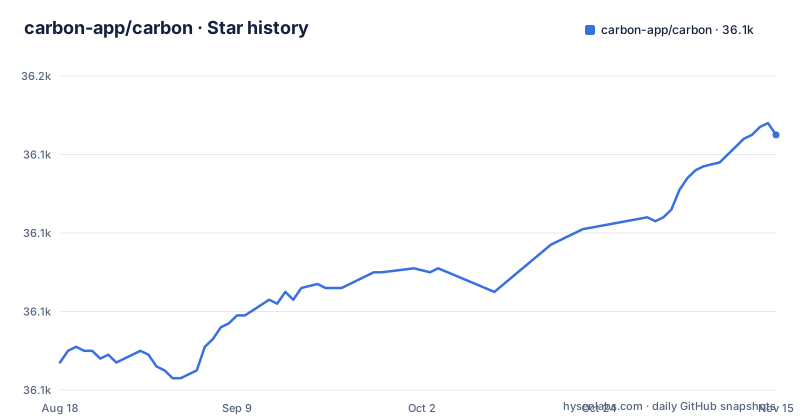
Star history
- carbon-app/carbon36,145 ★ · +58
| Repository | 2026-08-18 | 2026-11-15 |
|---|---|---|
| carbon-app/carbon | 36.1k | 36.1k |
58 Stars in the last 89 days, measured from the daily GitHub snapshot. Compare with other projects
Editorial analysis
What Carbon Actually Does
Carbon exists to solve one problem: source code screenshots look bad by default. Plain text in a terminal or an editor window has inconsistent spacing, harsh contrast, and no visual hierarchy. Carbon takes the code you paste or drop into a browser tab and renders it as a styled image, with a syntax theme, background color, window chrome, padding, and shadows. The output is meant for social media and documentation, not for reading code in an editor. The README is explicit about the audience: people who want to impress followers on Twitter with aesthetically pleasing code images. That is a narrow job, and Carbon does not pretend to be a general-purpose image generator.
The Mechanism: Browser-Based Rendering, Not a Server Pipeline
Carbon is a web application written in JavaScript, built with Next.js. You import code by typing, dropping a file, or appending a GitHub gist ID to the URL. The app then applies your chosen theme and layout and produces an image you can download as PNG or SVG. The package.json lists puppeteer-core and chrome-aws-lambda among its dependencies, which points to a headless-browser component.
Getting Started: Commands and Config Keys
There is no install command in the README. You visit carbon.now.sh and start typing. The customization options are visible in the interface, not in a config file: syntax theme, background color, window theme, padding, shadows, and fonts. The README does not list specific theme names or font options, so you have to discover them in the UI. For offline use, the README points to the Progressive Web App install flow in Chrome: visit the site, open the browser settings menu, and click "Install Carbon...". That gives you a desktop-like app, but it is still the same web code running locally. If you want to automate image generation, the README does not document a CLI or a library interface. The only programmatic entry point mentioned is the URL scheme: carbon.now.sh/embed/:id for embedding a saved snippet or gist.
Sharing and Embedding: The Social Layer
Carbon's sharing model is built around saved snippets. You sign in with an account, edit code, and the snippet saves automatically. The URL from your browser becomes a shareable link. Shared snippets unfurl on Twitter and Slack, meaning the image appears in the feed and the link gives access to the source code. That is a clever trick: the image is the bait, the source is the hook. The embed route, carbon.now.sh/embed, lets you put a snippet on your own site with an iframe or an encoded URL for Medium. The README claims readers can copy the code with a click, which is useful for tutorials. The Tweet button also encodes alt text for accessibility. This social integration is the core value proposition, and it is well thought out.
A Real Limitation: No Offline Rendering Without a Browser
Carbon is not a standalone image generator. The README describes the PWA install as a way to use Carbon offline. If you need to generate code images as part of a build script, a documentation generator, or a batch process, Carbon as described in the README is the wrong tool. The visible usage sections of the README document no command-line interface, Node.js module or API endpoint. The README mentions community tools like carbon-now-cli, which suggests you can work around this, but those are separate projects with their own maintenance status. Also, the most recent release is 4.9.10 from June 2022, although the repository received a push on 2026-10-27. That is a maintenance signal: the hosted service may still work, but do not expect new features or prompt bug fixes.
Alternatives: What a Different Approach Looks Like
The closest alternative is a dedicated code screenshot CLI like carbon-now-cli, which is listed in the README under community tools. That tool takes a local file or selection and sends it to the Carbon service or renders it locally, depending on its implementation. The difference in approach is that a CLI is scriptable and can be integrated into a workflow, whereas the web app is interactive and manual. Another alternative is a general-purpose screenshot tool like a browser extension or a headless browser script that captures a styled HTML page. That approach gives you full control over the styling and the rendering engine, but you have to build the styling yourself. Carbon's advantage is that the aesthetics are pre-packaged and tuned for social media. The trade-off is that you trade control for convenience.
Maintenance and License: What You Are Signing Up For
The repository is licensed under MIT, which means you can fork it, modify it, and use it commercially without paying a fee. The last release, 4.9.10, is from June 2022, although the repository received a push on 2026-10-27, so check the commit history before judging its maintenance status. If you depend on the hosted service, you are trusting that the domain stays up and the authentication still works. If you self-host, you have to deal with the dependencies and the build process yourself. The community plugin list is long, covering editors like VS Code, Vim, and Emacs, which suggests the project had a healthy ecosystem at some point. But those plugins are also third-party and may have their own maintenance gaps.
Editorial conclusion
Adopt Carbon if you regularly share code snippets on Twitter, Slack, or a blog and want them to look consistent without touching an image editor. Skip it if you need high-volume programmatic generation, precise control over rasterization, or a maintained codebase, since the last release (4.9.10) is from June 2022, although the repository received a push on 2026-10-27. Before relying on it, verify that the hosted service at carbon.now.sh still works for you and that the export formats cover your use case..
Frequently asked questions
What is Carbon?
Carbon is described as a tool for creating and sharing beautiful images of your source code. It runs as a website at carbon.now.sh, where you can import code by dropping a file, appending a GitHub gist identifier to the URL, or typing it, then customise the syntax theme, background colour, window theme, padding, shadows and fonts before exporting as PNG or SVG.
How do I embed a Carbon image in my blog?
Use the embed URL on carbon.now.sh, and the Copy Menu gives you either an iframe snippet or an encoded URL for platforms such as Medium. Saved snippets and gists can also be embedded by appending an identifier to the embed route. The front page describes embedding as the recommended method for sharing on your own website or blog.
Can I self-host Carbon?
The repository is a Next.js application with a Vercel deploy script, but the visible part of the README documents no self-hosting guide and ships no container recipe. Rendering depends on a headless Chromium whose bundled build targets AWS Lambda, so running it elsewhere may require replacing that dependency.
How do I install Carbon for offline use?
Using Chrome or another browser that supports Progressive Web Apps, visit carbon.now.sh, open the browser settings menu and choose Install Carbon. The project uses a progressive web app library, so this installs the application to the machine. The README describes this as installing Carbon for use offline.
Official sources
Add this badge to your README
If you maintain this project, the badge below links readers to this analysis and shows its maintenance status from the daily GitHub snapshot. Paste the markdown into your README; add ?metric=license or ?metric=stars to the image URL for a different field.

[](https://hysenlabs.com/projects/carbon-app-carbon)Star history chart for your README
[](https://hysenlabs.com/projects/carbon-app-carbon)Was this useful?