Transform is a Next.js app where each converter is one file in pages/ and one entry in utils/routes.tsx
A polyglot web converter.
At a glance
- What is it?
- ritz078/transform powers transform.tools, a web converter between formats and languages. The repository README is short, so the structure shows up in the directory layout and package.json: a route per transformer, graphql-codegen plugins, Babel in the browser and a patched install.
- Who is it for?
- Use the hosted transform.tools if you just need a conversion, and clone ritz078/transform if you want to self-host it or add a transformer of your own. It suits a developer comfortable with Next.js and yarn.
- Can I use it commercially?
- Yes. MIT is a permissive licence: you can use, modify and sell software built on it, as long as you keep its copyright and licence notices.
- Is it still maintained?
- Yes. The repository last received commits 40 days ago.
- What is it written in?
- Mainly TypeScript, according to GitHub's language statistics.
Answers come from the project's GitHub data, last synced on November 6, 2026, and from our analysis. They are not legal advice.
Star history
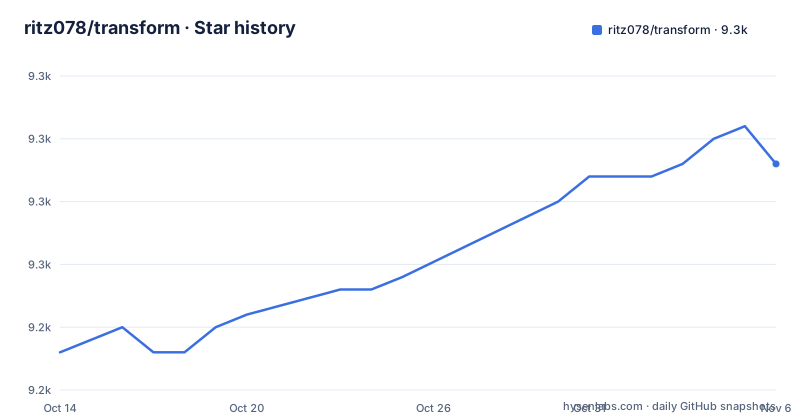
- ritz078/transform9,258 ★ · +15
| Repository | 2026-10-14 | 2026-11-06 |
|---|---|---|
| ritz078/transform | 9.2k | 9.3k |
15 Stars in the last 23 days, measured from the daily GitHub snapshot. Compare with other projects
Editorial analysis
Every transformer is a route, and routes are registered by hand
The README's development notes are three lines. Every route is a different file in the pages/ directory. A new transformer is added by creating a file there and then adding the route in utils/routes.tsx. The README itself contains a typo in that sentence, which shows how lightly the documentation is maintained.
Two steps mean two places to forget. A page file without an entry in utils/routes.tsx exists at its URL but, by the README's description, is not registered with the route list. Because the second step is manual, nothing described in the repository enforces it.
The top-level layout supports the same picture: pages/ for routes, components/ for shared UI, hooks/ and utils/ for logic, constants/ and typings/ for types and values, workers/ for background work, and public/ and assets/ for static files. The project is described as a polyglot web converter, with the hosted version at transform.tools.
Development and self-hosting are two yarn one-liners
For development the README gives one command:
yarn && yarn devFor self-hosting it gives another:
yarn && yarn build && yarn startBehind them, package.json maps dev to next dev, start to next start and build to NODE_OPTIONS=--openssl-legacy-provider next build. The legacy OpenSSL flag on the build script is a workaround, and it signals an older toolchain inside the build. A separate script, build:analyze, sets ANALYZE=true and runs yarn build. There is also dev:inspect, which sets NODE_OPTIONS="--inspect" and runs next dev, and a now-build script that runs plain next build.
The engines field says node 20.x. Self-hosting therefore needs yarn and a Node 20 line. There is no Dockerfile at the repository root, only vercel.json, so container deployment is something you write yourself.
postinstall runs patch-package against a patches directory
package.json defines postinstall as patch-package, and the repository root has a patches/ directory. Together they mean that installing dependencies applies local modifications to some third-party packages in node_modules. The README does not say which packages are patched or why.
The effect on you is practical. A fresh yarn install is not just a download. If a dependency version changes and its patch no longer applies, the postinstall step fails and the install stops. Updating a patched package therefore means regenerating its patch, not only bumping a version number.
The same pattern is a reason the project cannot be treated as a pure assembly of published packages. If you fork the repository and copy only package.json into another project, you lose the patches. Keep patches/ alongside it, and read the files there before upgrading dependencies so you know what behaviour you are relying on.
GraphQL conversions come from a long list of graphql-codegen plugins
A large part of the dependency list is @graphql-codegen. package.json includes core, flow, flow-operations, flow-resolvers, fragment-matcher, introspection, java, java-resolvers, schema-ast, typescript, typescript-apollo-angular, typescript-mongodb, typescript-operations, typescript-react-apollo, typescript-resolvers, typescript-stencil-apollo and typescript-urql.
That list reads like a menu of output targets: Flow types, Java, TypeScript for Apollo Angular, MongoDB, React Apollo, Stencil and urql. The README does not map each plugin to a page, so which plugin backs which route has to be read from the pages/ directory.
The versions are in the 1.x and 2.x range, for example @graphql-codegen/core ^1.17.10 and @graphql-codegen/typescript ^1.22.3. These are older releases of a tool that has moved on, so the output of the converter reflects those versions of the plugins. If you need the code generated by a newer codegen release, compare before trusting the output.
Babel runs inside the page through @babel/standalone
The dependency list includes @babel/standalone ^7.14.7, @babel/plugin-transform-typescript ^7.16.1 and @babel/plugin-transform-flow-strip-types ^7.16.0, alongside @khanacademy/flow-to-ts ^0.5.2. These are the pieces for converting between Flow, TypeScript and plain JavaScript. @babel/standalone is the build of Babel meant to run in a browser, so such a conversion can happen on the client.
Other format libraries are visible: @iarna/toml ^3.0.0 for TOML, @openapi-contrib/json-schema-to-openapi-schema for JSON Schema to OpenAPI schema, and @lemonneko/easi-gen ^0.0.36. @monaco-editor/react ^4.2.1 supplies the editor component.
The repository also has a workers/ directory. The README does not describe it, but a directory with that name sits next to the pages and components. If you plan to add a heavy transformer, look there first to see how existing code keeps work off the main thread. Where the conversion runs matters for privacy: inspect the code before pasting anything sensitive into the hosted site.
The README is mostly credits, and the version number lags the project
Most of the README is not documentation. It covers sponsors, a logo credit to mikicon, an MIT licence line, a generated all-contributors table and badges for Product Hunt and Vercel. The all-contributors list records code, documentation, ideas and review contributions from many people.
package.json lists version 2.0.2, and the repository has no GitHub releases, so there is no changelog or tagged history to read. The repository is not archived. Its last push was on 2026-09-28, which is recent.
That combination is typical for a hosted tool where the deployed site is the product: the live site at transform.tools is what users get, and the repository is the source behind it. You cannot pin a release of the converter. If a future commit changes a conversion, the only version you can reproduce is a commit hash from the default branch, which is named master.
What the repository does not tell you about each conversion
The README never lists the supported conversions. There is no table of inputs and outputs, no statement of which transformations are lossless, and no description of edge cases. To know whether a given conversion exists, you open the site or read the pages/ directory.
There are also no tests mentioned in the scripts. The package.json has dev, start, format, build and analysis scripts, with prettier --write for the format script on .ts and .tsx files. No test directory sits at the repository root, so correctness rests on the underlying libraries.
For a developer, this means the project is easy to run and extend but hard to audit from the README alone. Before you build a workflow around a particular converter, try it on representative input and compare against the library that backs it. A converter that silently drops fields is a risk for schemas and configs, and the repository gives no promise about it.
Editorial conclusion
Use the hosted transform.tools if you just need a conversion, and clone ritz078/transform if you want to self-host it or add a transformer of your own. It suits a developer comfortable with Next.js and yarn. Before building, confirm you are on Node 20.x and that the postinstall patch-package step succeeds on your machine.
Frequently asked questions
How do I run Transform locally?
Run yarn && yarn dev for development. The package requires Node 20.x according to its engines field.
How do I self-host Transform?
Run yarn && yarn build && yarn start. The build script sets NODE_OPTIONS=--openssl-legacy-provider before running next build.
How do I add a new transformer to Transform?
Add a file in the pages directory, then add the route in utils/routes.tsx. Every route is a separate file in pages.
What license does Transform use?
Transform is released under the MIT license, copyright Ritesh Kumar. The hosted site is at transform.tools.
Official sources
Add this badge to your README
If you maintain this project, the badge below links readers to this analysis and shows its maintenance status from the daily GitHub snapshot. Paste the markdown into your README; add ?metric=license or ?metric=stars to the image URL for a different field.

[](https://hysenlabs.com/projects/ritz078-transform)Star history chart for your README
[](https://hysenlabs.com/projects/ritz078-transform)Was this useful?