Catppuccin for Discord: Installation, Custom CSS, and Trade-offs
🎮 Soothing pastel theme for Discord
At a glance
- What is it?
- Catppuccin for Discord is a pastel SCSS theme distributed for BetterDiscord, custom-CSS Discord clients, and Stylus. It offers four flavours and accent variants, but its README explicitly warns that third-party clients and CSS injection violate Discord's terms of service.
- Who is it for?
- Adopt Catppuccin for Discord if you already accept the documented terms-of-service risk and need a consistent Catppuccin palette across supported clients. Do not adopt it as a supported Discord extension or a safe option for an account that cannot tolerate enforcement risk.
- Can I use it commercially?
- Yes. MIT is a permissive licence: you can use, modify and sell software built on it, as long as you keep its copyright and licence notices.
- Is it still maintained?
- Yes. The repository last received commits 1 day ago.
- What is it written in?
- Mainly SCSS, according to GitHub's language statistics.
Answers come from the project's GitHub data, last synced on November 7, 2026, and from our analysis. They are not legal advice.
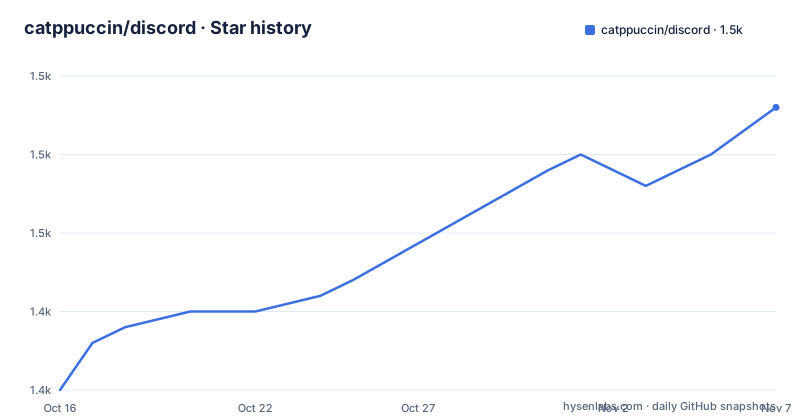
Star history
- catppuccin/discord1,458 ★ · +18
| Repository | 2026-10-16 | 2026-11-07 |
|---|---|---|
| catppuccin/discord | 1.4k | 1.5k |
18 Stars in the last 22 days, measured from the daily GitHub snapshot. Compare with other projects
Editorial analysis
What Catppuccin Changes in Discord
Catppuccin for Discord replaces Discord's visual palette with the Catppuccin colour system. It is intended for people who want Discord to use soft pastel colours, especially users of BetterDiscord or Discord client modifications that expose a custom CSS editor. The repository also targets PowerCord, Vencord, and Stylus through its topics and documented custom-CSS routes, but the README does not provide separate installation instructions for every client.
The project offers four named flavours: Latte, Frappé, Macchiato, and Mocha. The README preview distinguishes them as visual variants rather than separate feature sets. Latte is used in the documented automatic mode-switching example as the light theme, while Mocha is used as the dark theme. Other files in the published Catppuccin CDN examples add accent-specific variants such as a pink Mocha build and a maroon Frappé build. The theme therefore solves a presentation problem, not a messaging, moderation, notification, or Discord client functionality problem.
This distinction matters for adoption. A user looking for a Discord theme can install CSS without rebuilding the client, but a user looking for a supported Discord feature has to evaluate a different category of software. The repository is an SCSS project with a build script, generated theme files, and a Stylus user stylesheet. It is not presented as a Discord bot or a server-side configuration package.
The SCSS Build and Published Theme Assets
The repository's `package.json` defines `catppuccin-discord` as a private package with a `0.2.0` version and an MIT license. Its development dependencies include Sass, Prettier, Husky, and Catppuccin packages. The main build script creates `dist/dist`, invokes Sass with the `src` directory as input, and disables charset and source-map output:
npm run buildThe command compiles the repository's SCSS sources into theme output under `dist/dist`. The package also defines `watch`, which runs the same Sass source-to-output mapping in watch mode, and `release`, which invokes `node build.js`, compiles compressed CSS, and removes generated `src/catppuccin-*-*.theme.scss` files. These scripts describe a source build for maintainers and contributors. The README's installation route instead directs users to prebuilt CSS files or CDN imports, so ordinary users do not need to run the build.
The source layout matters when troubleshooting. `src/` contains the theme sources, `themes/` contains distributable flavour files such as `themes/latte.theme.css`, `build.js` participates in the release flow, and `discord.user.css` is the file linked by the Stylus installation instructions. The repository does not document the output of a local build in enough detail to promise that a locally generated file is identical to a hosted CDN file. For ordinary use, the README's direct download and import paths are clearer than reproducing the release toolchain.
Installing Catppuccin Through BetterDiscord
The BetterDiscord route is the most direct installation path documented by the README. Download the preferred flavour, copy the downloaded file into the BetterDiscord themes folder, then enable it in BetterDiscord settings. The README links each flavour directly from the repository. This route avoids local SCSS compilation, but it still depends on a third-party Discord modification rather than the stock Discord client.
For a user choosing a first flavour, Latte is the light-oriented example used in the README's mode-switching snippet, while Mocha is the dark-oriented example. The choice is visual. The README provides preview images for all four variants, so selecting by appearance is more reliable than assuming that every flavour changes behavior.
BetterDiscord installation has a clear operational limitation. The repository's own FAQ warns that using third-party clients and injecting custom CSS is against Discord's terms of service. It also states that the Catppuccin project does not accept responsibility for account consequences. That warning is not evidence that a ban will occur. It is evidence that the documented method carries an account-policy risk that a user must consider before copying the file.
Using Catppuccin Through Custom CSS and Stylus
For Discord clients or modifications with custom CSS support, the README instructs users to add the preferred flavour to the client's CustomCSS file or editor. The published imports use the Catppuccin GitHub Pages distribution and include the four base flavours. The following example shows the documented URLs exactly:
@import url("https://catppuccin.github.io/discord/dist/catppuccin-latte.theme.css");
@import url("https://catppuccin.github.io/discord/dist/catppuccin-frappe.theme.css");
@import url("https://catppuccin.github.io/discord/dist/catppuccin-macchiato.theme.css");
@import url("https://catppuccin.github.io/discord/dist/catppuccin-mocha.theme.css");
The README also documents accent-specific files. A Mocha pink import is listed as `catppuccin-mocha-pink.theme.css`, and a Frappé maroon import is listed as `catppuccin-frappe-maroon.theme.css`. These are styling variants, not independent plugins. Import only the variant you intend to use, because the README describes them as appended Catppuccin colors for customizing the accent.
Stylus uses a different delivery mechanism. The README says to enable `CSP Patching` in `Stylus Settings > Advanced`, then install `discord.user.css` through the provided link. The Stylus preference dropdown controls the flavour and accent colour. The README does not explain how CSP patching works, so users should not treat the setting as a documented security guarantee. It is simply the required configuration step for this installation route.
An optional media-query configuration can select Latte for light mode and Mocha for dark mode:
@import url("https://catppuccin.github.io/discord/dist/catppuccin-mocha.theme.css")
(prefers-color-scheme: dark);
@import url("https://catppuccin.github.io/discord/dist/catppuccin-latte.theme.css")
(prefers-color-scheme: light);
This approach follows the operating system's colour-scheme preference. The README does not claim that Discord itself changes modes automatically, and it does not document a fallback for clients that ignore the media query.
Rainbow Threads and Account Policy Constraints
Catppuccin exposes one specific visual control for Rainbow Threads. The README says that placing a CSS custom property in QuickCSS makes threads use the same colour as typical channels. The declaration includes an empty value on purpose, and the README specifically calls out the space between the colon and semicolon:
:root {
  --ctp-rainbow-thread-disabled: ;
}
This is useful when a user prefers consistent channel colours, but it is a theme override rather than a Discord setting. The README does not document a corresponding UI control, a preference file format, or a way to configure the behaviour through `package.json`. Users who edit the theme should preserve the documented syntax and place the declaration in the client editor they already use.
The larger constraint is policy. The README states that third-party clients and injected custom CSS are against Discord's terms of service. It does not provide a formal risk assessment, an appeal procedure, or a guarantee about moderation. It also does not say that stock Discord supports arbitrary CSS injection. That makes Catppuccin unsuitable for an organization that requires only vendor-supported Discord clients, centrally managed devices, or a documented account-risk position. A normal CSS theme cannot remove that dependency.
Maintenance, License, and the Default Discord Alternative
The repository is not archived, and the last push was on 2026-10-16. The project has no GitHub releases, so upgrade behavior is not represented by versioned release artifacts. The `package.json` version is `0.2.0`, but the README's user installation links point to repository files and CDN paths rather than to a release workflow users can follow. An upgrade may therefore involve replacing a local theme file or refreshing an imported URL, but the README does not explicitly document a rollback procedure or compatibility policy for Discord updates.
The repository is licensed under MIT. That permits use and modification under the license's terms, subject to its notice and conditions. The license is relevant to redistribution and derivative CSS work, but this article does not provide legal advice. A user distributing a modified theme should inspect the repository `LICENSE` and preserve the required notices.
The alternative is Discord's default appearance with no third-party CSS. It avoids the installation, compatibility, and terms-of-service concerns associated with BetterDiscord, custom CSS clients, and Stylus. The trade-off is loss of Catppuccin's palette, flavour selection, accent variants, and Rainbow Threads override. A user who values a consistent pastel interface and accepts the documented client dependency may prefer Catppuccin. A user who values supported-client boundaries and policy certainty should keep the default appearance.
Catppuccin also differs from writing a private, client-specific stylesheet. Its documented distribution is reusable across several supported loading paths, includes multiple published flavours, and centralizes the palette in generated assets. That convenience comes with an external dependency on the project's CDN or repository files and on Discord's DOM continuing to expose the selectors the stylesheet targets.
Editorial conclusion
Adopt Catppuccin for Discord if you already accept the documented terms-of-service risk and need a consistent Catppuccin palette across supported clients. Do not adopt it as a supported Discord extension or a safe option for an account that cannot tolerate enforcement risk. Before installation, verify that your client permits custom CSS, choose Latte, Frappé, Macchiato, or Mocha, and confirm whether automatic light and dark switching fits your workflow.
Frequently asked questions
Can using Catppuccin for Discord get my account banned?
The README says that using third-party clients and injecting custom CSS is against Discord's terms of service. It does not guarantee that a ban will occur, and it says the Catppuccin project is not responsible for account consequences.
How do I choose a Catppuccin Discord flavour?
The README provides Latte, Frappé, Macchiato, and Mocha flavours, along with preview images. For a light and dark switch, its documented example uses Latte for `prefers-color-scheme: light` and Mocha for `prefers-color-scheme: dark`.
How do I disable Rainbow Threads in the Catppuccin Discord theme?
Add the documented custom property to QuickCSS. The README says to preserve the space between the colon and semicolon, which is shown in its CSS example.
Official sources
Add this badge to your README
If you maintain this project, the badge below links readers to this analysis and shows its maintenance status from the daily GitHub snapshot. Paste the markdown into your README; add ?metric=license or ?metric=stars to the image URL for a different field.

[](https://hysenlabs.com/projects/catppuccin-discord)Star history chart for your README
[](https://hysenlabs.com/projects/catppuccin-discord)Was this useful?