Chapel: parallel programming language for HPC, GPU clusters, and distributed computing
a Productive Parallel Programming Language
At a glance
- What is it?
- Chapel is a compiled parallel programming language designed to run on hardware ranging from a laptop to a leadership-class supercomputer, with both LLVM and GNU compiler backends. Version 2.10.0 was released on 2026-09-24 under the Apache 2.0 license, with third-party components carrying separate terms.
- Who is it for?
- Chapel fits engineers who write programs for distributed clusters or GPUs where performance and portability across hardware tiers are both hard requirements. Skip it for single-machine data analysis where existing ecosystem tools handle concurrency, or for projects where only MPI-compatible toolchains are approved.
- Can I use it commercially?
- Check first. The repository uses a licence we do not classify automatically, so read its LICENSE file before any commercial use.
- Is it still maintained?
- Yes. The repository last received commits 1 day ago.
- What is it written in?
- Mainly Chapel, according to GitHub's language statistics.
Answers come from the project's GitHub data, last synced on November 6, 2026, and from our analysis. They are not legal advice.
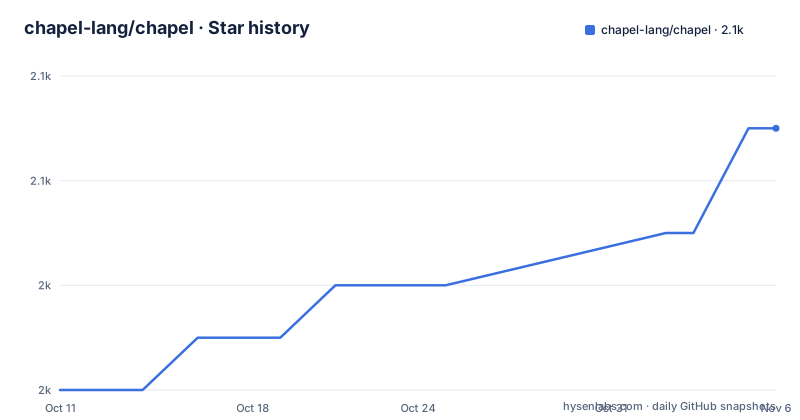
Star history
- chapel-lang/chapel2,051 ★ · +5
| Repository | 2026-10-11 | 2026-11-06 |
|---|---|---|
| chapel-lang/chapel | 2k | 2.1k |
5 Stars in the last 26 days, measured from the daily GitHub snapshot. Compare with other projects
Editorial analysis
Chapel targets the gap between scripting productivity and HPC-grade parallel performance
Chapel is a modern programming language designed for productive parallel computing at scale. Its stated target spans the CPUs and GPUs of laptops, desktops, commodity clusters, cloud environments, and the high-end supercomputers that were the original motivation for the language. That breadth of target hardware is a design constraint, not a marketing claim: the compiler has to generate correct, performant code for all of those environments from a single source file.
Repository topics list chapel, compiler, concurrency, distributed-computing, gpu, high-performance-computing, hpc, language, open-source, parallel, parallel-computing, performance, productive, programming-language, and scientific-computing. That list describes the intended user base: researchers and engineers working in scientific computing and HPC who need to write programs for distributed clusters or GPU-enabled nodes without managing every detail of data placement and inter-process communication by hand.
Chapel is maintained by Hewlett Packard Enterprise and governed through the High Performance Software Foundation, a project of the Linux Foundation. The copyright file names 2020-2026 Hewlett Packard Enterprise Development LP and 2004-2019 Cray Inc. HPE acquired Cray in 2019, which explains the split copyright line. The repository is not archived, and the last push was on 2026-10-06.
LLVM and GNU are separate compiler backends, and the Docker build compiles both
Chapel supports two compiler backends: LLVM and GNU. The environment variable CHPL_TARGET_COMPILER selects which one is active for a given build. The Dockerfile in the repository builds both backends sequentially. First, it runs the LLVM backend build:
CHPL_TARGET_COMPILER=llvm make -j$MAKE_THREADSThen the GNU backend:
CHPL_TARGET_COMPILER=gnu make -j$MAKE_THREADSThe variable MAKE_THREADS is an ARG in the Docker build stage with a default of 1. For a faster build, pass a higher value as a build argument. The Docker image sets CHPL_HOME to /opt/chapel as the base directory and sets CHPL_TARGET_CPU to none.
Two additional environment variables control which GMP and LLVM installations the build uses. CHPL_GMP and CHPL_LLVM are each set to system in the Dockerfile, meaning the build uses the system-installed versions of those libraries rather than building Chapel's own bundled copies. A build environment that lacks compatible system GMP or LLVM versions would need to omit those flags or provide its own.
Building from source on Debian requires LLVM, cmake, clang, and locales configured correctly
The Dockerfile starts from debian:latest and installs a substantial dependency list before the build can begin. The required packages include make, cmake, m4, perl, pkg-config, gcc, g++, clang, libclang-dev, libclang-cpp-dev, llvm, llvm-dev, libgmp10, libgmp-dev, protobuf-compiler, python3, python3-dev, python3-setuptools, python3-pip, and python3-venv, along with curl, wget, git, mawk, file, libedit-dev, ca-certificates, bash, and locales.
The build also requires that the locale be explicitly configured. The Dockerfile sets en_US.UTF-8 through dpkg-reconfigure. Skipping that step on a minimal base image produces failures during the build.
There is one non-obvious requirement: the Docker build configures a dummy git user with [email protected] before building, because the Mason unit tests require git to have user.email and user.name configured. A CI environment where git has no user configured will fail Mason tests.
For engineers who do not want to build from source, prebuilt downloads are available at https://chapel-lang.org/download/. That page is where platform-specific options and binary packages are documented, rather than in the repository README.
Five auxiliary targets build separately from the main compiler
The base compiler build does not include the documentation generator, the package manager, the linter, the language server, or the C-to-Chapel translation tool. Each is a separate make target, and the Dockerfile builds all of them in three additional steps after the main compiler.
A single call builds the documentation generator, the test environment, and the package manager:
make -j$MAKE_THREADS chpldoc test-venv masonchpldoc generates documentation from Chapel source files. mason is Chapel's package manager for managing dependencies. test-venv sets up the Python-based test infrastructure. A second call builds the remaining language-support tools:
make -j$MAKE_THREADS chapel-py-venv chplcheck chpl-language-serverchplcheck is the linter for Chapel source files. chpl-language-server provides editor integration through the language server protocol, enabling features like diagnostics and code navigation in editors that support it. chapel-py-venv sets up the Python virtual environment those tools depend on. The C-to-Chapel translation utility is its own step:
make -j$MAKE_THREADS c2chapelAfter all of these are built, the Docker image runs make cleanall to reduce the final image size. A user building manually can skip any tools they do not need, since none of the auxiliary targets are required dependencies of the main compiler.
Quarterly seasonal releases since 2026: Spring, Summer, and Fall version labels
Chapel releases follow a seasonal cadence. Three releases shipped in 2026: 2.8.0 labeled Spring 2026 on 2026-03-12, 2.9.0 labeled Summer 2026 on 2026-06-18, and 2.10.0 labeled Fall 2026 on 2026-09-24. Each release is named by season rather than by a date string, which makes it easy to place a version in the year without checking the release date. The version scheme uses three-part numbers, and CHANGES.md at the repository root tracks the detail per release.
For a production environment that pins a compiler version, this cadence means evaluating a new release roughly every three months. That is different from a language that releases annually: smaller upgrade increments lower the risk of any single upgrade, but they also mean the version pinned in a long-running project will drift further behind if updates are skipped.
All three releases above came from the main branch, and the repository shows no separate stable or LTS branch in the top-level layout. Whether a given release qualifies as stable for production use is a judgement the project does not formalize in the repository structure visible here.
Apache 2.0 covers Chapel itself, but third-party packages carry their own terms
The README states that Chapel is developed and released under the Apache 2.0 license. GitHub classifies the repository's overall license as "Other" rather than Apache 2.0 because the repository bundles third-party packages under their own licensing terms.
The top-level directory contains three license files: LICENSE (the main file), LICENSE.chapel, and LICENSE.devel. The third-party/ directory holds the external packages. The project's license page at https://chapel-lang.org/license/ is where the full picture is documented.
For a team that distributes a modified Chapel compiler or ships Chapel as part of a product, the third-party/ directory requires its own audit, since those packages are not all Apache 2.0. For teams that use Chapel to compile their own programs without distributing the compiler, the Apache 2.0 core is the relevant document. This article does not give legal advice on what those terms permit.
MPI with C or Fortran is the established alternative, with explicit control at the cost of abstraction
For distributed-memory parallel computing, the traditional alternative to Chapel is MPI combined with C or Fortran. In that approach, programmers write explicit message-passing code: they decide what data lives on which process, when sends and receives happen, and how synchronization is managed. Chapel's design goal of productive parallel programming implies a higher level of abstraction over those same tasks.
The practical difference is that MPI with C or Fortran is the toolchain most existing HPC centers already support and for which most HPC libraries are built. Chapel targeting those same supercomputers does not mean it is drop-in compatible with an existing MPI codebase: it is a different language with its own compiler and runtime. A project with a large existing Fortran or MPI codebase, or one where the computing center only supports approved compilers, faces a transition cost that Chapel does not eliminate.
For GPU-specific work where the team already uses CUDA or HIP, Chapel's GPU support provides a portability path, but the repository gives no detail on which GPU architectures are supported or what the performance characteristics look like.
Editorial conclusion
Chapel fits engineers who write programs for distributed clusters or GPUs where performance and portability across hardware tiers are both hard requirements. Skip it for single-machine data analysis where existing ecosystem tools handle concurrency, or for projects where only MPI-compatible toolchains are approved. Before committing, check the dependency list from the Dockerfile against the target build environment, verify that the required LLVM and cmake versions are available, and confirm whether a prebuilt binary from chapel-lang.org/download/ covers the target platform, since building from source is not a quick step.
Frequently asked questions
What is the Chapel programming language?
Chapel is a modern compiled language designed for productive parallel computing at scale, able to run on CPUs and GPUs from laptops and desktops to commodity clusters, cloud environments, and high-end supercomputers. It is maintained by Hewlett Packard Enterprise and governed through the High Performance Software Foundation.
How do I install Chapel?
Prebuilt downloads are available at https://chapel-lang.org/download/. Building from source requires LLVM, cmake, clang, and a set of other system libraries; the Dockerfile in the repository shows the full dependency list for a Debian-based build.
What is the current version of Chapel?
Version 2.10.0, released on 2026-09-24 and labeled the Fall 2026 release, is the most recent. The prior releases were 2.9.0 on 2026-06-18 and 2.8.0 on 2026-03-12.
Is Chapel open source?
Yes. Chapel itself is released under the Apache 2.0 license. The repository also bundles third-party packages under their own separate licensing terms, which is why GitHub classifies the overall repository license as Other.
Does Chapel support GPU programming?
GPU support is listed as a design goal in the README, which states Chapel is designed to run on the CPUs and GPUs of laptops, desktops, clusters, cloud, and supercomputers. The repository does not document specific supported GPU architectures in the README.
Official sources
Add this badge to your README
If you maintain this project, the badge below links readers to this analysis and shows its maintenance status from the daily GitHub snapshot. Paste the markdown into your README; add ?metric=license or ?metric=stars to the image URL for a different field.

[](https://hysenlabs.com/projects/chapel-lang-chapel)Star history chart for your README
[](https://hysenlabs.com/projects/chapel-lang-chapel)Was this useful?