EDVR Unofficial Patch: Fixing Elite Dangerous Odyssey's VR Pain Points
Unofficial VR fixes for Elite Dangerous: Odyssey - per-eye brightness, black void around the on-foot panel, adjustable panel distance
At a glance
- What is it?
- A two-DLL patch for Elite Dangerous: Odyssey that tackles per-eye brightness, the black void around the on-foot panel, and panel distance. It is an installer-driven tool for VR players who want comfort fixes without manual file surgery.
- Who is it for?
- Adopt EDVR if you play Elite Dangerous: Odyssey in VR and the default brightness mismatch, the on-foot panel void, or panel distance makes you uncomfortable. Do not adopt it if you avoid unsigned binaries or cannot tolerate a tool that renames your game's openvr_api.dll, since a misstep there can break VR startup.
- Can I use it commercially?
- Check first. The repository uses a licence we do not classify automatically, so read its LICENSE file before any commercial use.
- Is it still maintained?
- Yes. The repository received new commits within the last day.
- What is it written in?
- Mainly C++, according to GitHub's language statistics.
Answers come from the project's GitHub data, last synced on October 22, 2026, and from our analysis. They are not legal advice.
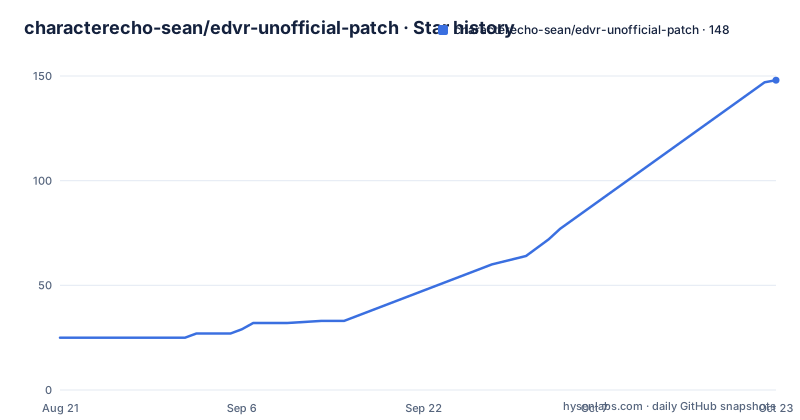
Star history
- characterecho-sean/edvr-unofficial-patch147 ★ · +122
| Repository | 2026-08-21 | 2026-10-22 |
|---|---|---|
| characterecho-sean/edvr-unofficial-patch | 25 | 147 |
122 Stars in the last 62 days, measured from the daily GitHub snapshot. Compare with other projects
Editorial analysis
The Problem: Odyssey in VR Has Specific Comfort Failures
Elite Dangerous: Odyssey, the on-foot expansion, has VR modes that are functional but uncomfortable. The README lists three persistent issues: per-eye brightness mismatch, a black void around the on-foot panel, and a panel distance that feels wrong. These are not game-breaking bugs; they are comfort failures that make long sessions in a headset unpleasant. The patch targets exactly these, with twelve fixes total across two DLL files. The intended user is an Elite Dangerous player who already owns a headset and wants to keep playing Odyssey without squinting or feeling like one eye is in shadow. This is not a graphics overhaul; it is a surgical comfort patch.
How the Two-DLL Architecture Works
The patch splits its work across two files. The first, d3d11.dll, handles most fixes, including the per-eye brightness toggle. The second, openvr_api.dll, is required for the transition flash fix and Explorer Cam. The README explains why the split exists: the decision not to show a frame has to be made where frames are handed to SteamVR, which is inside the openvr_api.dll. That file cannot ride along in d3d11.dll because it operates at a different layer. The openvr_api.dll is not a replacement; it is a proxy. The installer renames the game's original openvr_api.dll to openvr_api_orig.dll and loads that, passing every call through. If the original is overwritten instead, VR will not start, and the log will say so. This is a design with a sharp edge: it works only if the rename is done correctly.
Installer-Driven Setup: One File, No Manual Placement
The installer, edvr-installer.exe, is the recommended path. It carries both DLLs and edvr.ini inside it, so there is nothing to extract or move by hand. The installer finds the game by asking each launcher (Frontier, Steam, Epic) where it put the game, rather than guessing paths, and confirms by finding EliteDangerous64.exe. It can also take a manual folder. It preserves your edvr.ini settings across updates, writing the new file with your values merged in. It renames the game's openvr_api.dll instead of overwriting it, and it can tell the game's own copy from EDVR's by reading the file, so it will not rename the wrong one. It also handles coexistence with EDHM: if EDHM is already installed as d3d11.dll, the installer renames it aside, takes the name, and sets advanced.real_dll so EDVR passes calls through. The installer has no network access, which is a privacy plus, but it is unsigned, so Windows will warn. The release lists the SHA-256 for verification.
Manual Install: The Two Files, Step by Step
For those who prefer control, the README gives manual steps. The first file, d3d11.dll, goes into the folder containing EliteDangerous64.exe. The README lists common paths: Frontier launcher under Products\elite-dangerous-odyssey-64, Steam under steamapps\common\Elite Dangerous\Products\elite-dangerous-odyssey-64, Epic under Epic Games\EliteDangerous\Products\elite-dangerous-odyssey-64. If none match, find the exe yourself; that folder is the answer. Copy d3d11.dll and edvr.ini there, then start the game. Press Scroll Lock in game to toggle the brightness fix; at a star the difference is immediate. The second file, openvr_api.dll, is trickier. You must find the folder that already contains the game's own openvr_api.dll, which may be in Openvr\ or Openvr\win64\. Rename that file to openvr_api_orig.dll, then copy EDVR's openvr_api.dll in its place. The README warns: do not overwrite or delete the original. If you do, VR will not start, and the log will say exactly that. This is a manual process where a single mistake breaks VR, so the installer is clearly the safer route.
Verification and Logging: How to Know It Worked
After install, logs appear in edvr_logs\ next to the game. There are two logs; the second, with vr in the name, should say compositor hook installed on IVRCompositor_014. If it reports an unknown compositor version instead, the fix is off, the game runs normally, and that version string is worth reporting to the project. The README also mentions pressing Pause if you see a flash anyway, though the full context is truncated. The log also records the folder EDVR loaded from, so you can verify the path after a manual install. The project emphasizes that logs are the key to bug reports: the issue template asks for the log, and the README says the log is usually the whole answer. This logging discipline is a practical strength, but it also means you need to know where to look if something goes wrong.
Coexistence with Other Mods: EDHM and ReShade
The README addresses two common companions: EDHM and ReShade. EDHM also installs as d3d11.dll, and only one file can have that name. The installer handles this by renaming EDHM's DLL aside and setting advanced.real_dll for pass-through. By hand, it is one rename and one setting. ReShade needs nothing as of version 0.7.2, which suggests the patch is compatible without extra steps. However, there is a failure mode: another mod's uninstaller, like EDHM's, might run del d3d11.dll, which after an EDVR install is EDVR's own file. The installer includes a Repair function that puts both files back side by side. This is a real-world maintenance concern: mod load order and uninstallers can silently break EDVR. The repair option is a direct response, but it requires you to notice the breakage first.
Limitations and Wrong-Tool Cases
The most obvious limitation is the dependence on the openvr_api.dll rename. If the original is overwritten, VR will not start, and recovery requires verifying the game install in the launcher to restore the file. That is a heavy step for a user who just wanted a brightness fix. Another limitation is the unsigned installer: Windows will flag it, and the only provenance is the SHA-256 in the release notes. For a security-conscious user, that is a barrier. The patch also does nothing for people who do not play Odyssey; it is specifically for that expansion. If you are on a non-VR setup, or you play only the base game, this is the wrong tool. The README also notes that skipping the openvr_api.dll leaves the flash fix able to detect and log only, and Explorer Cam doing nothing at all, with a log message the first time it would have engaged. So a partial install silently disables two features, which is a trap if you follow a guide that only mentions d3d11.dll.
Alternatives: EDHM and ReShade, and Why They Differ
The README mentions EDHM and ReShade as compatible, but they are also alternatives for some of the same pain points. EDHM is a HUD mod that also installs as d3d11.dll, but its focus is color and HUD customization, not per-eye brightness or panel distance. It does not touch the openvr_api.dll layer, so it cannot fix the transition flash or Explorer Cam. ReShade is a post-processing injector that can adjust brightness and color globally, but it works on the final image, not per-eye, and it cannot address the black void around the on-foot panel because that is a stereoscopic rendering issue, not a color grade. The key difference is architectural: EDVR hooks into the compositor via openvr_api.dll to make per-eye decisions, while EDHM and ReShade operate at the D3D11 level. If your only problem is brightness, ReShade might suffice, but if you need per-eye correction or the panel void fix, EDVR is the only one of the three that targets those directly.
Maintenance and Upgrade Cost
The project has a recent release cadence: v0.10.2 on 2026-08-24, v0.11.0 on 2026-08-27, and v0.12.0 on 2026-08-29. That is three releases in five days, which suggests active development, but it also means frequent updates. The installer preserves your edvr.ini settings across updates, so the upgrade cost is low: run the new installer, and it merges your values. However, the manual install path requires re-copying files and re-renaming openvr_api.dll each time, which is tedious. The README does not specify a license, listing NOASSERTION, so legal reuse is unclear; you should treat it as source-available but not licensed for redistribution. The project is free and accepts tips via Ko-fi, but the unsigned binary is a trust issue. Before each update, verify the SHA-256 from the release page, and after update, check the log for the compositor hook line to confirm the fix is active.
Editorial conclusion
Adopt EDVR if you play Elite Dangerous: Odyssey in VR and the default brightness mismatch, the on-foot panel void, or panel distance makes you uncomfortable. Do not adopt it if you avoid unsigned binaries or cannot tolerate a tool that renames your game's openvr_api.dll, since a misstep there can break VR startup. Before installing, verify your game path, check for an existing d3d11.dll from EDHM or ReShade, and confirm the installer's SHA-256 from the release page. If you hit the transition flash or Explorer Cam not working, check the log for the compositor hook line and ensure the openvr_api.dll rename was done correctly.
Frequently asked questions
How do I install edvr-unofficial-patch?
Download the edvr-installer zip from the release, unzip it, and run edvr-installer.exe. It is a single file once unzipped, finds the game, shows what it will change before changing it, and copies what it replaces into a backup directory.
How do I know whether edvr-unofficial-patch actually loaded?
Look for the second log file, the one with vr in its name, next to the game. It prints runtime, then the runtime name and version it reached. If there is no second log at all, the game is not on its OpenVR path and half the patch never loaded.
Which headsets and runtimes does edvr-unofficial-patch support?
The native OpenXR route was checked in the field on Pimax over PiOpenXR, Quest 3 over Virtual Desktop's VDXR, and the latest Air Link flight. Nothing is claimed for other headsets or runtimes, and the legacy LibOVR path is not supported at all.
Does edvr-unofficial-patch work with EDHM and ReShade?
Both run alongside it. EDHM also installs as d3d11.dll and only one file can have that name, so the installer handles the ordering for you. ReShade has needed nothing at all since version 0.7.2.
Why is edvr-unofficial-patch installer flagged by Windows?
Because the installer is unsigned. Windows reports the program as unrecognised and you choose More info then Run anyway. Every release lists the installer's SHA-256, and without a signature that hash is the only way to check the file's origin.
Official sources
Add this badge to your README
If you maintain this project, the badge below links readers to this analysis and shows its maintenance status from the daily GitHub snapshot. Paste the markdown into your README; add ?metric=license or ?metric=stars to the image URL for a different field.

[](https://hysenlabs.com/projects/characterecho-sean-edvr-unofficial-patch)Star history chart for your README
[](https://hysenlabs.com/projects/characterecho-sean-edvr-unofficial-patch)