WeChat-AI relays roleplay chat through Tencent iLink, and Tencent can stop it
WeChat AI - a self-hosted WeChat role-play chat service.
At a glance
- What is it?
- A TypeScript workspace that puts a self hosted chat persona behind Tencent's iLink bot channel, with OAuth login, remote Redis state and a Cloudflare Worker in front of several identical nodes. The project says plainly that personal bots face rate limits and takedown, that only approved users can talk by default, and that the protocol is reverse engineered.
- Who is it for?
- This suits one person, or a small group, who wants a roleplay persona answering inside WeChat and accepts that the channel belongs to someone else. Four things to settle first, in this order.
- Can I use it commercially?
- Yes. Apache-2.0 is a permissive licence: you can use, modify and sell software built on it, as long as you keep its copyright and licence notices.
- Is it still maintained?
- Yes. The repository received new commits within the last day.
- What is it written in?
- Mainly TypeScript, according to GitHub's language statistics.
Answers come from the project's GitHub data, last synced on November 23, 2026, and from our analysis. They are not legal advice.
Star history
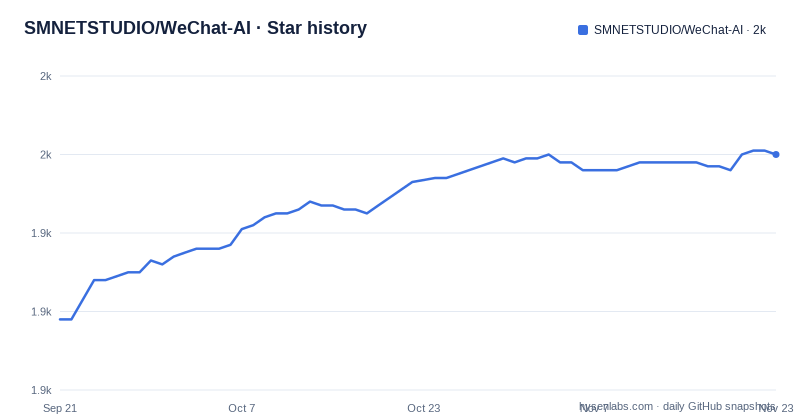
- SMNETSTUDIO/WeChat-AI1,960 ★ · +42
| Repository | 2026-09-21 | 2026-11-23 |
|---|---|---|
| SMNETSTUDIO/WeChat-AI | 1.9k | 2k |
42 Stars in the last 63 days, measured from the daily GitHub snapshot. Compare with other projects
Editorial analysis
Whitelist by default, and the protocol is reverse engineered
The compliance section is short and it is the most important part of the page, so it comes first here.
Using the Tencent WeChat ClawBot and iLink capabilities requires compliance with the applicable terms. Individual bots carry rate limiting and takedown risk, and the project states plainly that personal bots can be disposed of. That is the single biggest operational fact about this project: the transport is not yours. A self hosted service whose upstream is a first party bot channel can stop working without anything changing in your infrastructure.
The protocol layer is honest about what it is. The iLink protocol is based on observed behaviour and fields may change, and the adapter lives in packages/ilink. So the integration is a compatibility layer against a moving target, maintained in one package rather than spread through the application, which is the right shape for something that can change under you.
The access model is conservative by default. Only approved users can chat, and a peer has to agree before anything is relayed. In WeChat a user sends an at mention with the target's username to request a chat; the other person replies with an agree command, and from then on messages relay both ways. That is a two step handshake with an explicit human decision in the middle, which is a consent model rather than an open bot.
The privacy note is one line and worth repeating: roleplay content leaves the machine through LLM APIs, and the project says to assess your own privacy posture. There is no local model option in the described path, and every conversation you have is a conversation with a provider.
Two features also send data outward by design. Inbound images can be understood when VISION_ENABLED is set, which is off by default and the caption mode needs no vision capable roleplay model. Inbound voice uses WeChat's own transcription and is on by default.
Metadata says Apache-2.0, the README says Apache-2.0 with Commons Clause
The licence on this repository is described two different ways, and the difference is not cosmetic.
The repository metadata field reports Apache-2.0. The page's own licence line says Apache-2.0 with Commons Clause, links that LICENSE file, and then adds two paragraphs of restriction in both Chinese and English: no commercial use and no resale, personal and non commercial use only, and you may not charge fees, offer paid hosting or support, or resell the code in commercial products.
The Commons Clause on its own is a source availability modification of Apache-2.0 rather than an open source licence. What the README adds on top of it, a flat prohibition on paid hosting and consulting, is broader than the clause itself describes. Either way, the practical answer is the same and it is not the permissive one: if you were planning to run this for a paying audience, the page forbids it in plain words.
So plan around the prose, not the metadata badge. The metadata field is the host's classifier looking at the file; the README is the maintainer telling you the terms. When they disagree about a non commercial rider, the maintainer's sentence is the one that will be enforced.
The package manifest adds a small piece of corroboration. The workspace is marked private, so it is never published to a package registry, and its description names the same three pillars the architecture diagram does: iLink, Redis and LINUX DO OAuth.
Nothing else in the tree contradicts this. There is one release, v0.12.0 from 13 August 2026, and the manifest version matches it, so at least the version number is consistent between the tag and the code.
User supplied models leave through a separate container, not the main service
The architecture has an unusual shape for a chat bot, and the shape is the design decision.
The main service holds the things that matter: bot tokens, the OAuth sessions, personas, memory and the sticker library, all in remote Redis. It talks to the platform's own model endpoint. When a user brings their own model or wants web search, that request does not go through the main service at all. It goes to a separate deployment, huggingface/wechat-ai-tools, configured through TOOLS_BASE_URL and TOOLS_API_KEY, and that container is described as the only outbound AI and search exit in the system, independently deployable.
The compose file makes the split concrete. The main service is wechat-ai, and the tools container is wechat-ai-tools with a profile named tools, so it only starts when you ask for it:
docker compose --profile tools up -d --buildwith the main site's environment then pointing at it as TOOLS_BASE_URL=http://wechat-ai-tools:7860 with a TOOLS_API_KEY. A comment on that service states the rule in one line: user custom LLM egress and web search, while the platform LLM stays on wechat-ai.
Why this matters. A user who pastes an arbitrary endpoint URL and an API key into a web form is asking the server to make a request on their behalf. If that request is made by the process that also holds every bot token in Redis, the blast radius of that feature is the whole system. Moving it one container away means the main service never sees the credential and never talks to the destination, and the tools container can be restarted, replaced or removed without touching the bots.
The Redis connection is configured for the same reality. The example URL is a rediss:// Upstash endpoint, connection timeout is 15000 milliseconds, and command pipelining is on by default with the note that it merges concurrent commands into a single round trip and is required for a remote Redis, with a false value to disable it. Every millisecond of latency on a remote database is a millisecond a WeChat user is waiting.
docker compose up does not bump the version or build the update payload
The quick start gives a one line deploy, and the compose file's own header says that line does less than you would expect.
The page says configure your .env and then:
# 配置好 .env 后 After configuring .env
docker compose up -d --build
The compose header describes a different, three step path: run pnpm docker:up, which bumps the version, builds the local OTA pack and then brings the compose stack up with a rebuild. It states in parentheses that a plain docker compose up -d --build will not bump the version and will not pack.
So the documented one click deploy produces a running service on the version you already had. If you are upgrading from an older release, the path in the quick start silently does not do the upgrade.
The update mechanism it is skipping is described in the feature table as OTA incremental updates, a file diff plus an automatic restart. The publish channel is inside the admin interface: the compose header describes uploading a channel package through /admin by uploading files.json, with no CLI cookie required. That is the update path for a fleet of nodes, where pulling an image on each machine is the slow part and a diff is not.
The version numbers involved are worth keeping straight. One GitHub release exists, v0.12.0, published on 13 August 2026, and package.json also says 0.12.0. The last commit on the default branch, which is master rather than main, is dated 3 October 2026. So the tree has moved well past the newest tag, which is what the bump step in the wrapper script is for.
There is also a local development path that never touches Docker:
pnpm install
cp .env.example .env
pnpm db:seed
pnpm diag
pnpm dev
where the required values are REDIS_URL, an LLM API key, the LINUXDO values and LINUXDO_ADMIN_IDS, and diag is a diagnostic command of its own.
Thirty seconds of grace so the bot leases can be released
One line in the compose file explains a timeout better than any documentation would.
The main service sets stop_grace_period to 30 seconds, with the comment that this gives the graceful shutdown time to release bot leases before the kill signal arrives. So the system holds leases on its WeChat bots in Redis, and a container that is killed without releasing them leaves state behind that another node has to notice and clean up. That is the kind of detail that only shows up after an unclean restart, and it is the kind of detail that gets written down once it has bitten.
The rest of the service definition is careful in the same way. Restart is unless-stopped. The health check runs node with a one line fetch of the health endpoint on loopback, with a 30 second interval, an 8 second timeout, 3 retries and a 50 second start period, which is a sensible shape for a service that needs to warm up before it can answer. The port is published from a variable with 8787 as the default.
One environment variable is forced in the container: WECHAT_AI_HOST is set to 0.0.0.0 rather than left to the file, and the header notes the OAuth callback therefore has to use a public domain. The local development default is the opposite, 127.0.0.1, and the sample file says the listen address is fixed at listen time and cannot be changed the way other settings can. That is deliberate: the one setting you cannot change at runtime is the one that decides whether the process is reachable from the network.
For more than one machine, the compose file defaults to a single replica and the comment says each server should run the same image with docker run, sharing REDIS_URL and the public base URL, with a unique WORKER_ID per machine. The public domain is fronted by the Cloudflare Worker, which does health checks and round robin, and origin addresses live only in that Worker's ORIGINS list.
Almost every setting lives in Redis and reaches all nodes in five seconds
The sample environment file opens with a note that changes how you should administer the service. The values in the file are defaults, and nearly all of them can be changed in the admin settings page instead, where the value is stored in Redis and takes effect on every node within five seconds, without editing the file and restarting.
The exceptions are named: REDIS_URL, the LLM and provider secret settings, the legacy script token, the admin id list, the cookie settings and anything URL related. Those are the values the service cannot read late, mostly because they are needed before it can serve a request.
The rest of the file is a set of cache timeouts over Redis, and the comments on them are unusually good. There is a session, user and prompt cache, plus a separate value for the default persona with the note that it is read on every opening message so a persona edit can take that long to appear. The square listing, which holds personas and stickers, uses one snapshot shared by paging, search and sorting so that a page view does not run a full set scan followed by a bulk read, and under several nodes a persona published by one node can be that stale elsewhere.
The dashboard statistics are the interesting case. doctorSnapshot scans every bot, peer and persona, and the three deep items, assignments, messages and memories, read about four extra keys per peer. Above a configurable peer count, that entire computation is skipped and the snapshot returns deepStats=false, so the interface shows that it was not counted rather than showing zero. A cap set to zero disables it entirely. Reporting a missing measurement as missing is rarer than it should be.
There is also an identity cache for the superadmin role at 120 seconds, with a note that authorisation changes and account deletions invalidate it immediately, and automatic command pipelining that merges concurrent commands into one round trip and is called out as required for a remote Redis.
pnpm lives under /pnpm so the non-root user stops hitting EACCES
The image is built for a user who is not root, and the build file explains the one thing that broke.
It starts from node 22 on Debian bookworm slim, and the package manager is placed deliberately: PNPM_HOME is set to /pnpm, COREPACK_HOME to /pnpm/corepack, and that directory is put on the path. The comment says this keeps corepack and pnpm under /pnpm so the non root runtime user can use them without writing to a home cache directory, which is where the EACCES came from. That is a permission bug described by its cause and its fix, which is the ideal form.
Corepack is enabled and pnpm 11.15.0 is prepared and activated at build time, matching the packageManager field in the manifest. The manifest also declares an engine floor of node 20 while the image is node 22, so the runtime is newer than the declared minimum.
The layer order is textbook: the workspace manifests are copied first, the install runs with a frozen lockfile, and only then does the source go in. That means a source change does not invalidate the dependency layer. The comment above the source copy notes that the application is TypeScript run through tsx, and that tsx is a runtime dependency of the API package rather than a build tool, which is why the install cannot be pruned to dev dependencies.
The workspace itself is five packages under packages/, plus apps/api which carries the REST surface, the iLink worker and the admin, user and chatflow interfaces as static HTML. There is a db package for Redis repositories and seeds, an llm package for OpenAI compatible chat and the tools gateway client, a core package holding sessions, personas, memory, routing and the chatflow engine, and an ilink package that is the only place that knows the protocol. A cloudflare-worker directory holds the load balancer, and scripts/ holds the build, pack and acceptance tooling.
Acceptance is one command, pnpm accept, described as an offline automated gate, with a separate real device checklist and a status document beside it. Keeping the offline gate and the real device acceptance apart is the difference between a check that runs on every commit and a check that tells you the thing actually works.
Editorial conclusion
This suits one person, or a small group, who wants a roleplay persona answering inside WeChat and accepts that the channel belongs to someone else. Four things to settle first, in this order. Whether the iLink channel is something you are allowed to use, because the project's own compliance section points at Tencent's terms, warns that personal bots are rate limited and can be taken down, and says the protocol is based on observed behaviour with fields that may change. What you are allowed to do with the code, because the repository metadata reports Apache-2.0 while the README states Apache-2.0 with a Commons Clause and forbids charging fees, offering paid hosting or support, and reselling it inside a commercial product. Where your traffic goes, because every reply is a call to a model provider and the project says so plainly, and the user supplied model path is deliberately routed through a separate container rather than the main service. And who may talk to your bot, since the default is an approved user list, and the peer handshake is a request plus an explicit agree, not an open channel.
Frequently asked questions
What does WeChat-AI do and how does it connect to WeChat?
It is a self hosted roleplay chat service. Messages travel from a WeChat user to Tencent iLink, then into this multi node system which receives the message, applies the persona and memory, calls a model and sends the reply back. Data is kept in remote Redis, and users sign in through LINUX DO OAuth rather than a local password.
Can anyone chat with a WeChat-AI bot?
Not by default. Only approved users can chat, and a peer has to agree first: one user sends an at mention with the username to request a chat and the other replies with an agree command, after which messages relay both ways. The admin dashboard is where peers are approved and personas assigned.
What licence does WeChat-AI use?
The sources disagree. The repository metadata field reports Apache-2.0, while the README states Apache-2.0 with Commons Clause and adds that use is personal and non commercial only: no fees, no paid hosting or support, and no reselling the code in commercial products. The package manifest is marked private, so it is not published to a registry.
What are the risks of running WeChat-AI?
The project's own compliance section names them. Using Tencent WeChat ClawBot and iLink requires compliance with the applicable terms, individual bots face rate limiting and takedown risk, and the iLink protocol is based on observed behaviour with fields that may change, which is why the adapter is isolated in packages/ilink. Roleplay content also leaves the machine through LLM APIs.
How do I deploy WeChat-AI with Docker?
Configure .env with at least REDIS_URL, the LINUX DO OAuth values, LLM_API_KEY and PUBLIC_BASE_URL, then use pnpm docker:up rather than a plain docker compose up -d --build, because the wrapper bumps the version and builds the OTA pack while the bare compose command does neither. For user supplied models and web search, add the tools profile, which starts a separate wechat-ai-tools container on port 7860.
Official sources
Add this badge to your README
If you maintain this project, the badge below links readers to this analysis and shows its maintenance status from the daily GitHub snapshot. Paste the markdown into your README; add ?metric=license or ?metric=stars to the image URL for a different field.

[](https://hysenlabs.com/projects/smnetstudio-wechat-ai)Star history chart for your README
[](https://hysenlabs.com/projects/smnetstudio-wechat-ai)Was this useful?