Beads: A Dolt-Backed Issue Graph That Gives Coding Agents a Real Memory
Beads - A memory upgrade for your coding agent. bd - Beads Distributed graph issue tracker for AI agents, powered by Dolt.** Platforms:** macOS, Linux, Windows, FreeBSD Docs:** Beads provides a persistent, structured memory for coding agents.
At a glance
- What is it?
- Beads replaces markdown plans and TODO lists with a version-controlled, dependency-aware graph of issues, powered by Dolt. It is built for AI coding agents that lose context on long tasks, and it ships as a single CLI you install once and use in any project.
- Who is it for?
- Adopt Beads if you run an AI coding agent (Codex, Claude Code, Factory) on projects with long-horizon tasks and you want to replace markdown plans with a structured, dependency-aware graph that syncs across machines. Skip it if you need a traditional human-facing issue tracker with rich UI, or if you cannot accept the extra Dolt sync and upgrade steps.
- Can I use it commercially?
- Yes. MIT is a permissive licence: you can use, modify and sell software built on it, as long as you keep its copyright and licence notices.
- Is it still maintained?
- Yes. The repository received new commits within the last day.
- What is it written in?
- Mainly Go, according to GitHub's language statistics.
Answers come from the project's GitHub data, last synced on November 13, 2026, and from our analysis. They are not legal advice.
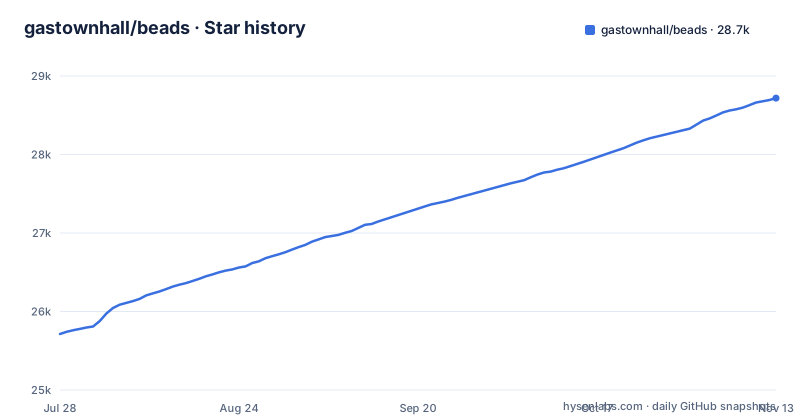
Star history
- gastownhall/beads28,719 ★ · +3,005
| Repository | 2026-07-28 | 2026-11-13 |
|---|---|---|
| gastownhall/beads | 25.7k | 28.7k |
3,005 Stars in the last 108 days, measured from the daily GitHub snapshot. Compare with other projects
Editorial analysis
What Beads Actually Solves
Coding agents like Codex or Claude Code often start a task, lose context, and then drift. Markdown plans and TODO lists are flat, so an agent cannot see which tasks block others or what work is ready to claim. Beads gives those agents a persistent, structured memory: a graph of issues where every task has dependencies, a status, and an audit trail. The README frames it directly: it replaces messy markdown plans with a dependency-aware graph, so agents can handle long-horizon tasks without losing context. The target user is a developer who runs an AI agent on a real project and wants that agent to remember what it was doing, what is blocked, and what to pick up next. It is not a general-purpose issue tracker for humans, though the CLI works fine for that too. The core insight is that agents need machine-readable state, not prose.
The Dolt-Backed Graph: How State Moves
Beads stores everything in Dolt, a version-controlled SQL database with cell-level merge and native branching. That choice is what makes the graph distributed. Each issue is a row, each dependency is an edge, and the whole graph is a database you can push and pull with `bd dolt push` and `bd dolt pull`. The README's flowchart shows the lifecycle: `bd create` makes a bead, it enters the dependency graph, `bd ready` lists claimable work, `bd update --claim` assigns it, and `bd close` marks it done, which releases blockers and makes new work ready. Hash-based IDs like `bd-a1b2` prevent merge collisions when multiple agents or branches write to the same graph. That is a real design win: you do not need a central server to coordinate agents, you just need a shared Dolt remote. The graph also supports hierarchical IDs for epics (`bd-a3f8`), tasks (`bd-a3f8.1`), and sub-tasks (`bd-a3f8.1.1`), which gives structure to large plans without forcing a separate tool.
Getting Started: Install, Init, and Agent Setup
Installation is deliberately simple. The README recommends `brew install beads` on macOS or Linux, or `npm install -g @beads/bd` for Node.js users. There is also a curl install script, which the Quick Start uses. You do not clone the Beads repo into your project; you install the CLI once and run `bd init` in each project. That command creates or updates `AGENTS.md` so agents can discover the workflow, and it installs integrations for Codex, Claude Code, and others. You can skip those with `--skip-agents` or `--stealth`. For agents not covered by `bd setup`, the README gives a minimal `AGENTS.md` snippet: run `bd prime` for workflow context, use `bd ready`, `bd show <id>`, `bd update <id> --claim`, `bd close <id>`, and `bd remember` for persistent memory. A key command is `bd remember "insight"`, which stores a memory that `bd prime` injects later, so the agent's context window is not cluttered with stale notes.
Storage Modes and Concurrency Trade-offs
The README's flowchart shows the dependency graph syncing with other machines and agents through `bd dolt push` and `bd dolt pull`, and its feature list describes Dolt as a version-controlled SQL database with cell-level merge, native branching and built-in sync via Dolt remotes. Hash-based IDs are there to prevent merge collisions in multi-agent and multi-branch workflows, and `bd update <id> --claim` claims a task atomically. If you plan to run several agents against one project, check the storage and concurrency options in the installation guide before relying on it.
Stealth Mode and Contributor Workflows
Two workflow flags show Beads is designed for real-world collaboration. `bd init --stealth` runs Beads locally without committing files to the main repo, which is useful for personal use on shared projects where you do not want to pollute the repository with your planning data. The README calls this "git-free usage," and it points to a dedicated section further down the README. For open-source contributors, `bd init --contributor` routes planning issues to a separate repo, for example `~/.beads-planning`, so your experimental work stays out of pull requests. Maintainers get auto-detection via SSH URLs or HTTPS with credentials, or they can set `git config beads.role maintainer` manually. This is a thoughtful split: contributors and maintainers have different write permissions, and Beads adapts without forcing a single workflow. The stealth mode is particularly useful if you want to keep your agent's planning memory private while still tracking issues in the shared repo.
Upgrade and Maintenance: Not Just a Binary Swap
The README is explicit that upgrading Beads is not always a simple binary replacement. The short version: sync remote-backed databases with your current `bd`, back up with `bd export --all`, upgrade the binary, then run `bd info --whats-new`, `bd hooks install`, and `bd version`. If the upgrade crosses a schema migration on a remote-backed database, exactly one designated clone runs `bd migrate schema` and `bd dolt push`, while other clones install the new binary and run `bd bootstrap`. That is a multi-step process that requires planning, especially if you have multiple clones. The good news is the README points to a full upgrade guide, so the steps are documented. The maintenance cost is not zero: you need to keep your Dolt remotes in sync, handle schema migrations, and reinstall hooks after upgrades. This is a tool that expects you to understand its data layer, not a fire-and-forget SaaS.
Limitations and Wrong Use Cases
Beads is not a fit for every scenario. Beads is a CLI tool; if your team wants a graphical issue tracker, nothing in the Quick Start or install steps provides one. The dependency graph is powerful, but it requires agents to actually use the commands; if your agent ignores `AGENTS.md` and falls back to markdown TODOs, you get no benefit. Also, releases move quickly (v1.3.2 shipped on 2026-10-24 after several release candidates), and the upgrade process is more involved than a typical CLI, including schema migrations on remote-backed databases.
Alternatives and How Beads Differs
The obvious alternative is a plain markdown file or a TODO list in the repository, which is what Beads explicitly replaces. The difference is structural: markdown is flat and has no dependency edges, so an agent cannot tell what is blocked or ready. Another alternative is a traditional issue tracker like GitHub Issues, which has a web UI and API but is not designed for agent memory or local sync. Beads differs by storing state in Dolt, which gives you versioning, branching, and cell-level merge, so you can sync across machines without a central service.
Editorial conclusion
Adopt Beads if you run an AI coding agent (Codex, Claude Code, Factory) on projects with long-horizon tasks and you want to replace markdown plans with a structured, dependency-aware graph that syncs across machines. Skip it if you need a traditional human-facing issue tracker with rich UI, or if you cannot accept the extra Dolt sync and upgrade steps. Before adopting, verify the upgrade path for your remote-backed databases, and confirm how Dolt sync fits your concurrency needs. Beads is a young tool, so test it on a non-critical project first.
Frequently asked questions
How do I install the bd CLI without cloning the repository?
Beads is a CLI you install once and use everywhere, so you do not clone the repository into your project. Homebrew is the recommended route with `brew install beads` on macOS and Linux, `npm install -g @beads/bd` serves Node users, and an install script covers all platforms, with go install, a source build, Windows and Arch AUR documented as further methods.
What does bd init do to my repository?
By default `bd init` creates or updates AGENTS.md so agents can discover the beads workflow, and it installs the project Claude and Codex integrations unless you pass `--skip-agents` or `--stealth`. It also writes into .beads/, so running it in a repository you do not control changes tracked files.
Can two agents write to the same beads database at once?
The README shows the graph syncing between machines and agents through bd dolt push and bd dolt pull, uses hash-based IDs to prevent merge collisions in multi-agent workflows, and makes `bd update <id> --claim` an atomic claim. Check the installation guide for the storage and concurrency options before pointing several writers at one database.
How do I upgrade bd without breaking a shared database?
Sync remote-backed databases with your current bd, back up with `bd export --all`, upgrade the binary, then run `bd info --whats-new`, `bd hooks install` and `bd version`. If the upgrade crosses a schema migration on a remote-backed database, exactly one designated clone runs `bd migrate schema` and `bd dolt push`, while every other clone installs the binary and runs `bd bootstrap`.
Official sources
Where developers are discussing it
Posts on Hacker News, dev.to and Lobsters that link to this repository, found by our scan of those communities. 1 in the last 30 days; newest first.
- Herding coding agents with Beadsdev.to · Oct 26, 2026 · 3 points · 0 comments
Add this badge to your README
If you maintain this project, the badge below links readers to this analysis and shows its maintenance status from the daily GitHub snapshot. Paste the markdown into your README; add ?metric=license or ?metric=stars to the image URL for a different field.

[](https://hysenlabs.com/projects/gastownhall-beads)Star history chart for your README
[](https://hysenlabs.com/projects/gastownhall-beads)Was this useful?