scc: A Fast Code Counter With Complexity, COCOMO and LOCOMO Estimates
Sloc, Cloc and Code: scc is a very fast accurate code counter with complexity calculations and COCOMO estimates written in pure Go.
At a glance
- What is it?
- scc is a Go-based line counter that aims to be faster than cloc or tokei while adding complexity, COCOMO, and LLM cost estimates. It is a practical tool for developers who need quick repository metrics.
- Who is it for?
- Adopt scc if you need a fast, single-binary counter for everyday repository size checks, complexity estimates, or CI scripts where speed matters more than perfect accuracy. Avoid it if you need historical analysis, team dashboards or policy enforcement, which the README places in a separate scc Enterprise offering.
- Can I use it commercially?
- Yes. MIT is a permissive licence: you can use, modify and sell software built on it, as long as you keep its copyright and licence notices.
- Is it still maintained?
- Yes. The repository last received commits 2 days ago.
- What is it written in?
- Mainly Go, according to GitHub's language statistics.
Answers come from the project's GitHub data, last synced on November 14, 2026, and from our analysis. They are not legal advice.
Star history
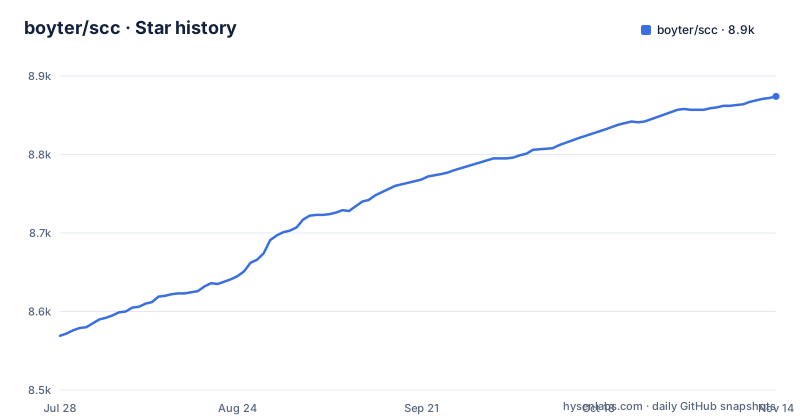
- boyter/scc8,874 ★ · +305
| Repository | 2026-07-28 | 2026-11-14 |
|---|---|---|
| boyter/scc | 8.6k | 8.9k |
305 Stars in the last 109 days, measured from the daily GitHub snapshot. Compare with other projects
Editorial analysis
What scc Solves and Who It Is For
scc is a command-line tool for counting lines of code, blank lines, comment lines, and physical lines across many programming languages. It is designed for developers and engineering leaders who need a quick, rough measure of a codebase's size without waiting for slower tools. The README states its goal is to be 'the fastest code counter possible', and it adds features that plain counters lack: cyclomatic complexity estimates, COCOMO cost calculations, LOCOMO estimates for LLM-based development costs, and unique lines of code (ULOC) for DRYness metrics. The tool is written in pure Go, which means it compiles to a single static binary and runs on Windows, Linux, and macOS. It is especially useful in CI pipelines, pre-commit hooks, or any script where you want repository metrics without pulling in a heavy dependency. The project also powers searchcode.com, so it has a real production use case beyond hobbyist counting.
How scc Works: Counting, Complexity, and Estimates
scc scans files in a directory tree, identifies the language of each file, and then parses the content to separate code, comments, and blanks. The README links background posts on how it came to be, with performance benchmarks. Beyond raw counts, scc computes a complexity estimate per file, similar to cyclomatic complexity calculators. It also calculates COCOMO (Constructive Cost Model) estimates, which predict effort and cost based on lines of code, and LOCOMO, a newer estimate for LLM-based development costs. The ULOC metric counts unique lines across the codebase, giving a sense of duplication or DRYness. These extra metrics are the main differentiator from simpler counters like tokei, which only provide line counts. The output can be formatted in multiple ways, including an HTML report, making it suitable for automated ingestion.
Getting scc Running: Installation and Basic Usage
Installation is straightforward. The README lists several package managers: `go install github.com/boyter/scc/v4@latest` for Go users (requires Go 1.25 or later), `brew install scc` for Homebrew, `sudo snap install scc` for Snap, and `sudo dnf copr enable lihaohong/scc && sudo dnf install scc` for Fedora. Windows users can use Scoop, Chocolatey, or WinGet. There is also a Docker image: `docker run --rm -it -v "$PWD:/pwd:ro" --network none ghcr.io/boyter/scc:master scc /pwd`. Once installed, running `scc` in a directory produces a summary table of languages, files, lines, blanks, comments, and complexity. The README has sections on configuration files and output formats, and the tool also has Git insight reports and an HTML report. For basic use, you simply point it at a directory and read the table.
The Speed vs. Accuracy Trade-off
scc's primary selling point is speed. The README lists cloc, tokei, and gocloc as similar tools, and the author's blog posts (linked) discuss performance benchmarks. A fast counter often uses heuristics for language detection, which can misclassify files with ambiguous extensions or unusual comment syntax. For example, a file with a `.h` extension could be C, C++, or Objective-C, and scc must guess. This matters if you use scc for cost estimation or COCOMO calculations, where a 10% error in line count can skew the effort estimate. The project's own description says 'accurate', but the definition of accurate is not quantified. If you need precise counts for legal or contractual reasons, you should cross-check with a slower but more rigorous tool like cloc.
COCOMO and LOCOMO: Useful Estimates or Gimmicks?
scc includes COCOMO calculations, which estimate the effort and cost to develop a codebase based on lines of code. This is a classic software engineering metric, and scc's implementation follows the same model as sloccount. The README also mentions LOCOMO, which is a newer estimate for LLM-based development costs. This is an interesting addition, as it addresses the growing use of AI coding assistants. For a developer, these estimates are rough at best. COCOMO itself has known limitations, and applying it to modern codebases with frameworks and generated code can produce misleading numbers. That said, having these estimates in the same tool as the line count is convenient. You do not need to export counts to a separate spreadsheet. The LOCOMO feature is a differentiator, but treat it as a heuristic, not a budget forecast.
Limitations and When scc Is the Wrong Tool
The most obvious limitation is the Snap packaging issue: the README notes that Snap-installed applications cannot run outside of `/home`, so if you use Snap, you may encounter permission errors when scanning directories outside your home folder. This is a real constraint for CI systems that run in `/tmp` or `/opt`. Another limitation is the requirement for Go 1.25 or later if you install from source, which might be a problem on older systems. The project also has an 'Enterprise' offering that is not yet available, and the README asks for interest in a private beta. This suggests the core tool is stable, but the team is exploring commercial features like historical analysis and policy enforcement, which are not in the open-source version. If you need those features, scc alone is not enough. For very large monorepos, scc's speed is an advantage, but for small projects, the overhead of running a separate tool might not be worth it when you can use `wc -l` or a simple script.
Alternatives: cloc, tokei, and gocloc
The most direct alternative is cloc, which is written in Perl and is often slower but more configurable. tokei is a Rust-based counter that is also fast and accurate, but it does not include COCOMO or LOCOMO estimates. gocloc is another Go counter inspired by tokei, but it is less feature-rich than scc. The README lists these tools and links to performance comparisons. The key difference is that scc bundles complexity and cost estimates, which neither tokei nor gocloc provide. cloc has a `--by-file` option and can output results in many formats, similar to scc, but cloc's focus is on accuracy and portability, not raw speed. If you need a counter that runs everywhere without a Go toolchain, cloc's Perl script is easier to deploy. If you want speed and do not care about cost estimates, tokei is a solid choice. scc sits in the middle, offering speed plus extra metrics, but with a less proven track record than cloc.
Maintenance and Upgrade Considerations
scc is actively maintained, with the latest release v4.1.0 on 2026-09-07 following v4.0.0 on 2026-08-24, and the master branch is the default. The project uses GitHub Actions for CI, and the README includes a link to a coverage report, though the exact percentage is not shown. The license is MIT, which is permissive and allows commercial use without restrictions. v4.0.0 was a major version bump, so check the release notes before upgrading from v3.x. The README also has a Development section, and the repository includes CONTRIBUTING.md. For a production environment, consider pinning a specific version in your scripts to avoid surprises. The Docker image tag `master` is a moving target, so use a versioned tag if you rely on it. The maintenance cost is low for individual users, but if you depend on scc in a CI pipeline, you should budget time for occasional updates to match new releases.
Editorial conclusion
Adopt scc if you need a fast, single-binary counter for everyday repository size checks, complexity estimates, or CI scripts where speed matters more than perfect accuracy. Avoid it if you need historical analysis, team dashboards or policy enforcement, which the README places in a separate scc Enterprise offering. Before relying on it, verify its language detection rules against your codebase, check the v4.0.0 and v4.1.0 release notes, and test its output against cloc or tokei on a representative sample.
Frequently asked questions
What is Sloc, Cloc and code (scc)?
A line counter written in pure Go, similar in purpose to the older Perl and Rust counters it lists. It counts lines of code, blank lines, comment lines and physical lines across many languages, and adds rough complexity estimates, unique-line and duplication metrics, and two cost models, one classical and one aimed at estimating development cost for machine-assisted work.
How do you calculate code complexity?
The readme says the tool estimates complexity in a way similar to the cyclomatic complexity calculators, and it has a dedicated Complexity Estimates section; treat the number as an estimate to compare across a run.
Is a cyclomatic complexity of 20 considered high?
scc does not frame it that way. The readme describes complexity as an estimate alongside duplication and cost models rather than as a value with an acceptable range, which means a figure of 20 tells you where a function sits relative to the rest of the tree and not whether it is acceptable.
What is SCC coding?
That phrase is not this project, and the repository does not use it. The project is spelled in lowercase and stands for a line counter; it also powers a hosted code search site and offers an MCP server mode, which is probably the connection behind the question. Nothing in the readme describes a coding standard or an abbreviation by that name.
Official sources
Add this badge to your README
If you maintain this project, the badge below links readers to this analysis and shows its maintenance status from the daily GitHub snapshot. Paste the markdown into your README; add ?metric=license or ?metric=stars to the image URL for a different field.

[](https://hysenlabs.com/projects/boyter-scc)Star history chart for your README
[](https://hysenlabs.com/projects/boyter-scc)Was this useful?