GDMaim, an export-time obfuscator for GDScript in Godot
GDMaim is a GDScript obfuscation plugin for the Godot Engine.
At a glance
- What is it?
- GDMaim is a Godot Engine plugin that obfuscates your GDScript files when a project is exported, rewriting identifiers, inlining constants and stripping comments so the shipped pck is harder to read. It does not make reverse engineering impossible and it says so.
- Who is it for?
- Adopt GDMaim if you ship a Godot project whose exported pck currently contains readable GDScript and you want a larger barrier against casual source extraction, especially for multiplayer games where server authoritative logic matters. Do not adopt it expecting protection you cannot get, since the project states plainly that obfuscation does not make reverse engineering impossible, and it is not a replacement for a server side trust boundary.
- Can I use it commercially?
- Yes. MIT is a permissive licence: you can use, modify and sell software built on it, as long as you keep its copyright and licence notices.
- Is it still maintained?
- Yes. The repository last received commits 3 days ago.
- What is it written in?
- Mainly GDScript, according to GitHub's language statistics.
Answers come from the project's GitHub data, last synced on November 6, 2026, and from our analysis. They are not legal advice.
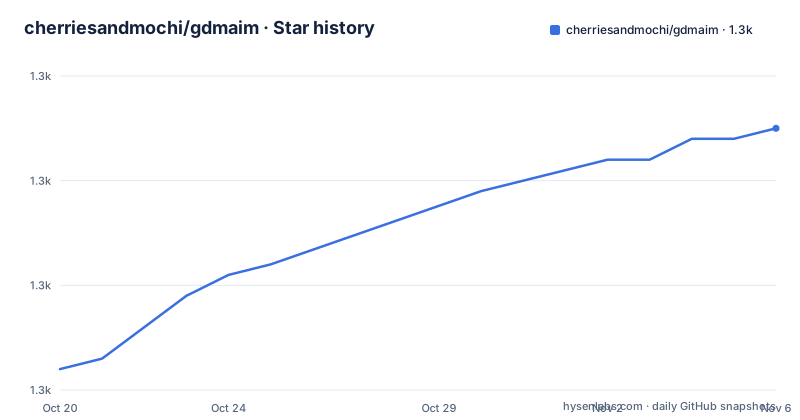
Star history
- cherriesandmochi/gdmaim1,335 ★ · +23
| Repository | 2026-10-20 | 2026-11-06 |
|---|---|---|
| cherriesandmochi/gdmaim | 1.3k | 1.3k |
23 Stars in the last 17 days, measured from the daily GitHub snapshot. Compare with other projects
Editorial analysis
Godot ships your GDScript as readable text
The starting point is a property of the engine, not of this plugin. GDScripts are stored as they are when a project is exported, which means anyone with the shipped files can read the original source code, and the project description names the tool that makes this painless, gdsdecomp.
Godot does ship a built-in encryption option, and the description is honest about its limits. It will only deter people who do not know about another tool, gdke, which extracts the encryption key from the executable itself. That is the whole argument against encryption as a scheme: the key travels with the binary.
The consequence the project draws is twofold. It is easy to obtain the entire GDScript source of any exported project, and that makes writing cheats for multiplayer games easier, including finding and taking advantage of vulnerabilities in server authoritative code.
That second point is the one that should decide whether you need this. Obfuscation is not a security boundary. It is a speed bump on a road that a determined person can still travel, and its value is that the tools for the straightforward version of the attack, unzip the pck and read the text, stop working out of the box.
The audience is therefore a Godot developer shipping a game, especially an online one, who wants to raise the cost of that casual extraction without changing how the project is written.
Only the exported pck is processed, so the project stays intact
The mechanism has one design decision that matters more than the individual options: the plugin processes the exported pck file, not your project. Obfuscation is described as non-destructive to the project itself, which means you keep readable, debuggable source in the editor and the shipped artefact is the transformed one.
Inside that exported file, the transformations are listed as generating random names for identifiers, hardcoding enum and constant values, and stripping out comments and empty lines. The identifier renaming is what does the heavy lifting against a tool like gdsdecomp, since a decompiled script full of meaningless names is far more work to understand than one with your own variable names.
The comparison the project makes is with encryption rather than with nothing. Obfuscation is not a way to make reverse engineering impossible, but it acts as a far greater barrier than encryption, which can be bypassed with a publicly available tool.
Two more choices widen the scope. One option shuffles the line positions of top-level declarations such as variables, functions and classes, so even a reader who has renamed the identifiers back has to reconstruct the file order. Another compresses multiple lines of code into as few lines as possible, which is a size reduction as much as an obfuscation measure.
The result is a trade the project states plainly: a readable pck becomes a large, deliberately awkward one, and the source you ship is not the source you wrote.
The dock: obfuscation, post processing, name generator, source mapping
Configuration happens in the GDMaim dock at the bottom left of the editor, next to the file dock, and it is organised into four groups that correspond to the four stages of the pipeline.
The obfuscation group holds the transforms that change meaning-preserving code into something harder to read. There is a master switch for enabling obfuscation of scripts, which does not affect post-processing, so the two halves of the pipeline can be used separately. Obfuscate Export Vars covers exported variables, with the stated requirement that every resource modifying export variables must be saved as .tres files. There is the switch to shuffle top level declarations, the one to inline statements, and two that inline constants and enums, replacing accesses with hardcoded values and removing the declarations that held them. Two more remove static typing from variables and functions, and the complement of that action initialises the stripped typed variables.
The post processing group is the cleaning pass. It strips comments, strips empty lines, removes spacing that is not required, removes annotations used only by the editor, and removes any line matching a regular expression you supply.
The export mode option defines the final format of the exported scripts and mirrors the script export option in the editor, letting you choose between plain text, binary tokens and compressed binary tokens. That choice is independent of the obfuscation, which is worth remembering when you read a build that still looks like text.
The name generator, and why a fixed seed matters
Identifiers are renamed, and the name generator decides what the new names look like. It has a prefix applied to every generated name, a character list it is allowed to use, a target name length that does not include the prefix, and a seed.
The seed is the interesting parameter. A given seed always produces the same name for every identifier, so the mapping is deterministic and reproducible. That matters in two practical ways. It means two exports of the same project produce the same obfuscated names, so a bug report that refers to a symbol can still be traced back to the original. And it means the obfuscation can be reasoned about rather than being a fresh scramble every time.
The dynamic seed option turns that off, generating a random seed on every export. The project warns about the consequences in specific terms: dynamic seeds produce unique scripts on each export, which might potentially break delta updates as used by Steam for example, and it makes debugging harder.
That warning is the practical argument for the default. If your game ships through a platform that patches rather than re-downloads, a build whose symbol names change on every export is a build whose patches cannot be reasoned about, and the bug reports that come back from players will refer to names that no longer exist in your project.
For a shipped title, the fixed seed is the choice. The dynamic seed is for a build you are producing once and will never patch.
Source maps, and the runtime issue they do not solve
The source mapping group is what keeps an obfuscated build debuggable. Source maps are saved automatically on export to a path you choose, with a maximum number of saved maps, where the oldest is replaced when the limit is reached, and an option to compress them before export to take up less space.
There is also an Inject Name option, which searches for the first enabled autoload during export and inserts a print statement into its _enter_tree method, creating that method if it does not exist. The print statement carries the filename of the associated file, which is a way to confirm at runtime which build is actually running.
A source map viewer is part of the project, and the documentation links a video about fixing load and save resources using GDMaim, specifically for runtime in exported projects, tied to issue number 157. That reference is a warning rather than an endorsement. Runtime resource loading and saving is the part of the pipeline most likely to interact badly with an obfuscated build, because the code that opens and writes a resource path at runtime is code that has been renamed and stripped.
The source maps are what you use when that goes wrong. Keeping them out of the shipped build, and keeping the limit configured so you still have the maps from the build a player is actually running, is the part of this that needs a decision on your side.
Preprocessor hints, export feature tags and ignore tokens
Godot's export process can strip code that is not needed for the target platform, using export template feature tags, and the plugin can take part in that filtering rather than fighting it. The Process Feature Filters option handles the automatic filtering of code based on those tags, and the documentation links it to the preprocessor hints section.
The preprocessor prefix is the setting that ties into this. It is the prefix used for preprocessor hints, and it is what lets you write conditions into a script that the export step can act on. A custom prefix matters when you already use one in your own codebase, since two systems claiming the same prefix in the same file is a conflict you would rather find at configuration time.
The project also documents custom ignore tokens, which is the mechanism for marking parts of a file that the obfuscator should leave alone. This is the escape hatch for the cases the automatic transforms get wrong, and the standard reason to reach for it is the same as for any obfuscator: a piece of code whose behaviour depends on its own name or structure.
The feature filter processing is also the point where the plugin intersects with the engine rather than sitting beside it, and it is the option most likely to differ between a debug build and a release build, since a feature tag decides which code survives the export in the first place.
Installing: copy the addon folder and enable the plugin
The installation is three steps, and the first of them decides where you get the code from.
The project offers a release build on its releases page, or the latest main branch as a zip archive. The releases are the sensible choice, with the branch zip for anyone who needs the newest change.
The second step is a file operation. You extract the zip and copy the addons/gdmaim folder into the project's addons directory, so that the plugin ends up at res://addons/gdmaim inside the project. It is a Godot addon, and the engine loads it from that path.
The third step is in the editor, and it is a menu path rather than a command: Project, then Project Settings, then Plugins. Enable GDMaim there, and the dock appears at the bottom left next to the file dock, which is where the configuration lives.
The version requirement is stated as Godot 4.0 and later, and the project notes it was developed and tested on Godot 4.2-stable, with a badge indicating 4.x support. The plugin requires the Godot Engine 4 series, so a project on Godot 3 is not a candidate.
There is no build step, no package manager and no script to run. Everything is done in the editor, which is the right shape for a tool whose entire job happens at export time.
MIT licence, version 0.4.0, and where the documentation admits limits
The licence is MIT, and the plugin is distributed under it, so it carries no copyleft obligation, but the copyright and licence notice must be kept in distributions.
The version history is short and moving. The releases are 0.4.0 on 2026-09-26, 0.3.0 on 2026-05-22 and 0.2.0 on 2026-01-29, and the last push was on 2026-10-10. The repository is not archived, and the project publishes a change log and a contributing guide alongside the documentation.
The documentation structure is itself informative, because it separates the claims from the caveats. There is a section on why the project exists, one on limitations and caveats, one on stability, one on external libraries, one on troubleshooting, one on the roadmap and one on issues. A plugin that changes the shape of your exported code should be judged on its failure modes, and having a dedicated stability section is a reasonable sign that the author expects some.
The project also links written material rather than only code: an introduction video, a video on the best settings for debug and release builds, and a post describing the 2026 changes. For a tool whose behaviour varies with the export mode and the feature tags, a settings walkthrough is often more informative than the option list itself.
Editorial conclusion
Adopt GDMaim if you ship a Godot project whose exported pck currently contains readable GDScript and you want a larger barrier against casual source extraction, especially for multiplayer games where server authoritative logic matters. Do not adopt it expecting protection you cannot get, since the project states plainly that obfuscation does not make reverse engineering impossible, and it is not a replacement for a server side trust boundary. Before you enable it, read the limitations, caveats and stability sections of the project documentation, keep the seed fixed for a release rather than using the dynamic seed, and confirm the export mode you choose does not break the delta update mechanism you use, such as the one Steam applies.
Frequently asked questions
What does the GDMaim plugin do to my Godot project?
It obfuscates the GDScript files inside the exported pck by generating random names for identifiers, hardcoding enum and constant values, and stripping comments and empty lines. Only the exported file is processed, so the project in the editor is unchanged.
How do I install GDMaim in Godot?
Download a release build or the main branch zip, extract it, and copy the addons/gdmaim folder into the project's res://addons directory. Then enable it through Project, Project Settings, Plugins. It requires Godot 4.0 or later.
What is the difference between the fixed seed and the dynamic seed in GDMaim?
A given seed always produces the same name for every identifier, so exports are reproducible. The dynamic seed option generates a random seed on every export, which the project warns can break delta updates as used by Steam and makes debugging harder.
Does GDMaim make reverse engineering impossible?
No. The project states that it does not make reverse engineering impossible, but that it acts as a much greater barrier than encryption, which can be bypassed with a publicly available tool that extracts the encryption key from the executable.
What is the current version of GDMaim and what licence is it under?
The project is MIT licensed and the recent releases are 0.4.0 on 2026-09-26, 0.3.0 on 2026-05-22 and 0.2.0 on 2026-01-29. The last push was on 2026-10-10.
Official sources
Add this badge to your README
If you maintain this project, the badge below links readers to this analysis and shows its maintenance status from the daily GitHub snapshot. Paste the markdown into your README; add ?metric=license or ?metric=stars to the image URL for a different field.

[](https://hysenlabs.com/projects/cherriesandmochi-gdmaim)Star history chart for your README
[](https://hysenlabs.com/projects/cherriesandmochi-gdmaim)Was this useful?