HarkinianPad: Ship of Harkinian on iOS and iPadOS
Ocarina of Time native on iOS and iPadOS via Ship of Harkinian with Metal rendering, touch controls, controller support, and ROM-free reproducible builds.
At a glance
- What is it?
- HarkinianPad repackages the Ship of Harkinian source port as a native iOS and iPadOS app with Metal rendering and touch controls. It ships no game data, and the only public install path is an unsigned developer-preview IPA you re-sign with AltStore Classic.
- Who is it for?
- Adopt HarkinianPad if you already own a supported Ocarina of Time ROM, have a Mac with Xcode, and want the Shipwright port running natively on an iPhone or iPad with Metal rendering and a customizable touch controller. Do not adopt it if you want a computer-free install, an App Store or TestFlight build, or a ready-made game: the README states there is no AltStore PAL release, no App Store listing, and no bundled game data.
- Can I use it commercially?
- Check first. The repository uses a licence we do not classify automatically, so read its LICENSE file before any commercial use.
- Is it still maintained?
- Yes. The repository last received commits 3 days ago.
- What is it written in?
- Mainly Shell, according to GitHub's language statistics.
Answers come from the project's GitHub data, last synced on November 23, 2026, and from our analysis. They are not legal advice.
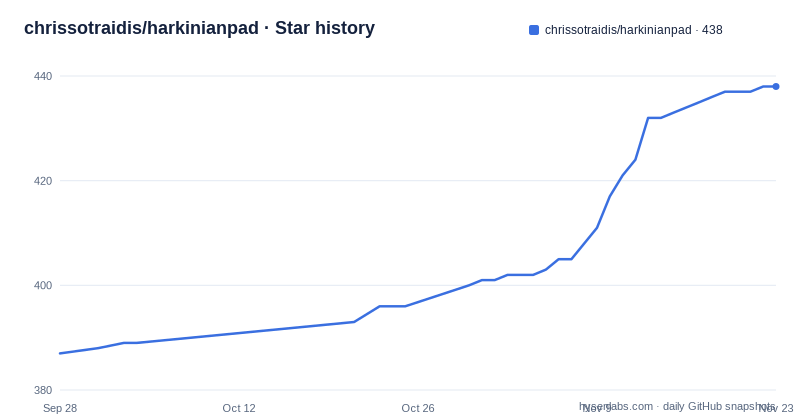
Star history
- chrissotraidis/harkinianpad438 ★ · +51
| Repository | 2026-09-28 | 2026-11-23 |
|---|---|---|
| chrissotraidis/harkinianpad | 387 | 438 |
51 Stars in the last 56 days, measured from the daily GitHub snapshot. Compare with other projects
Editorial analysis
What HarkinianPad is, and who it is for
Ship of Harkinian is a source port of Ocarina of Time that runs on desktop platforms. HarkinianPad takes that port and packages it as a native iOS and iPadOS application, which means the game runs on the device rather than inside an emulator. The repository is the mobile integration layer plus the build scripts that produce it. It is not a fork of the game logic.
The target reader is a developer or a technically comfortable player who owns a legally acquired, supported Ocarina of Time ROM and wants to play it on an iPhone or iPad with a real renderer. The README is explicit that the repository contains no Ocarina of Time, no ROM, and no playable ROM-derived archive, and it points at RIGHTS_AND_LICENSES.md for the scoped boundary. That boundary also states the project does not relicense Shipwright, third-party projects, or game material. If you were hoping for a download that includes the game, this is not it, and the licence file is the place to confirm that rather than a forum post.
Two details shape everything else. First, the app renders through Metal, Apple's graphics API, rather than through an SDL or OpenGL path. Second, the interface is built for touch first: a landscape layout is selected for the current device class, and the on-screen controller can be hidden when a physical controller is connected.
How the iOS integration is put together
The repository layout tells most of the story. Alongside README.md and the licence file there are scripts/, patches/, ref/, tests/, docs/, assets/, and .github/. The scripts directory holds the build entry point, patches holds the changes applied to the upstream source, ref is a reference checkout, and tests covers the parts the author decided were worth locking down. Shell is the primary language, which fits a project whose job is orchestration: fetch upstream, apply patches, invoke CMake and Ninja, then produce an Xcode project and an .app bundle.
The runtime data flow is documented in the first-launch steps. The app never downloads or bundles game data. On first launch iOS creates a Files-visible folder for the app, which is its Documents directory. You place a supported ROM there, return to the app, and select Rescan. The app then builds a local oot.o2r archive from that ROM while it stays open. The README notes that both the original ROM and the generated archive stay inside the app container, are ignored by Git, and are rejected by the repository's package audit. That audit is a deliberate guardrail: it stops a contributor from accidentally committing game material into a public repository.
Rendering and input sit on top of libultraship, the port's engine layer, with SDL2 for platform glue. The touch layer is UIKit: the README describes transparent UIKit touch targets behind the native A/B/C HUD controls. That is a sensible split. The game draws its own buttons, and invisible UIKit views sit over them to capture touches, which keeps the visual style consistent with the port while still giving iOS a hit-testing surface it understands.
Building and running it on a physical iPad
The README gives a complete path for a local build, and it is the only route that does not involve re-signing an IPA. You need a Mac with Xcode and its command-line tools, Homebrew, an Apple ID configured in Xcode for physical-device signing, and your own supported Ocarina of Time ROM. The dependencies are installed through Homebrew:
brew install cmake ninja pkgconf sdl2 glew nlohmann-json libpng libzip \
  tinyxml2 libogg libvorbis opus opusfile sdl2_net
That single command pulls in the build system, the SDL2 stack, image and archive libraries, and the audio codecs. Nothing exotic, and no vendored binaries to trust.
After cloning the repository, the build script takes a mode flag. The simulator build is the quick check; the device build needs two environment variables, a ten-character team identifier from Xcode and a bundle identifier that belongs to you:
git clone https://github.com/chrissotraidis/harkinianpad.git
cd harkinianpad

# Simulator
scripts/build-ios.sh --simulator

# Physical iPhone or iPad
DEVELOPMENT_TEAM=ABCDE12345 \
BUNDLE_ID=com.yourname.harkinianpad \
scripts/build-ios.sh --device
The README states the device app is written to build-ios-soh/soh/Release-iphoneos/HarkinianPad.app. If Xcode needs to register the device or create a provisioning profile, the documented fallback is to open build-ios-soh/Ship.xcodeproj, select the soh target and your device, then choose your team under Signing & Capabilities. docs/BUILDING.md is described as the complete workflow covering simulator, signing, installation, controller, and package audit.
First launch is a five-step sequence, and step five is the one people miss. Launch the app once so iOS creates its Files-visible folder. Open Files, go to On My iPad, then HarkinianPad, and move your ROM into that folder. Return to the app, select Rescan, and leave the app open while it creates the local oot.o2r archive. Then press the on-screen Start button or Start on a connected controller. The README adds a note for LiveContainer users: open HarkinianPad's container and use its Documents folder, not SystemData.
The touch layout, and where the documentation stops
The touch controller is the part of this project with the most surface area, and the README documents it in more detail than anything else. A landscape layout is chosen for the current device class. The left side carries a separate D-pad, the control stick, and Z within left-thumb reach. The right side carries Start, R, L, the native A/B/C HUD controls, and their transparent UIKit touch targets. A small three-dot button stays available even when gameplay touch controls are disabled, which matters because otherwise you could hide the overlay and lose your route back into the menu.
The settings are worth listing precisely because they are easy to misread. Settings, then Controls, then Touch Controls hides or restores the gameplay overlay. Touch Control Transparency reveals a 25% to 100% opacity slider, is off by default, and, per the README, does not change touch targets. Customize Touch Layout lets you move, resize, or hide controls in separate phone and tablet layouts. Legacy Fixed Touch Controls switches back to the previous non-customizable UIKit controller. Opening the menu hides the gameplay controls so the settings interface stays usable, and closing it restores them only when Touch Controls is enabled.
That last sentence is a small trap. If you disable Touch Controls, open the menu, and close it again, the overlay does not come back. You need the three-dot button. This is reasonable behaviour, but it is the kind of thing a first-time user will hit and misread as a bug.
One gap: the README's touch control table is truncated at the point where it maps touch controls to Shipwright bindings. The mapping exists in the repository, but the excerpt does not show it, so anyone who needs the exact binding for a given on-screen button should read the full table in README.md rather than assume the layout described above is complete.
Install options, and the one that does not exist yet
The README carries an install-status table, and reading it carefully saves time. A developer-preview IPA is available, but it is unsigned, and the documented path is to re-sign it with your Apple ID through AltStore Classic and AltServer on macOS or Windows, following docs/INSTALL_IPA.md. The current release is v0.1.0-preview.5, published on 2026-08-18, and the download is named HarkinianPad-0.1.0-preview.5-unsigned.ipa.
The row that matters most is the second one. AltStore PAL and computer-free installation is marked not available, and the README explains why in plain terms: the current IPA is not an AltStore PAL release, and installing AltStore Classic through PAL does not remove Classic's requirement for AltServer on a Mac or Windows PC. So there is no path today that gets this onto an iPad without a computer somewhere in the loop. If computer-free installation is your requirement, this project does not meet it, and the README says so rather than leaving you to discover it after downloading.
The remaining rows are straightforward. A local iPad build is available now. The simulator is available now and is described as best for development and UI testing, explicitly not a substitute for physical-device testing. App Store and TestFlight are marked not announced, with no listing or public TestFlight currently in existence.
What is verified on hardware, and what is still open
The README is unusually specific about testing, which is a point in its favour and also the source of its clearest limitations. The current development build has been signed, installed, and played on a 12.9-inch iPad Pro (6th generation) running iPadOS 26.5.2. Files import, on-device archive loading, touch gameplay, save loading, the settings menu, and in-place app updates have all been exercised on that hardware. That is one device, and the project says so.
Audio is the weaker area. The README states audio has been heard during repeated physical-iPad playtests, but headphone, Bluetooth, and interruption recovery still need a complete device matrix. Controller support is split in an interesting way. Controller sleep and reconnect ownership now has deterministic regression coverage and physical-iPad foreground proof, which suggests tests/ contains real assertions about that state machine rather than a manual checklist. But hands-on Bluetooth, wired, natural-sleep, mapping, rumble, motion, and two-controller acceptance remains open. So the automated coverage and the human coverage sit at different points, and the README does not pretend otherwise.
This is where a reader should slow down. If your plan is to play with a Bluetooth controller and rely on rumble, you are in the open-acceptance column, not the verified column. The project is honest about that, which is more useful than a blanket claim of support.
Licence boundary and maintenance cost
The licence field is NOASSERTION, which means GitHub could not match the repository to a recognised licence template. That is not the same as having no terms, but it does mean you should read RIGHTS_AND_LICENSES.md before you do anything with the code. The README describes it as a scoped rights and licensing boundary and states that it does not relicense Shipwright, third-party projects, or game material. In practice that means the upstream port keeps its own terms, the bundled libraries keep theirs, and the game itself is not covered by any of them. This is a description of what the file says, not legal advice; if you plan to redistribute a build, read the file and the upstream licences yourself.
The practical cost of running this is the toolchain, not the code. You need a Mac with Xcode, Homebrew, and a working signing setup, and you need to rebuild when you want a newer preview. The repository has a release checklist at docs/RELEASE_CHECKLIST.md to follow before publishing or sharing a build, which is a sign the author expects people to produce their own binaries. The last push to the default branch was on 2026-08-18, the same day as the v0.1.0-preview.5 release. The project is not archived, and the release cadence visible in the release list is roughly weekly to biweekly across previews 3, 4, and 5, but the version number is still 0.1.0 and every release carries a preview tag. Treat it as a developer preview with an active build pipeline, not as a finished product.
Editorial conclusion
Adopt HarkinianPad if you already own a supported Ocarina of Time ROM, have a Mac with Xcode, and want the Shipwright port running natively on an iPhone or iPad with Metal rendering and a customizable touch controller. Do not adopt it if you want a computer-free install, an App Store or TestFlight build, or a ready-made game: the README states there is no AltStore PAL release, no App Store listing, and no bundled game data. Before committing, verify three things in the repository: that your ROM is a supported Ocarina of Time release, that your device is on iOS or iPadOS 14 or later, and that your Apple ID can produce a provisioning profile for the bundle identifier you pass to scripts/build-ios.sh.
Frequently asked questions
Can I play Ship of Harkinian on iOS with HarkinianPad?
Yes, that is what the project does: it packages the Ship of Harkinian source port as a native iOS and iPadOS app. You still need your own legally acquired, supported Ocarina of Time ROM, which you place in the app's Documents folder and import through the Rescan step. The README states the app never downloads or bundles game data.
Does Ocarina of Time use the D-pad in HarkinianPad?
HarkinianPad's touch layout places a separate D-pad on the left side of the landscape layout, alongside the control stick. The README's touch control table maps each on-screen control to its Shipwright binding, but that table is truncated in the available documentation, so check README.md for the exact mapping.
Can I install HarkinianPad without a computer?
No. The README's install table marks AltStore PAL and computer-free installation as not available, and explains that installing AltStore Classic through PAL does not remove Classic's requirement for AltServer on a Mac or Windows PC. The available IPA is unsigned and is meant to be re-signed with your Apple ID through AltStore Classic.
Where does HarkinianPad look for the Ocarina of Time ROM?
In the app's Documents folder, reached through Files, then On My iPad, then HarkinianPad. After moving the ROM there, return to the app and select Rescan, then leave the app open while it creates the local oot.o2r archive. The README notes that LiveContainer users should use the app container's Documents folder, not SystemData.
What iOS version does HarkinianPad require?
The README badge states iOS and iPadOS 14 or later. The current development build has been signed, installed, and played on a 12.9-inch iPad Pro (6th generation) running iPadOS 26.5.2, which is the only hardware configuration the documentation names.
Official sources
Add this badge to your README
If you maintain this project, the badge below links readers to this analysis and shows its maintenance status from the daily GitHub snapshot. Paste the markdown into your README; add ?metric=license or ?metric=stars to the image URL for a different field.

[](https://hysenlabs.com/projects/chrissotraidis-harkinianpad)Star history chart for your README
[](https://hysenlabs.com/projects/chrissotraidis-harkinianpad)Was this useful?