CircuitLord's VR Mod Installer for Big Walk and Titanfall 2
One-click installer for Big Walk VR and Titanfall 2 VR
At a glance
- What is it?
- CircuitLord's VR Mod Installer is a small C# application that installs, updates and launches two full-conversion VR mods, Big Walk VR and Titanfall 2 VR. It is driven by a versioned manifest with hashes and release channels, and it records exactly which files it wrote so an uninstall is clean.
- Who is it for?
- Adopt CircuitLord's VR Mod Installer if you play Big Walk or Titanfall 2 in VR and want the mod set installed, updated and launched in one place rather than by hand on every patch, and if you are comfortable with an unsigned community tool that writes into your game folder. Do not adopt it as a place to get the mods themselves, because the mods are closed source and not covered by the installer licence, and do not redistribute the downloaded mod files.
- Can I use it commercially?
- Check first. The repository uses a licence we do not classify automatically, so read its LICENSE file before any commercial use.
- Is it still maintained?
- Yes. The repository last received commits 1 day ago.
- What is it written in?
- Mainly C#, according to GitHub's language statistics.
Answers come from the project's GitHub data, last synced on November 7, 2026, and from our analysis. They are not legal advice.
Star history
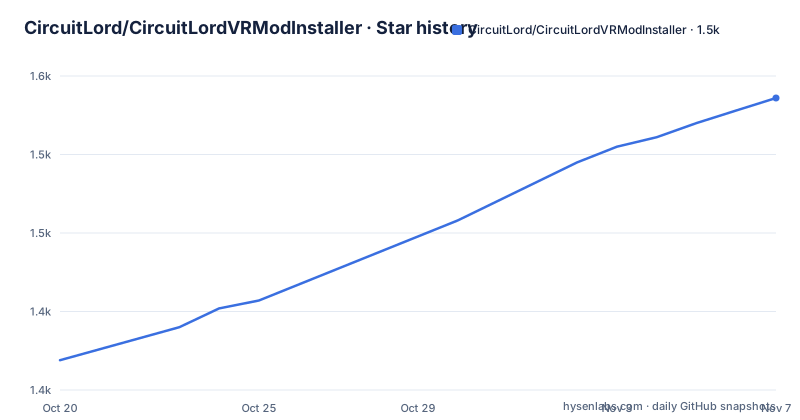
- CircuitLord/CircuitLordVRModInstaller1,536 ★ · +167
| Repository | 2026-10-20 | 2026-11-07 |
|---|---|---|
| CircuitLord/CircuitLordVRModInstaller | 1.4k | 1.5k |
167 Stars in the last 18 days, measured from the daily GitHub snapshot. Compare with other projects
Editorial analysis
One program, two full-conversion VR mods
CircuitLord's VR Mod Installer is a utility that automatically installs a set of full-conversion VR mods, keeps them up to date, and launches them in VR. It currently supports two games: Big Walk VR and Titanfall 2 VR.
The mods themselves are the substance. Titanfall 2 VR adds full VR support to the Titanfall 2 campaign, with stereo rendering, full body IK, manual reloads and Titan controls. Big Walk VR adds full multiplayer-compatible SteamVR support to Big Walk by House House, with stereo rendering and 6dof motion controls with support for grabbing and throwing objects.
The installer is a wrapper around that work, and it is useful precisely because the installation steps are not trivial. For Titanfall 2 it finds the game through your Steam, EA or Xbox install, checks for the EA app, which the game needs you signed into, and installs Northstar and the mod into a separate TF2VR profile in the game directory. For Big Walk it finds the game through your Steam install, sets up BepInEx, the mod loader Big Walk VR depends on, and installs the mod into the game directory.
Both games keep their normal behaviour if you launch them as usual, and VR play goes through the installer's Launch in VR button, which needs SteamVR or your runtime of choice running first. The project states that these mods and the installer are community projects, not affiliated with or endorsed by the game developers or publishers, and to use them at your own risk.
The manifest decides what Install and Update mean
The update mechanism is a JSON manifest, and it is the part of the design that makes the installer behave like a package manager rather than a downloader.
manifest-v3.json lists the installer version and each mod release with its download URL and a SHA-256 hash. The application compares that manifest against what is installed and shows either Install or Update accordingly. The hash is what makes the update verifiable: the installer is not just fetching a file from a URL, it is checking that the file is the one the manifest describes.
There is a detail that shows care about old installations. Older manifests stay frozen, so an older installer can still update itself. Without that, a user running a version from months ago could stop being able to update at all, because the manifest it knows how to read has moved on.
The repository keeps the earlier formats alongside the current one, with manifest.json, manifest-v2.json and manifest-v3.json at the top level, and a packages/ directory, a repotools/ directory, a src/ directory and a tests/ directory around them.
Each mod entry in the manifest can declare three things beyond its version and hash. preserve lists files that are left alone if they already exist, which is how your calibration and configuration files survive an update. tokenize lists files in which the placeholders {{GAMEDIR}} and {{GAMEDIR_JSON}} are replaced with your game folder at install time. And channels lets a mod publish releases users can pick themselves.
Beta channels sit next to stable in a dropdown
The channels mechanism is how this installer handles pre-release builds without a separate installer. A channel is optional, and when present it appears in the version dropdown next to stable. Each channel has an id, an optional description, and its own version, url, sha256 and size:
"channels": [
  {
    "id": "beta",
    "description": "New features, may be unstable",
    "version": "1.1.0-beta.1",
    "url": "https://example.com/BigWalkVR-1.1.0-beta.1.zip",
    "sha256": "...",
    "size": 20214466
  }
]
The visibility rule is the useful part. A channel shows only while its version is newer than stable, so once a beta has been overtaken by a stable release it disappears from the dropdown rather than lingering as a stale option. Removing a channel moves its users back to stable, which means the rollback is automatic and does not need a separate reinstallation step.
The size field is there for the same reason the hash is. The installer can show how much it is about to download before it starts, and it can confirm afterwards that what arrived is what it expected.
For a user, the practical upshot is that you can try a pre-release without leaving the installer, and you can go back to stable without reinstalling anything, because stable is always present in the list.
Every install leaves a record, and uninstall follows it
Writes into a game directory are the part of a mod installer that usually goes wrong, and this one is explicit about it. Every install records the files it wrote inside the game folder.
That single record is what makes updates and uninstalls precise. Updates delete the files the previous version shipped that the new one no longer does, so a mod that drops a file between versions does not leave a stale copy behind. And uninstall removes exactly what was recorded, rather than attempting to guess which files in a directory belong to the mod.
The preserve list ties into the same bookkeeping. A file listed there is left alone when it already exists, so calibration data and configuration survive an update. That is a different rule from deletion: preserved files are the ones deliberately not tracked for removal, because the user owns them.
The result is an installer that can be run repeatedly without a growing pile of orphaned files, and that can be removed without touching the game itself. For a game directory that also contains your saves and settings, that is a meaningful guarantee, and it is also a difference from the usual experience of removing a mod by deleting folders.
One practical note about where your data lives. VR campaign save files for Titanfall 2 are stored in %LOCALAPPDATA%\Respawn\Titanfall2_VR, which is outside the game folder and therefore outside what the installer records. Uninstalling the mod does not touch your saves, and you should not expect it to.
Building the installer from source
The build is a single command and it needs the .NET Framework 4.8 SDK:
dotnet build src/Installer -c ReleaseThe output is a single executable at src/Installer/bin/Release/net48/CircuitLordVRModInstaller.exe, built using only .NET Framework assemblies, with no additional runtime dependencies to install on the target machine. That is a deliberate choice for a tool people run on a gaming PC, where a prerequisite runtime is one more thing to go wrong before the tool even starts.
The repository is a Visual Studio solution, CircuitLordVRModInstaller.sln, with src/, tests/, packages/ and repotools/ directories alongside the manifests.
The release page hosts the built installer directly, with a download link to the latest release asset, and the release numbers show it is being shipped often. Version 1.2.7 was tagged on 2026-10-02, 1.2.8 on 2026-10-03 and 1.2.9 on 2026-10-06, and the last push was on 2026-10-15. That cadence fits a tool whose job is tracking upstream game patches and mod releases.
There is also a Discord linked from the README for questions and feedback, and a ko-fi page for supporting the work.
What the licence covers, and what it does not
The licensing here needs two sentences read carefully, because they cover different things.
The installer source code is MIT, with the licence in the LICENSE file, and third-party software details are in THIRD-PARTY-NOTICES.md. The repository's licence classification on GitHub is a custom one that GitHub cannot categorise, so the LICENSE file and the README statement are what you should rely on rather than the metadata badge.
The mods are closed source and not covered by the MIT license. All rights reserved. Do not redistribute them without permission. That is a clear line: the tooling that installs the mods is open, the mods themselves are not, and the installer is not a redistribution channel for them. If you are reading this because you want to mirror the mod files to a shared machine, the answer is no without permission.
A few other boundaries are worth stating plainly. The mods and the installer are community projects with no endorsement from the game developers or publishers, and the project asks you to use them at your own risk. Both games need something else in place before VR play works: Titanfall 2 needs the EA app, and Big Walk VR needs BepInEx, which the installer sets up for you but which is a separate project with its own terms.
For Big Walk VR there is one multiplayer detail that will decide whether your friends can join you. The host and other players need the mod installed to see your VR hands. Non-VR friends can install the mod and still play in flatscreen, so a mixed group is possible, but a player without the mod sees a different game from a player with it.
Editorial conclusion
Adopt CircuitLord's VR Mod Installer if you play Big Walk or Titanfall 2 in VR and want the mod set installed, updated and launched in one place rather than by hand on every patch, and if you are comfortable with an unsigned community tool that writes into your game folder. Do not adopt it as a place to get the mods themselves, because the mods are closed source and not covered by the installer licence, and do not redistribute the downloaded mod files. Before you start, check that the game's launcher is signed in, since Titanfall 2 VR needs the EA app and Big Walk VR needs BepInEx present, and read the manifest version your installer uses, because older manifests stay frozen on purpose so an old installer can still update itself.
Frequently asked questions
What games does CircuitLord's VR Mod Installer support?
It currently supports Big Walk VR and Titanfall 2 VR. Big Walk VR adds multiplayer-compatible SteamVR support to Big Walk, and Titanfall 2 VR adds full VR support to the Titanfall 2 campaign with stereo rendering and full body IK.
How does the installer know whether to install or update a mod?
manifest-v3.json lists the installer version and each mod release with its download URL and SHA-256 hash, and the app compares it against what is installed. Older manifests stay frozen so that older installers can still update themselves.
What do preserve, tokenize and channels do in the manifest?
preserve lists files left alone if they already exist, so calibration and configs survive updates. tokenize lists files where {{GAMEDIR}} and {{GAMEDIR_JSON}} are replaced with your game folder on install. channels lets a mod publish optional releases users pick in the version dropdown, shown only while newer than stable.
Can I uninstall the mods cleanly?
Yes. Every install records the files it wrote inside the game folder, so updates delete files the previous version shipped and the new one no longer does, and uninstall removes exactly what was recorded. Files you own, such as VR campaign saves in %LOCALAPPDATA%\Respawn\Titanfall2_VR, are left alone.
Can I redistribute the mod files from the installer?
No. The installer source code is MIT, but the mods are closed source and not covered by that licence, and the README states that they are all rights reserved and must not be redistributed without permission.
Official sources
Add this badge to your README
If you maintain this project, the badge below links readers to this analysis and shows its maintenance status from the daily GitHub snapshot. Paste the markdown into your README; add ?metric=license or ?metric=stars to the image URL for a different field.

[](https://hysenlabs.com/projects/circuitlord-circuitlordvrmodinstaller)Star history chart for your README
[](https://hysenlabs.com/projects/circuitlord-circuitlordvrmodinstaller)Was this useful?