DefenseClaw: a governance and evidence layer in front of an AI coding agent
Security Governance for Agentic AI
At a glance
- What is it?
- DefenseClaw is Cisco's open source stack for putting policy, hooks and observability around an AI coding agent: a Python operator CLI with a terminal interface, a Go gateway, connector hooks, policy bundles and exporters for audit evidence. It makes no claim to prove an agent is risk-free, and it is explicit about when its hooks fail open.
- Who is it for?
- DefenseClaw fits an enterprise team that has to show auditors what its coding agents did, that needs to deny specific capabilities before an agent reaches for them, and that wants a gateway in front of model and tool traffic with the evidence exported somewhere durable.
- Can I use it commercially?
- Yes. Apache-2.0 is a permissive licence: you can use, modify and sell software built on it, as long as you keep its copyright and licence notices.
- Is it still maintained?
- Yes. The repository received new commits within the last day.
- What is it written in?
- Mainly Go, according to GitHub's language statistics.
Answers come from the project's GitHub data, last synced on November 7, 2026, and from our analysis. They are not legal advice.
Star history
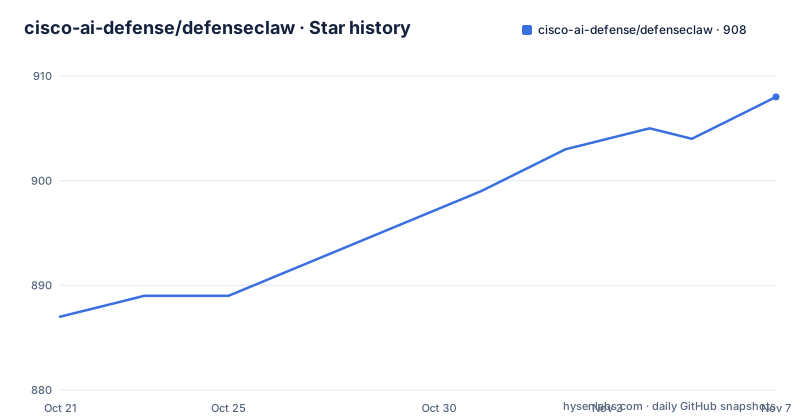
- cisco-ai-defense/defenseclaw908 ★ · +21
| Repository | 2026-10-21 | 2026-11-07 |
|---|---|---|
| cisco-ai-defense/defenseclaw | 887 | 908 |
21 Stars in the last 17 days, measured from the daily GitHub snapshot. Compare with other projects
Editorial analysis
The claim is deliberately narrow: enforcement and evidence, not proof
The README states the scope in three clauses. DefenseClaw combines a Python operator CLI, a Go gateway, connector hooks, policy, scanners, and observability exporters. It is an enforcement and evidence layer. And it does not prove that an agent, model interaction, or third-party capability is risk-free.
That last sentence is unusual and worth dwelling on, because most tools in this space promise some form of assurance. This one says plainly that the thing it does is enforcement and evidence, and that the judgement about risk stays with you.
The tag line above it says the same thing in a different form: scan capabilities before use, inspect runtime traffic, and export durable audit evidence. Three verbs, three phases of a lifecycle. The scan phase is pre-flight, the inspection is in flight, and the export is the after-the-fact record.
The scope is also visible in what the project does not claim. There is no mention of the model itself, of prompt injection defences, or of guaranteeing that a tool call is safe. The tools and connectors are things the agent can reach; the project's job is to decide which of them are allowed on a given deployment and to record what happened.
For an enterprise buyer, that is arguably the right framing. You cannot certify an agent, but you can certify that a particular capability was blocked on a particular host on a particular day, and that is the artefact an auditor actually asks for.
Hooks fail closed, with one documented exception
The most operationally significant paragraph in the README is the one about fail modes, and it is worth reading as a policy statement rather than as a feature list.
Hooks fail closed by default. Only Cisco Secure Client deployments default hook delivery to fail-open when no policy is specified; there an explicit fail-closed setting and valid policy denials remain effective.
Fail closed is the right default for a security control. If the hook mechanism cannot be reached, the agent should not proceed, because proceeding means the control was silently absent. A control that fails open when it is broken is a control that an attacker can disable by breaking it, which inverts the point of having it.
The exception is narrower than it first looks. It is scoped to Cisco Secure Client deployments, it applies only when no policy is specified, and setting fail closed explicitly still works there, and a policy that says deny still denies. So the exception is about the default posture in a specific deployment topology, not about the mechanism as a whole.
The documentation points at a fail modes reference page for the Secure Client scope, which tells you this is a topic with enough subtlety to have its own page. For an adopter, the practical step is to read that page and to know, for each deployment you run, which of the two postures applies. A governance layer whose behaviour changes by topology is fine, as long as you know which one you are in.
There is a related detail in the Python packaging, where the comment on the cryptography dependency notes that CVE-2026-69247 is fixed in 50.0.0 and that the next-major ceiling is kept so published wheels and managed installs share a reviewable upgrade line. The same pattern appears for aiohttp, multidict, and pygments, each with the advisory number and the fixed version in a comment. That is a project that tracks its dependencies against advisories rather than pinning them and hoping.
A Python CLI, a Go gateway, and the seams between them
The architecture is a two-language system, and the repository layout maps it out.
The principal source areas are given as a table. The Python CLI and TUI live in cli/defenseclaw/, the Go gateway commands in cmd/, the Go implementation packages in internal/, the OpenClaw extension in extensions/defenseclaw/, policy bundles in policies/, versioned schemas in schemas/, release and developer automation in scripts/, and tests and fixtures in test/ along with component-local test files.
The Python side is the operator face. The dependencies give the shape: click for the command line, fastapi and starlette for the server, pydantic-settings for configuration, rich and textual for the terminal interface, pygments for syntax highlighting, and requests and aiohttp for HTTP. The comment in the manifest explains that the scanner and TUI runtime is one dependency set, that Textual 8 is used for the ANSI theme and Tabs APIs, and that Textual 8 requires Rich 14.2 or newer, so the tested bounds are kept in the wheel metadata so managed installs do not depend on development-only overrides.
The Go side is the gateway, and its dependencies are more infrastructural. Open Policy Agent at 1.15.2 is there, so policy evaluation is delegated to OPA, and cel-go at 0.30.0 is there for CEL expressions. The OpenTelemetry stack is extensive, with the SDK, the metric and trace SDKs, and OTLP exporters over gRPC, over HTTP, and to Prometheus, plus the Prometheus client. The AWS SDK v2, the paho MQTT client, gorilla/websocket, fsnotify, cobra, viper and toml round out a picture of a component that talks to a lot of different systems.
The Makefile names the four binaries the project produces: defenseclaw itself, defenseclaw-gateway, defenseclaw-acp, and defenseclaw-hook. A separate hook launcher and a separate gateway mean the enforcement path and the data path are distinct programs, which is the right shape for a control that has to keep working when the thing it is controlling misbehaves.
Installing it is a curl pipe, and the docs are the real documentation
The get started section is two commands:
curl -LsSf https://github.com/cisco-ai-defense/defenseclaw/releases/latest/download/install.sh | bash
defenseclaw quickstart
The README then says to read the docs, and on native Windows it points at a specific install page, which tells you the Windows path differs enough from the shell path to need its own page.
That is the shape of the project: the README is an index, and the documentation website is the source of truth for installation, setup, configuration, commands and operator workflows. The index table in the README maps each topic to its canonical guide, and the list covers install, quickstart, upgrade, native Windows, connector compatibility, guardrail setup, the configuration reference, the CLI reference and observability.
The policy for repository Markdown is stated explicitly, which is a sign of a project trying to keep its documentation surface small and its website authoritative. Repository Markdown is limited to contributor guidance, implementation contracts, package-local notes, generated schema references, test fixtures and historical design records, and the README says to start at docs/README.md.
For source development the commands are:
git clone https://github.com/cisco-ai-defense/defenseclaw.git
cd defenseclaw
make build
make test
make check
make lint
And the README is unusually careful about what those targets do. make build produces checkout artifacts without publishing them or changing managed installation state, and its pycli step may create or update the shared repository-local .venv. Run make help before using state-changing source targets. All local source targets share that one locked, test-ready .venv, and there is no separate production-versus-development Python environment to select.
That last point is the one to internalise. The make install, make dev-install and scripts/install-dev.sh targets enforce source-ownership rules and are explicitly not an upgrade path. Release installs upgrade with defenseclaw upgrade, which runs the latest release's installer.
The toolchain contracts are also pinned in the README: Python 3.10 or newer and below 3.14, and Go 1.26.4, with CI exercising the TypeScript components on Node.js 24.
Evidence and observability are the parts that outlive the incident
The observability section of the documentation index and the setup.py build hooks together describe what the evidence layer actually produces.
The setup.py file is called build hooks for package-local runtime assets, and it assembles a set of files that ship inside the wheel. From the configuration side there is defenseclaw-config.schema.json, plus observability.yaml and observability.md, all sourced from a versioned schema directory, schemas/config/v8. From the telemetry side there is telemetry.schema.json, a catalog, and a set of compatibility files for different exporter generations: a v7 exporter selection file, a galileo-rich-v2 file, a local-observability-v1 file, and an openinference-v1 file.
The build hook is strict about how it collects them. The inventory function refuses to run if a required runtime asset directory is unavailable, and it refuses any source path that is a symlink, raising a runtime error if a runtime asset source must not be a symlink. That is a supply chain check on the project's own build, which is a reasonable posture for a tool whose job is supply chain and agent governance.
The versioned schema directories are the interesting design decision. Configuration schema at v8 and telemetry schema under schemas/telemetry/runtime mean that the shape of the configuration and of the exported evidence is versioned independently of the binary, and the compatibility files in the telemetry directory exist to bridge exporter generations. An organisation that keeps evidence for a year will be reading files written by a version that no longer exists, and the schema versioning is what makes that readable.
The Go dependencies confirm the export story. The OpenTelemetry SDK with OTLP exporters for metrics and traces over both gRPC and HTTP, plus the Prometheus exporter and the Prometheus client, means the evidence can go out as metrics, as traces, or as Prometheus scrape targets rather than only as a file nobody can query.
Where DefenseClaw is the wrong choice
Three situations rule it out, and one of them is the project stating its own limits.
The first is a single developer running an agent on their own machine. This is a stack with a Go gateway, a policy engine, an OpenClaw extension, a schema versioned configuration format, a TUI, four binaries and an OpenTelemetry export pipeline. For one person running one agent on one laptop, the governance surface is larger than the thing being governed, and the quickstart will get you a working install faster than you can decide what the policy should say.
The second is if you need assurance that the agent is safe. The README says plainly that DefenseClaw does not prove that an agent, a model interaction or a third-party capability is risk-free. If your requirement is a guarantee, this is the wrong category of tool, because a gateway that denies some calls and records the rest is evidence of control, not evidence of correctness.
The third is an environment where you cannot run a gateway. The whole enforcement model depends on the agent's traffic passing through something the project controls, and on hooks being delivered. If your agent runtime cannot be pointed at a gateway, or the connectors you need do not have hooks, the enforcement path does not exist and you are left with scanners and an audit trail, which is a different and much weaker product.
There is also a version-timing point to keep in view. The releases are 1.0.2 on 2026-10-16, 1.0.1 on 2026-10-12 and 1.0.0 on 2026-10-11, so this is a project that reached 1.0 within a week, and the last push was on 2026-10-22. The configuration schema is at v8 while the binary is at 1.0.2, which tells you the schema version and the release version move on different schedules, and that a deployment will need to hold both numbers in mind. The README also carries a doc-sync marker, last-spec=007 last-synced=2026-10-11, which is the sort of thing that helps you notice when the repository copy of a document has fallen behind the website copy.
Editorial conclusion
DefenseClaw fits an enterprise team that has to show auditors what its coding agents did, that needs to deny specific capabilities before an agent reaches for them, and that wants a gateway in front of model and tool traffic with the evidence exported somewhere durable. It is the wrong choice for a solo developer running an agent locally, where the gateway, the policy bundle and the audit pipeline are more infrastructure than the problem, and it is the wrong choice if you need it to certify that an agent is safe, since the project states it does not prove that. Before deploying it, read the fail modes reference and decide deliberately which deployments are allowed to fail open, because the default is fail closed everywhere except the Cisco Secure Client scope.
Frequently asked questions
What is DefenseClaw?
It is an Apache-2.0 stack from Cisco for security governance of AI coding agents and agentic runtimes, combining a Python operator CLI and TUI, a Go gateway, connector hooks, policy bundles, scanners and observability exporters. The project describes it as an enforcement and evidence layer that does not prove that an agent or third-party capability is risk-free.
How do I install and start DefenseClaw?
Run curl -LsSf https://github.com/cisco-ai-defense/defenseclaw/releases/latest/download/install.sh | bash and then defenseclaw quickstart. Native Windows has its own install guide, and the documentation website is the source of truth for installation, setup, configuration and operator workflows.
When do DefenseClaw hooks fail open?
Hooks fail closed by default. Only Cisco Secure Client deployments default hook delivery to fail-open when no policy is specified, and in that scope an explicit fail-closed setting and valid policy denials remain effective.
What does DefenseClaw use for policy evaluation and for observability?
The Go side depends on Open Policy Agent for policy evaluation and cel-go for CEL expressions, with the OpenTelemetry SDK and OTLP exporters for metrics and traces over gRPC and HTTP, plus Prometheus exporters. The Python side uses click, fastapi, starlette, pydantic-settings, rich and textual for the CLI and terminal interface.
Is DefenseClaw still being developed?
The last push to the repository was on 2026-10-22 and the repository is not archived, with releases 1.0.2 on 2026-10-16, 1.0.1 on 2026-10-12 and 1.0.0 on 2026-10-11. The licence is Apache-2.0, copyright 2026 Cisco Systems, Inc. and its affiliates, and the toolchain contracts are Python 3.10 or newer and Go 1.26.4.
Official sources
Add this badge to your README
If you maintain this project, the badge below links readers to this analysis and shows its maintenance status from the daily GitHub snapshot. Paste the markdown into your README; add ?metric=license or ?metric=stars to the image URL for a different field.

[](https://hysenlabs.com/projects/cisco-ai-defense-defenseclaw)Star history chart for your README
[](https://hysenlabs.com/projects/cisco-ai-defense-defenseclaw)Was this useful?