Whisper: six model sizes, one multitask decoder, and a turbo model that cannot translate
reliable Speech Recognition via Large-Scale Weak Supervision. The multitask training format uses a set of special tokens that serve as task specifiers or classification targets.
At a glance
- What is it?
- Whisper trains transcription, translation, language identification and voice activity detection as one decoder with task tokens. The default turbo model is a fast option for English and the one that will not translate at all, even when you pass the translate flag.
- Who is it for?
- Adopt Whisper when your audio is long enough that the ffmpeg dependency and the 30-second window loop cost less than the accuracy you gain, and when you can match a model size to the VRAM you actually have.
- Can I use it commercially?
- Yes. MIT is a permissive licence: you can use, modify and sell software built on it, as long as you keep its copyright and licence notices.
- Is it still maintained?
- Yes. The repository last received commits 74 days ago.
- What is it written in?
- Mainly Python, according to GitHub's language statistics.
Answers come from the project's GitHub data, last synced on November 13, 2026, and from our analysis. They are not legal advice.
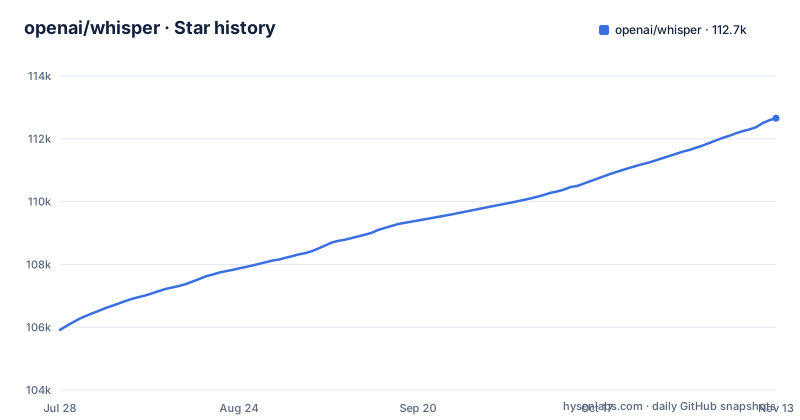
Star history
- openai/whisper112,657 ★ · +6,744
| Repository | 2026-07-28 | 2026-11-13 |
|---|---|---|
| openai/whisper | 105.9k | 112.7k |
6,744 Stars in the last 108 days, measured from the daily GitHub snapshot. Compare with other projects
Editorial analysis
Four speech tasks share one decoder and a set of task tokens
A Transformer sequence-to-sequence model is trained jointly on multilingual speech recognition, speech translation, spoken language identification and voice activity detection. All four are expressed as token sequences the decoder predicts, and a set of special tokens marks which task a sequence belongs to, so one checkpoint stands in for several stages of a traditional speech pipeline. Voice activity detection sits in the same training mix as transcription.
Consequence for a user is interface shape rather than raw speed. There is no voice activity model to download next to the recognizer, and no separate identifier to run first. What you choose instead is a checkpoint size, and the language is something the model is told or infers, not a stage you assemble.
The six sizes span 39M to 1550M parameters and roughly 1 GB to 10 GB of VRAM
The size table lists tiny at 39M parameters, base at 74M, small at 244M, medium at 769M, large at 1550M and turbo at 809M. Required VRAM runs from about 1 GB for tiny and base, through 2 GB for small, 5 GB for medium and 6 GB for turbo, up to 10 GB for large. Relative speed is quoted against large: roughly 10x for tiny, 7x for base, 4x for small, 2x for medium and 8x for turbo, with large as the 1x baseline.
That column is the shape of the trade: the two smallest models need about 1 GB of VRAM, and the top end costs ten times the memory of the cheapest one. turbo sits oddly in the middle, carrying large-v3 quality claims at a fraction of large's memory.
turbo is the default, and it returns the original language instead of English
The command line selects turbo unless you say otherwise, and the documentation is direct about the cost: the turbo model is not trained for translation tasks. Point it at Japanese audio and it hands back Japanese, even with the translate flag in the command, because there is no translation behaviour to invoke. The documented path to English output is a multilingual model plus an explicit language and task:
whisper japanese.wav --model medium --language Japanese --task translateThe same note names medium or large as the choice for the best translation results. Consequence: a pipeline that transcribes by default and translates by flag produces untranslated output on exactly the files where translation mattered, and the failure looks like success, since the command prints text and exits cleanly. If any part of your work translates, pin a multilingual model as the default and treat turbo as an English shortcut.
transcribe() loads the whole file and slides a 30-second window across it
The Python path is three lines:
import whisper

model = whisper.load_model("turbo")
result = model.transcribe("audio.mp3")
print(result["text"])
That call reads the entire file and processes the audio with a sliding 30-second window, running autoregressive sequence-to-sequence predictions on each window. Nothing in that description is incremental. Consequence: there is no partial transcript to show while a long recording is still being processed, and the input has to be there in full before the first window is predicted, so a multi-hour meeting recording is a different kind of commitment than a thirty-second clip. For finer control, whisper.detect_language() and whisper.decode() are exposed, and the full list of available languages lives in tokenizer.py rather than in the project documentation.
ffmpeg lives outside pip, and Rust may be needed before the install finishes
The package itself is one command:
pip install -U openai-whisperThe alternative pulls the latest commit together with its Python dependencies:
pip install git+https://github.com/openai/whisper.gitand refreshing that install is a third command using --upgrade, --no-deps and --force-reinstall. Underneath both sit requirements pip cannot satisfy on its own. The command line needs ffmpeg on the system, which is available from most package managers:
# on Ubuntu or Debian
sudo apt update && sudo apt install ffmpeg

# on Arch Linux
sudo pacman -S ffmpeg

# on MacOS using Homebrew (https://brew.sh/)
brew install ffmpeg

# on Windows using Chocolatey (https://chocolatey.org/)
choco install ffmpeg

# on Windows using Scoop (https://scoop.sh/)
scoop install ffmpeg
Consequence: a container image that only runs pip produces an install whose command line fails on the first file it is given. Where tiktoken has no pre-built wheel for your platform, the install stops earlier still and asks for a Rust toolchain, a PATH entry and setuptools_rust. Model training used Python 3.9.9 with PyTorch 1.10.1, the codebase is expected to work on Python 3.8 through 3.11 with recent PyTorch, and the package metadata declares requires-python of 3.8 or newer with classifiers up to 3.13, so the range you actually meet matters more than the pair the models were built with.
English-only checkpoints stop at medium, so the strongest English option is multilingual
Four sizes ship an English-only variant: tiny.en, base.en, small.en and medium.en. large and turbo have no English-only counterpart. The .en models tend to perform better, especially tiny.en and base.en, and the difference becomes less significant for small.en and medium.en. turbo is described as an optimized version of large-v3 offering faster transcription with minimal degradation in accuracy.
Consequence: at the top of the table there is no English-specialised option, so the 1550M large model needs about 10 GB of VRAM and the 809M turbo model needs about 6 GB, and both are multilingual. Moving a deployment from medium.en up to turbo is a model change, not a speed setting, and the two deserve a measurement on your own recordings before the switch.
The speed column is English on one A100, and the newest tag predates the last commit
The relative speed column is defined narrowly: English speech transcribed on an A100, and the documentation says real-world speed varies significantly with the language, the speaking speed and the available hardware. The accuracy data is just as specific, word error rates and character error rates for large-v3 and large-v2 on Common Voice 15 and Fleurs, with the remaining model and dataset combinations in appendices of the paper. Consequence: the table gives you the ordering of the sizes and almost nothing about your own workload, so choose a size by measuring error rate on your language and your audio instead of by reading a multiplier.
The repository is not archived, the license is MIT, and the last push to main landed on 2026-08-31. The three most recent tags are v20250625, v20240930 and v20240927, which puts the newest release more than a year behind that last commit. Consequence: pip install of openai-whisper hands you v20250625, and everything committed since then is reachable only through the git install, which is a second upgrade path to keep working.
Editorial conclusion
Adopt Whisper when your audio is long enough that the ffmpeg dependency and the 30-second window loop cost less than the accuracy you gain, and when you can match a model size to the VRAM you actually have. Skip it for translation that runs on the default model, because turbo hands back the original language even with the translate flag set, and measure word error rate on your own language before trusting any size, since the published speed numbers cover English on one A100 and the accuracy figures cover large-v3 and large-v2 on Common Voice 15 and Fleurs. Before installing, check the supported Python range against your interpreter, and remember that ffmpeg and possibly Rust sit outside pip.
Frequently asked questions
What is Whisper used for?
Whisper is a general-purpose speech recognition model trained on a large dataset of diverse audio, and the same model handles multilingual speech recognition, speech translation, spoken language identification and voice activity detection as a single decoding task.
Is OpenAI Whisper free to use?
The code is published under the MIT license and installed from a package index with pip, so there is no license fee for the software. What running the models costs depends on the hardware you pick, and the size table ties that to VRAM from about 1 GB for tiny up to about 10 GB for large.
How do I install Whisper on Windows?
Install the package with pip install -U openai-whisper, then add ffmpeg to the system, which the command line requires. The project lists two Windows routes: choco install ffmpeg through Chocolatey, or scoop install ffmpeg through Scoop.
How do I use Whisper to transcribe audio?
From a shell, whisper audio.flac audio.mp3 audio.wav --model turbo transcribes files with the default turbo model. In Python, load whisper.load_model("turbo") and pass the file to model.transcribe("audio.mp3"), which reads the whole file and works over it with a sliding 30-second window.
Official sources
Where this project is recommended
Add this badge to your README
If you maintain this project, the badge below links readers to this analysis and shows its maintenance status from the daily GitHub snapshot. Paste the markdown into your README; add ?metric=license or ?metric=stars to the image URL for a different field.

[](https://hysenlabs.com/projects/openai-whisper)Star history chart for your README
[](https://hysenlabs.com/projects/openai-whisper)Was this useful?