cloudflare/workers-sdk: Wrangler, Miniflare and the CLI You Actually Deploy With
⛅️ Home to Wrangler, the CLI for Cloudflare Workers®
At a glance
- What is it?
- The monorepo behind Wrangler is the tool most Cloudflare Workers users touch first. Here is what each package does, how to install it, and where the documentation stops short.
- Who is it for?
- Adopt it if you already target Cloudflare Workers or Pages and want one CLI for local simulation, configuration and deploys; the Apache-2.0/MIT licensing and the frequent release cadence make it easy to pin and audit. Do not adopt it if you need a provider-neutral serverless abstraction, because Wrangler is built around Cloudflare's own runtime and account model.
- Can I use it commercially?
- Yes. Apache-2.0 is a permissive licence: you can use, modify and sell software built on it, as long as you keep its copyright and licence notices.
- Is it still maintained?
- Yes. The repository last received commits 1 day ago.
- What is it written in?
- Mainly TypeScript, according to GitHub's language statistics.
Answers come from the project's GitHub data, last synced on November 13, 2026, and from our analysis. They are not legal advice.
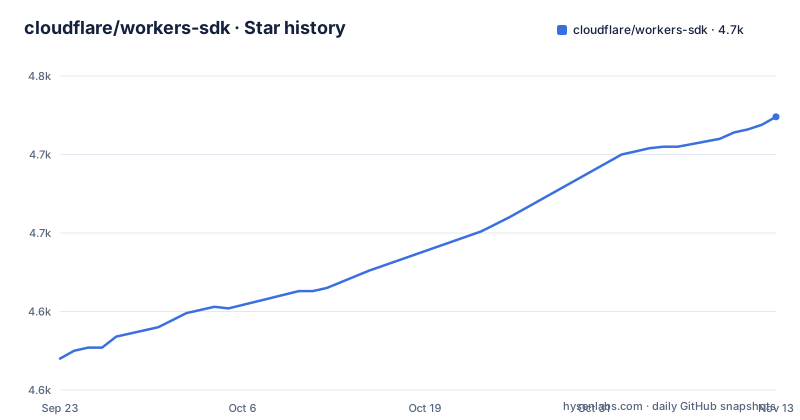
Star history
- cloudflare/workers-sdk4,724 ★ · +154
| Repository | 2026-09-23 | 2026-11-13 |
|---|---|---|
| cloudflare/workers-sdk | 4.6k | 4.7k |
154 Stars in the last 51 days, measured from the daily GitHub snapshot. Compare with other projects
Editorial analysis
The problem workers-sdk solves: one repo, three different jobs
Cloudflare Workers is a serverless runtime, and workers-sdk is the client side of it. The README describes the repository as the home of Wrangler, the CLI for Cloudflare Workers, but the directory table lists five packages with distinct responsibilities. wrangler builds and deploys Workers. create-cloudflare, abbreviated C3, scaffolds and deploys new applications. miniflare is a simulator for developing and testing Workers locally, powered by workerd. chrome-devtools-patches is Cloudflare's fork of Chrome DevTools for inspecting local or remote Workers. pages-shared holds code shared between Wrangler and Cloudflare Pages and is marked as used internally.
That split matters when you are deciding what to install. A team that only deploys from CI needs wrangler and nothing else. A team writing integration tests wants miniflare, the simulator for developing and testing Workers. Someone starting a project from zero is better served by create-cloudflare, which the README presents as the quick start path. Treating the repository as a single product leads to installing packages you never call.
The audience is narrow by design. This is for people who have already chosen Cloudflare's runtime, or are evaluating it against another serverless platform and want to see what the local development story looks like before committing.
How the packages fit together, from scaffold to deploy
The data flow is conventional for a cloud CLI. create-cloudflare creates and deploys new applications, wrangler builds Workers, and miniflare is the workerd-powered simulator for developing and testing them locally.
The monorepo itself is a pnpm workspace with Turborepo driving builds and a long list of validation scripts in package.json. There is a check:catalog script that validates catalog usage, a check:compat-date script that checks the default compatibility date, and a check:deployments script that validates how non-npm packages are deployed. Those scripts are aimed at contributors, not users, but they tell you something about the project: compatibility dates are treated as a first-class, checked artifact rather than a free-form string.
The repository also carries AGENTS.md, CLAUDE.md and a STYLEGUIDE.md at the top level, alongside CONTRIBUTING.md and a CODEOWNERS file. That is a project with an explicit contribution process, which is worth knowing before you open a pull request against a package you depend on.
Installing Wrangler and running a first Worker locally
The README gives the scaffold command first. Running it starts an interactive prompt that creates a project and, per the README, can deploy it. The three package managers are listed as equivalent.
npm create cloudflare@latestIf you already have a project and only want the CLI, Wrangler is published to npm under the name wrangler, which is what the README's badge links to. The README does not restate an install command for it, so check the Workers documentation's Wrangler section before assuming a global install is the recommended path.
After that, the CLI is your entry point for local development and deployment. The README points to the Wrangler CLI documentation rather than documenting subcommands inline, so treat the official docs as the source of truth for flags. What the repository does show clearly is the package layout: if you are debugging local behaviour, the code you are exercising lives in packages/miniflare, and if you are debugging the command itself, it lives in packages/wrangler.
For inspection, the repository includes chrome-devtools-patches, described as Cloudflare's fork of Chrome DevTools for inspecting local or remote Workers. That is the debugging surface when a Worker behaves differently locally than you expect.
The beta releases are a trap if you use them as versions
The README is unusually direct here. Beta releases are generated by pkg.pr.new and updated on every commit pushed to main. The warning states that these releases get updated over time, so they are ill suited to being used as stable versions, and that the proper npm release should be used instead. They are meant for quick testing of not-yet-released features or fixes.
This is a real failure mode, not a theoretical one. Installing a beta with the documented command pins you to a URL that resolves to whatever main looked like when you ran it, and the next install of the same URL can pull different code. If that ends up in a lockfile that a colleague or a CI runner resolves later, you get nondeterministic builds. The command form the README gives is the same shape for every package, for example:
npm i https://pkg.pr.new/wrangler@mainThe repository lists beta channels for create-cloudflare, miniflare, @cloudflare/pages-shared, @cloudflare/unenv-preset, @cloudflare/vite-plugin, @cloudflare/vitest-plugin, @cloudflare/workers-editor-shared and wrangler. Use them to reproduce a bug against an unreleased fix, then move back to a numbered release. The release list shows numbered package releases arriving on 2026-11-02, so the stable channel is moving quickly enough that waiting for a fix is usually cheaper than tracking main.
Miniflare versus running the real thing
Miniflare is the alternative to deploying in order to find out what your Worker does. It is a simulator powered by workerd, and the README links to miniflare.dev rather than documenting its API in the repository README. The distinction that matters: a simulator runs on your machine, so it can be fast and offline, but it is a separate code path from the production edge. Anything that depends on Cloudflare's network position, account configuration or live bindings needs a deployed environment to confirm.
Compared with a general-purpose local serverless emulator, Miniflare's difference is that it tracks a specific runtime rather than a generic Node.js HTTP server. That is the point of the workerd dependency.
Maintenance, licensing and what an upgrade costs you
The repository is not archived, and the last push was on 2026-11-02. Numbered releases of @cloudflare/devprod-status-bot, @cloudflare/pages-functions and @cloudflare/containers-shared landed the same day. For a project of this size that is a fast cadence, and it is the main cost of adoption: pinning a version is not a one-time decision, because compatibility dates and runtime behaviour move with it.
Licensing is split. The repository package.json declares MIT OR Apache-2.0, and the top-level files include both LICENSE-APACHE and LICENSE-MIT. Individual packages under packages/ may carry their own license fields, so if you are redistributing a package rather than consuming it as a dependency, read the license file that sits next to the package you are shipping. That is a factual observation about the repository layout, not legal advice.
Upgrade cost is mostly in configuration rather than code. The README does not document rollback. Before upgrading in production, read the release notes for the specific wrangler version you are moving to, and keep the previous version pinned in your lockfile so you can revert without re-resolving.
Editorial conclusion
Adopt it if you already target Cloudflare Workers or Pages and want one CLI for local simulation, configuration and deploys; the Apache-2.0/MIT licensing and the frequent release cadence make it easy to pin and audit. Do not adopt it if you need a provider-neutral serverless abstraction, because Wrangler is built around Cloudflare's own runtime and account model. Before committing, verify which package you actually need (wrangler for deploys, miniflare for local simulation, create-cloudflare for scaffolding), and read the release notes for the version you pin rather than tracking main.
Frequently asked questions
What are Cloudflare Workers used for?
The README describes Workers as letting you deploy serverless code instantly across the globe, and the SDK's packages exist to build, simulate and deploy that code. The wrangler package is the command line tool for building Workers.
Is Workers AI free?
The repository does not cover Workers AI pricing or availability. The README and directory table describe the CLI packages only, so this question cannot be answered from the project's own documentation.
Is Workers KV free?
The repository does not address Workers KV pricing. The closest relevant detail is that the repository contains a beta channel for @cloudflare/kv-asset-handler, which is a package name, not a pricing statement.
What does "workers dev" mean?
The repository does not define the term. The README and directory table describe Wrangler, create-cloudflare, miniflare, chrome-devtools-patches and pages-shared, and none of them explains a workers dev subdomain or environment.
Official sources
Add this badge to your README
If you maintain this project, the badge below links readers to this analysis and shows its maintenance status from the daily GitHub snapshot. Paste the markdown into your README; add ?metric=license or ?metric=stars to the image URL for a different field.

[](https://hysenlabs.com/projects/cloudflare-workers-sdk)Star history chart for your README
[](https://hysenlabs.com/projects/cloudflare-workers-sdk)Was this useful?