wrangler-action turns a push to main into a Worker deployment
🧙♀️ easily deploy cloudflare workers applications using wrangler and github actions
At a glance
- What is it?
- cloudflare/wrangler-action is the official GitHub Action that runs Wrangler inside a workflow, so deploying a Worker or a Pages project is a step rather than a laptop command. It pins the Wrangler version, injects worker secrets, runs commands before and after the deploy, and needs a Cloudflare API token that never reaches the log, but it defaults to Wrangler v4 and dropped the global API key.
- Who is it for?
- wrangler-action is the sensible default for a team that deploys Cloudflare Workers from GitHub Actions, because it removes the version drift between a local Wrangler and a CI one, keeps the API token out of the workflow file, and gives you a place to put the commands that have to run around a deploy. It is the wrong tool if your deploys happen somewhere other than GitHub Actions, or if you have to stay on the old global API key, which is no longer supported.
- Can I use it commercially?
- Yes. Apache-2.0 is a permissive licence: you can use, modify and sell software built on it, as long as you keep its copyright and licence notices.
- Is it still maintained?
- Yes. The repository last received commits 24 days ago.
- What is it written in?
- Mainly TypeScript, according to GitHub's language statistics.
Answers come from the project's GitHub data, last synced on October 23, 2026, and from our analysis. They are not legal advice.
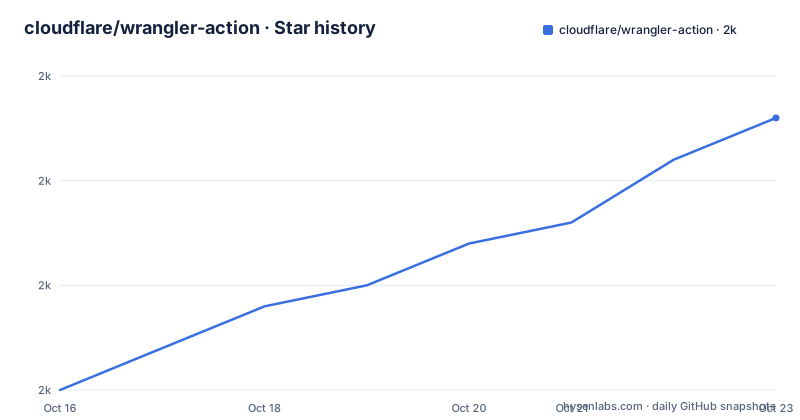
Star history
- cloudflare/wrangler-action1,988 ★ · +13
| Repository | 2026-10-16 | 2026-10-23 |
|---|---|---|
| cloudflare/wrangler-action | 2k | 2k |
13 Stars in the last 7 days, measured from the daily GitHub snapshot. Compare with other projects
Editorial analysis
A deploy is one step in the workflow
The basic case is small enough to read at a glance. You add the action to a workflow for a Workers or Pages application, and a push to main deploys the Worker:
name: Deploy

on:
  push:
    branches:
      - main

jobs:
  deploy:
    runs-on: ubuntu-latest
    name: Deploy
    steps:
      - uses: actions/checkout@v6
      - name: Deploy
        uses: cloudflare/wrangler-action@v4
        with:
          apiToken: ${{ secrets.CLOUDFLARE_API_TOKEN }}
The action is a TypeScript project that wraps the Wrangler CLI, and the repository is built with ncc into a single file, main dist/index.mjs, with the runtime dependencies limited to the GitHub Actions core, exec and github packages plus zod for validating inputs. The change in approach versus calling Wrangler directly in a run step is that the action owns the version of Wrangler that runs, which removes the class of bug where a workflow breaks because the CLI moved. The trade is that you now depend on the action's own behaviour, and the action's behaviour changes with its major versions.
The v prefix in the action tag is now mandatory
The breaking changes from v3 are still the part most likely to bite, and they are worth knowing before you paste an old workflow. Wrangler v1 is no longer supported. The global API key with email authentication is no longer supported either, which removes the older authentication path entirely. And the version syntax changed: action version syntax is newly supported, so uses: cloudflare/wrangler-action@v4, @v4.x and @v4.x.x are all valid now, while the previously supported @3.x.x form is not, because the v prefix is now necessary. A workflow written against v2 of the action therefore fails on two counts, the tag format and the authentication method. The project points to its CHANGELOG.md for the details, and the repository uses changesets for releases, which is why the tag names in the changelog match the action versions.
The API token stays in GitHub secrets and out of the log
Authentication is one secret and one input. You add your Cloudflare API token in the repository settings under Settings and Secrets, and pass it to the action in the with block:
jobs:
  deploy:
    name: Deploy
    steps:
      uses: cloudflare/wrangler-action@v4
    with:
      apiToken: ${{ secrets.CLOUDFLARE_API_TOKEN }}
The documentation notes that the token is encrypted by GitHub and that the action will not print it into logs, so it should be safe. That is the design point of the whole action, since a Cloudflare token is a bearer credential that can deploy code into your account, and a token echoed into a build log is a token that ends up in a log aggregator, a retention policy and a set of people who should not have it. The documentation also links to the Workers documentation for guidance on finding an API token, which is the part you need to get right, because the token's permissions determine what the workflow can do. Anything that reads the token out of the environment is a risk you are accepting by using it, and the action is explicit that it keeps the value out of its own output.
Pin the Wrangler version, or let the action choose
The wranglerVersion input installs a specific version of Wrangler from NPM, and it accepts any version format NPM understands: an exact version such as 4.81.0, a major version such as 4, a range such as ^4.0.0 or 4.x, or latest.
jobs:
  deploy:
    steps:
      uses: cloudflare/wrangler-action@v4
    with:
      apiToken: ${{ secrets.CLOUDFLARE_API_TOKEN }}
      wranglerVersion: "4"
The rule when you omit it is worth remembering, because it decides whether your build is reproducible. If wranglerVersion is omitted and Wrangler is already installed in your environment, the action uses the existing installation. If Wrangler is not installed, the action installs a default version. So the same workflow behaves differently depending on what is on the runner image, and the difference between the two paths is exactly the kind of thing that produces a deploy that works on one day and not the next. The action defaults to Wrangler v4, and if you need to stay on v3 you pin it explicitly, for example wranglerVersion: "3.90.0". There is also a workingDirectory input, which runs the Wrangler command from a subdirectory of the repository, for monorepos where the Worker does not sit at the root.
Worker secrets arrive as environment variables and are put by name
Worker secrets are handled by name rather than by value, and the mechanics are specific. You pass a secrets input as a string of names separated by newlines, and each name must match the name of an environment variable specified in the env field. The action then creates or replaces the value for the Worker secret using the wrangler secret put command, and the environment input selects the Worker environment:
jobs:
  deploy:
    steps:
      uses: cloudflare/wrangler-action@v4
    with:
      apiToken: ${{ secrets.CLOUDFLARE_API_TOKEN }}
      environment: production
      secrets: |
        SECRET1
        SECRET2
      env:
        SECRET1: ${{ secrets.SECRET1 }}
        SECRET2: ${{ secrets.SECRET2 }}
The indirection through the env field is deliberate, since it keeps the value in the runner's environment and out of the workflow file, while the name is what the Worker sees. The alternative would be a command that pipes values straight into wrangler, which puts them in the workflow definition. The limitation is that the action can only set secrets that already exist as environment variables, so a secret defined only in Cloudflare and not in your repository settings will not be carried.
preCommands and postCommands wrap the deploy
Some workflows need to do something before or after the deploy, and the action provides two inputs for it. preCommands runs before the deploy and postCommands runs after it, and the documentation says these can include additional wrangler commands such as whoami or kv:key put, or any other command available inside the wrangler-action context:
jobs:
  deploy:
    steps:
      uses: cloudflare/wrangler-action@v4
    with:
      apiToken: ${{ secrets.CLOUDFLARE_API_TOKEN }}
      preCommands: echo "*** pre command ***"
      postCommands: |
        echo "*** post commands ***"
        wrangler kv:key put --binding=MY_KV key2 value2
        echo "******"
For a single specific action rather than a deploy, the command input takes over entirely, so you can run wrangler whoami against your project, or a multi-line block such as pages project list followed by a pages deploy with a project name and a branch. The difference in approach between these two mechanisms is that preCommands and postCommands still perform the default deploy, while command replaces it. That distinction is easy to get wrong in a hurry, because a workflow with a command set will silently stop deploying.
Workers Previews need a recent Wrangler and produce named outputs
Pull request previews are the feature that pushed the action forward, and they have a hard version floor. Workers Previews require Wrangler 4.136.3 or newer. You can run Wrangler directly from a pull request workflow with npx wrangler preview --json and the API token and account id in the environment, but if you want the preview exposed as outputs and a GitHub Deployment and job summary created, you use the action, and the documented workflow sets permissions to contents: read and deployments: write, sets the command to preview --name pr- followed by the pull request number, and passes gitHubToken:
name: Preview

on: [pull_request]

permissions:
  contents: read
  deployments: write

jobs:
  preview:
    runs-on: ubuntu-latest
    steps:
      - uses: actions/checkout@v6
      - name: Deploy preview
        id: preview
        uses: cloudflare/wrangler-action@v4
        with:
          apiToken: ${{ secrets.CLOUDFLARE_API_TOKEN }}
          accountId: ${{ secrets.CLOUDFLARE_ACCOUNT_ID }}
          wranglerVersion: "4.136.3"
          command: preview --name pr-${{ github.event.pull_request.number }}
          gitHubToken: ${{ secrets.GITHUB_TOKEN }}
The action exposes preview-url, preview-deployment-url, preview-name, preview-id and preview-deployment-id as outputs, and deployment-url is also set to the stable preview-url. On maintenance, the project moves often, with v4.1.1, v4.1.2 and v4.1.3 published on 2026-09-22, 2026-09-23 and 2026-09-24, and the last push on 2026-09-28. The package licence is MIT OR Apache-2.0, with both LICENSE-APACHE and LICENSE-MIT in the repository, and tests run on vitest.
Editorial conclusion
wrangler-action is the sensible default for a team that deploys Cloudflare Workers from GitHub Actions, because it removes the version drift between a local Wrangler and a CI one, keeps the API token out of the workflow file, and gives you a place to put the commands that have to run around a deploy. It is the wrong tool if your deploys happen somewhere other than GitHub Actions, or if you have to stay on the old global API key, which is no longer supported. Before adopting it, decide whether you want to pin wranglerVersion, because the default moves with each release of the action, and check that your workflow permissions include deployments: write if you intend to use the preview outputs, since the documented preview workflow asks for it explicitly.
Frequently asked questions
Which Wrangler version does wrangler-action use by default?
The action now defaults to Wrangler v4. If you omit wranglerVersion and Wrangler is already installed in your environment the action uses that installation, otherwise it installs a default version. You can pin an exact version, a major version, a range or latest.
How do I pass Cloudflare credentials to wrangler-action?
Add a Cloudflare API token as a GitHub secret and pass it in the with block as apiToken: ${{ secrets.CLOUDFLARE_API_TOKEN }}. The documentation notes that the token is encrypted by GitHub and that the action does not print it into logs. The global API key with email authentication is no longer supported.
How do I set Worker secrets from a GitHub Actions workflow?
Pass a secrets input containing the secret names separated by newlines, and define a matching environment variable for each name in the env field. The action then creates or replaces the value using the wrangler secret put command, and the environment input selects the Worker environment.
What is required to use Workers Previews with wrangler-action?
Wrangler 4.136.3 or newer. The documented workflow uses the preview command with a name built from the pull request number, passes a gitHubToken, and sets permissions to contents: read and deployments: write. The action exposes preview-url, preview-deployment-url, preview-name, preview-id and preview-deployment-id as outputs.
Official sources
Add this badge to your README
If you maintain this project, the badge below links readers to this analysis and shows its maintenance status from the daily GitHub snapshot. Paste the markdown into your README; add ?metric=license or ?metric=stars to the image URL for a different field.

[](https://hysenlabs.com/projects/cloudflare-wrangler-action)Star history chart for your README
[](https://hysenlabs.com/projects/cloudflare-wrangler-action)Was this useful?