NodeWarden: deleting the Worker keeps your vault, and the comparison is against the free tier
Bitwarden-compatible server running on Cloudflare Workers
At a glance
- What is it?
- NodeWarden is a Bitwarden-compatible password server that runs on Cloudflare Workers, with its own web vault interface and two storage modes. It is also unusually candid about its own sharp edges: the file states that deleting the Worker leaves the database and namespace behind, that the comparison table measures it against the free client tier rather than the self-hosted server, and that hiding the web interface returns 404 for pages while every API endpoint stays live.
- Who is it for?
- NodeWarden fits someone who wants to hold their own password server without running a long-lived server, and who is prepared to own the operational consequences of that choice. Four things to weigh first, and all four come from the project's own documentation rather than from inference.
- Can I use it commercially?
- Check first. The repository uses a licence we do not classify automatically, so read its LICENSE file before any commercial use.
- Is it still maintained?
- Yes. The repository received new commits within the last day.
- What is it written in?
- Mainly TypeScript, according to GitHub's language statistics.
Answers come from the project's GitHub data, last synced on November 15, 2026, and from our analysis. They are not legal advice.
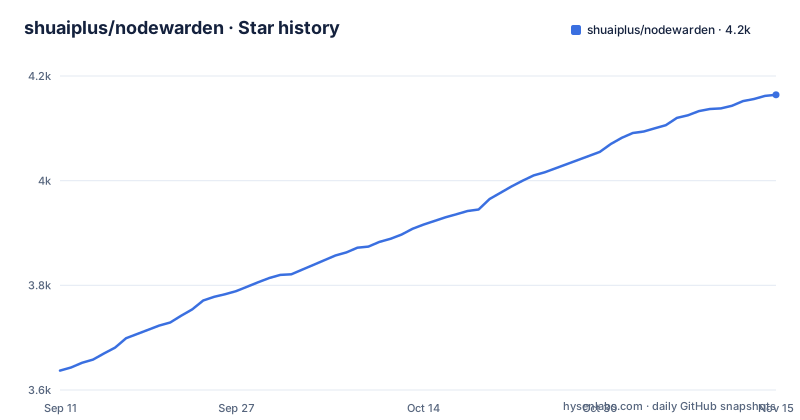
Star history
- shuaiplus/nodewarden4,164 ★ · +527
| Repository | 2026-09-11 | 2026-11-15 |
|---|---|---|
| shuaiplus/nodewarden | 3.6k | 4.2k |
527 Stars in the last 65 days, measured from the daily GitHub snapshot. Compare with other projects
Editorial analysis
Deleting the Worker keeps your vault
The most useful thing in the file is a troubleshooting entry that documents a data-retention surprise. Someone deleted their deployment and redeployed it, found that registration demanded an invite code again, and the explanation is that deleting the Worker or redeploying it does not remove persistent data that already exists: the users, invite codes and related configuration stored in the database and the storage namespace are still there, so a newly deployed Worker reads the old data and keeps enforcing the invite requirement. The stated fix for a genuine clean start is to delete the database and the namespace as well. For a password server that means the operational inverse of what people expect. Undeploying is not deleting, and a vault full of credentials outlives the thing serving it.
Two of the four troubleshooting entries are about the signing secret
A JWT secret has to be supplied by the operator, and the file devotes two entries to the ways that goes wrong. One entry covers the case where the secret is configured and the page still reports it missing: it has to be set as a runtime variable or secret rather than as a build variable, because build-time values are unavailable to the running Worker, so the build can succeed and the application can still complain. The other covers the secret disappearing after an upgrade or redeployment, and the advice is to store it as a secret rather than a plain-text variable because a deploy process that recreates or overwrites variable configuration can take ordinary variables with it. The production guidance attached to the quick deploy notes is a random string of at least 32 characters, explicitly not a temporary or example value. So the security of the whole server rests on one operator-supplied string with a documented history of going missing.
The comparison table measures the free tier, not the server
The feature table has eighteen rows, and the column header on the other side reads Bitwarden Free. That choice decides how the table reads. Time-based one-time passwords, an installable offline progressive web app, and a scheduled cloud backup centre over WebDAV or S3 are all marked as absent from Bitwarden Free and present here, which makes them look like advantages of this project. They are advantages over a client tier, not over the self-hosted server a person in this position would otherwise run. Read the other direction and the table is candid: organizations, collections and roles are marked not implemented, and so are single sign-on with directory sync. Those two gaps are the reason a team cannot move onto it unchanged, and they are stated plainly in the same table that produces the favourable rows.
Hiding the web vault returns 404 and leaves the API live
There is a documented way to remove the web interface without disabling the server. Setting a text variable with a particular name to the value 1 makes server-hosted frontend pages and static assets return 404, while the login, sync, attachment, icon and notification endpoints used by clients remain available, and an already installed or cached progressive web app keeps working from its own local frontend. Deleting the variable, or changing it to anything else, brings the interface back. Two things follow. A cached client survives the hiding, so this is a presentation change rather than an access control. And it is a partial availability mode by design, which means an operator who wants the vault unreachable has to reason about the API surface separately rather than assuming an empty page means an empty server.
The fork has to be renamed before it will deploy
The deployment instructions are unusually blunt about a step nobody expects. The first troubleshooting entry explains that after forking, connecting the fork to Cloudflare sometimes shows no repository or returns a 404, and attributes it to how the fork is identified and to how the platform handles repository authorization and synchronization. The specific trigger given is a fork whose repository name, description or other information stays very similar to the upstream project, which may be more likely to trigger restrictions. The recommended action is to rename the fork to something different and change its description, with a suggested name offered. The same section states the trade plainly: in this flow you hand code to the platform to build and deploy. Two storage backends are available with different costs, one requiring a card with a 100 MB per-file soft limit and a 10 GB free allowance, the other requiring no card with a 25 MiB platform limit and a 1 GB allowance.
Two deployment modes and a schema that initialises itself
The repository ships two deployment configurations side by side, one for object storage and one for the key-value store, with matching local development and deploy commands for each, and the deploy path for the second runs a script that ensures the namespace exists before deploying. The commands themselves are one pair per configuration, after a one-off authentication step:
npx wrangler login

# Default: R2 mode
npm run deploy

# Optional: KV mode
npm run deploy:kv
The schema is not uploaded by the operator: the Worker initializes the database structure on its first request, and a migrations directory sits in the tree as well, so both a runtime initialization and a set of migration files exist. There is also a demo build mode that serves on a fixed loopback port and runs an extra script afterwards to generate redirects for a static host. The Node requirement is pinned in a file at the root and expressed in the manifest as two disjoint ranges, so either of two specific release lines will do and nothing in between the pairs necessarily will.
The security surfaces have named test scripts, and updates are manual
The manifest's script list is the clearest evidence of what this project worries about. There are separate test scripts for notification security, web crypto availability, passkey connectors on desktop and mobile, configuration compatibility, and vault compatibility, the last of which runs against a special loader that stands in for the platform runtime offline. Two test runners are used, one for the TypeScript files and the platform's own for the module files, and one validator is registered under two script names. Updates have no automation at all: the documented path is opening the fork and clicking the platform's sync button, with a release notes file in the tree as the only version history. The file also carries a security policy, a contributing guide, a Chinese translation, and a disclaimer asking readers to back up their vaults.
Editorial conclusion
NodeWarden fits someone who wants to hold their own password server without running a long-lived server, and who is prepared to own the operational consequences of that choice. Four things to weigh first, and all four come from the project's own documentation rather than from inference. Check the terms and the affiliation position before you rely on it: the file calls itself a learning and discussion project, disclaims affiliation with Bitwarden, asks you to back up your vault regularly, and leaves the licence field empty in the repository metadata while three other places say LGPL-3.0. Plan for data to outlive the deployment, because deleting the Worker does not delete the database. Supply the signing secret as a runtime secret of at least 32 random characters, and know that the default hostname may be unreachable on your network. And read the two missing features before you migrate: organizations, collections and roles, and single sign-on with directory sync, are not implemented.
Frequently asked questions
What is the NodeWarden server?
A Bitwarden-compatible password server that runs on Cloudflare Workers, written in TypeScript under LGPL-3.0, and shipping its own web vault interface rather than the official one. Organizations, collections and roles are marked not implemented, as are single sign-on and directory sync. The file states it is not affiliated with Bitwarden and is for learning and discussion.
How do I self-host NodeWarden?
By forking the repository to your own account and deploying it through the platform's Workers and Pages flow, which the file says means handing your code to that platform to build and deploy. It also advises renaming the fork away from the upstream name, since a similar name and description can trigger platform restrictions. Storage is either an object store with a card requirement or a key-value store without one.
Does NodeWarden support passkeys and two-factor login?
The comparison table lists passwordless passkey login, and login two-factor using TOTP, a hardware key, or a passkey, plus one-time codes that disable two-factor. Time-based one-time password support is described as including a Steam URI scheme. Of the clients tested, Windows desktop, mobile, the browser extension and Linux desktop are marked verified, while macOS desktop is marked not fully verified.
Official sources
Add this badge to your README
If you maintain this project, the badge below links readers to this analysis and shows its maintenance status from the daily GitHub snapshot. Paste the markdown into your README; add ?metric=license or ?metric=stars to the image URL for a different field.

[](https://hysenlabs.com/projects/shuaiplus-nodewarden)Star history chart for your README
[](https://hysenlabs.com/projects/shuaiplus-nodewarden)Was this useful?