Animata: copy-paste interaction animations for React and Tailwind
Bring your site to life with easy to use animation & interaction code. Copy. Paste. Animate.
At a glance
- What is it?
- Animata is a collection of handcrafted animation and interaction components you copy into a Next.js or React project instead of installing as a package. It is small, MIT licensed, and honest about not being a UI library.
- Who is it for?
- Animata suits teams already on Tailwind CSS and React who want a specific interaction effect and are willing to own the pasted source, including its imports and any tailwind.config.js entries it needs. It is the wrong choice if you want a versioned dependency with a changelog you can pin, or a component library with form controls, tables and accessibility work already done.
- Can I use it commercially?
- Yes. MIT is a permissive licence: you can use, modify and sell software built on it, as long as you keep its copyright and licence notices.
- Is it still maintained?
- Yes. The repository last received commits 4 days ago.
- What is it written in?
- Mainly TypeScript, according to GitHub's language statistics.
Answers come from the project's GitHub data, last synced on November 7, 2026, and from our analysis. They are not legal advice.
Star history
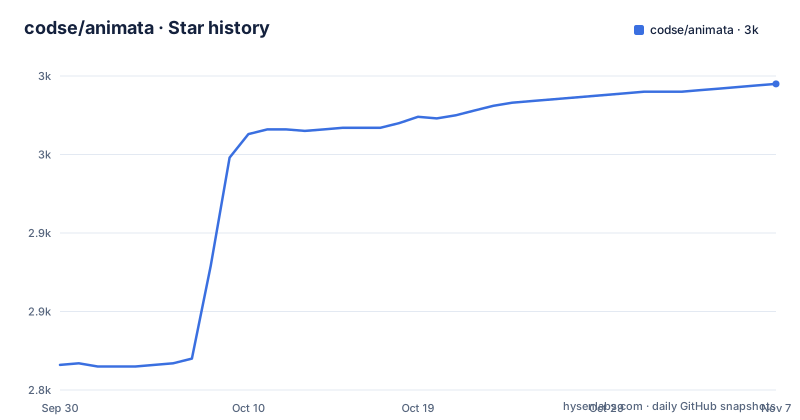
- codse/animata2,995 ★ · +179
| Repository | 2026-09-30 | 2026-11-07 |
|---|---|---|
| codse/animata | 2.8k | 3k |
179 Stars in the last 38 days, measured from the daily GitHub snapshot. Compare with other projects
Editorial analysis
What Animata actually is, and what it refuses to be
Animata is a catalogue of interaction animations and visual effects built with Tailwind CSS and React, distributed as source you copy rather than as an npm dependency. The README is explicit about the distribution model: "You don't need to install it as a dependency instead you can simply copy and paste the code, as shadcn/ui, into your project." That single sentence defines the audience. If you are building a marketing page, a landing hero, or a product surface where one hover, marquee or cursor effect carries the personality of the page, Animata gives you a finished implementation instead of a blank file.
The README also draws a boundary that most component collections avoid stating: "Animata is not a full-fledged UI library like Material-UI or Chakra-UI." There are no buttons, no form primitives, no data tables, no theming layer. You are expected to bring your own design system and use Animata alongside it. The stated requirement is Tailwind CSS for styling; Framer Motion, Lucide Icons and Radix Icons are all marked optional in the README, which matters because it means a chunk of the catalogue works with nothing but Tailwind classes and CSS keyframes.
The project is TypeScript, MIT licensed, and the repository is laid out as a Next.js application that doubles as the documentation site. The top-level entries include app/, components/, content/, hooks/, lib/, styles/, templates/, a Storybook configuration and a Velite content pipeline. That structure is worth knowing before you clone anything: this is the site's own codebase, not a publishable library package. The package.json carries "private": true and version 4.0.0, so the repository version and the released tags do not move in lockstep.
How the copy-paste model works in practice
There is no runtime to reason about. Each component is a self-contained file that imports React, sometimes Framer Motion, sometimes an icon set, and applies Tailwind utility classes and animation classes. The data flow is entirely local: your component tree renders the pasted file, the file's own state and event handlers drive the animation, and no Animata service, registry endpoint or API is contacted at runtime.
That has a direct consequence for upgrades. When Animata changes a component, nothing in your project changes, because you own the copy. The repository ships a registry build step (scripts/build-registry.js) and a validation script (scripts/validate-registry-install.js), and package.json exposes registry:build and validate:registry commands, which suggests the project is working toward a shadcn-style registry install path. The README, however, still describes manual copy and paste and does not document a CLI install flow, so treat the registry tooling as internal build plumbing rather than a documented user feature.
The README's two notes are the most practically useful lines in the whole document. The first: if a component imports something the documentation never mentions, it is a dependency you must install, and an import starting with @/ is an Animata component while anything else is external. The second: if something does not work, the docs probably omit a tailwind.config.js update, and you can find the needed entries in Animata's own source. Both notes are admissions that the per-component documentation is incomplete. That is the real cost of this model.
Installing Animata and getting one animation running
Start by installing the shared dependencies the README lists. This is a normal npm install into your existing project, not an Animata package:
npm install tailwind-merge clsx lucide-react tailwindcss-animateAfter that, the README says to register tailwindcss-animate as a plugin in tailwind.config.js:
module.exports = {
  plugins: [require("tailwindcss-animate")],
};
Next, create the cn helper the components rely on for class merging. The README places it in a utils.ts file inside a libs folder and gives this exact code:
import { type ClassValue, clsx } from "clsx";
import { twMerge } from "tailwind-merge";

export function cn(...inputs: ClassValue[]) {
  return twMerge(clsx(inputs));
}
The README's recommended folder structure assumes a path alias already configured in tsconfig.json, with @/* mapped to the project root. If your project lacks that alias, imports inside pasted components will not resolve:
{
  "compilerOptions": {
    "baseUrl": ".",
    "paths": {
      "@/*": ["./*"]
    }
  }
}
With those three pieces in place, browse animata.design, open a component, copy its source into a file under your components directory, and render it. What you should see is the animation running with no further wiring. If it does not render, check the imports first: per the README, an unresolved non-@/ import is a missing dependency and an unresolved @/ import is a component you have not copied yet.
Where the model breaks down
The most concrete limitation is documentation drift, and the README names it rather than hiding it. Components occasionally depend on Tailwind configuration entries that the per-component docs do not list, and the workaround is to read Animata's own tailwind.config.js. For a team evaluating this on a deadline, that means every component you adopt carries an unquantified setup cost until you have pasted it and watched it fail.
The second limitation follows from the first: there is no version to pin. Because you copy source rather than install a package, you get no dependency resolution, no semver guarantee and no changelog that maps to the code in your tree. If Animata fixes a bug in a component six months after you copied it, you will not hear about it through npm. You have to go back and diff.
The third is scope. Animata is the wrong tool if you need accessible interactive primitives. The README describes a collection of animations and effects, and the requirements list icons and motion libraries, not accessibility utilities. Keyboard handling, focus management and ARIA wiring are your responsibility, and a decorative effect that captures pointer events can create real problems if you paste it into a form or a navigation menu without reading the code.
Finally, the repository is a Next.js app with a Storybook, a Velite content pipeline and a multi-step build script. Cloning it to run locally is a heavier operation than the copy-paste workflow implies, and that build chain is aimed at maintaining the documentation site, not at producing something you consume.
How Animata differs from a motion library or a UI kit
The closest conceptual alternative is a general animation library such as Framer Motion used directly. Framer Motion gives you primitives (motion components, variants, gesture props) and you compose the effect yourself; Animata gives you the finished composition and you paste it. The trade-off is control against time. With the library you understand every line because you wrote it, and you get one versioned dependency with a real upgrade path. With Animata you get the effect working in minutes and inherit code you did not write, including its assumptions about layout and pointer behaviour. Animata's own README lists Framer Motion as an optional requirement, which tells you the catalogue is not uniformly built on it.
The other comparison the README invites is shadcn/ui, and the difference is worth stating precisely. Both distribute source rather than a package. shadcn/ui is a component system: you install primitives, you get a coherent set of building blocks for an application. Animata is a set of effects layered on top of whatever system you already have. If you adopt shadcn/ui, Animata can sit beside it without conflict, because the shared dependency is Tailwind and the components are independent files. If you were hoping Animata would replace a UI kit, the README closes that door in its second section.
Maintenance, licence and the upgrade question
The repository is not archived, and the last push was on 2026-09-14, which is recent. Releases are tagged: v3.4.1 on 2026-09-14, v3.4.0 on 2026-07-30 and v3.3.0 on 2026-06-11. That cadence suggests ongoing work on the site and catalogue, though note the mismatch between the release tags (3.4.x) and the version field in package.json (4.0.0), which means the repository version is not a reliable signal of what has shipped.
Upgrade cost is unusual here and worth being blunt about. Because there is no installed package, there is nothing to upgrade. New components and fixes reach you only if you revisit the site or the repository and re-copy. For a project with a handful of pasted effects, that is fine. For a project with thirty, you have effectively forked the catalogue and will need to track upstream changes manually. The registry build scripts in the repository hint at a future install path that would change this, but the README does not document one, so plan around the copy-paste reality.
The licence is MIT, which permits commercial use, modification and redistribution provided the copyright notice and permission notice are retained. Since you are copying source into your own repository, the practical question is whether you keep a record of where the code came from. That is a housekeeping decision rather than a legal one, and it is not legal advice; if your organisation has a policy on third-party source, this is the point to check it.
Editorial conclusion
Animata suits teams already on Tailwind CSS and React who want a specific interaction effect and are willing to own the pasted source, including its imports and any tailwind.config.js entries it needs. It is the wrong choice if you want a versioned dependency with a changelog you can pin, or a component library with form controls, tables and accessibility work already done. Before adopting, open one component on animata.design, copy it, and check whether every import resolves in your tree; the README itself warns that missing documentation usually means a missing tailwind.config.js entry rather than a broken component.
Frequently asked questions
Is Animata a UI component library I install with npm?
No. The README states you do not install it as a dependency and instead copy and paste the code into your project, in the style of shadcn/ui. It also says explicitly that Animata is not a full-fledged UI library like Material-UI or Chakra-UI.
What do I need installed before using an Animata component?
Tailwind CSS is required for styling, while Framer Motion, Lucide Icons and Radix Icons are listed as optional. The README's install command brings in tailwind-merge, clsx, lucide-react and tailwindcss-animate.
Why does a pasted Animata component not work after I copy it?
The README notes that if something is not working, the docs probably miss the tailwind.config.js updates, and suggests looking at the entries added in Animata's own source. It also says any import not starting with @/ is an external dependency you need to install.
How do I get updates to an Animata component I already copied?
There is no installed package to update, so the README's copy-and-paste workflow means you re-copy the component from the site or repository yourself. The repository does contain registry build and validation scripts, but the README does not document a registry install command.
Official sources
Add this badge to your README
If you maintain this project, the badge below links readers to this analysis and shows its maintenance status from the daily GitHub snapshot. Paste the markdown into your README; add ?metric=license or ?metric=stars to the image URL for a different field.

[](https://hysenlabs.com/projects/codse-animata)Star history chart for your README
[](https://hysenlabs.com/projects/codse-animata)Was this useful?