workflow_templates ships ComfyUI's template catalogue as Python packages
ComfyUI template workflows
At a glance
- What is it?
- The Comfy-Org/workflow_templates repository holds the official ComfyUI workflow templates and subgraph blueprints, distributed on PyPI as a set of small packages with a meta package tying them together. It fits ComfyUI users who want the official template picker and node palette, and it does not fit you if you need to author your own workflows from scratch, which is a different problem entirely.
- Who is it for?
- workflow_templates fits ComfyUI installations that want the official template picker content, the node palette blueprints, or a browsable catalogue of ready workflows, and it does not fit a team building its own template distribution or a workflow engine that has to work offline without the hub API.
- Can I use it commercially?
- Yes. MIT is a permissive licence: you can use, modify and sell software built on it, as long as you keep its copyright and licence notices.
- Is it still maintained?
- Yes. The repository last received commits 1 day ago.
- What is it written in?
- Mainly TypeScript, according to GitHub's language statistics.
Answers come from the project's GitHub data, last synced on November 6, 2026, and from our analysis. They are not legal advice.
Star history
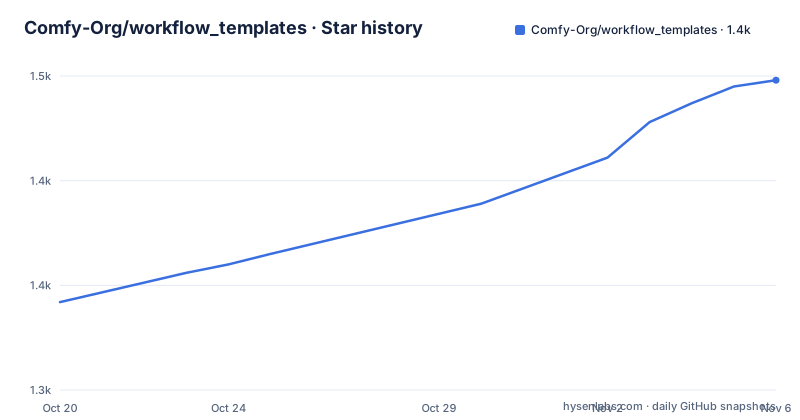
- Comfy-Org/workflow_templates1,448 ★ · +106
| Repository | 2026-10-20 | 2026-11-06 |
|---|---|---|
| Comfy-Org/workflow_templates | 1.3k | 1.4k |
106 Stars in the last 17 days, measured from the daily GitHub snapshot. Compare with other projects
Editorial analysis
Two kinds of content in one repository: workflows and blueprints
The repository hosts the official ComfyUI workflow templates and subgraph blueprints, and the README draws the distinction in a table. Workflow templates are full standalone workflows for the template picker, and they live in templates/ and packages/. Subgraph blueprints are reusable node components that appear in the node palette, and they live in blueprints/ and packages/blueprints/.
That split matters because the two have different consumers. A workflow template is something a user opens and runs. A blueprint is a building block that shows up in the palette and gets dragged into a workflow someone else is building. Treating them as one kind of content is the usual first mistake, since they need different validation and different review.
The third directory is the template site, an Astro static site under site/ that showcases templates at comfy.org/workflows, providing a browsable, searchable interface with AI-generated descriptions, i18n support across 11 languages, SEO optimisation and automated content pipelines. The site is documented separately in site/AGENTS.md.
Package-per-media is why the PyPI dependency list looks like this
The distribution structure is unusual and worth understanding before you install anything. The repository uses a package-per-media structure for Python distribution, so each media type is published as its own package and the user picks what they need.
The core package, packages/core, is a manifest plus loader helpers shipped as comfyui-workflow-templates-core. The media packages carry workflow template JSON and preview assets for each media type. The blueprints package carries subgraph blueprint JSON and preview assets as comfyui-subgraph-blueprints. The meta package is packages/meta together with the root pyproject.toml, and it is published as comfyui-workflow-templates.
The root pyproject.toml shows the meta package depends on all of them: core at 0.3.376, json at 0.1.111, media-api at 0.3.84, media-video at 0.3.101, media-image at 0.3.160, media-other at 0.3.229, and the two asset packages media-assets-01 at 0.1.48 and media-assets-02 at 0.1.16. The optional-dependencies table then exposes json, assets, api, video, image, other and all as extras, so a user who only needs image templates does not have to install the video pack. Every dependency is pinned to an exact version, which is what makes a template catalogue reproducible.
The package requires Python 3.9 or later, is MIT licensed, and its classifiers list Python 3 and Operating System OS Independent.
The site builds in three commands and deploys to four environments
The template site is an independent Astro static site, and running it locally takes a few commands:
cd site
pnpm install
pnpm run dev       # Start dev server at localhost:4321
pnpm run build     # Production build (runs prebuild pipeline automatically)
You should see the dev server on localhost:4321 once pnpm run dev starts. The root package.json exposes the same actions as npm scripts, with site:install, site:dev, site:sync, site:build and site:preview, and site:build sets SKIP_AI_GENERATION=true so a local build does not spend tokens on description generation.
Deployment is handled by GitHub Actions across four environments, and the diagram in the README lays out the triggers. A main merge bumps the version and publishes to PyPI, which then runs deploy-site.yml to Production. Two cron workflows run once per day at 00:00 UTC: cron-rebuild-site.yml rebuilds Production, and preview-cron.yml builds a Preview Prod against the production API and a Preview Test against the test API. A pull request gets a one-off PR Preview from preview-site.yml, plus a daily PR Preview from preview-cron.yml if the pull request carries the preview-cron label.
The table that follows gives the per-environment detail, including the API each build talks to, a Vercel flag, and the alias secret. The one that matters most to understand is the status filter.
PUBLIC_APPROVED_ONLY is the switch between a curated site and an internal one
Status filtering is controlled by the PUBLIC_APPROVED_ONLY environment variable at build time. When it is set to 'true', only workflows with status: 'approved' from the hub API index endpoint are included in the build. Preview environments omit this flag so that all workflows show up, including pending, approved, rejected and deprecated ones, for internal review.
That is a sensible design and it also tells you something about the underlying model. The hub API is the source of truth for workflow status, and the site is a view over it. Production builds are the curated subset, and previews are the full catalogue including the rejects, which is exactly what you want when reviewing changes but exactly what you do not want in public.
A team mirroring the site for its own deployment therefore has to decide which side of that switch to be on, and the answer depends on whether the reviewing is finished. The build table also distinguishes the production API from the test API across the preview environments, and the alias secrets VERCEL_PREVIEW_ALIAS and VERCEL_PREVIEW_TEST_ALIAS route each of them to a different address.
Adding a template means editing JSON, a bundle file and running a sync script
The Quick Start table gives the four routine tasks with their exact commands. Adding a workflow template means editing templates/, editing bundles.json, then running python scripts/sync/sync_bundles.py. Adding a subgraph blueprint means editing blueprints/, editing blueprints_bundles.json, then running python scripts/sync/sync_blueprints.py. Importing external blueprints means copying the JSONs into blueprints/ and then running python scripts/blueprints/import_blueprints.py. And checking node compatibility is npm run validate:comfyui-nodes against a local ComfyUI, with more detail in scripts/README.md.
The package.json exposes the same steps as npm scripts with slightly different names, including sync:templates, sync:bundles, and validate:templates, validate:manifests and validate:comfyui-nodes pointing at the Python scripts under scripts/validate/ and scripts/comfyui_node_compat/. The root is an Nx monorepo with nx 19.8.14 as its only dev dependency, and the sync target runs the tooling package with the Nx cache skipped, so a sync always reflects the working tree.
The pattern is worth internalising: a template is not just a JSON file. It is a JSON file, an entry in a bundle manifest, and the result of a sync run that propagates it into the packages and the site.
Extracting a workflow from a video and the metadata trap
The README walks through adding the Wan text to video template, and the middle step is the one with a real gotcha. You obtain the workflow either by creating it and exporting with Save then Export, or by using an existing workflow, and to extract the workflow JSON from an image you can use the tool at comfyui-embedded-workflow-editor.vercel.app. In the example, the author drags a video from the ComfyUI_examples Wan 2.1 page into that editor and copies the result into a new JSON file.
The important instruction is the flagged note that comes with it: make sure you start ComfyUI with --disable-all-custom-nodes when creating the workflow file, to prevent custom extensions adding metadata into the saved workflow file. Extensions add their own keys to the saved JSON, and a template carrying that baggage is not the clean workflow the picker expects. This is the kind of detail that is invisible until a template misbehaves for a user who installed a different set of custom nodes.
Thumbnails are a separate deliverable. Ideally the thumbnail is simply the output produced by the workflow on first execution, which is what the Mixing ControlNets template does. Thumbnail content type and hover effect are chosen from a fixed set, including image with no extra effect, compare slider for before and after comparison, video player for webp animation, and hover dissolve.
AI descriptions are optional, and the build can skip them
The site includes AI-generated descriptions, and the tooling around them is a fair amount of the scripts directory. The .env.example is explicit that the client talks to a generic OpenAI-compatible Chat Completions API rather than a single vendor, with the request going to POST {AI_BASE_URL}/chat/completions with bearer auth and a JSON body. It lists providers that work, including OpenAI, OpenRouter, DeepSeek, Groq, Together, Fireworks, Moonshot, local Ollama at /v1, LM Studio, vLLM, a LiteLLM proxy and Azure OpenAI, and it notes that native-only APIs such as Anthropic Messages and Gemini generateContent do not work unless routed through a compatible proxy.
The .env.example offers a commented block per provider with AI_API_KEY, AI_BASE_URL and AI_MODEL, and the model id has to match that provider's catalog. The npm scripts wire this into a pipeline: mcp:models runs enhance_models_registry.py, mcp:ai runs enhance_descriptions.py, and mcp:enhance chains the two. There is also mcp:check, which runs sync_index.py with the check flag.
Two things make this usable in a restricted environment. SKIP_AI_GENERATION=true skips description generation during a build, and the site:build script sets it. The other is that the .env.example carries a local ComfyUI path, COMFYUI_REPO_PATH, and notes that live local checks use http://127.0.0.1:8188/object_info, with an optional COMFYUI_OBJECT_INFO_URL override for the same endpoint.
What this repository is not, and where it stops
It is worth naming the boundary. This is a content repository with distribution machinery, not an engine. It does not run workflows, it does not replace ComfyUI, and it does not define the node system. The validation scripts check that templates and manifests are well formed and that the node references still resolve against a ComfyUI checkout, which is a compatibility check, not an execution guarantee.
The other boundary is the hub API. The site is a view over the hub API index endpoint, and the status filter reads from it. A deployment that must work with no network access to that API is outside what the documented pipeline supports, because the status filtering and the AI description enrichment both assume reachable endpoints.
The maintenance picture is active. The last push was on 2026-10-15, and the release history shows v0.11.85 on 2026-10-15, v0.11.84 on the same day and v0.11.83 on 2026-10-13, so the version bump tracks each merge to main rather than following a release cadence. The root package.json is marked private, since it is a monorepo root and the publishable artefacts are the packages/ tree, and the licence is MIT. The repository also carries an archived/ directory, which suggests retired templates are kept rather than deleted, and a benchmarks/ directory whose purpose the README does not explain.
Editorial conclusion
workflow_templates fits ComfyUI installations that want the official template picker content, the node palette blueprints, or a browsable catalogue of ready workflows, and it does not fit a team building its own template distribution or a workflow engine that has to work offline without the hub API. Before adopting it, decide which optional dependency group you actually need, since the meta package pulls in json, api, video, image, other and two asset packages by default, and check the PUBLIC_APPROVED_ONLY build flag if you intend to mirror the site, because it is what keeps unapproved and rejected workflows out of a production build.
Frequently asked questions
What is in the Comfy-Org workflow_templates repository?
It hosts two kinds of content: workflow templates, which are full standalone workflows for the template picker in templates/ and packages/, and subgraph blueprints, which are reusable node components for the node palette in blueprints/ and packages/blueprints/. It also holds an Astro static site under site/ that showcases the templates.
How are the ComfyUI workflow templates distributed on PyPI?
The repository uses a package-per-media structure. The meta package comfyui-workflow-templates depends on core, json, media-api, media-video, media-image, media-other and two media-assets packages, and the pyproject.toml also exposes them as optional dependency groups named json, assets, api, video, image, other and all.
How do I add a new workflow template?
Edit the templates/ folder and bundles.json, then run python scripts/sync/sync_bundles.py. When creating the workflow file itself, start ComfyUI with --disable-all-custom-nodes so custom extensions do not add metadata into the saved JSON.
What does PUBLIC_APPROVED_ONLY do?
It is a build-time environment variable that controls status filtering. When set to 'true', only workflows with status: 'approved' from the hub API index endpoint are included in the build, and preview environments omit it so that pending, approved, rejected and deprecated workflows all show for internal review.
Do the ComfyUI template descriptions require a specific AI provider?
No. The .env.example describes a generic OpenAI-compatible Chat Completions API, with POST {AI_BASE_URL}/chat/completions and bearer auth, so providers such as OpenAI, OpenRouter, DeepSeek, Groq, Together, local Ollama, LM Studio, vLLM and a LiteLLM proxy work. Native-only Anthropic Messages and Gemini generateContent endpoints do not work without a compatible proxy.
Official sources
Add this badge to your README
If you maintain this project, the badge below links readers to this analysis and shows its maintenance status from the daily GitHub snapshot. Paste the markdown into your README; add ?metric=license or ?metric=stars to the image URL for a different field.

[](https://hysenlabs.com/projects/comfy-org-workflow-templates)Star history chart for your README
[](https://hysenlabs.com/projects/comfy-org-workflow-templates)Was this useful?