confluentinc/examples: Kafka and Confluent Platform reference demos organized by use case
Apache Kafka, Apache Flink and Confluent Platform examples and demos
At a glance
- What is it?
- confluentinc/examples is a curated collection of Apache Kafka, Apache Flink and Confluent Platform demos, covering cloud deployments, stream processing, data pipelines and security configurations. It is a learning and reference resource, not a standalone library.
- Who is it for?
- confluentinc/examples suits engineers learning Confluent Platform or Apache Kafka who want runnable reference code for ksqlDB, Kafka Connect, Schema Registry, microservices ordering and multi-datacenter replication. Skip it if you need a versioned library or an API: there are no GitHub releases, no package to install, and each demo directory is its own project.
- Can I use it commercially?
- Yes. Apache-2.0 is a permissive licence: you can use, modify and sell software built on it, as long as you keep its copyright and licence notices.
- Is it still maintained?
- Yes. The repository last received commits 19 days ago.
- What is it written in?
- Mainly Java, according to GitHub's language statistics.
Answers come from the project's GitHub data, last synced on October 22, 2026, and from our analysis. They are not legal advice.
Star history
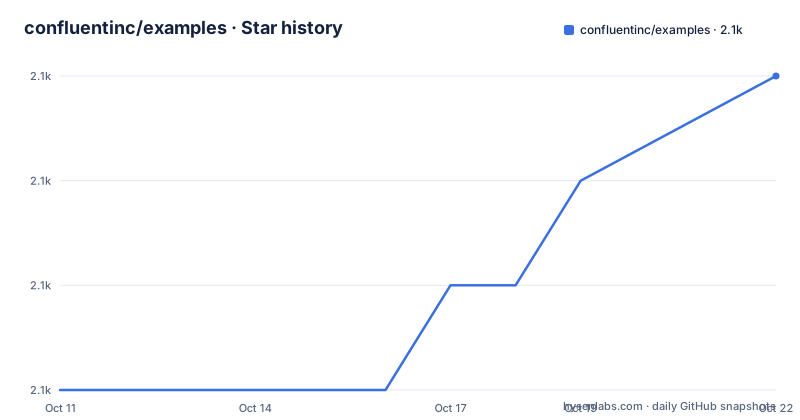
- confluentinc/examples2,070 ★ · +3
| Repository | 2026-10-11 | 2026-10-22 |
|---|---|---|
| confluentinc/examples | 2.1k | 2.1k |
3 Stars in the last 11 days, measured from the daily GitHub snapshot. Compare with other projects
Editorial analysis
A demo collection, not a single installable tool
confluentinc/examples collects demos and example projects covering Apache Kafka, Apache Flink and the Confluent Platform. Each demo lives in its own directory with its own README. Topics include cloud deployments, ksqlDB stream processing, Kafka Connect data pipelines, multi-datacenter replication, security configurations, and Kubernetes-based operations.
Engineers learning Confluent Platform or building Kafka-based systems are the intended audience. Running a demo gives a working reference for a specific architecture rather than a synthetic toy example, but using the demo code directly in production is not the repository's purpose.
No GitHub releases exist for this repository. Version alignment works through the default branch name, currently 8.2.0-post, which corresponds to a Confluent Platform release. The last push to the repository was on 2026-10-04. Top-level directories include ccloud/, clickstream/, clients/, cloud-etl/, cp-all-in-one/, cp-all-in-one-community/, cp-all-in-one-cloud/, cp-quickstart/, microservices-orders/, multi-datacenter/, multiregion/, replicator-schema-translation/, replicator-security/, security/, and wikipedia/, among others.
cp-demo is the recommended starting point: ksqlDB, connectors, Elasticsearch and security
cp-demo is what the README names as the best demo to start with. It lives in a separate repository at github.com/confluentinc/cp-demo and is referenced at the 5.4.1-post tag in the overview image. A Kafka event streaming application using ksqlDB for stream processing is at the center of it, with security features enabled throughout, a source connector pulling from live data, and a sink connector that writes to Elasticsearch and Kibana for visualization.
cp-demo also functions as a configuration reference for Confluent Platform. Security configuration in cp-demo covers TLS and authentication settings that match a production-grade deployment, not just a default open installation.
Module 2 of cp-demo covers copying data between an on-premises cluster and a Confluent Cloud cluster. Inside confluentinc/examples, that scenario appears in the On-Prem Kafka to Cloud entry, which runs with Docker. Its instructions live on the Confluent docs site, not in this repository's README. An earlier version of the cp-demo overview diagram appears in the repository at the 5.4.1-post tag of the cp-demo repository.
Local and Docker columns show which demos run without a container runtime
Each demo entry carries two columns: Local and Docker. A Y in Local means the demo runs entirely on a developer's machine. A Y in Docker means it requires a container runtime. Several demos support both modes, and a few show N in both columns and point entirely to external documentation. DevOps for Apache Kafka with Kubernetes and GitOps is one such demo: it requires neither a local setup nor Docker, just a Kubernetes environment and access to Confluent Cloud.
No general setup command spans all demos. Running any demo means navigating to its sub-directory and following the instructions in its README. Those READMEs vary considerably in completeness: some are fully documented with all prerequisites listed, while others redirect to the Confluent docs site for the full setup sequence.
For Confluent Cloud demos, most run locally (Y in Local, N in Docker). That constraint reflects the nature of those demos: they interact with Confluent Cloud APIs, not with local containers. A Confluent Cloud account and the Confluent CLI are prerequisites those demos assume rather than provision. The Confluent CLI demo entry in the README is the one that makes the CLI interaction most explicit, running fully automated against a live cluster.
Confluent Cloud demos: ccloud-stack creates 6 resources; Cloud ETL connects 5 cloud services
ccloud-stack, found under ccloud/ccloud-stack/, creates a full managed stack in Confluent Cloud in one automated step. The 6 resources it provisions are: a new environment, a service account, a Kafka cluster, a KSQL application, Schema Registry, and ACLs. It also generates a configuration file for client applications, making it a practical scaffold rather than a read-only demonstration.
Cloud ETL, under cloud-etl/, is fully automated and connects Confluent Cloud connectors to 5 cloud storage targets: AWS Kinesis, Postgres on AWS RDS, GCP GCS, AWS S3, and Azure Blob. Fully-managed ksqlDB handles the processing layer between those sources and sinks. Both ccloud-stack and Cloud ETL run locally without Docker.
Clients in Various Languages, under clients/cloud/, shows producer and consumer code connecting to Confluent Cloud in multiple programming languages. Six entries appear in the Confluent Cloud table of the README in total, counting from the CLI demo through the Kubernetes and GitOps entry.
Stream processing demos: ksqlDB clickstream, Kafka Tutorials, and a microservices orders application
Three demos appear in the Stream Processing section of the README. Clickstream, under clickstream/, processes website click events into session and engagement metrics using ksqlDB. It runs with Docker only, and detailed documentation lives at the Confluent docs site rather than in the sub-directory.
Kafka Tutorials at kafka-tutorials.confluent.io is listed as a separate entry in the stream processing table. Each tutorial presents a common event streaming scenario with several complete code solutions and supports both local and Docker modes. It is more structured than the other entries in the stream processing table because each tutorial focuses on a single specific scenario.
Microservices Orders, under microservices-orders/, integrates the Kafka Streams microservices sample application into Confluent Platform using Docker. That sample originates in the kafka-streams-examples repository at the 5.2.2-post tag. Running it inside this repository adds Schema Registry and Kafka Connect to the environment, whereas the upstream sample runs Kafka Streams in isolation.
Beyond the visible README: replication, multi-datacenter, security, and the wikipedia demo
Several demo categories are visible only from the top-level directory listing because the README is long and its full contents are not shown in a truncated view. multi-datacenter/ and multiregion/ cover scenarios for running Kafka clusters across data centers and geographic regions. replicator-schema-translation/ and replicator-security/ cover Confluent Replicator with schema and security considerations respectively. security/ holds security scenarios separate from the configurations embedded in cp-demo.
wikipedia/, a directory that stands out in a Kafka demos collection, likely covers the Wikipedia recent-changes stream, a public Kafka feed that requires no credentials and is a standard teaching example in the Kafka community.
Repository topics include avro, cdc, debezium, jdbc, schema-registry, and replicator, confirming that data capture, schema evolution and cross-cluster replication are covered beyond the demos visible in the truncated README. Apache-2.0 is the repository licence. Its LICENSE file is at the root, though individual sub-projects may carry their own licences.
No versioned releases and no API: what to use instead for production code
confluentinc/examples has no GitHub releases and exports no library API. A Kafka client such as kafka-clients carries a version number you can pin, a documented upgrade path and a changelog that explains behaviour changes between releases. This repository offers none of those. Copying demo code into a production service is a decision to evaluate carefully, since demos are structured for illustration and do not carry the error handling or operational configuration a production service needs.
For guided learning without running a full repository clone, kafka-tutorials.confluent.io covers many of the same scenarios as the stream processing demos here, with explicit language choices and runnable code for each. That site lists the same demo Docker modes as this repository, but each scenario is self-contained on a single tutorial page. For infrastructure documentation not tied to any demo directory, the Confluent Platform docs at docs.confluent.io are the authoritative source for prerequisite versions and configuration keys.
A team migrating from Apache Kafka to Confluent Platform should start with cp-all-in-one/, since that directory provides a baseline configuration for running all Platform components together. Mismatches between the 8.2.0-post default branch and the Confluent Platform version in use appear earliest as Schema Registry and Kafka Connect configuration errors.
Editorial conclusion
confluentinc/examples suits engineers learning Confluent Platform or Apache Kafka who want runnable reference code for ksqlDB, Kafka Connect, Schema Registry, microservices ordering and multi-datacenter replication. Skip it if you need a versioned library or an API: there are no GitHub releases, no package to install, and each demo directory is its own project. Before running any demo, confirm your Docker and Confluent Platform versions match the default branch, 8.2.0-post, since mismatches in cp-all-in-one/ and cp-quickstart/ show up as configuration errors in Schema Registry and Kafka Connect.
Frequently asked questions
What is the confluentinc/examples repository?
It is a curated collection of demos covering Apache Kafka, Apache Flink and Confluent Platform, including stream processing with ksqlDB, Confluent Cloud deployments, data pipelines with Kafka Connect, multi-datacenter replication and security configurations. Each demo lives in its own sub-directory with its own README.
Which demo in confluentinc/examples should I start with?
The README recommends cp-demo, hosted at github.com/confluentinc/cp-demo. It runs a Kafka application with ksqlDB, security features, a live-data source connector, and a sink connector to Elasticsearch and Kibana, and doubles as a configuration reference for Confluent Platform.
Does confluentinc/examples require Docker?
It depends on the demo. Each demo entry shows whether it runs locally, with Docker, or both. Some demos, like the DevOps with Kubernetes example, require neither and point to external documentation instead.
What licence does confluentinc/examples use?
Apache-2.0. The LICENSE file is at the repository root, and individual sub-projects may carry their own licence files.
Does confluentinc/examples have versioned releases?
No. There are no GitHub releases. Version alignment works through the default branch name, which is currently 8.2.0-post, corresponding to a Confluent Platform release.
Official sources
Add this badge to your README
If you maintain this project, the badge below links readers to this analysis and shows its maintenance status from the daily GitHub snapshot. Paste the markdown into your README; add ?metric=license or ?metric=stars to the image URL for a different field.

[](https://hysenlabs.com/projects/confluentinc-examples)Star history chart for your README
[](https://hysenlabs.com/projects/confluentinc-examples)Was this useful?