OWASP crAPI: A Vulnerable-by-Design API Training Lab
completely ridiculous API (crAPI)
At a glance
- What is it?
- OWASP crAPI is a deliberately vulnerable API environment for learning about ten critical API security risks. Its Docker Compose deployment is direct to start, but network exposure and captured mail require a controlled lab boundary.
- Who is it for?
- OWASP crAPI suits developers, instructors, and security learners who need a controlled environment for studying API vulnerabilities. It is not suitable for production hosting or for users expecting a hardened application.
- Can I use it commercially?
- Yes. Apache-2.0 is a permissive licence: you can use, modify and sell software built on it, as long as you keep its copyright and licence notices.
- Is it still maintained?
- Yes. The repository last received commits 44 days ago.
- What is it written in?
- Mainly Java, according to GitHub's language statistics.
Answers come from the project's GitHub data, last synced on October 23, 2026, and from our analysis. They are not legal advice.
Star history
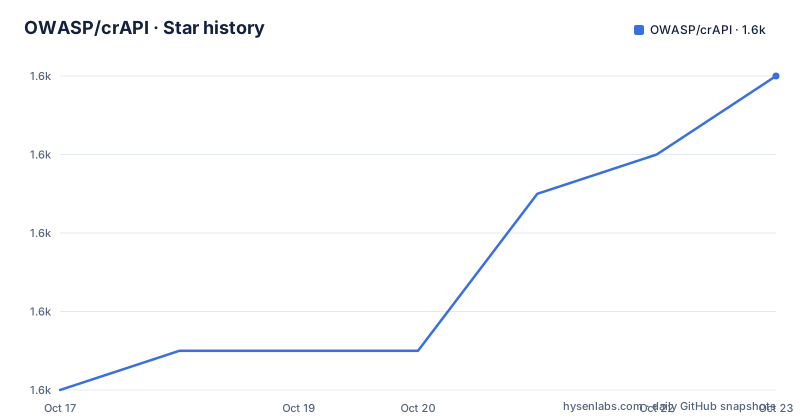
- OWASP/crAPI1,616 ★ · +8
| Repository | 2026-10-17 | 2026-10-23 |
|---|---|---|
| OWASP/crAPI | 1.6k | 1.6k |
8 Stars in the last 6 days, measured from the daily GitHub snapshot. Compare with other projects
Editorial analysis
What OWASP crAPI Is Designed to Teach
OWASP crAPI addresses a specific gap between reading about API security risks and interacting with an application that exhibits them. Its README describes the project as a "completely ridiculous API" that helps users understand the ten most critical API security risks. This is not an API client library, gateway, scanner, or production starter kit. It is a vulnerable-by-design practice environment.
The intended users are people who want to learn or train through an application rather than memorize risk names in isolation. The repository supplies challenge documentation, an application workflow, a setup guide, OpenAPI specifications, and Postman collections. Those resources support self-study, guided exercises, and classroom demonstrations. However, the README does not describe a formal curriculum, assessment system, or built-in progress tracking. Instructors would still need to define exercises around `docs/challenges.md` and `docs/happy-path.md`.
The vulnerable design is also a strict boundary. crAPI should be treated as a lab application because its purpose depends on known weaknesses. The README explicitly says it can be run safely for education and training, but it does not claim that the deployment is hardened. Publishing it to a shared network without isolation would expose an intentionally flawed system to an audience for which it was not designed.
Based on the repository layout, crAPI is a Java project organized around `services/`, deployment assets, documentation, and API descriptions. The documentation also calls it a modern microservices application. That architecture gives learners multiple service boundaries instead of presenting the risks through a single isolated function. The repository does not identify every service or document internal APIs, data stores, or messaging mechanisms, so claims about those implementation details would go beyond what the README supports.
crAPI's Microservices and User Workflow
The README identifies crAPI as a microservices application and directs users to an intended workflow before they attempt security challenges. That ordering matters. A learner is expected to register an account and proceed through a car-buying journey, which gives the lab a recognizable business context before the user starts examining its behavior.
This is the only broad mechanism described for the application architecture. The repository contains `services/`, `deploy/`, `openapi-spec/`, and `postman_collections/`. Those paths support the stated microservice and API scope. The README does not identify each service, its internal API, its data store, or its inter-service protocol. It would therefore be inaccurate to claim that crAPI uses a particular database, message broker, authentication implementation, or service-discovery mechanism.
The workflow documentation creates a useful teaching baseline. By first following `docs/happy-path.md`, a learner can observe the expected user journey and compare it with the challenge conditions in `docs/challenges.md`. The OpenAPI specifications may help users understand the API surface, while the Postman collections provide another possible route for sending requests. The README does not say that either resource is mandatory, so they should be treated as supporting assets rather than confirmed steps in every challenge.
The Java implementation and service-oriented layout make crAPI suitable for studying API behavior in a web application. They do not establish production-scale behavior. The README does not claim that crAPI reproduces a specific industry workload, handles production traffic, or integrates with external identity providers. Its documented value comes from its constructed vulnerable scenarios rather than from unsupported claims about infrastructure fidelity.
Starting the Stable Docker Compose Lab
The shortest documented path uses prebuilt images. Docker and docker compose must already be installed and running, with docker compose version `1.27.0` or above. Check the installed version before downloading the deployment:
docker compose versionFor the stable branch on Linux, download the repository archive and enter its Docker deployment directory. The README says `docker compose pull` fetches the prebuilt images before Compose starts the services in the background.
curl -L -o /tmp/crapi.zip https://github.com/OWASP/crAPI/archive/refs/heads/main.zip
unzip /tmp/crapi.zip
cd crAPI-main/deploy/docker
docker compose pull
docker compose -f docker-compose.yml --compatibility up -d
After startup, open `http://localhost:8888`. That is the first application check described by the README. Follow `docs/happy-path.md` through the account registration and car-buying journey before opening `docs/challenges.md`. This checks both that the interface is reachable and that the intended workflow can be completed.
The README also routes email through a mailhog service by default. Captured messages can be inspected at `http://localhost:8025`. This matters during the happy path because workflows that involve notifications can be checked without relying on a real external mailbox. Messages addressed to the `example.com` domain continue to go to mailhog even if other SMTP settings are changed.
Keep the default local binding for learning on one machine. The documentation permits overriding `LISTEN_IP`, but exposing the lab changes who can reach its deliberately vulnerable services.
Controlling LISTEN_IP and MailHog Exposure
The deployment supports a server-side override when a lab must be reachable beyond its default local interface. The README gives `0.0.0.0` as the example for exposing the system to all network interfaces:
LISTEN_IP="0.0.0.0" docker compose -f docker-compose.yml --compatibility up -dThis command supplies `LISTEN_IP` while Compose starts the system. It changes the interface on which the deployment listens. The documentation also says that values in the `.env` file can be changed instead. It does not state the default value of `LISTEN_IP`, so leaving it unset is the most conservative documented choice until a separate network requirement is clear.
Binding to every network interface is not equivalent to making a lab private. It can make the application and MailHog interface available on networks to which the host is connected. Firewall rules, virtual network boundaries, authentication, and host-specific restrictions are not described in the crAPI documentation. An engineer should not assume that any of those controls are configured by the project.
The MailHog endpoint introduces a related concern. It can receive messages generated by the lab. The README confirms the default endpoint but does not document authentication, retention controls, or message cleanup. Network exposure should therefore remain limited to a controlled training environment where other users do not need access to the application or captured mail.
Configuration can also be managed through `.env`. The README allows administrators to change its variables or provide overrides at the start of the Compose command. Because the complete service mapping is not shown in the README text, it would be unsafe to identify every `.env` key or claim how conflicting file and shell values are resolved.
The Vagrant Alternative and Its Isolation Boundary
Vagrant is the documented alternative for running crAPI inside a virtual machine. It requires Vagrant and a provider such as VirtualBox. The README uses a placeholder for the repository URL, so the placeholder must be replaced before the command can work:
$ git clone [REPOSITORY-URL]After replacing `[REPOSITORY-URL]` with the actual crAPI repository address, the documented startup sequence enters the Vagrant deployment and creates the virtual machine:
$ cd deploy/vagrant && vagrant upThe application URL for this method is `http://192.168.33.20`, and captured emails are available through `http://192.168.33.20:8025`. Unlike the Docker commands, the Vagrant workflow uses a fixed private-network address in the documentation. That difference can make the virtual machine boundary relevant for users who do not want to run crAPI directly on the host. It does not automatically make every challenge safe on a shared network.
Cleanup is explicit. Run the following command from the repository root to destroy the Vagrant virtual machine:
$ cd deploy/vagrant && vagrant destroyThe alternative therefore exchanges a direct Compose workflow for a virtual machine. Docker is more convenient when prebuilt container images and background startup are acceptable. Vagrant is more relevant when virtual-machine isolation is already part of the host setup. The README does not provide guest resource requirements, startup timing, snapshot guidance, or the guest operating system, so those costs cannot be compared reliably.
Releases, Branch Choice, and Apache-2.0
The repository is not archived, and its last push was on 2026-09-09. The release history lists `v1.1.6` on 2025-09-30, along with `v1.1.6-rc7` and `v1.1.6-rc8` from 2024-05-02. The README provides separate commands for the latest stable `main` branch and the latest development `develop` branch. For a repeatable training environment, `main` is the conservative choice because the documentation labels that workflow as the latest stable version. The `develop` branch can change after a release.
Upgrading can affect more than an image tag. A branch change may alter application behavior, challenge content, services, and deployment assets. The README explains configuration through `.env` and command-line overrides, but it does not publish a migration procedure for persistent data, SMTP changes, or customized Compose files. Users who modify those assets should retain their own copies before changing branches. This is a repository management precaution, not a claim that crAPI provides a formal migration framework.
crAPI uses the Apache-2.0 license. That license permits broad use, modification, and redistribution subject to its conditions. When distributing a modified copy or an application containing project code, the license text and applicable notices are relevant. This is not legal advice. Exact obligations depend on what is distributed and how it is combined with other software, so integrators should consult `LICENSE.md`.
Repository activity and production readiness are separate questions. A push on 2026-09-09 confirms recent repository work, but crAPI remains vulnerable by design. That date does not convert the lab into an application suitable for production traffic.
Editorial conclusion
OWASP crAPI suits developers, instructors, and security learners who need a controlled environment for studying API vulnerabilities. It is not suitable for production hosting or for users expecting a hardened application. Before exposing it beyond the local machine, verify `LISTEN_IP`, mail routing, stored data, and access controls for the selected deployment. For the documented Docker workflow, the clearest adoption criterion is whether you can isolate the intentionally vulnerable services and keep `LISTEN_IP` limited to localhost.
Frequently asked questions
How do I install and start OWASP crAPI?
Install Docker and docker compose version `1.27.0` or above, download the stable repository archive, enter `crAPI-main/deploy/docker`, and run `docker compose pull` followed by the documented Compose startup command. The application should then be available at `http://localhost:8888`.
Where can I see emails generated by OWASP crAPI?
With the default Docker deployment, emails are sent to mailhog and can be viewed at `http://localhost:8025`. Messages addressed to the `example.com` domain still go to mailhog even when SMTP configuration is changed.
Is OWASP crAPI suitable for production use?
No. The README describes crAPI as vulnerable by design and intended for education and training. Its architecture and deployment files support a practice environment, not a hardened production service.
Official sources
Add this badge to your README
If you maintain this project, the badge below links readers to this analysis and shows its maintenance status from the daily GitHub snapshot. Paste the markdown into your README; add ?metric=license or ?metric=stars to the image URL for a different field.

[](https://hysenlabs.com/projects/owasp-crapi)Star history chart for your README
[](https://hysenlabs.com/projects/owasp-crapi)Was this useful?