ZAP keeps its user documentation on the website and ships weekly builds
The ZAP by Checkmarx Core project
At a glance
- What is it?
- ZAP by Checkmarx is a free and open source web app scanner that this repository barely documents. It names two uses, automatic scanning during development and manual testing by experienced pentesters, and otherwise points at zaproxy.org. What the repository does show is a Gradle build, weekly date-tagged releases, four checked-in sample reports, and packaging directories the README never mentions.
- Who is it for?
- ZAP fits a team that wants a scanner it can drive from a terminal or a container and read the Apache-2.0 source for, and it does not fit a reader who expects the repository to explain how to operate it.
- Can I use it commercially?
- Yes. Apache-2.0 is a permissive licence: you can use, modify and sell software built on it, as long as you keep its copyright and licence notices.
- Is it still maintained?
- Yes. The repository last received commits 2 days ago.
- What is it written in?
- Mainly Java, according to GitHub's language statistics.
Answers come from the project's GitHub data, last synced on November 15, 2026, and from our analysis. They are not legal advice.
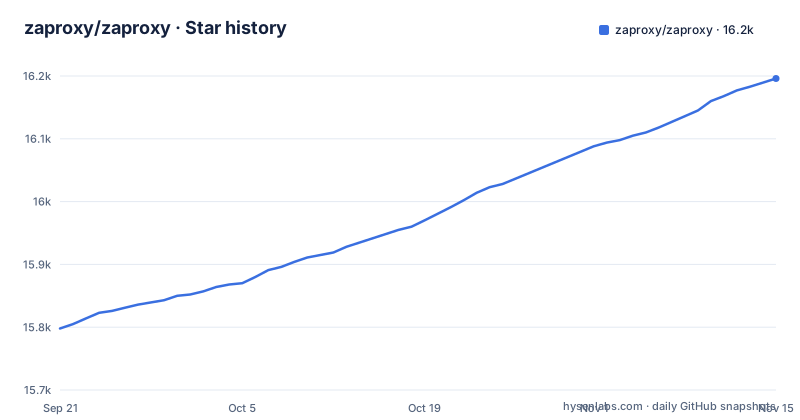
Star history
- zaproxy/zaproxy16,196 ★ · +398
| Repository | 2026-09-21 | 2026-11-15 |
|---|---|---|
| zaproxy/zaproxy | 15.8k | 16.2k |
398 Stars in the last 55 days, measured from the daily GitHub snapshot. Compare with other projects
Editorial analysis
The README runs 89 words and ends at a download page
It is worth being precise about what this repository contains in prose, because the amount is unusual. Stripped of badges, the README is a handful of short sentences and two links. The Zed Attack Proxy, by Checkmarx, is called the world's most widely used web app scanner, free and open source, and a community based GitHub Top 1000 project that anyone can contribute to. It can automatically find security vulnerabilities in web applications while you are developing and testing them, and it is also positioned as a tool for experienced pentesters doing manual security testing.
Two audiences, two different products, and both are named. The automated framing is the one that matters for CI, and the manual framing is the one a person drives through a proxy in front of a browser.
What is absent is any instruction. There is no command, no configuration file, no add-on list, no description of passive versus active scanning, nothing about authentication or session handling, and no example of wiring a scan into a pipeline. The only actionable lines are a link to zaproxy.org/download/ and a pointer to the website for more detail.
So the honest reading is that this repository is a source mirror with a landing page attached, and the documentation lives somewhere else entirely. Anyone evaluating ZAP needs to treat the website as part of the product, not as a supplement.
Weekly tags named w followed by a date
The release tags are the clearest signal about how this project moves. The three most recent are w2026-11-02, w2026-10-29 and w2026-10-23, published on those same dates. The w prefix followed by a date is a build train, not a semantic version line.
That has a direct consequence for anyone planning to deploy it. The three most recent releases are all weekly tags, so a reproducible environment means choosing a specific weekly tag and accepting that you own the upgrade. The alternative is tracking the train, which for a tool that drives HTTP requests at your application means the scanner's behaviour can shift under you between runs and you have to attribute a new finding or a disappeared finding to a version change rather than to a code change.
The repository itself demonstrates the gap between the two schemes. The sample output checked in is named for version 2.4.3: `ZAP_2.4.3_report-merged.html`, `ZAP_2.4.3_report-merged.xml`, `ZAP_2.4.3_report-unmerged.html` and `ZAP_2.4.3_report-unmerged.xml`. A 2.4.3-era artefact sitting next to 2026 date tags tells you the example has not been refreshed to match the current scheme. The last push to the repository was on 2026-11-02 and it is not archived, so work continues; the versioning is simply not something you can lean on.
Gradle, a checked-in wrapper, and BUILDING.md holding the build story
The build system is the part of the repository that is properly self-contained. The tree is a Gradle project in Kotlin DSL: build.gradle.kts and settings.gradle.kts at the root, a buildSrc/ directory for build logic, gradle.properties for configuration, a gradle/ directory for the wrapper, and both gradlew and gradlew.bat committed. The primary language is Java.
Committing the wrapper matters more than it looks. gradlew and gradlew.bat together mean a contributor on Linux or macOS and a contributor on Windows build with the same Gradle version without installing one themselves, which removes a whole class of "works on my machine" difference in a project whose contributors are spread across operating systems.
The documentation for that process is not in the README. It is BUILDING.md, alongside RELEASING.md. Both are conventional, which is mild evidence that the release process is deliberate rather than improvised, but neither is summarised in the README, so you have to open them to learn the procedure.
The consequence for an adopter is narrow but real: you can clone and build from source with confidence that the tooling is pinned, and the build and release procedure lives in BUILDING.md and RELEASING.md rather than in the README.
docker/, snap/ and python/ exist in the tree but not in the README
The repository ships three packaging directories that the README never mentions, and that gap is where most self-hosted deployments actually start:
docker/
snap/
python/
A docker/ directory means there is a container build here. A snap/ directory means there is a Linux desktop package. A python/ directory means there is a programmatic interface as well as the Java application itself, which is the part that matters if you want to drive scans from your own code rather than from a GUI or a command line.
None of this is described. The README's single installation statement is a link to zaproxy.org/download/, so a reader looking for a container image, a snap or a Python API finds the directory and no instructions for using it. That is the opposite of the usual problem, where documentation describes an option the code dropped; here the code carries options the documentation does not acknowledge.
The practical read: if you plan to run ZAP in a container or against a build pipeline, expect to source those instructions from the website, and expect to verify that the directory in this repository corresponds to the image you end up pulling.
Merged or unmerged, HTML or XML: the sample reports decide that
The four files in examples/ are the only worked example of ZAP output anywhere in the repository, and the naming encodes two independent choices. HTML or XML decides whether the result is for a person to read or for a machine to parse.
That is a small thing to learn from filenames and a large thing to get wrong. If you are building anything on top of scan results, XML is the parseable form, and choosing HTML means writing a scraper for a page layout.
The version in those names also matters, and it is old. A report generated by 2.4.3 may not match the schema a current weekly build emits, so treat the samples as an illustration of the shape of the output rather than as a contract for parsing.
What you will not learn from them is which fields are stable, which are advisory, or how severity is expressed. That is documented elsewhere, and the repository is not where it lives.
CodeQL, a contributor licence agreement, and a LEGALNOTICE
A scanner project has a particular obligation to be trustworthy about its own dependencies, and the repository shows signs of taking that seriously. There is a SECURITY.md, and the README badge list points at both a ci.yml workflow and a codeql.yml workflow, plus a SonarCloud dashboard and a Core Infrastructure Initiative best practices entry. A vulnerability scanner that does not scan its own build would be an awkward artefact, and the presence of a CodeQL workflow indicates that code scanning runs in CI rather than occasionally.
The contribution side is also more formal than a typical script repository. CONTRIBUTING.md is the usual document, and next to it sits a CLA.md, a Contributor License Agreement. That is a meaningful difference: a CLA asks contributors to sign a rights agreement before a pull request is accepted, which adds a step to contributing that a repository without one does not have.
LEGALNOTICE.md sits alongside LICENSE, and the licence is Apache-2.0, the same licence the README badge links to on the Apache site. For anyone considering commercial use or redistribution, the two files to read are LICENSE and LEGALNOTICE.md, and neither is summarised in the README.
One last detail about self-description: the README calls ZAP a community based GitHub Top 1000 project. That is the project's own framing of its standing rather than a measurement, and the files above are the better evidence of how the project is run.
The README names no competitor and no command either
If you are choosing between ZAP and another web proxy or scanner, none of that evidence is in this repository. There is no comparison, no feature matrix, and no named alternative anywhere in the README. What the README does do is split the tool into the two modes it serves, and those modes have genuinely different costs.
The automated mode is the one you wire into a build, and it inherits every property of a build tool that shells out to a scanner: pinned version, machine-readable output, and a baseline so that a new alert is distinguishable from a pre-existing one. The manual mode is a person driving requests through a proxy, where the value is in the request history and the ability to poke at something by hand, and where the cost is entirely human time.
Treating them as one product is where teams go wrong. A scanner wired into CI on a weekly tag will change behaviour without notice, as the release scheme allows. A scanner used manually has no version pressure at all, because a person is deciding what to run each time.
The repository does not settle the choice, and it is not trying to. It is a source tree with a landing page, and the landing page is zaproxy.org.
Editorial conclusion
ZAP fits a team that wants a scanner it can drive from a terminal or a container and read the Apache-2.0 source for, and it does not fit a reader who expects the repository to explain how to operate it. Before adopting it, read zaproxy.org rather than the README for anything operational, pin a specific w-tagged release instead of tracking the weekly train, and decide from the sample reports in examples/ whether you need the merged or unmerged XML form to drive tooling of your own.
Frequently asked questions
What is ZAP used for?
The README gives two uses. It can automatically find security vulnerabilities in your web applications while you are developing and testing them, and it is described as a tool for experienced pentesters to use for manual security testing.
Is the ZAP proxy free?
Yes. The README states that ZAP by Checkmarx is free and open source and that anyone can contribute to it. The licence is Apache-2.0, with LICENSE and LEGALNOTICE.md at the repository root.
Is OWASP ZAP still used?
The project is still shipping. Releases are published weekly with tags such as w2026-11-02, w2026-10-29 and w2026-10-23, the last push was on 2026-11-02, and the repository is not archived. Note that the README now credits Checkmarx rather than OWASP in the product name.
How do I install ZAP?
The README does not give commands. It links to zaproxy.org/download/ for the software, and the repository itself carries a docker/ directory, a snap/ directory and a python/ directory alongside the Gradle wrapper files gradlew and gradlew.bat, with BUILDING.md and RELEASING.md covering building and releasing from source.
Official sources
Add this badge to your README
If you maintain this project, the badge below links readers to this analysis and shows its maintenance status from the daily GitHub snapshot. Paste the markdown into your README; add ?metric=license or ?metric=stars to the image URL for a different field.

[](https://hysenlabs.com/projects/zaproxy-zaproxy)Star history chart for your README
[](https://hysenlabs.com/projects/zaproxy-zaproxy)Was this useful?