GitHub1s: a read-only VS Code window onto GitHub, GitLab and npm, with a bring-your-own-model AI panel
One second to read GitHub code with VS Code.
At a glance
- What is it?
- GitHub1s turns a repository URL into a browser VS Code session by inserting 1s after github. It is fast for reading code and tracing changes, but it never writes back, it leans on upstream rate limits, and its AI chat ships your code context to whichever endpoint you configure.
- Who is it for?
- Use GitHub1s when you need to read, search or review someone else's repository and do not want to clone it; it handles branches, tags, commit history and pull request diffs in a familiar editor. Do not pick it if you need to edit, commit or run code, since remote repositories are read-only.
- Can I use it commercially?
- Yes. MIT is a permissive licence: you can use, modify and sell software built on it, as long as you keep its copyright and licence notices.
- Is it still maintained?
- Yes. The repository last received commits 9 days ago.
- What is it written in?
- Mainly TypeScript, according to GitHub's language statistics.
Answers come from the project's GitHub data, last synced on November 14, 2026, and from our analysis. They are not legal advice.
Star history
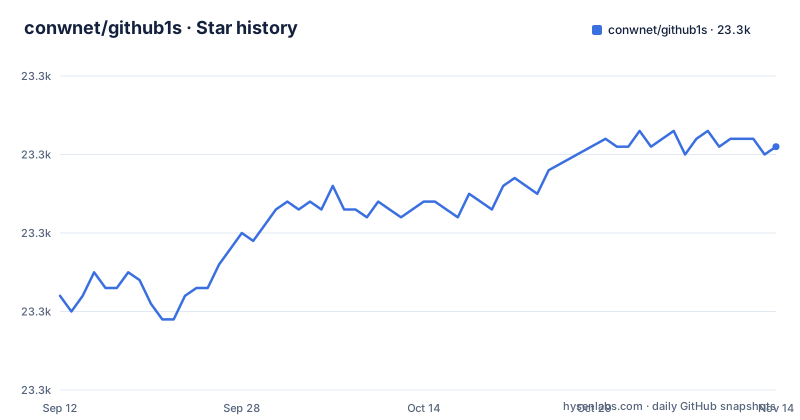
- conwnet/github1s23,311 ★ · +19
| Repository | 2026-09-12 | 2026-11-14 |
|---|---|---|
| conwnet/github1s | 23.3k | 23.3k |
19 Stars in the last 63 days, measured from the daily GitHub snapshot. Compare with other projects
Editorial analysis
Adding 1s to the hostname is the entire setup
There is nothing to install for ordinary use. You take any GitHub repository address and insert 1s after github in the domain:
https://github.com/microsoft/vscode
        ↓
https://github1s.com/microsoft/vscode
The page that loads is a VS Code web workbench pointed at that repository. You get the file explorer, quick file lookup and code search in the same layout you know from the desktop editor, so there is no new interface to learn. The same trick has two siblings run by the project: gitlab1s.com opens GitLab repositories, and npmjs1s.com opens published npm packages, which is handy when you want to read the code that actually shipped to the registry rather than what sits in a repository. URL formats for each host, plus authentication and navigation, are covered in docs/usage.md. The cost of this convenience is that you are running inside a hosted service at github1s.com, so every limit in the sections below applies to you whether you notice it or not.
Nothing you open through github1s.com can be changed
Remote repositories are read-only. You can open a file, put a cursor in it and use editor navigation, but there is no path from GitHub1s back to the repository: no saving, no commits, no branches created, no pull requests opened. For a reviewer that is fine and even reassuring, because a stray keystroke cannot alter anything upstream. For anyone who spots a bug while reading, it means the session ends with copying a file path or a line reference and switching to a local clone or the GitHub web editor to make the actual fix. It also means you cannot run anything. There is no terminal attached to the repository, no build, no test run, so questions such as whether a function behaves the way its name suggests still need a checkout. Treat GitHub1s as a reader and a review tool, and plan on a second tool for anything that changes state.
Search and go-to-definition depend on services GitHub1s does not control
Code search and code navigation are not computed entirely inside your browser tab. They depend on the repository platform and on available upstream services, and the project thanks Sourcegraph and searchcode among the tools and services it uses. The practical consequence is uneven behaviour: a repository on one platform may give you richer search or navigation than a repository on another, and a feature that worked yesterday can degrade if an upstream service changes its availability. When search returns nothing or go-to-definition does not jump, the problem may sit outside GitHub1s entirely. The capabilities and limits section of docs/usage.md is where the project sets out what to expect per platform, and it is the page to read before you rely on GitHub1s for a code audit where missing a search hit would matter.
Anonymous browsing runs into upstream rate limits
Public repositories open without signing in, but that access is subject to the upstream services' own access rules and rate limits. Reading a few files is unlikely to hit a ceiling; walking through a large repository, flipping between many commits or opening a long pull request diff makes many more upstream requests, and an anonymous session is the one that runs out first. When that happens you are blocked until the limit resets, or until you authenticate. Private repositories need authentication from the start. You can connect a GitHub or GitLab account, or supply an access token with the permissions the repository requires. Either route hands GitHub1s credentials that can read code you may not want exposed, so scope the token to what the session needs. Self-hosting is an option for teams that want control over that path: docs/deployment.md covers hosting, OAuth and service configuration.
The AI panel sends code context to an endpoint you choose
GitHub1s AI is a chat panel that can give a repository overview, explain a file or a selection, answer follow-up questions and look up relevant code while you talk to it. It is hidden by default; you open it by clicking Toggle Secondary Side Bar in the layout controls at the top of the page. GitHub1s does not decide which model answers. You connect your preferred model, and that model's endpoint has to accept requests made directly from a browser. Endpoints that only accept server-side calls will not work in this setup. The other consequence is about data: your messages and the code context the assistant gathers go to the endpoint you selected. On a public repository that may not matter. On a private repository opened with your token, it means private source leaves for a third party. Model setup, context, tools and data handling are spelled out in docs/ai.md, which is worth reading before the first question.
Tracing a change across branches, commits and review diffs
Reading the current tree is only half of what the workbench offers. You can switch between branches and tags, inspect individual commits, follow a single file's history, and open pull request diffs on GitHub or merge request diffs on GitLab. Combined with the editor layout, this lets you review a change with the surrounding code one click away instead of reading isolated hunks in a web diff view. The AI panel can be pointed at a selection inside that diff to ask about implementation details. What it does not give you is the write half of review: since the repository is read-only, approving, commenting on or merging the pull request still happens on GitHub or GitLab itself. GitHub1s is where you understand the change; the host platform is where you act on that understanding.
A webpack dev server, two extensions and a Workers layer
For contributors, the repository is a TypeScript project built around a VS Code web package. The top level holds extensions/, functions/, workers/, vscode-web/ and src/, and the dev dependencies pull in @github1s/vscode-web at ^0.30.3 alongside @cloudflare/workers-types, which points to Cloudflare Workers as part of the hosting story. The watch script runs a webpack dev server and the two bundled extensions in parallel:
"watch:dev-server": "webpack serve --mode=development",
"watch:github1s-extension": "cd extensions/github1s && npm run watch",
"watch:github1s-ai-extension": "cd extensions/github1s-ai && npm run watch",
"watch-with-vscode": "DEV_VSCODE=true npm run watch",
The github1s extension and the github1s-ai extension are separate builds, so the AI panel is its own piece of code. Production builds go through node scripts/build.js. End-to-end tests live in tests/ and run with Playwright, and test:ci starts the dev server on port 8080 before running them. Local setup is in docs/development.md and component layout in docs/architecture.md.
Release tags and package.json tell different version stories
The project ships tagged releases at a steady pace: v0.35.2 on September 20, 2026, v0.35.3 on October 10, 2026 and v0.35.4 on October 20, 2026, and the last push landed on November 2, 2026. The package.json, however, still says version 1.0.0 and a license field of ISC, while the repository itself is licensed MIT through its LICENSE file. Neither mismatch affects anyone using github1s.com, but if you are packaging or redistributing a fork, take the release tag as the version and the LICENSE file as the licence, not the placeholder fields in package.json. The project is maintained by conwnet, xcv58 and Siddhant Khare, with bugs and suggestions going through GitHub Issues. Third-party extensions built around GitHub1s are collected in docs/community.md.
Editorial conclusion
Use GitHub1s when you need to read, search or review someone else's repository and do not want to clone it; it handles branches, tags, commit history and pull request diffs in a familiar editor. Do not pick it if you need to edit, commit or run code, since remote repositories are read-only. Before connecting a private repository or the AI panel, check what token scope you are granting and which model endpoint will receive your code context.
Frequently asked questions
What is GitHub1s?
GitHub1s is a browser-based code explorer built on VS Code. You add 1s after github in a repository URL to browse files, search code and review changes without cloning the repository.
Can I edit or commit code in GitHub1s?
No. Remote repositories opened in GitHub1s are read-only, so changes have to be made in a local clone or on the host platform.
Does GitHub1s work with GitLab repositories or npm packages?
Yes, through sibling sites: gitlab1s.com opens GitLab repositories and npmjs1s.com opens published npm packages. Pull request diffs on GitHub and merge request diffs on GitLab can both be reviewed.
Is GitHub1s safe to use with private code and the AI chat?
Private repositories require connecting a GitHub or GitLab account or supplying an access token. When you use GitHub1s AI, your messages and code context are sent to the model endpoint you selected, so check that endpoint before using it on private code.
Official sources
Add this badge to your README
If you maintain this project, the badge below links readers to this analysis and shows its maintenance status from the daily GitHub snapshot. Paste the markdown into your README; add ?metric=license or ?metric=stars to the image URL for a different field.

[](https://hysenlabs.com/projects/conwnet-github1s)Star history chart for your README
[](https://hysenlabs.com/projects/conwnet-github1s)Was this useful?