teableio/teable: what the standalone deployment leaves out
✨ AI Spreadsheet for Business
At a glance
- What is it?
- Teable is a PostgreSQL spreadsheet that bundles AI chat, an App Builder, automations, and a database layer into one deployable, and it splits into three deployment shapes that do not carry equal features. The gaps between those shapes, not the feature list, decide where it fits.
- Who is it for?
- Teable suits two different buyers, and reading the deployment table first prevents most of the disappointment. Teams that want AI chat and the App Builder should start from the full-featured self-host or the cloud, because the standalone column marks both as absent.
- Can I use it commercially?
- Check first. The repository uses a licence we do not classify automatically, so read its LICENSE file before any commercial use.
- Is it still maintained?
- Yes. The repository last received commits 1 day ago.
- What is it written in?
- Mainly TypeScript, according to GitHub's language statistics.
Answers come from the project's GitHub data, last synced on November 14, 2026, and from our analysis. They are not legal advice.
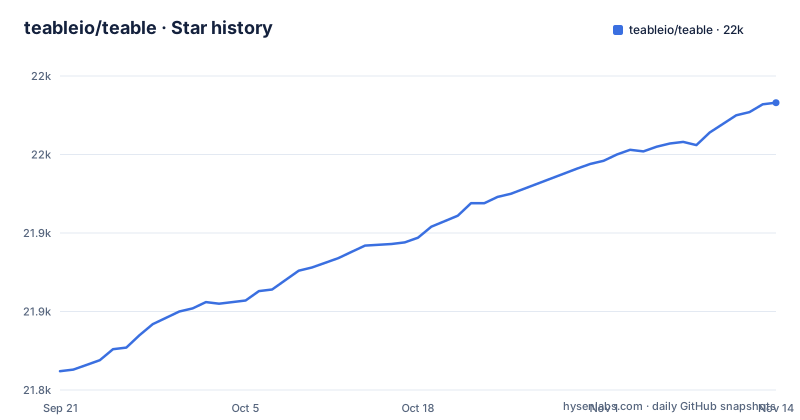
Star history
- teableio/teable21,983 ★ · +171
| Repository | 2026-09-21 | 2026-11-14 |
|---|---|---|
| teableio/teable | 21.8k | 22k |
171 Stars in the last 54 days, measured from the daily GitHub snapshot. Compare with other projects
Editorial analysis
Release tags are timestamps, so the version hides in package.json
The three most recent release tags in teableio/teable are release.2026-11-03T05-42-34Z.3718, release.2026-11-01T07-52-11Z.3675, and release.2026-10-30T09-29-42Z.3673. None of them carries a version number you can read. Each encodes a moment and a build counter. The human facing version lives somewhere else, in the root package.json, where the package @teable/teable sits at 1.10.0. That split has a direct effect on anyone tracking releases: git describe will not tell you which version a build corresponds to, and the only mapping from tag to version is to open the manifest at that tag. The same file carries a second oddity, a build script that filters against '...[origin/main]', while the repository default branch is develop. Release notes themselves live off the repository, behind the help site changelog link.
The deployment table is the only place AI is marked absent
Teable offers three ways to run, and the comparison table draws a hard line through the standalone column. Tables, collaboration, API, and automation appear in all three: Teable Cloud, Full-featured self-host, and Standalone self-host. AI features (chat, agents) and App Builder (build and deploy apps) appear in the first two and are marked absent in the third. The Start here row sends Cloud readers to teable.ai, the full-featured self-host to the teableio/teable-deployment repository, and standalone to the Docker guide under help.teable.ai. So anyone who installs standalone expecting the AI chat or the App Builder finds those cells empty, with no row in the table explaining how to switch. The upgrade path is documented below the table. A migration guide inside teableio/teable-deployment covers basic to full-featured, and notes that the runtime plane installs next to an existing install with the data left in place.
Agent sandboxes are disposable, published apps are not
Self-hosting Teable is described as deploying four platforms at once, and two of them are container lifecycles with very different endings. The agent sandbox runs every AI session in its own isolated container, started on demand and gone when the session ends. The app deployment platform runs each app a team builds and publishes as its own lightweight, long-lived container. The third piece is the AI workflow engine, where automations fire on record changes, schedules, and webhooks, with AI steps doing the reasoning, running where the data lives. The fourth is the PostgreSQL collaboration layer of tables, views, permissions, and API.
The dev database URL hard-codes credentials and drops statement caching
The Makefile carries the development database connection as an overridable default, `POSTGRES_PRISMA_DATABASE_URL ?= postgresql://teable:teable\@127.0.0.1:5432/teable?schema=public\&statement_cache_size=0`. The comment above it explains the final parameter: prepared statement caching is disabled to avoid `ERROR: cached plan must not change result type` after field schema changes in tests. Two more defaults matter to anyone driving the compose stack directly: DOCKER_COMPOSE ?= docker compose, with compose files picked up by wildcard from ./dockers/*.yml alongside an optional ./dockers/.env, and a service health wait of TIMEOUT ?= 300. The default credential pair is a local development convenience, not a production value. The same Makefile also exposes NETWORK_MODE ?= teablenet for the compose network name, CI and CI_JOB_ID both defaulting to 0, and SCRATCH ?= /tmp for temporary files.
One dev command brings up the frontend as well
Development setup is four steps, and the shell parts run exactly as written. Dependencies arrive through corepack and pnpm, Postgres is initialized through a Makefile target, and the environment override is copied per developer:
# Enabling the Help Management Package Manager
corepack enable

# Install project dependencies
pnpm installmake switch-db-modecd apps/nextjs-app
cp .env.development .env.development.localThat third step is marked optional, and the copy produces a .env.development.local that each developer owns rather than editing the shared file. The fourth step is the one that shapes the workflow, because the README is explicit that you start only the backend and the Next server for the frontend comes up automatically, with file changes reloading on their own:
cd apps/nestjs-backend
pnpm dev
No command is documented for bringing up the frontend alone, so a session spent debugging the Next app still goes through the backend process.
The workspace map keeps electron out
The root package @teable/teable is marked private and declares AGPL-3.0, while the repository root carries both AGPL_LICENSE and LICENSE. The workspace list defines what a package install actually reaches:
  "workspaces": [
    "apps/*",
    "packages/*",
    "packages/v2/*",
    "plugins",
    "!apps/electron"
  ],
The negation on apps/electron is the line worth reading twice. The directory sits inside the monorepo yet stays out of workspace resolution, so any tool that walks packages skips it silently rather than failing. The top level also carries dockers/, dottea/, plugins/, scripts/, static/, and a separate packages/v2 tree, which means an install has to satisfy several package roots at once. Two license files sitting next to a declared license string is worth resolving before vendoring any part of the project, because no file in the listing says which of them governs. The rest of the root tells you how much process hangs off this tree: crowdin.yml for translations, renovate.json5 for dependency bumps, commitlint.config.js and lint-staged.config.js for commit rules, docker-bake.hcl for image builds, and .codeclimate.yml for lint analysis.
The deployment handoff asks for a domain and a DNS token
The project offers to hand the deployment to an agent rather than to a person. The README instructs you to give teableio/teable-deployment to your AI agent, naming Claude Code and Codex, together with a domain, a DNS token, and access to the target machine or cluster. That list is the whole checklist, and it means this route is not a trial run. The credentials passed in are the credentials that can change DNS and write to a host you operate, and the README does not describe a reduced permission mode for it. For teams that already run standalone Teable, the alternative route is a documented migration guide at teableio/teable-deployment under migration/2026-07-basic-to-full-featured.md, which states that the runtime plane installs next to the existing setup and the data stays in place. The practical difference between the two routes comes down to who holds the credentials, not to how long either takes.
Editorial conclusion
Teable suits two different buyers, and reading the deployment table first prevents most of the disappointment. Teams that want AI chat and the App Builder should start from the full-featured self-host or the cloud, because the standalone column marks both as absent. Anyone building on the source should expect timestamp-only release tags, a development Postgres URL with a hard-coded local credential pair, and a dev server started from the backend that brings up the frontend automatically. Before depending on it, check the AGPL-3.0 declaration in package.json against the two license files at the repository root, and confirm which migration direction an existing standalone install supports.
Frequently asked questions
What is teable used for?
Teable presents itself as an AI spreadsheet for business, combining data management, AI workflows and app building on PostgreSQL. Its features include AI chat, AI automations triggered by record changes, schedules and webhooks, AI field filling, and an App Builder that deploys an app to its own URL.
teable vs nocodb
Teable's README does not set NocoDB against it in its features or deployment sections. The only comparison Teable draws is between its own three deployment shapes, and the full version of that table lives at https://help.teable.ai/en/deploy/choose.
Does Teable standalone include AI features and the App Builder?
No. The deployment table marks AI features (chat, agents) and App Builder as absent for Standalone self-host, while Tables, collaboration, API and automation are marked present for all three shapes.
How do you tell which Teable version a release tag refers to?
The tags themselves only carry a timestamp and a build number, such as release.2026-11-03T05-42-34Z.3718. The version string lives in package.json, where the root package @teable/teable is at 1.10.0.
Official sources
Where this project is recommended
Add this badge to your README
If you maintain this project, the badge below links readers to this analysis and shows its maintenance status from the daily GitHub snapshot. Paste the markdown into your README; add ?metric=license or ?metric=stars to the image URL for a different field.

[](https://hysenlabs.com/projects/teableio-teable)Star history chart for your README
[](https://hysenlabs.com/projects/teableio-teable)Was this useful?