CoreShop: A cross-platform .NET 9 commerce system
基于 Asp.Net Core 9.0、Uni-App开发,支持可视化布局的小程序商城系统,前后端分离,支持分布式部署,跨平台运行,拥有分销、代理、团购、拼团、秒杀、直播、优惠券、自定义表单等众多营销功能,拥有完整SKU、下单、售后、物流流程。支持一套代码编译发布微信小程序版、H5版、Android版、iOS版、支付宝小程序版、字节跳动小程序版、QQ小程序版等共10个平台。
At a glance
- What is it?
- CoreShop combines an ASP.NET Core 9.0 backend with a Uni-App storefront and an administration system for shops that need multi-platform publishing and extensive commerce workflows. Its breadth is substantial, but the repository does not document installation, upgrade, or deployment verification steps.
- Who is it for?
- CoreShop is suitable for organizations that want a broad commerce foundation and plan to publish a Uni-App storefront across several Chinese and mobile platforms. It is a poor choice for teams that need a documented one-command setup, a conventional component marketplace, or a clear upgrade path before making an adoption decision.
- Can I use it commercially?
- Yes. Apache-2.0 is a permissive licence: you can use, modify and sell software built on it, as long as you keep its copyright and licence notices.
- Is it still maintained?
- Yes. The repository received new commits within the last day.
- What is it written in?
- Mainly C#, according to GitHub's language statistics.
Answers come from the project's GitHub data, last synced on October 23, 2026, and from our analysis. They are not legal advice.
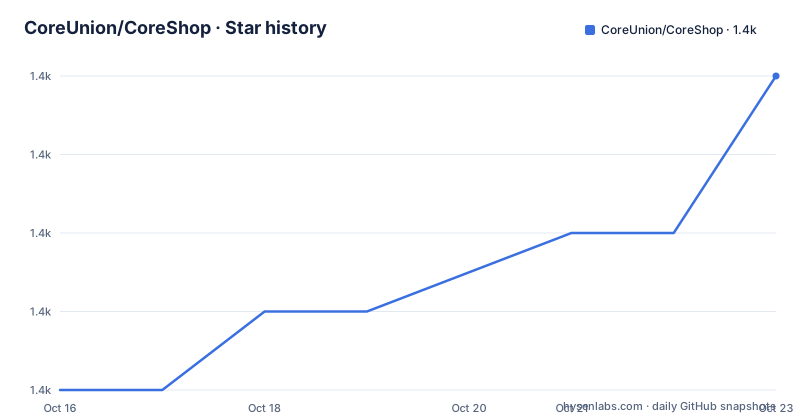
Star history
- CoreUnion/CoreShop1,437 ★ · +4
| Repository | 2026-10-16 | 2026-10-23 |
|---|---|---|
| CoreUnion/CoreShop | 1.4k | 1.4k |
4 Stars in the last 7 days, measured from the daily GitHub snapshot. Compare with other projects
Editorial analysis
What CoreShop is built to manage
CoreShop addresses the operational needs of a shop rather than only the presentation of a product catalogue. Its documentation describes single-specification and multi-specification products, brands, categories, attributes, parameters, reviews, inventory records, payment records, refunds, shipping, after-sales documents, and store verification. That makes it relevant to operators who need the transaction lifecycle to extend beyond a basic catalogue and checkout screen.
The intended users also appear to include teams running physical stores or service businesses. CoreShop includes door-store verification, pickup orders, staff management, and a service-product model. A service product can have a defined number of consumptions, generated verification codes, designated stores, and either in-store or on-site consumption. The documented example is a ten-use car-washing subscription, which is different from an ordinary physical SKU.
The marketing scope is unusually broad for a single repository. The README lists group buying, flash sales, group purchasing, coupons, distribution, agents, live commerce, custom forms, and user-level promotions. Distribution and agency operations have their own settings, levels, users, and orders. This concentration is useful for a business that wants these concepts in one administration system, although it also creates a large configuration surface.
The storefront side uses Uni-App, with ColorUI and uViewUI named in the README. The project claims that one codebase can compile for WeChat Mini Programs, H5, Android, iOS, Alipay Mini Programs, Baidu Mini Programs, ByteDance Mini Programs, QQ Mini Programs, Quick App, and 360 Mini Programs. Those are platform targets, not evidence that every external payment, messaging, printing, or shipping integration is equally supported.
The repository structure and service boundaries
Based on the repository layout, CoreShop is split into many .NET projects rather than being a single web application. The named areas include CoreCms.Net.Web.Admin, CoreCms.Net.Web.WebApi, CoreCms.Net.Model, CoreCms.Net.Repository, CoreCms.Net.Services, CoreCms.Net.Swagger, CoreCms.Net.Task, CoreCms.Net.RedisMQ, CoreCms.Net.WeChat.Service, and CoreCms.Net.Uni-App. This separation suggests an administration web application, an API application, shared models, persistence services, background tasks, messaging or queue support, WeChat integration, and the cross-platform client.
The README identifies ASP.NET Core MVC as the application framework and ASP.NET Core WebApi as the API framework. It also names Swagger2, AutoFac, and SqlSugar. The repository consequently presents a layered service structure in which the web clients and administrative interface can call backend services rather than share a single presentation layer. The top-level solution file is CoreShopCommunity.slnx.
The database directory and the docker-compose.yaml indicate that persistence and service dependencies are intended to be managed as separate concerns. The compose file defines frontservice, webapiservice, redis, and mysql. It maps host port 8088 to container port 80 for the front service and host port 8089 to container port 80 for the web API. MySQL uses port 3306 and Redis uses port 6379.
The compose file expects published directories named ./front/publish and ./api/publish, while the listed repository entries are organized under CoreCms.Net.* projects. That difference is important. The file describes a deployment-time layout, but the README does not explain how the .NET projects are published into those directories.
CoreShop installation and first deployment check
The README does not provide installation commands, package restore steps, database import instructions, or a documented first-use workflow. It directs readers to the official site, https://www.coreshop.cn, for a demonstration and includes the repository's docker-compose.yaml for a deployment-oriented starting point. Because no exact installation command is documented, inventing one would risk producing a procedure that does not match the project.
The compose file shows the services and ports that a deployment is designed around. It builds the front service from ./front/publish, builds the API from ./api/publish, and starts Redis and MySQL alongside them. The following is a configuration excerpt, not an executable installation guide. A reader should first confirm that the two publish directories have been produced and that the database initialization files in 数据库/ have been applied according to the project's own instructions.
services:
  frontservice:
    build:
      context: ./front/publish
    ports:
      - 8088:80
  webapiservice:
    build:
      context: ./api/publish
    ports:
      - 8089:80
The compose file also defines redis with redis:latest and mysql with mysql:5.7.19. The latter is a version choice that should be checked against the current .NET application and database scripts, especially for a new production deployment. The compose file uses a simple Redis command and sets MYSQL_ROOT_PASSWORD=admin. That is configuration to review, not a production security recommendation.
Cross-platform publishing and integration boundaries
The cross-platform claim is implemented through Uni-App on the client side. The README names ten compilation targets, including WeChat, H5, Android, iOS, Alipay, Baidu, ByteDance, QQ, Quick App, and 360 Mini Programs. This can reduce the number of separate storefront codebases when the business accepts the platform-specific constraints of each target.
The integration surface is broad. CoreShop lists Aliyun OSS, Tencent COS, Tencent Maps, courier query services, Kuaidi100 waybill printing, SMS platforms, WeChat subscription messages, and EasyLink network printers. It also describes WeChat Video Account live commerce, Video Account showcases, and live delivery. These features are named in the README, but the repository excerpt does not provide configuration keys, credential procedures, callback URLs, or integration test instructions for each provider.
This distinction matters for adoption. A platform target means that the client has a documented publication path. It does not mean that payment, identity, storage, delivery, printing, and messaging behavior is identical across all ten targets. The project is therefore best evaluated against the specific platforms and external services required by the business, rather than by the headline count alone.
Limitations visible in CoreShop's documentation
The clearest limitation is missing operational documentation. The README does not explain how to restore the .NET solution, publish the Uni-App client, initialize MySQL, configure Redis, enable HTTPS, or verify the admin login. It also does not document a rollback procedure. The docker-compose.yaml supplies infrastructure definitions, but it is not a complete deployment guide.
A second limitation is the large feature surface. Distribution, agency, promotions, inventory, live commerce, custom forms, payments, after-sales, and logistics all add administrative and integration decisions. A team may adopt the code and still need to decide which modules to enable, which external credentials to supply, and how data retention should work. The README lists capabilities, but it does not provide a compatibility matrix for those modules across every supported platform.
The database configuration also needs scrutiny. The compose file uses mysql:5.7.19 and exposes port 3306, while the repository description places the application on ASP.NET Core 9.0. The documentation excerpt does not state whether the shipped database scripts are intended for that exact database version or whether newer MySQL deployments require changes. The fixed MySQL image should not be treated as proof of long-term compatibility.
Finally, the repository has no GitHub releases in the available repository information. That leaves operators without a documented release stream from which to select versions or identify migration notes. The last push was on 2026-09-13, so the repository is not archived and has recent activity, but recent activity alone does not provide upgrade compatibility.
CoreShop versus a focused commerce stack
CoreShop is materially different from a focused storefront or a collection of independent commerce modules. Its design centers on one administration system, one service-oriented .NET backend, and one Uni-App client intended for multiple publication targets. The inclusion of distribution, agency, custom forms, live commerce, service verification, and physical-store functions is part of the product scope.
A focused alternative would instead begin with a smaller product, checkout, and administration boundary, then add only the integrations required by the business. That approach can reduce configuration and integration work, but it would not provide CoreShop's documented module set as one starting point. The trade-off is breadth against operational simplicity.
For an organization with several storefront targets and a need for promotions, fulfilment, and store operations, CoreShop may be the more relevant starting architecture. For a team that only needs a catalogue, payment, and order history, the module count may be unnecessary. The decision depends on whether the business will actually use the commerce and marketing workflows, not simply on the number of listed features.
Licence, maintenance, and adoption cost
CoreShop is identified as licensed under Apache-2.0. That licence is an important adoption input, but the repository excerpt does not include the full licence text or project-specific notices. An organisation should review the LICENSE file and the notices attached to any separately distributed modules before redistribution or commercial deployment. This is a licence review step, not legal advice.
The repository is not archived, and its last push was on 2026-09-13. The available release information contains no GitHub releases. Consequently, maintenance activity can be observed from repository history, but the excerpt does not establish a regular release schedule, migration policy, or supported upgrade path. ASP.NET Core 9.0 compatibility and the `mysql:5.7.19` dependency should be checked before deployment.
The adoption cost is likely to involve more than copying source files. Teams may need to prepare publish artifacts, configure Redis and MySQL, load the database files, supply credentials for payments and storage, configure shipping and messaging services, and validate each client target. CoreShop suits organisations willing to own those integration and operations decisions. It is less suitable for those expecting a self-contained turnkey deployment based solely on the published README.
Editorial conclusion
CoreShop is suitable for organizations that want a broad commerce foundation and plan to publish a Uni-App storefront across several Chinese and mobile platforms. It is a poor choice for teams that need a documented one-command setup, a conventional component marketplace, or a clear upgrade path before making an adoption decision. The first checks should be the API and database compatibility for ASP.NET Core 9.0, the deployment layout expected by docker-compose.yaml, and the licence obligations attached to Apache-2.0.
Frequently asked questions
How do I install CoreShop?
The README does not provide installation commands or a complete setup tutorial. It directs users to https://www.coreshop.cn, while the repository includes docker-compose.yaml and a database directory that may be part of the deployment process.
Which platforms can CoreShop publish for?
The README lists ten targets: WeChat Mini Programs, H5, Android, iOS, Alipay, Baidu, ByteDance, QQ, Quick App, and 360 Mini Programs. The storefront is described as a Uni-App project, but platform-specific integration requirements are not documented in the excerpt.
Does CoreShop use Redis and MySQL?
Yes. The repository's docker-compose.yaml defines redis:latest and mysql:5.7.19 services. Redis uses port 6379, MySQL uses port 3306, and the compose file configures the MySQL root password as admin.
Official sources
Add this badge to your README
If you maintain this project, the badge below links readers to this analysis and shows its maintenance status from the daily GitHub snapshot. Paste the markdown into your README; add ?metric=license or ?metric=stars to the image URL for a different field.

[](https://hysenlabs.com/projects/coreunion-coreshop)Star history chart for your README
[](https://hysenlabs.com/projects/coreunion-coreshop)Was this useful?