Corrosion for Rust and CMake Integration
Marrying Rust and CMake - Easy Rust and C/C++ Integration!
At a glance
- What is it?
- Corrosion, formerly called cmake-cargo, integrates Rust libraries and executables into an existing CMake project. It is aimed at C/C++ projects that use CMake and want Cargo packages and workspace targets to participate in the same build.
- Who is it for?
- Adopt Corrosion when CMake already owns a C/C++ build and Rust artifacts must be linked into it, especially through a workspace or package manifest. Do not choose it for a Cargo-only project or for a build system that does not use CMake.
- Can I use it commercially?
- Yes. MIT is a permissive licence: you can use, modify and sell software built on it, as long as you keep its copyright and licence notices.
- Is it still maintained?
- Yes. The repository last received commits 9 days ago.
- What is it written in?
- Mainly CMake, according to GitHub's language statistics.
Answers come from the project's GitHub data, last synced on November 7, 2026, and from our analysis. They are not legal advice.
Star history
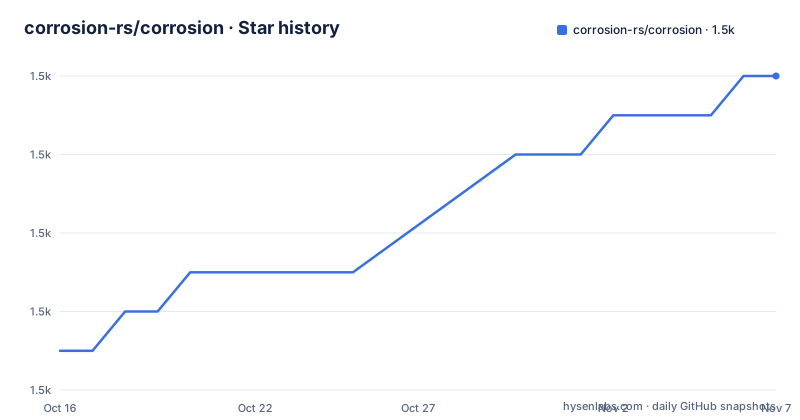
- corrosion-rs/corrosion1,520 ★ · +7
| Repository | 2026-10-16 | 2026-11-07 |
|---|---|---|
| corrosion-rs/corrosion | 1.5k | 1.5k |
7 Stars in the last 22 days, measured from the daily GitHub snapshot. Compare with other projects
Editorial analysis
What Corrosion Changes in an Existing CMake Build
Corrosion solves a specific build-system boundary. A C/C++ project often has its native libraries, executable targets, compiler settings and link relationships defined in CMake, while its Rust code is normally built by Cargo. Manually coordinating those two build systems creates avoidable decisions about build order, output paths, library names and linker inputs. Corrosion places the Cargo operation behind CMake integration functions.
The intended users are maintainers of existing CMake projects who need to add Rust code without replacing CMake or restructuring the native side of the build. The README identifies automatic import of Rust executables, static libraries and shared libraries from either a workspace or a package manifest. It also describes installation of Rust executables, linking a Rust executable to C or C++ libraries in the CMake tree, support for multi-config generators and simple cross-compilation.
Corrosion is not a replacement for Cargo. Cargo remains the Rust build tool described by the integration, and Corrosion works from a `Cargo.toml` manifest. The practical benefit is that CMake can express the relationship between the imported Rust target and native CMake targets. That relationship is more useful than merely invoking a separate Rust build and manually copying files afterward.
The project was formerly named `cmake-cargo`. That naming change matters for older documentation and scripts because an integration recipe may refer to the former name while the current repository and README use Corrosion.
The FetchContent Import Path and CMake Target Flow
The documented `FetchContent` path brings the Corrosion repository into a consuming CMake build, then calls a CMake function with the path to the Rust manifest. The resulting imported target can be passed to `target_link_libraries`. In the README example, the Rust manifest belongs to `rust-lib/Cargo.toml`, while the native executable is `main.cpp`.
The visible data flow has three parts. First, `FetchContent_Declare` identifies the Corrosion repository and selects a Git tag. Second, `FetchContent_MakeAvailable` makes Corrosion available to the surrounding CMake project. Third, `corrosion_import_crate` imports targets defined by the Rust package or workspace manifest. CMake then uses the imported target name when linking the C++ executable.
This arrangement leaves the Rust manifest as the source of Cargo package information. Corrosion does not require the native project to rewrite its Rust dependency graph in CMake. Instead, CMake receives targets derived from `Cargo.toml`. The README specifically names executables, static libraries and shared libraries as supported import targets, so the integration is aimed at Cargo artifacts rather than an arbitrary file-copy convention.
The imported target is not an isolated build artifact. In the example, `target_link_libraries(your_cpp_bin PUBLIC rust-lib)` makes the native executable depend on the Rust target. That dependency gives CMake a build relationship to coordinate. The README does not document the internal Cargo command line, exact generated target names for every crate type or all generator-specific behavior, so those details should be checked in the Corrosion documentation for the version selected.
Installing Corrosion and Linking a First Rust Library
The README’s shortest documented setup uses CMake `FetchContent`. It requires CMake 3.22 or newer for the v0.6 release. The following block declares Corrosion, makes it available and imports the Rust manifest. The `GIT_TAG` value is copied from the README, where it is shown as an optional version tag.
include(FetchContent)

FetchContent_Declare(
    Corrosion
    GIT_REPOSITORY https://github.com/corrosion-rs/corrosion.git
    GIT_TAG v0.6
)
FetchContent_MakeAvailable(Corrosion)
corrosion_import_crate(MANIFEST_PATH rust-lib/Cargo.toml)
The reader should see the Rust manifest path resolve to the package or workspace that contains the intended Cargo targets. The README does not require a separate installation step for this method. It links to the setup chapter for alternatives including installing Corrosion or adding it as a subdirectory, but those alternatives are not expanded in the repository excerpt.
After the import, create the native executable and link the imported Rust target. This block uses the exact target and source names from the README.
add_executable(your_cpp_bin main.cpp)
target_link_libraries(your_cpp_bin PUBLIC rust-lib)
CMake should then treat `your_cpp_bin` as depending on `rust-lib`. The precise artifact produced and the files emitted by Cargo depend on the manifest and crate configuration, which are not included in the README. The example is therefore a build-system smoke test, not a demonstration of a particular Rust API.
Library Types, Executables and Cross-Compilation Boundaries
Corrosion’s feature list covers the artifact categories that commonly cross the CMake and Cargo boundary: Rust executables, static libraries and dynamic libraries. It also calls out “easy installation of Rust executables” and the ability to link Rust executables to C/C++ libraries in the CMake tree. These are separate capabilities. Importing a library and installing an executable are not interchangeable operations, and a project that needs an install rule must use the Corrosion path documented for executables.
Multi-config generator support is explicitly listed. That matters for generators that maintain multiple build configurations, such as Debug and Release, because a build integration cannot assume one single output directory. The README does not enumerate the supported generator names or explain their per-configuration output paths, so teams should not infer those details from the feature label alone.
Simple cross-compilation is also listed as a feature, but the README does not provide a target configuration example, toolchain file or Rust target variable. The supported mechanism should be checked against the setup and cross-compilation documentation before a build is changed for another platform. The feature should be treated as a documented capability, not as proof that every Cargo target or host/target combination is covered.
The practical constraint is that CMake and Cargo must agree on the build context. The manifest identifies the Rust package or workspace, while CMake identifies the native targets. Corrosion bridges those declarations, but the README does not say that it removes the need for a compatible Rust toolchain, native CMake toolchain or platform-specific linker configuration.
CMake and Cargo Alternatives Compared by Build Ownership
A real alternative is to keep Cargo as the top-level build tool and invoke CMake from Cargo when a C or C++ dependency must be built. That reverses the ownership relationship. Cargo defines the dependency graph and Rust build order, while CMake becomes a subordinate build for selected native components. This can fit projects whose primary entry point is already Cargo, but it does not provide the same CMake-facing import model as `corrosion_import_crate`.
Another alternative is manual coordination: run Cargo separately, then configure CMake to link the resulting library by path. The difference is architectural. Corrosion imports targets from a manifest and exposes them to CMake target relationships, whereas manual coordination requires the build author to manage output locations, rebuild triggers and target names. The manual route may be adequate for a one-off binding, but it leaves more synchronization logic outside the build system.
Corrosion is the better fit when CMake is already responsible for a substantial C/C++ target tree. The README’s native executable example shows that relationship directly. It is not the right tool for a Cargo-only project that has no CMake build to integrate, and the README does not claim that Corrosion replaces Cargo’s package, feature or target selection mechanisms.
Maintenance, Releases and Upgrade Work
The repository is not archived, and its last push was on 2026-10-10. The listed releases are v0.6.1 on 2026-01-17, v0.6.0 on 2025-11-23 and v0.6.0-beta1 on 2025-11-16. These facts indicate recent repository activity and a documented 0.6 release line, but they do not establish compatibility with every CMake or Rust version.
Upgrade cost depends on the integration style. A project using `FetchContent` pins Corrosion with `GIT_TAG`, so changing that tag can change the CMake functions available to the project. The README states that v0.6 requires CMake 3.22 or newer, while the older v0.5 line requires CMake 3.15 or newer and Rust 1.46 or newer, with some platform or feature limitations. An upgrade therefore needs a check of the consuming project’s CMake minimum, Rust toolchain and native build behavior.
The project is distributed under the MIT license. That license identifier is recorded in the repository information and README. This review does not interpret the license or provide legal advice. The upgrade work should focus on the documented version boundary, the selected Corrosion tag and the target relationships in the consuming `CMakeLists.txt`.
Editorial conclusion
Adopt Corrosion when CMake already owns a C/C++ build and Rust artifacts must be linked into it, especially through a workspace or package manifest. Do not choose it for a Cargo-only project or for a build system that does not use CMake. Verify first that the required CMake version is available, that the selected Corrosion tag matches the project, and that the Rust target and native libraries are represented correctly in the imported CMake targets. For version 0.6, the documented requirement is CMake 3.22 or newer, and the latest listed release is v0.6.1 from 2026-01-17.
Frequently asked questions
What is Corrosion used for in a CMake project?
Corrosion imports Rust executables, static libraries and shared libraries from a Cargo workspace or package manifest into an existing CMake build. The README also lists Rust executable installation, CMake-tree linking, multi-config generator support and simple cross-compilation.
How do I install Corrosion with FetchContent?
Declare Corrosion with `FetchContent_Declare`, use `FetchContent_MakeAvailable`, and call `corrosion_import_crate` with the path to the Rust manifest. The v0.6 release requires CMake 3.22 or newer.
Can Corrosion be used without CMake?
The documented purpose is integrating Rust into an existing CMake project. The README does not describe a standalone Corrosion workflow for projects that do not use CMake.
Does Corrosion replace Cargo?
No. Corrosion integrates a Cargo package or workspace into CMake through its manifest, so Cargo remains relevant to defining and building the Rust artifacts. Corrosion’s role is to connect those artifacts to CMake targets.
Official sources
Add this badge to your README
If you maintain this project, the badge below links readers to this analysis and shows its maintenance status from the daily GitHub snapshot. Paste the markdown into your README; add ?metric=license or ?metric=stars to the image URL for a different field.

[](https://hysenlabs.com/projects/corrosion-rs-corrosion)Star history chart for your README
[](https://hysenlabs.com/projects/corrosion-rs-corrosion)Was this useful?