cporter202/automate-faceless-content: a course repo, not a pipeline
Learn how to automate faceless short-form + long-form video content and dominate YouTube, TikTok, Facebook & Instagram on autopilot — from idea → script → video → scheduled posts.
At a glance
- What is it?
- The repository is a written guide and course for producing faceless video with ViralWave Studio. It ships no code, no licence and no install, so the honest question is what it actually gives an engineer.
- Who is it for?
- Adopt this repository if you want a structured reading path through faceless video production and are willing to use ViralWave Studio, the platform every module points back to. Skip it if you expected a runnable pipeline: there is no code, no licence file and no release in the repository, and the last push was on 2026-06-04.
- Can I use it commercially?
- Not without permission. GitHub finds no licence file in the repository, and without a licence all rights are reserved by default: you may read the code but not reuse it. Check the README, or ask the authors, before using it.
- Is it still maintained?
- Yes. The repository last received commits 29 days ago.
- What is it written in?
- GitHub does not report a main language for this repository.
Answers come from the project's GitHub data, last synced on November 15, 2026, and from our analysis. They are not legal advice.
Star history
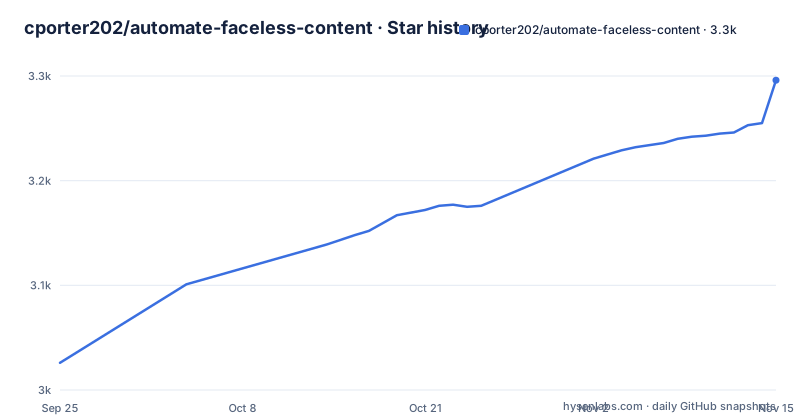
- cporter202/automate-faceless-content3,296 ★ · +270
| Repository | 2026-09-25 | 2026-11-15 |
|---|---|---|
| cporter202/automate-faceless-content | 3k | 3.3k |
270 Stars in the last 51 days, measured from the daily GitHub snapshot. Compare with other projects
Editorial analysis
What this repository actually is
Strip away the badges and the star-history chart and what remains is a Markdown curriculum. The top level holds README.md, MODULE-COMPLETION-TRACKER.md, best-automating-tools.md, video-ideas.md, plus four directories: course/, guides/, assets/ and more-repos-to-follow/. There is no source tree, no package manifest, no workflow file. The README calls itself a "Complete Guide and Full Learning Course to Automating Faceless Video Content" and says it covers the path "from idea → script → video → scheduled posts". That path is described in prose, not implemented in code.
The intended reader is a beginner creator, not an engineer. The README offers two routes: a ten-module course described as 4-6 weeks, and a self-guided track through guides/getting-started/. Every route converges on the same external product. The README states plainly that "In order to take full advantage of this course and guide, join ViralWave Studio for free!" and repeats the link at the head and foot of the page.
So the repository is best understood as documentation for a hosted tool, published on GitHub. That framing matters for anyone evaluating it: you are not adopting software, you are adopting a reading list attached to a commercial signup.
The idea to scheduled post flow, as documented
The README's own summary of the mechanism is the arrow chain: idea, script, video, scheduled posts. The guides directory maps that chain onto named features. Idea Discovery is described as research-backed content discovery. The Faceless Video Generator and Video Editing pages cover production. Bulk Scheduler is described as monthly content planning, and Connecting Social Media Accounts covers publishing destinations. Text to Scene, URL to Video and Audio to Video are listed as alternative entry points into the same generator, and Real Clone and Character Consistency address reusing a presenter identity across clips.
What the repository never explains is how any of this is wired. There is no description of an API, a queue, a rendering backend or a storage model. The architecture is a set of web pages in a hosted product, and the repository documents what to click. If you were hoping to see how a script becomes a timeline, or how scheduled posts are dispatched to YouTube, TikTok, Facebook and Instagram, the guides as described here do not promise that level of detail.
That is a legitimate design for a course. It is also the reason the repository cannot be evaluated the way a library can. There is nothing to read, build or diff.
Installing it: there is nothing to install
There is no install step in the repository. No package name, no version, no port, no environment variable, no CLI. The only entry point the README gives is a signup link, and the only local artefact is the repository itself, which you read in a browser or a Markdown viewer.
Cloning it is the closest thing to a setup command, and it only gets you the text:
git clone https://github.com/cporter202/automate-faceless-content
cd automate-faceless-content
After that, the README's Quick Start points a beginner at the course entry file rather than at any executable. The README links to ./course/README.md as the recommended first stop for complete beginners, and to ./guides/getting-started/your-first-video.md for a first faceless video.
The README lists Module 0 through Module 10 under course/, and a self-guided track under guides/getting-started/ with introduction.md, account-setup.md, dashboard-overview.md, your-first-video.md and connecting-accounts.md. The README claims your-first-video.md walks you through creating a faceless video in five minutes, and account-setup.md is where you create a ViralWave Studio account. Both of those steps happen on viralwavestudio.com, not in the repository.
If you want to follow along, read course/module-0/README.md first, then guides/getting-started/account-setup.md. Everything after that assumes an account on the hosted platform.
Where the repository runs out
The licence is not stated anywhere in the repository. There is no LICENSE file among the top-level entries, and the repository metadata has no licence value. For a text repository that is a real gap: without a licence, the default position is that others have no granted right to reuse the content, even though it is publicly readable on GitHub. Anyone planning to fork the course text, translate it or republish it in a paid product should treat that as unresolved rather than assume permission.
Maintenance is the second gap. The last push was on 2026-06-04, and the repository has no published releases. The repository is not archived, but nothing in it shows a release cadence, a changelog or a version. The README asks readers to star the repository and offers a Buy Me a Coffee link, which suggests an individual effort rather than a maintained product.
The third gap is scope. The README promises outcomes: creating professional videos in five minutes, getting monetized on all platforms in two to three weeks, and generating $1,000 or more per month in passive income. Those are the README's own promotional claims, not measurements, and the repository contains no evidence for them.
Finally, the entire guide is coupled to one product. If ViralWave Studio changes its interface, the step lists in guides/ and course/ go stale, and there is no mechanism in the repository to detect that.
Alternatives, and the difference in approach
The obvious alternative is to build the pipeline yourself from general-purpose tools: a text model for scripts, a text-to-speech engine, a video composition library such as FFmpeg or MoviePy, and a scheduler that talks to each platform's publishing API. That approach costs engineering time and ongoing maintenance, and it puts you on the hook for every platform's API changes. What you get in return is ownership: the pipeline lives in your repository, and no vendor can change a button out from under your documentation.
A second alternative is a different hosted generator. The difference between them and this repository is not the feature list, it is where the knowledge lives. With another hosted tool you would read that vendor's own docs; this repository exists to teach one vendor's product in a structured, module-by-module format, with a completion tracker for learners.
A third option is to skip generators and license stock footage with a voiceover. That removes the AI generation step and the character-consistency problem, at the cost of higher per-video sourcing effort and less volume.
The honest comparison is between buying a course-shaped path into a hosted tool and paying in engineering hours for a pipeline you control. This repository only serves the first.
What to check before you commit time
Start with the licence question, because it is the one that can invalidate a plan after the fact. Look for a LICENSE file at the repository root. The top-level entries listed in the repository do not include one.
Then check freshness against what you intend to do. The last push was on 2026-06-04. If you are following the course, open guides/getting-started/dashboard-overview.md and compare its described screens against the current ViralWave Studio interface before reading the rest, since a stale dashboard tour makes every later module harder to follow.
If you are evaluating the platform rather than the text, the README's only route is the free trial at viralwavestudio.com. The README does not document pricing, cancellation, export formats or what happens to generated videos if you stop paying. Those are the questions to answer before you build a publishing schedule around the tool.
Finally, decide what you want from the repository. As a reading path for a non-technical creator it is coherent: numbered modules, a tracker file, and a getting-started sequence. As a source of reusable automation code it offers nothing, and no amount of reading will change that.
Editorial conclusion
Adopt this repository if you want a structured reading path through faceless video production and are willing to use ViralWave Studio, the platform every module points back to. Skip it if you expected a runnable pipeline: there is no code, no licence file and no release in the repository, and the last push was on 2026-06-04. Before committing time, open guides/getting-started/your-first-video.md and course/module-0/README.md, confirm the free trial terms on viralwavestudio.com, and check whether the repository has a LICENSE file, because the licence field is empty and that governs reuse of the text.
Frequently asked questions
Do faceless content creators make money?
The README claims that following the course can lead to $1,000 or more per month in passive income and monetization on all platforms in two to three weeks. Those are the repository's own promotional claims, and it contains no data behind them.
Which AI is best for faceless content?
The repository does not compare AI systems. It documents one platform, ViralWave Studio, and the README states that joining it is needed to take full advantage of the course and guide.
How to generate faceless content with automate-faceless-content?
The documented path runs from idea to script to video to scheduled posts, using the Idea Discovery, Faceless Video Generator, Video Editing and Bulk Scheduler features described in the guides directory. The README's Quick Start sends beginners to ./course/README.md or to ./guides/getting-started/your-first-video.md, and account creation happens on viralwavestudio.com.
Can I generate faceless videos instantly using AI?
The README states that the course teaches creating professional videos in five minutes and that your-first-video.md covers making a first faceless video in five minutes. It does not describe the rendering process behind that, so the claim cannot be verified from the repository.
how to automate faceless content
The repository frames automation as idea, script, video and scheduled posts, with Bulk Scheduler described as monthly content planning and Connecting Social Media Accounts covering YouTube, TikTok, Facebook and Instagram. All of it is documented as steps inside ViralWave Studio rather than as a self-hosted pipeline.
Official sources
Add this badge to your README
If you maintain this project, the badge below links readers to this analysis and shows its maintenance status from the daily GitHub snapshot. Paste the markdown into your README; add ?metric=license or ?metric=stars to the image URL for a different field.

[](https://hysenlabs.com/projects/cporter202-automate-faceless-content)Star history chart for your README
[](https://hysenlabs.com/projects/cporter202-automate-faceless-content)Was this useful?